1. Introducció
This manual provides detailed instructions for the installation, operation, and maintenance of your XTRONS DIE123L 10.1-inch Android Car Stereo. Please read this manual thoroughly before using the product to ensure proper functionality and to prevent damage. Keep this manual for future reference.
2. Informació de seguretat
Always observe the following safety precautions to avoid injury or damage to the unit:
- Do not attempt to disassemble or modify the unit. This may cause electric shock, fire, or other malfunctions.
- Ensure proper wiring connections. Incorrect wiring can cause damage to the unit or the vehicle's electrical system.
- Avoid operating the unit in a manner that distracts you from driving. Always prioritize road safety.
- Consult a qualified professional for installation if you are unsure about any steps.
- Mantingueu la unitat allunyada de l'aigua i de la humitat excessiva.
3. Contingut del paquet
Verifiqueu que tots els elements siguin presents al paquet abans de la instal·lació:
- XTRONS DIE123L Head Unit
- Cable d'alimentació
- Antena GPS
- Cables USB
- Cables RCA
- Antena 4G
- Manual d'usuari
- Installation Tools (keys)
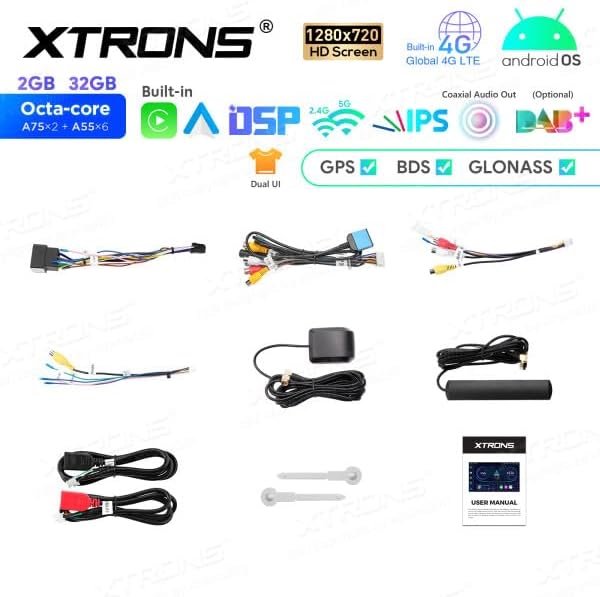
Imatge: Més deview of the XTRONS DIE123L package contents, including the head unit, various cables (power, USB, RCA), GPS antenna, 4G antenna, and installation tools.
4. Producte acabatview
The XTRONS DIE123L is a 1 DIN car stereo featuring a 10.1-inch HD touchscreen display, powered by an Android operating system. It integrates advanced connectivity and audio processing capabilities for an enhanced in-car experience.
Característiques principals:
- Visualització: 10.1-inch 1280x720 HD IPS Screen
- Sistema operatiu: SO Android
- Processador: Octa-core (A75*2 + A55*6)
- Memòria/emmagatzematge: 2 GB de RAM, 32 GB de ROM
- Connectivitat: Built-in 4G LTE, Dual Band WiFi (2.4G/5G), Bluetooth, USB
- Navegació: GPS, BDS, GLONASS support
- Àudio: Built-in DSP (Digital Sound Processor), Coaxial Audio Out (Optional)
- Integració del telèfon intel·ligent: Wireless Apple CarPlay, Wireless/Wired Android Auto
- Interfície d'usuari: Dual UI options
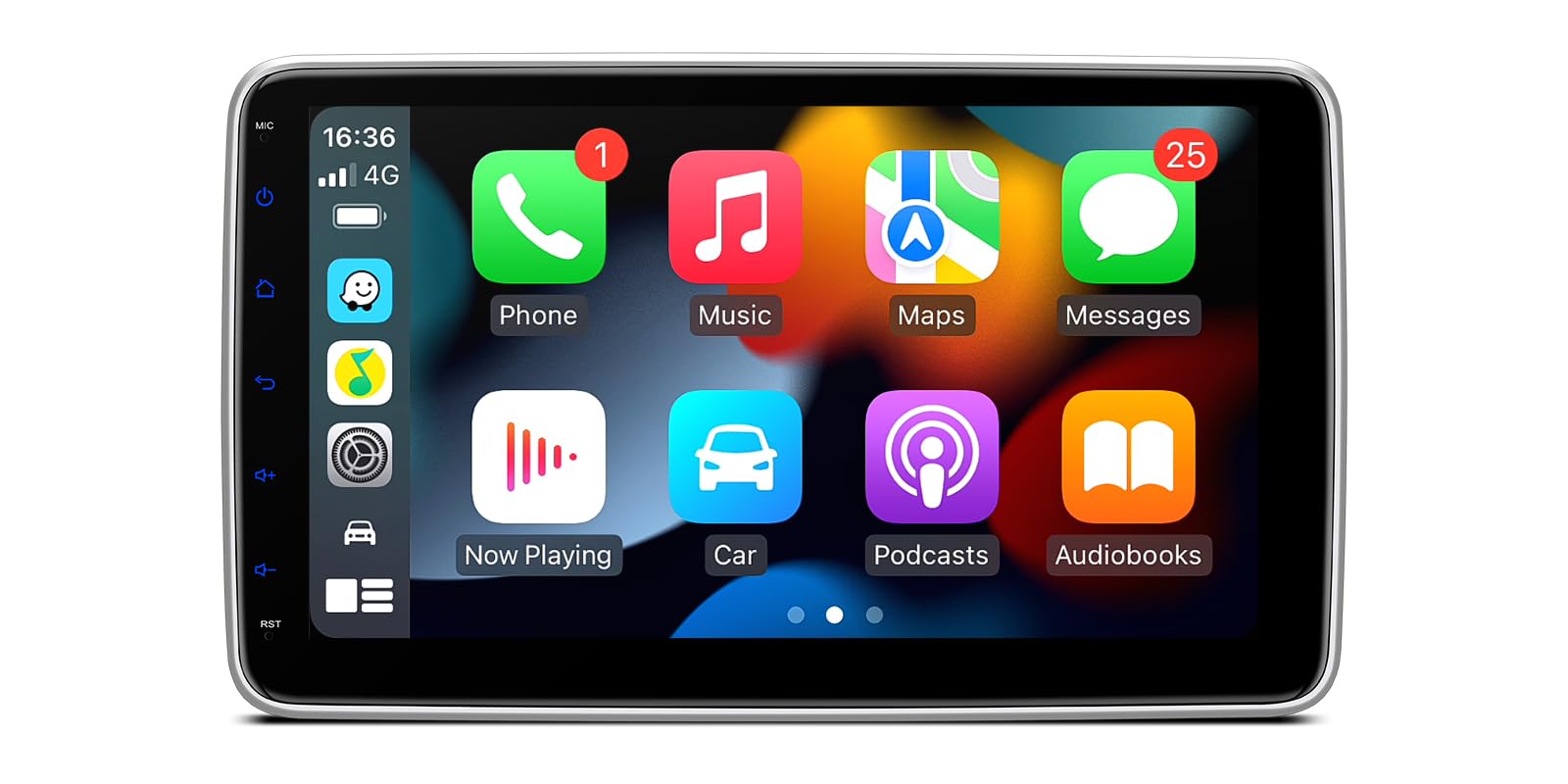
Image: The XTRONS DIE123L head unit displaying its main interface with navigation, media controls, and vehicle speed information.

Image: A visual summary of the XTRONS DIE123L's core features, including 2GB RAM, 32GB storage, Octa-core processor, 1280x720 HD screen, built-in 4G LTE, Android OS, DSP, GPS, BDS, and GLONASS.

Image: The XTRONS DIE123L home screen, showing various application icons such as Navigation, Radio, Video, Music, and other system utilities.
5. Configuració i instal·lació
Professional installation is highly recommended for this product. Incorrect installation can lead to damage to the unit or the vehicle. Ensure the vehicle''s battery is disconnected before beginning installation.
5.1 Dimensions físiques
Refer to the diagram below for the unit's dimensions to ensure compatibility with your vehicle's dashboard.
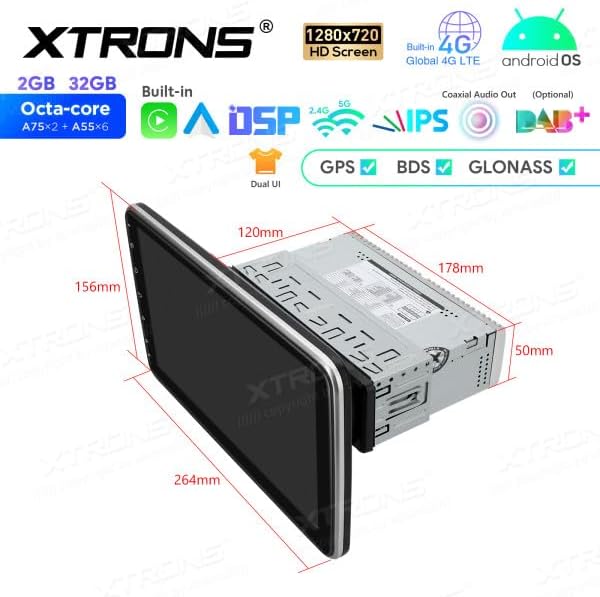
Image: A technical drawing illustrating the dimensions of the XTRONS DIE123L head unit, including screen size (264mm width, 156mm height) and chassis size (178mm width, 50mm height, 120mm depth).
5.2 Connexions de cablejat
Connect the provided cables according to your vehicle's wiring harness. Ensure all connections are secure to prevent intermittent issues.
- Cable de corrent: Connect to the vehicle's power supply (ACC, B+, Ground).
- Cables de l’altaveu: Connecteu-vos als altaveus del vostre vehicle.
- Antena GPS: Muntar en un lloc amb claredat view del cel.
- Antena 4G: Mount for optimal signal reception.
- Cables USB: For external USB devices or wired Android Auto.
- Cables RCA: Per a exteriors amplifiers, subwoofers, or video input/output.
5.3 Encès inicial
After installation, reconnect the vehicle's battery. Turn on the ignition. The unit should power on automatically. Follow the on-screen prompts for initial setup, including language selection and time zone.
6. Instruccions de funcionament
6.1 Funcionament bàsic
- Encès/apagat: Press and hold the power button on the front panel or use the vehicle's ignition.
- Control de volum: Ajusta-ho amb els botons físics o els controls en pantalla.
- Pantalla tàctil: Navigate the interface by tapping, swiping, and pinching.
6.2 Navegació
The unit supports GPS, BDS, and GLONASS for accurate positioning. Pre-installed navigation apps or downloaded apps can be used. Ensure the GPS antenna is properly installed for optimal performance.
6.3 Connectivitat
- Bluetooth: Pair your smartphone for hands-free calling and audio streaming. Go to Settings > Bluetooth to enable and pair devices.
- Wi-Fi: Connect to a Wi-Fi hotspot (e.g., from your phone or a dedicated car hotspot) to access online features, download apps, and browse the internet. Go to Settings > Network & Internet > Wi-Fi.
- 4G LTE: Insert a compatible SIM card (if applicable) to enable 4G connectivity for internet access without an external Wi-Fi hotspot.
- USB: Connect USB drives for media playback or use for wired Android Auto.
6.4 Apple CarPlay i Android Auto
The XTRONS DIE123L supports both Apple CarPlay and Android Auto for seamless smartphone integration.

Image: A split image demonstrating both Apple CarPlay (wireless via Bluetooth) and Android Auto (wireless via Bluetooth, wired via USB) interfaces on the XTRONS DIE123L screen, showing typical app layouts.
- Apple CarPlay: Connect wirelessly via Bluetooth. Once paired, CarPlay will launch automatically or can be selected from the main menu.
- Android Auto: Connect wirelessly via Bluetooth or via a USB cable. Follow the on-screen prompts to set up Android Auto.
6.5 Funcions d'àudio
- DSP: Utilize the built-in Digital Sound Processor to customize audio settings, including equalizer, balance, fader, and subwoofer controls. Access these settings through the 'Sound' or 'DSP' app.
- Reproducció multimèdia: Reprodueix àudio i vídeo files from USB drives, SD cards, or streaming services via connected internet.
- Ràdio: Access FM/AM radio stations.
7. Manteniment
- Neteja: Use a soft, dry cloth to clean the screen and unit exterior. For stubborn marks, slightly dampRenta el drap amb aigua. Evita productes químics agressius o materials abrasius.
- Actualitzacions de programari: Periodically check for software updates via the system settings or the XTRONS official weblloc per garantir un rendiment òptim i l'accés a noves funcions.
- Còpia de seguretat de dades: Regularly back up important data if stored on the unit.
8. Solució De Problemes
Si teniu problemes, consulteu els següents problemes i solucions habituals:
| Problema | Causa possible | Solució |
|---|---|---|
| La unitat no s'encén. | Incorrect power wiring, blown fuse, vehicle ignition off. | Check power connections, inspect vehicle fuses, ensure ignition is on. |
| No hi ha so dels altaveus. | Incorrect speaker wiring, volume too low, mute activated, ampproblemes de vida. | Verify speaker connections, increase volume, check mute status, test external amplificador si s'utilitza. |
| GPS signal is weak or absent. | Antena GPS no instal·lada correctament o obstruïda. | Assegureu-vos que l'antena GPS tingui una visió clara view del cel i està connectat de manera segura. |
| El dispositiu Bluetooth no es pot connectar. | Bluetooth no habilitat, dispositiu no en mode d'emparellament, interferències. | Enable Bluetooth on both devices, put device in pairing mode, try pairing in a different location. |
| La pantalla tàctil no respon. | Bloqueig del sistema, error temporal del programari. | Restart the unit (power cycle), perform a factory reset if necessary (note: this will erase data). |
If the problem persists after attempting these solutions, contact XTRONS customer support or a qualified service technician.
9. Especificacions
| Característica | Detall |
|---|---|
| Marca | XTRONS |
| Número de model | DIE123L |
| Mida de la pantalla | 10.1 polzades |
| Resolució de pantalla | 1280 x 720 HD |
| Sistema operatiu | Android |
| Processador | Octa-core |
| RAM | 2 GB |
| Emmagatzematge intern | 32 GB |
| Tecnologia de connectivitat | Bluetooth, USB, Wi-Fi, 4G |
| Característiques especials | Android Auto, Apple CarPlay, Built-in DSP |
| Dispositius compatibles | Smartphone |
| Mètode de control | Toca |
10. Garantia i assistència
XTRONS products are covered by a limited warranty. For specific warranty terms and conditions, please refer to the warranty card included with your product or visit the official XTRONS website. For technical support, troubleshooting assistance, or service inquiries, please contact XTRONS customer service through their official channels.


