1. Introducció
The SABLUTE Large Print Keyboard is designed to enhance typing comfort and visibility. Featuring large, easy-to-read characters and an ergonomic design with an integrated wrist rest, this wired keyboard is suitable for various users, including the elderly, students, and office professionals. It also includes a convenient phone/tablet holder for improved multitasking.
2. Configuració
The SABLUTE Large Print Keyboard offers a straightforward plug-and-play setup, requiring no additional drivers or software installation.
- Descomprimir el teclat: Traieu amb cura el teclat del seu embalatge.
- Connexió a l'ordinador: Locate an available USB-A port on your computer (desktop, laptop, etc.). Insert the USB-A cable from the keyboard firmly into the USB-A port.
- Reconeixement del sistema: Your operating system (Windows, macOS, Chrome OS, Vista) should automatically detect and configure the keyboard. A notification may appear indicating that the device is ready for use.
- Comença a escriure: The keyboard is now ready for immediate use.

Figure 2.1: The keyboard features a USB-A connection for plug-and-play compatibility with various operating systems.
3. Instruccions de funcionament
3.1 Basic Typing and Ergonomics
The keyboard features large, high-contrast yellow keycaps with black characters for enhanced visibility. The ergonomic design includes a built-in wrist rest and bottom support to reduce wrist fatigue during extended use.

Figure 3.1: The ergonomic design with an integrated wrist rest promotes comfortable typing posture.
3.2 Integrated Phone/Tablet Holder
A dedicated slot is integrated into the keyboard's design to securely hold your smartphone or tablet, allowing for convenient viewing during computer use. This holder does not provide charging functionality.

Figure 3.2: The integrated slot provides a stable resting place for mobile devices.
3.3 Multimèdia i tecles de drecera
The keyboard includes several one-touch multimedia and shortcut keys located above the function row for quick access to common functions. These include navigation (forward, backward), refresh, search, stop loading, and calculator. Note that multimedia keys may have limited compatibility with macOS systems.
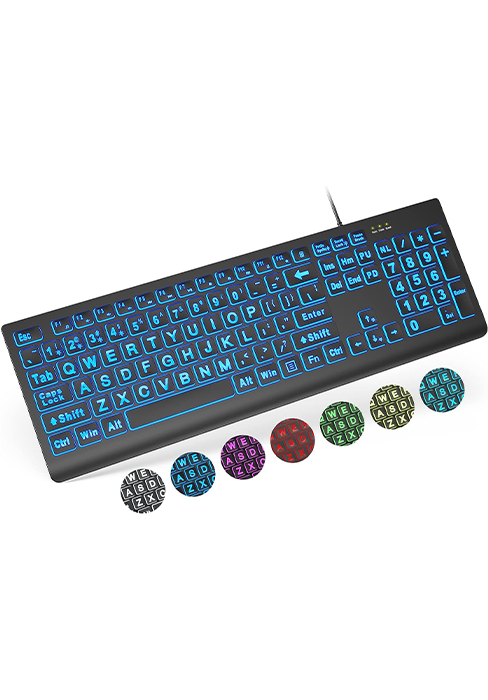
Figura 3.3: Mésview of the dedicated shortcut keys for enhanced productivity.
4. Manteniment
To ensure the longevity and cleanliness of your SABLUTE Large Print Keyboard, regular maintenance is recommended.
- Cleaning the Keys: Utilitzeu un drap suau i sense pelusa lleugerament dampened with water or a mild, non-abrasive cleaning solution to wipe down the keycaps. Avoid excessive moisture.
- Cleaning the Wrist Rest: The hard plastic wrist rest can be easily cleaned with a damp cloth. Avoid harsh chemicals that may damage the surface.
- Eliminació de pols: Periodically use compressed air to remove dust and debris from between the keys.
5. Solució De Problemes
If you encounter issues with your SABLUTE Large Print Keyboard, consider the following troubleshooting steps:
- El teclat no respon:
- Ensure the USB-A cable is securely connected to both the keyboard and the computer's USB port.
- Prova de connectar el teclat a un port USB diferent de l'ordinador.
- Restart your computer to refresh the USB connections.
- Claus que no es registren:
- Check for any physical obstructions or debris under the affected keys.
- Gently press the key multiple times to dislodge any stuck particles.
- Multimedia Keys Not Working (macOS):
- Some multimedia keys may have limited or no functionality on macOS systems due to operating system design. This is expected behavior and not a defect.
6. Especificacions
| Característica | Detall |
|---|---|
| Marca | SABLUTE |
| Model | B0CT2R9TN9 |
| Tecnologia de connectivitat | USB-A (amb cable) |
| Dispositius compatibles | Laptop, PC (Windows, macOS, Chrome OS, Vista) |
| Descripció del teclat | Flexible |
| Característiques especials | Ergonomic, Large Print, Phone Holder, Wired, Wrist Rest |
| Color | groc |
| Nombre de claus | 111 |
| Dimensions del producte | 17.32" de llargada x 9.49" d'amplada x 1.81" d'alçada (43.99 x 24.10 x 4.60 cm) |
| Pes de l'article | 1.98 lliures (0.90 kg) |
7. Garantia i Suport
SABLUTE is committed to customer satisfaction. For any inquiries or support needs, please refer to the following information:
- Garantia del fabricant: The product is covered by a 360-day manufacturer warranty.
- Política de substitució: A 90-day replacement policy is available for eligible issues.
- Atenció al client: Expect a reply to your inquiries within 24 hours.
- Número de contacte (EUA): 1-213-296-1273 (de dilluns a divendres de 9:00 a 13:00, de 14:00 a 18:00 PST)
- Cura de la marca: SABLUTE provides dedicated brand care for its products.

Figure 7.1: SABLUTE customer support details.


