1. Introducció
This manual provides detailed instructions for the safe and effective use of your iJoy Disney Winnie The Pooh Wireless Bluetooth Speaker. Please read this manual thoroughly before operating the device and retain it for future reference.
2. Què hi ha a la caixa
Carefully unpack your speaker and ensure all items are present:
- iJoy Disney Winnie The Pooh Wireless Bluetooth Speaker
- Cable de càrrega USB
- Cable AUX de reserva
- Manual del propietari (aquest document)

Image: The speaker shown next to its retail packaging, illustrating the product and its box.
3. Producte acabatview
3.1 botons de control
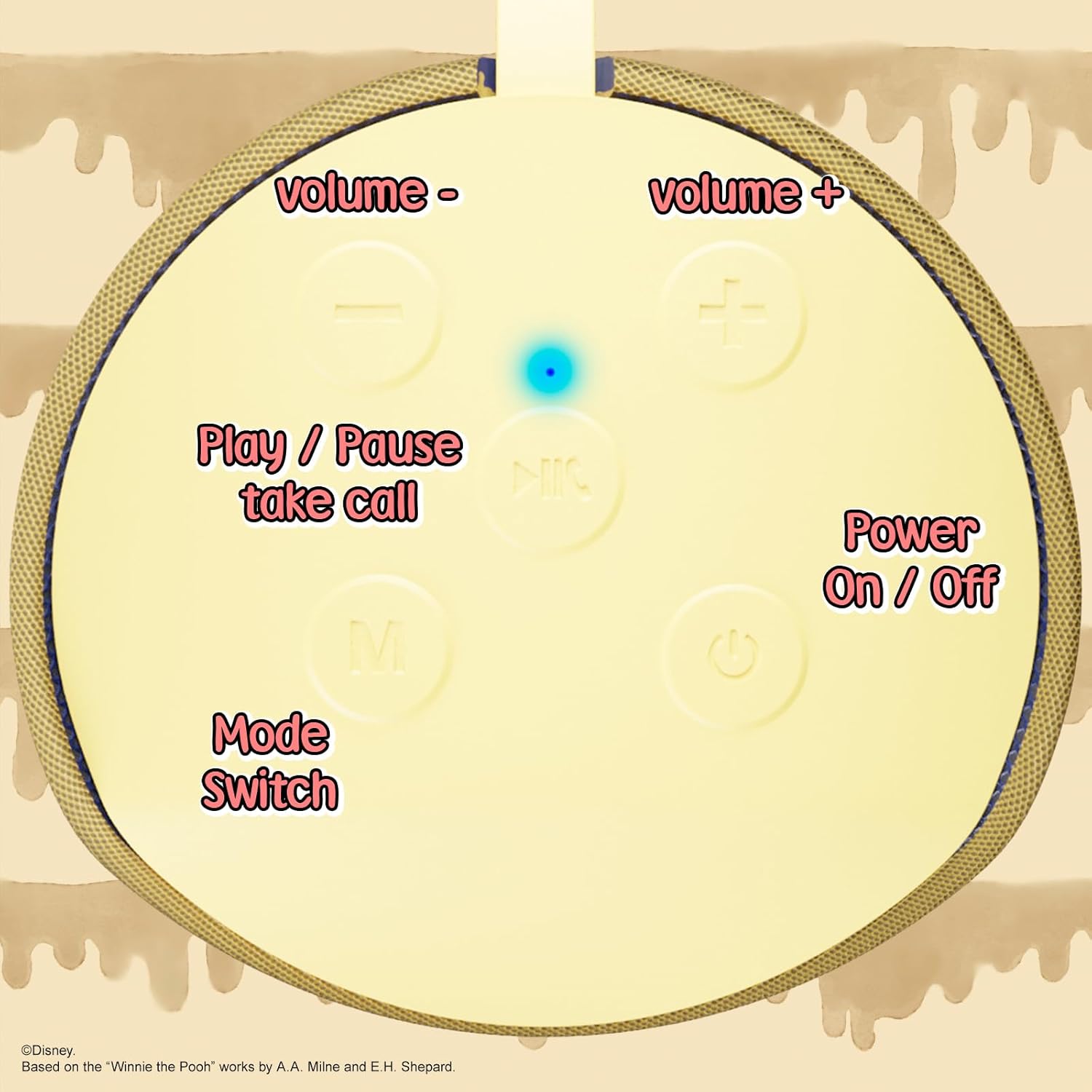
Image: A close-up of the speaker's top panel, displaying the control buttons.
- Botó d'engegada / apagada: Premeu i manteniu premut per encendre o apagar l'altaveu.
- Botó Reproduir/Pausa: Press to play or pause audio. Also used to answer or end phone calls.
- Botó per pujar el volum (+): Premeu per augmentar el volum. Mantingueu premut per saltar a la pista següent.
- Botó per baixar el volum (-): Premeu per baixar el volum. Mantingueu premut per anar a la pista anterior.
- Mode Switch (M) Button: Press to switch between Bluetooth, FM Radio, SD Card, and USB modes.
3.2 Ports i indicadors

Imatge: Una imatge detallada view of the speaker's rear panel, highlighting the AUX port, SD card slot, USB port, and Micro USB charging port.
- Port AUX: For connecting external audio devices via the provided 3.5mm AUX cable.
- Ranura per a targeta SD: Inseriu una targeta microSD per reproduir àudio directament.
- Port USB: Insert a USB flash drive for direct audio playback.
- Port de càrrega micro USB: Connect the USB charging cable here to charge the speaker.
- Llum indicador LED: Indicates charging status and Bluetooth pairing status.
4. Configuració
4.1 Càrrega de l'altaveu
- Connect the Micro USB end of the charging cable to the speaker's Micro USB charging port.
- Connecteu l'extrem USB estàndard del cable a un adaptador de corrent USB (no inclòs) o al port USB d'un ordinador.
- El llum indicador LED s'il·luminarà durant la càrrega i s'apagarà un cop estigui completament carregat.
- Una càrrega completa sol trigar aproximadament 2 hores.
4.2 Vinculació Bluetooth
- Assegureu-vos que l'altaveu estigui completament carregat.
- Press and hold the Power On/Off button to turn on the speaker. You will hear an audible prompt, and the LED indicator will flash, indicating it's in pairing mode.
- Al dispositiu mòbil (telèfon intel·ligent, tauleta, etc.), activeu el Bluetooth.
- Cerca available Bluetooth devices. The speaker will appear as "iJoy Winnie The Pooh Speaker" or similar.
- Select the speaker from the list to pair. Once successfully paired, you will hear a confirmation sound, and the LED indicator will stop flashing and remain solid.
- L'altaveu es tornarà a connectar automàticament al darrer dispositiu emparellat quan s'engegui, si el Bluetooth del dispositiu està actiu i dins del seu abast.
5. Instruccions de funcionament
5.1 Mode Bluetooth
After successful pairing, you can stream audio wirelessly from your device to the speaker. Use your device's controls or the speaker's Play/Pause, Volume Up/Down buttons to manage playback.
5.2 Mode de ràdio FM
- Premeu el botó Mode (M) per canviar al mode de ràdio FM.
- Press the Play/Pause button to automatically scan and save available FM stations.
- Feu servir els botons Pujar volum (+) i Baixar volum (-) (pressió curta) per navegar entre les emissores desades.
5.3 SD Card / USB Playback
- Insert a microSD card into the SD card slot or a USB flash drive into the USB port.
- L'altaveu canviarà automàticament al mode corresponent i començarà a reproduir àudio files. If not, press the Mode (M) button to select the correct mode.
- Use the speaker's Play/Pause, Volume Up/Down buttons to control playback.
5.4 Mode AUX
- Connect one end of the provided 3.5mm AUX cable to the speaker's AUX port.
- Connecteu l’altre extrem a la presa d’auriculars del dispositiu d’àudio.
- The speaker will automatically switch to AUX mode. If not, press the Mode (M) button.
- Control playback and volume primarily from your connected audio device.
5.5 Trucades de mans lliures
Quan es connecta a un telèfon intel·ligent mitjançant Bluetooth:
- Respon a la trucada: Premeu el botó Reproduir/Pausa una vegada.
- Finalitzar la trucada: Premeu el botó Reprodueix/Pausa una vegada durant una trucada.
- Rebutja la trucada: Mantén premut el botó Reproduir/Pausa.
6. Manteniment
- Netegeu l'altaveu amb un drap suau i sec. No utilitzeu productes de neteja abrasius ni dissolvents.
- The speaker is IPX4 splashproof, meaning it can withstand splashes of water. Do not submerge it in water.
- Guardeu l'altaveu en un lloc fresc i sec quan no l'utilitzeu.
- Eviteu exposar l'altaveu a temperatures extremes, llum solar directa o humitat elevada.
7. Solució De Problemes
| Problema | Causa possible | Solució |
|---|---|---|
| L'altaveu no s'encén | Bateria baixa | Carregueu l'altaveu completament. |
| No es pot emparellar per Bluetooth | Speaker not in pairing mode / Device Bluetooth off / Too far from device | Ensure speaker is in pairing mode (flashing LED). Turn on Bluetooth on your device. Move speaker closer to device (within 30 feet). |
| Sense so | Volume too low / Incorrect mode / Device not playing audio | Increase speaker and device volume. Press 'M' button to select correct mode. Ensure audio is playing on your connected device. |
| La recepció de ràdio FM és deficient | Senyal feble / Interferències | Move the speaker to a different location. The AUX cable can act as an antenna; try connecting it. |
8. Especificacions

Image: The speaker with visual indicators showing its height of 6.3 inches and width of 2.9 inches.
| Característica | Detall |
|---|---|
| Número de model | SS-KH7C-FS4O |
| Tecnologia de connectivitat | Bluetooth |
| Interval de comunicació sense fils | Fins a 30 peus (10 metres) |
| Tipus d'altaveu | Torre |
| Potència de sortida màxima dels altaveus | 20 watts |
| Mode de sortida d'àudio | Mono |
| Capacitat de la bateria | 800 milionsamp Hores |
| Temps de càrrega | Aproximadament 2 hores |
| Hora de joc | Up to 3 Hours (depending on volume and usage) |
| Nivell de resistència a l'aigua | IPX4 (a prova d'esquitxades) |
| Dimensions del producte | 3" de profunditat x 3" d'amplada x 6" d'alçada (7.62 cm de profunditat x 7.62 cm d'amplada x 15.24 cm d'alçada) |
| Pes de l'article | 8 unces (226.8 grams) |
| Components inclosos | Bluetooth Speaker, USB Charging Cable, Backup AUX Cable, Owners Manual |
| Característiques especials | Built-in Microphone, LED Indicator Lights, Portable, SD Card Slot, USB Port, FM Radio |
9. Garantia i Suport
9.1 Informació de la garantia
This iJoy Disney Winnie The Pooh Wireless Bluetooth Speaker comes with a 90-day manufacturer's warranty from the date of purchase. This warranty covers manufacturing defects and workmanship under normal use. It does not cover damage caused by misuse, accidents, unauthorized modifications, or normal wear and tear.
9.2 Atenció al client
For technical assistance, warranty claims, or further inquiries, please contact iJoy customer support through their official website or the retailer where the product was purchased. Please have your model number (SS-KH7C-FS4O) and proof of purchase ready.