Introducció
Thank you for choosing the PHOINIKAS Q5S Wireless Gaming Headset. This headset is designed to provide an immersive audio experience for gaming across multiple platforms. Featuring 2.4GHz ultra-low latency wireless technology, 7.1 stereo sound, and a detachable noise-canceling microphone, it offers versatility and comfort for extended use. This manual will guide you through the setup, operation, maintenance, and troubleshooting of your new headset.
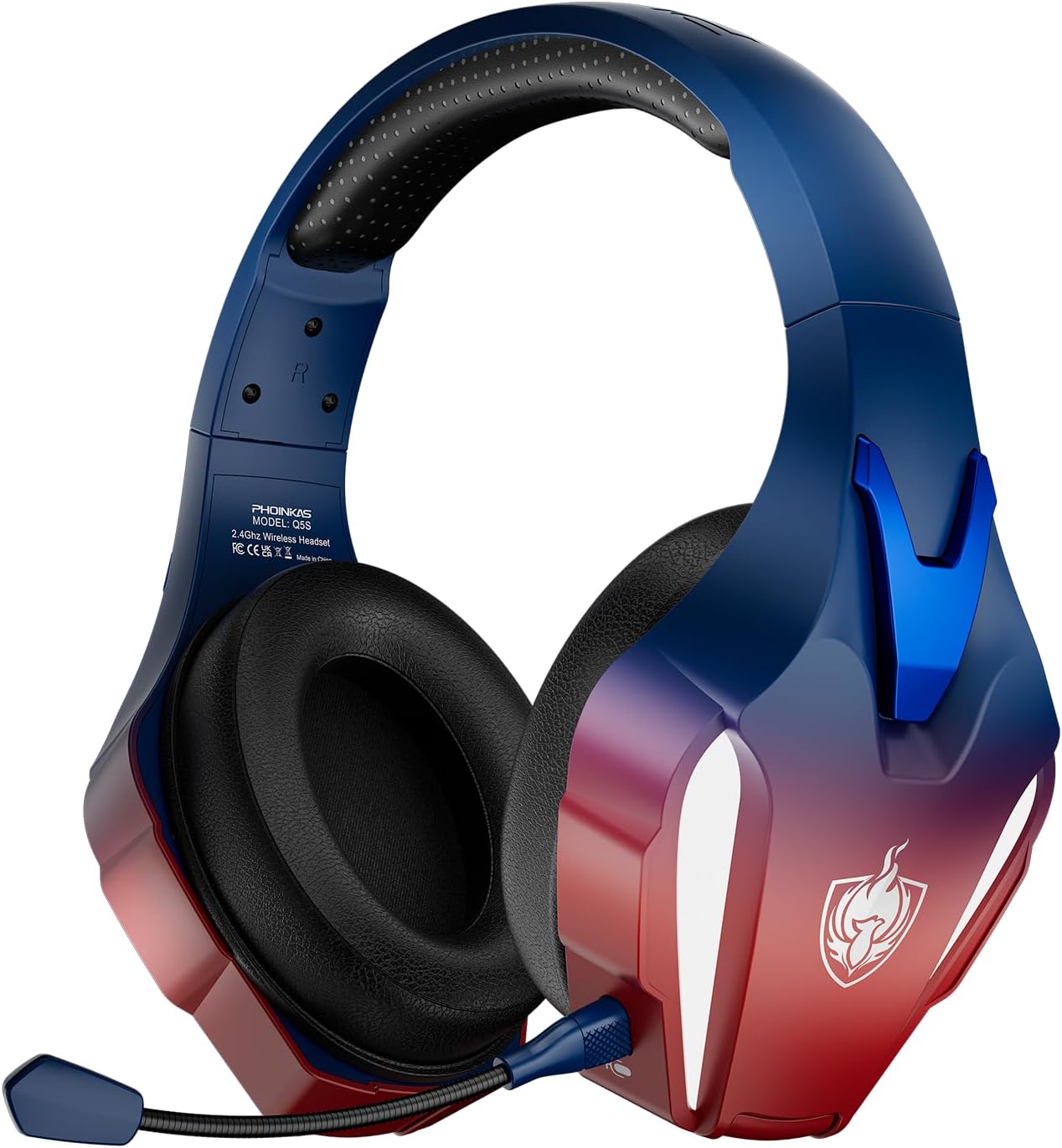
Image: The PHOINIKAS Q5S Wireless Gaming Headset in Navy Blue, showcasing its design with red and blue accents and a detachable microphone.
Contingut del paquet
Si us plau, comproveu el paquet per veure si hi ha els elements següents:
- PHOINIKAS Q5S Gaming Headset
- Cable de càrrega USB (tipus C)
- Manual d'usuari (aquest document)
- Micròfon desmuntable
- 2.4GHz USB Dongle (for wireless connection)
- Cable d'àudio de 3.5 mm
Producte acabatview: Controls i ports
Familiarize yourself with the various controls and ports on your PHOINIKAS Q5S headset:

Image: A detailed diagram highlighting the control buttons and ports on the PHOINIKAS Q5S headset.
- Power / Pairing Mode Button: Press and hold to power on/off. Short press to switch 7.1 sound mode or turn light on/off.
- Interruptor d'encesa/apagada del micròfon: Toggles the microphone function.
- Volume Adjustment Wheel: Scroll to increase or decrease audio volume.
- 3.5mm Wired Interface: For connecting the headset via the 3.5mm audio cable.
- External Microphone Interface: Port for attaching the detachable microphone.
- Port de càrrega tipus C: For charging the headset using the provided USB-C cable.
Configuració
1. Connectar el micròfon
Insert the detachable microphone into the External Microphone Interface (5) on the headset until it clicks into place. Ensure it is securely connected.

Image: The PHOINIKAS Q5S headset with its flexible, detachable noise-canceling microphone attached, illustrating its function to pick up voice clearly.
2. Càrrega dels auriculars
Before first use, fully charge the headset. Connect the USB-C charging cable to the Type-C Charging Port (6) on the headset and the other end to a USB power source (e.g., computer USB port, USB wall adapter). The charging indicator will show charging status (refer to LED indicators section for details). A full charge takes approximately 2.5-3 hours.
Nota important: For wireless mode, ensure the 3.5mm audio cable/charging cable is removed and the headset is fully charged, otherwise the headset will not turn on.

Image: The PHOINIKAS Q5S headset on a stand, with icons indicating 25-30 hours battery life, 1200mAh capacity, 3 hours charging time, and 15-20 hours lighting mode time.
Instruccions de funcionament
Wireless Mode (2.4GHz USB Dongle)
This mode offers ultra-low latency wireless connectivity for PS4, PS5, PC, Mac, and Nintendo Switch (audio only, microphone not supported).
- Encès: Press and hold the Power / Pairing Mode Button (1) for 3 seconds until the headset powers on.
- Connect USB Dongle: Plug the 2.4GHz USB dongle into an available USB port on your gaming console (PS4/PS5), PC, or Mac.
- Emparellament automàtic: The headset and dongle should automatically pair. The indicator light on the headset will show a solid color when connected.
- Configuració d'àudio: On your device, ensure the PHOINIKAS headset is selected as the audio output and input device.
Nota: For Nintendo Switch, the microphone function is not supported in wireless mode.
Mode amb cable (cable d'àudio de 3.5 mm)
Use the 3.5mm audio cable for devices like Xbox Series, PS4/PS5 controllers, Nintendo Switch, PC/Mac, laptops, tablets, and mobile phones. In wired mode, headset lights and mute function are inactive.
- Connectar el cable: Plug one end of the 3.5mm audio cable into the 3.5mm Wired Interface (4) on the headset.
- Connecta't al dispositiu: Connecteu l'altre extrem al connector d'àudio de 3.5 mm del dispositiu.
- Compatibilitat amb Xbox: Only the 3.5mm wired mode is compatible with Xbox. Older Xbox consoles may require an additional adapter (not included).
- Microphone Note: When using with Nintendo Switch via 3.5mm, the microphone does not work.
Nota important: When plugging in the external microphone/3.5mm audio cable/charging cable, please ensure the socket is correct, otherwise it may not work properly.
Ús del micròfon
- Activa/Desactiva: Use the Microphone On/Off Switch (2) to activate or deactivate the microphone.
- Posicionament: Adjust the flexible microphone arm for optimal voice pickup.
- The detachable omnidirectional microphone features noise-canceling capabilities for clear communication.
7.1 Stereo Sound Activation
To activate the 7.1 professional stereo surround sound, short press the Power / Pairing Mode Button (1) while the headset is powered on. This feature enhances the immersive audio experience.

Imatge: Una explosió view diagram of the PHOINIKAS Q5S headset's ear cup, illustrating the 40mm precision drivers and the concept of 3D surround sound.
Ajust de volum
Use the Volume Adjustment Wheel (3) to precisely control the audio output level.
Compatibilitat multiplataforma
The PHOINIKAS Q5S headset offers broad compatibility across various gaming platforms and devices. Refer to the table below for specific feature support:
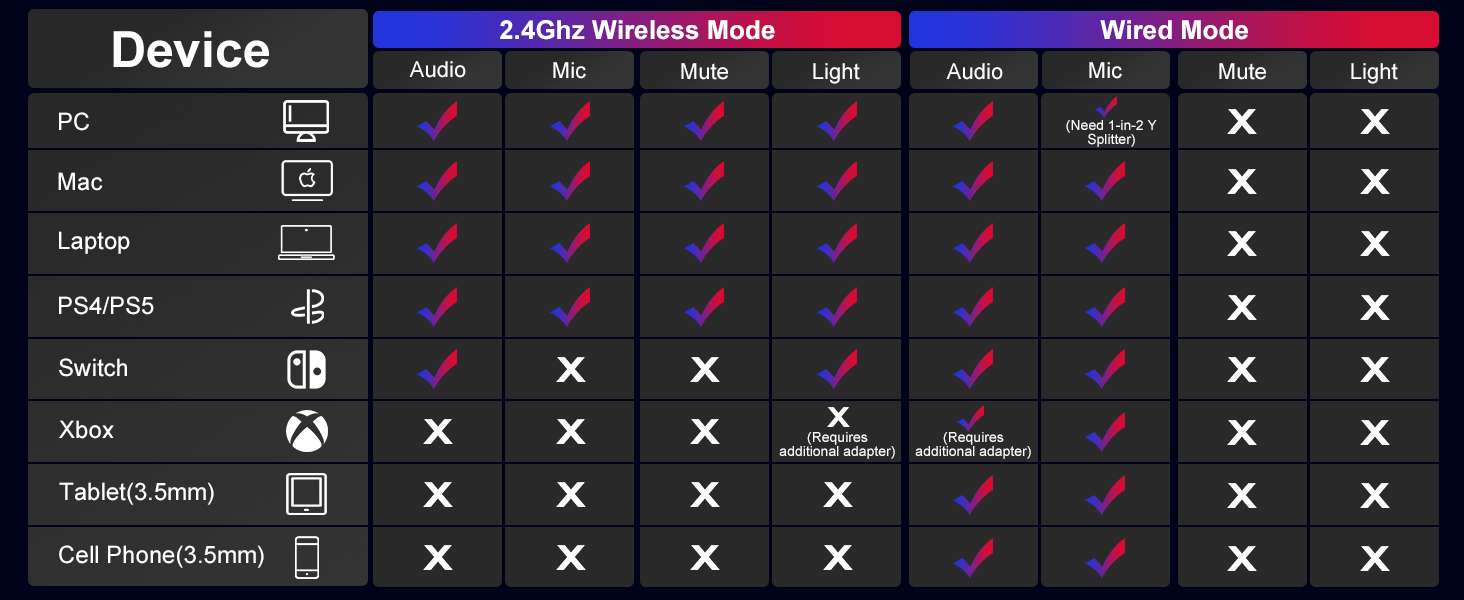
Image: A detailed compatibility table showing which features (Audio, Mic, Mute, Light) are supported on different devices (PC, Mac, Laptop, PS4/PS5, Switch, Xbox, Tablet, Cell Phone) in both 2.4GHz Wireless Mode and Wired Mode.
| Dispositiu | Mode sense fil de 2.4 GHz | Wired Mode (3.5mm) | ||||||
|---|---|---|---|---|---|---|---|---|
| Àudio | Mic | Silenciar | Llum | Àudio | Mic | Silenciar | Llum | |
| PC | ✓ | ✓ | ✓ | ✓ | ✓ | ✓ (Need 1-in-2 Y Splitter) | ✗ | ✗ |
| Mac | ✓ | ✓ | ✓ | ✓ | ✓ | ✓ | ✗ | ✗ |
| Portàtil | ✓ | ✓ | ✓ | ✓ | ✓ | ✓ | ✗ | ✗ |
| PS4/PS5 | ✓ | ✓ | ✓ | ✓ | ✓ | ✓ | ✗ | ✗ |
| Canvia | ✓ | ✗ | ✗ | ✓ | ✓ | ✗ | ✗ | ✗ |
| Xbox | ✗ | ✗ | ✗ | ✗ | ✓ | ✓ (Requires additional adapter for older Xboxes) | ✗ | ✗ |
| Tablet (3.5mm) | ✗ | ✗ | ✗ | ✗ | ✓ | ✓ | ✗ | ✗ |
| Telèfon mòbil (3.5 mm) | ✗ | ✗ | ✗ | ✗ | ✓ | ✓ | ✗ | ✗ |
Manteniment
- Neteja: Feu servir un drap suau i sec per netejar els auriculars. Eviteu utilitzar productes químics agressius o materials abrasius.
- Emmagatzematge: Guardeu els auriculars en un lloc fresc i sec, allunyat de la llum solar directa i de temperatures extremes.
- Cura del cable: Eviteu doblecs o doblecs pronunciats als cables per evitar danys.
- Longevitat de la bateria: For optimal battery life, avoid fully discharging the headset frequently. Charge it regularly.

Image: A child wearing the PHOINIKAS Q5S headset, illustrating its comfortable and ergonomic design with breathable earcups, soft head cushion, and adjustable headband.
Resolució de problemes
- Headset not turning on in wireless mode: Ensure the 3.5mm audio cable and charging cable are removed. The headset must be fully charged to operate wirelessly.
- Microphone not working on Nintendo Switch: The microphone function is not supported on Nintendo Switch in either wireless or wired mode.
- Microphone not working on Xbox: The headset is only compatible with Xbox in 3.5mm wired mode. Older Xbox consoles may require an additional adapter.
- No hi ha so o hi ha mala qualitat de so:
- Comproveu els nivells de volum tant als auriculars com al dispositiu connectat.
- Ensure the headset is properly connected (wireless dongle inserted, 3.5mm cable fully plugged in).
- Verify that the headset is selected as the default audio output device in your system settings.
- Lag or connectivity issues in wireless mode:
- Ensure the USB dongle is securely plugged in.
- Minimitzar les interferències d'altres dispositius de 2.4 GHz.
- Ensure the headset is within the effective range of the dongle.
- Problemes de càrrega: Ensure the USB-C cable is correctly inserted into the Type-C Charging Port (6) and the power source is active.
Especificacions
| Marca | FOINIKAS |
| Número de model | Q5S |
| Tecnologia de connectivitat | Amb cable, sense fil (2.4 GHz) |
| Conector d'auriculars | 3.5 mm Jack |
| Mida del controlador d'àudio | 40 mil·límetres |
| Latència d'àudio | ≤20 Milliseconds (2.4GHz wireless) |
| Durada de la bateria | Up to 30 Hours (25-30 hours) |
| Capacitat de la bateria | 1200 mAh |
| Temps de càrrega | 2.5-3 Hours (USB-C) |
| Tipus de micròfon | Detachable Omnidirectional Noise-Canceling |
| Característiques especials | Adjustable Headband, Detachable Cable, Noise Cancellation, 7.1 Surround Sound, Volume Control |
| Col·locació de l'orella | Sobre l'orella |
| Pes de l'article | 0.51 quilograms (1.12 lliures) |
Garantia i Suport
PHOINIKAS products are manufactured with a commitment to quality. For any product-related inquiries, technical support, or warranty claims, please contact PHOINIKAS customer service through the retailer where the product was purchased or visit the official PHOINIKAS weblloc web per obtenir informació de suport.
Products are sent out after 100% quality inspection and after-sales service is provided.
For frequently asked questions, you may also refer to the brand's A+ content section on the product page or their official weblloc.


