Introducció
This user manual provides detailed instructions for the operation, maintenance, and troubleshooting of your Mibro AC1 Wireless Bluetooth Earphones. Please read this manual thoroughly before using the product to ensure proper function and longevity.
Informació de seguretat
- No exposeu els auriculars ni l'estoig de càrrega a temperatures extremes, humitat ni substàncies corrosives.
- Eviteu deixar caure o sotmetre el dispositiu a forts impactes.
- Do not attempt to disassemble or modify the earphones or charging case. This may void the warranty and cause damage.
- Mantenir fora de l'abast dels nens i mascotes.
- Feu servir només el cable de càrrega proporcionat o un equivalent certificat.
- L'exposició prolongada a sons forts pot causar danys auditius. Ajusteu el volum a un nivell segur.
Contingut del paquet
Si us plau, comproveu el paquet per veure si hi ha els elements següents:
- Mibro AC1 Wireless Bluetooth Earphones (Left and Right)
- Estoig de càrrega
- Puntes per a les orelles (diverses mides)
- Cable de càrrega USB
- Manual d'usuari
Producte acabatview
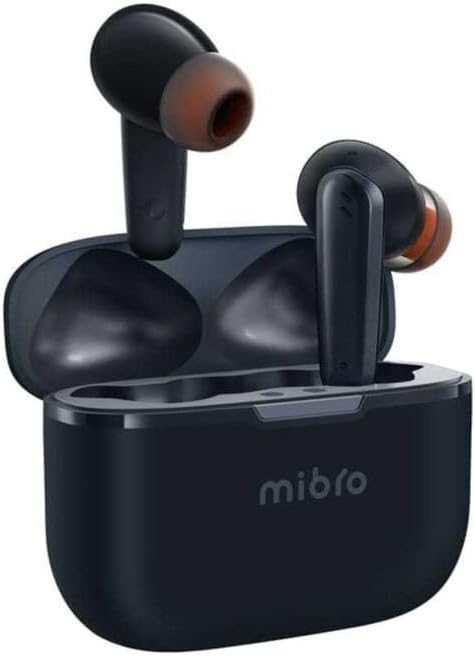
Figure 1: Mibro AC1 Wireless Bluetooth Earphones in their charging case. The image shows the compact design of the earbuds and the portable charging case, highlighting their readiness for use.

Figure 2: Mibro AC1 Earphones demonstrating IPX4 water resistance. The image depicts the earbuds being splashed with water, illustrating their ability to resist sweat and light rain during daily use. Note: The charging case is not waterproof.
Earphone Components:
- Àrea de control tàctil: Per gestionar la reproducció, les trucades i l'assistent de veu.
- Micròfon: Per a trucades i ordres de veu.
- Contactes de càrrega: Per carregar dins de la caixa.
- Punta de l'orella: Ofereix confort i aïllament acústic.
Components de la caixa de càrrega:
- Port de càrrega: Port USB-C per carregar la funda.
- Indicador LED: Mostra l'estat de càrrega i el nivell de la bateria.
- Ranures per a auriculars: Subjecta i carrega els auriculars de manera segura.
Configuració
1. Charging the Earphones and Case:
- Place the earphones into the charging case. Ensure the charging contacts align.
- Connect the USB charging cable to the charging port on the case and a power source (e.g., computer USB port, wall adapter).
- The LED indicator on the case will show the charging status. A full charge is indicated when the LED turns solid or off, depending on the model's specific behavior.
- Allow approximately 1.5 hours for a full charge of the earphones and 2 hours for the charging case.
2. Vinculació amb un dispositiu:
- Open the charging case. The earphones will automatically enter pairing mode, and their indicators will flash.
- Al dispositiu (telèfon intel·ligent, tauleta, ordinador), activeu el Bluetooth.
- Cerca available Bluetooth devices. Select "Mibro AC1" from the list.
- Once connected, the earphone indicators will stop flashing, and you will hear a confirmation tone.
- Els auriculars es tornaran a connectar automàticament a l'últim dispositiu emparellat quan es treguin de l'estoig, si el Bluetooth està habilitat al dispositiu.
Instruccions de funcionament
Controls tàctils:
| Acció | Funció |
|---|---|
| Toc únic (auricular esquerre/dret) | Reproduir / Pausar música, Respondre / Finalitzar trucada |
| Doble toc (auricular dret) | Pista següent |
| Doble toc (auricular esquerre) | Pista anterior |
| Triple toc (auricular esquerre/dret) | Activa l'Assistent de veu |
| Premsa llarga (2 segons) | Rebutja la trucada |
| Long Press (Left/Right Earbud, 3 seconds) | Toggle Noise Cancellation / Transparency Mode (if applicable) |
Cancel·lació de soroll:
The Mibro AC1 earphones feature advanced noise reduction technology, capable of blocking ambient sounds up to 42dB. This provides a clear and immersive listening experience. Refer to the touch controls table for how to activate or deactivate this feature.
Manteniment
Neteja:
- Netegeu regularment els auriculars i l'estoig de càrrega amb un drap suau, sec i sense borrissol.
- For ear tips, remove them from the earphones and clean with a damp un drap i sabó suau si cal. Assegureu-vos que estiguin completament secs abans de tornar-los a enganxar.
- Clean the charging contacts on both the earphones and the case using a dry cotton swab to ensure proper charging.
- No utilitzeu netejadors abrasius, alcohol ni dissolvents químics.
Emmagatzematge:
- Quan no els utilitzeu, guardeu els auriculars a la seva funda de càrrega per protegir-los i mantenir-los carregats.
- Guardeu el dispositiu en un lloc fresc i sec, allunyat de la llum solar directa i de temperatures extremes.
Resolució de problemes
| Problema | Possible solució |
|---|---|
| Els auriculars no es carreguen |
|
| No es pot emparellar amb el dispositiu |
|
| Sense so ni volum baix |
|
| Connexió intermitent |
|
Especificacions
| Característica | Detall |
|---|---|
| Dimensions del producte | 5 x 4 x 6 cm; 100 grams |
| Marca | Mibro |
| Nom del model | AC1 Earphones |
| Número de model | sol-meac1 |
| Tecnologia de connectivitat | Sense fil (Bluetooth) |
| Tecnologia de comunicació sense fils | Bluetooth 5.2 |
| Col·locació de l'orella | In-orella |
| Factor de forma | In-orella |
| Control de soroll | Cancel·lació activa de soroll (fins a 42 dB) |
| Color | Blau |
| Components inclosos | Ear pads (ear tips) |
| Fabricant | ZhenShi information technology (Shanghai) Co., Ltd. |
| Primera data disponible | 29 de gener de 2024 |


