1. Introducció
The AJAZZ AKP815 is a 75% low-profile mechanical keyboard designed for enhanced productivity and gaming. It features a unique 4.33-inch LED touch screen, programmable RGB lighting, and a gasket-mounted structure for a comfortable typing experience. This manual provides detailed instructions for setup, operation, and maintenance.
2. Contingut del paquet
Si us plau, verifiqueu que tots els elements siguin presents al paquet:
- AJAZZ AKP815 Mechanical Keyboard
- Cable USB-C a USB-A
- Extractor de tecles
- Manual d'usuari (aquest document)
3. Sobrecàrrega físicaview
Familiarize yourself with the keyboard's components:
- Disseny del 75%: Compact design with 81 keys.
- 4.33'' LCD Touch Screen: Located on the right side for customizable controls.
- Pro baixfile HUANO Mechanical Switches: Designed for a responsive typing experience.
- Adjustable Two-Level Stand: For ergonomic typing angles.
- Interfície USB-C: Per a connexió amb cable i càrrega.
- System Mode Switch: Located on the underside to toggle between Windows and Mac compatibility.

4. Configuració i connectivitat
4.1. Selecció del mode del sistema
Before connecting, locate the switch on the underside of the keyboard to select the appropriate operating system mode (Windows or Mac).
4.2. Connexió per cable
- Connecteu el cable USB-C proporcionat al port USB-C del teclat.
- Connecteu l'extrem USB-A del cable a un port USB disponible de l'ordinador.
- El sistema reconeixerà automàticament el teclat.
4.3. Connexió sense fil 2.4G
The keyboard supports 2.4G wireless connectivity via a USB dongle. The dongle is typically stored in a compartment on the underside of the keyboard.
- Traieu el dongle USB de 2.4 G de la ranura d'emmagatzematge a la part inferior del teclat.
- Connecteu el dongle a un port USB disponible de l'ordinador.
- Ensure the keyboard is switched to 2.4G wireless mode (refer to the underside switch).
- El teclat s'hauria de connectar automàticament.
4.4. Connexió Bluetooth
The keyboard supports Bluetooth connectivity for up to three devices.
- Ensure the keyboard is switched to Bluetooth mode (refer to the underside switch).
- Al dispositiu (ordinador, tauleta, telèfon intel·ligent), activeu el Bluetooth i cerqueu dispositius nous.
- Select 'AJAZZ AKP815' (or similar) from the list of available devices to pair.
- Seguiu les indicacions de la pantalla per completar el procés de vinculació.

5. Instal·lació del controlador
For full functionality and customization of both the keyboard and the touch screen, specific drivers are required.
- Keyboard Driver: Download the keyboard driver from the official AJAZZ weblloc.
- Touch Screen Controller Driver:
Per a sistemes Windows: AJAZZ.key123.vip/ENGwin
For Mac systems: AJAZZ.key123.vip/ENGmac
Important: Always download drivers from the official AJAZZ website or the provided links to ensure compatibility and security.
6. Instruccions de funcionament
6.1. Funcionament de la pantalla tàctil
The 4.33-inch LCD touch screen acts as a customizable desktop control center with 15 programmable buttons. Use the dedicated driver to:
- Manage desktop applications.
- Accés webllocs.
- Control chat applications.
- Edit shortcuts in software like Photoshop.
- Utilize a calculator or analyze stock market data.
- Customize key icons for quick control.


6.2. Personalització de la il·luminació RGB
The keyboard features programmable RGB lighting with 16.8 million color spectrums. Use the keyboard driver to:
- Select from various lighting modes and effects.
- Adjust lighting brightness.
- Synchronize lighting with music rhythms.
The south-facing LED design and two-color injection molded non-shine keycaps ensure soft and clear RGB illumination.


6.3. FN Key Functionality
The FN key provides access to secondary functions for various keys, enhancing efficiency for work or gaming. Refer to the keyboard's keycap legends for specific FN key combinations.
7. Funcions avançades
- Gasket Structure Technology: Built-in EVA sandwich cotton reduces hollow sounds and improves typing feel.
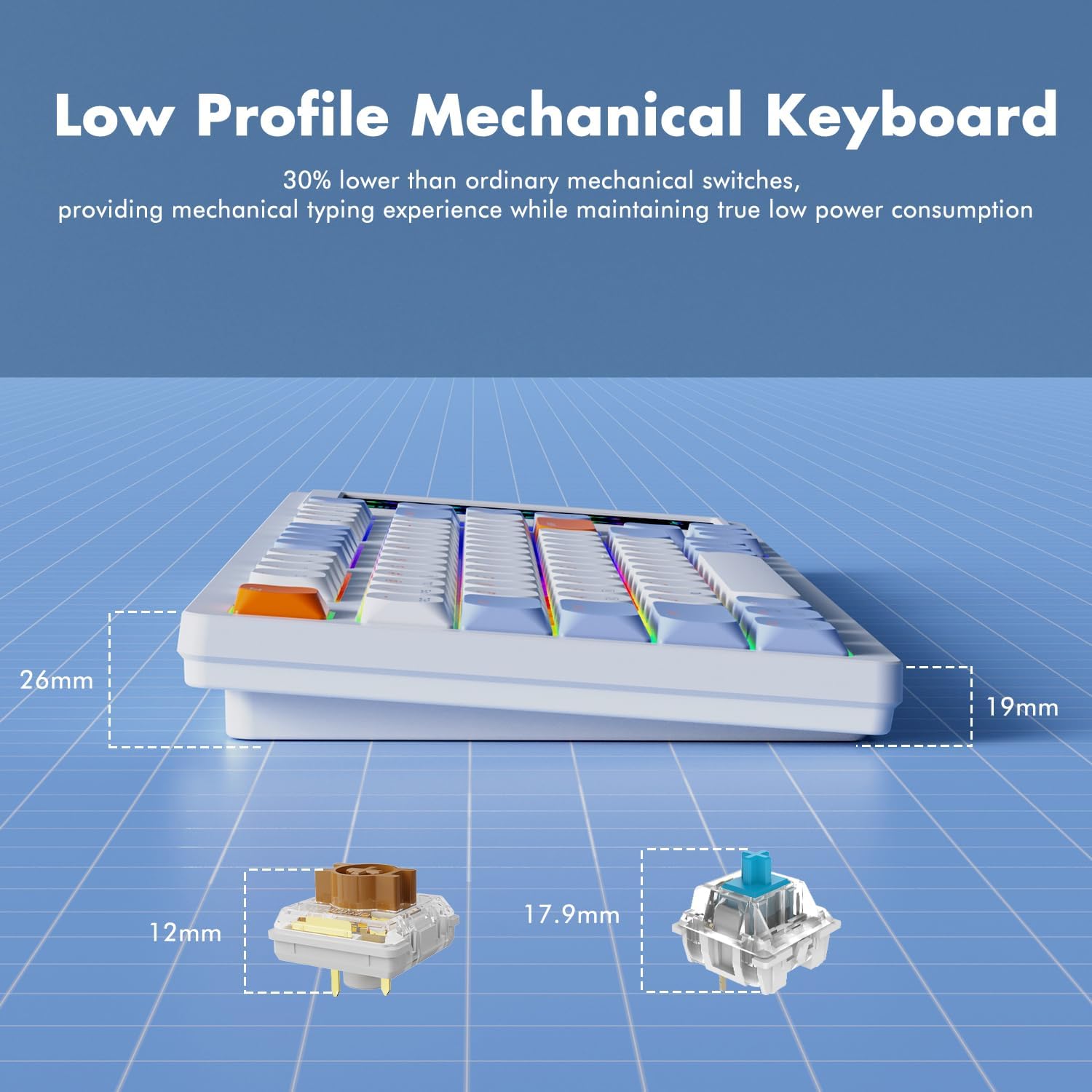
- 30% Ultra-Thin Design: Achieved with thin keycaps and low-profile HUANO mechanical switches, offering a mechanical typing experience with low power consumption.
- Canvi de clau N: Each key is controlled by a separate switch, allowing multiple keys to be pressed simultaneously without conflict.

8. Manteniment
To ensure the longevity and optimal performance of your AJAZZ AKP815 keyboard, follow these maintenance guidelines:
- Neteja: Use a soft, dry cloth to wipe down the keyboard surface. For deeper cleaning, use the provided keycap puller to remove keycaps and clean underneath with compressed air or a small brush.
- Eviteu líquids: No exposeu el teclat a líquids. En cas de vessament, desconnecteu immediatament el teclat i deixeu-lo assecar completament abans de tornar-lo a connectar.
- Emmagatzematge: Guardeu el teclat en un lloc fresc i sec, allunyat de la llum solar directa i de temperatures extremes.
9. Solució De Problemes
- El teclat no respon:
- Ensure the USB cable is securely connected or the wireless dongle is properly inserted.
- Verify the system mode switch (Windows/Mac) is set correctly.
- For wireless connections, check battery level and ensure proper pairing. - Problemes amb la pantalla tàctil:
- Ensure the touch screen controller driver is correctly installed and running.
- Restart the driver software or your computer.
- Check for any physical obstructions or damage to the screen. - La il·luminació RGB no funciona:
- Ensure the keyboard driver is installed.
- Check lighting settings within the driver software.
- Try cycling through lighting modes using FN key combinations. - Accidental Touch Screen Activation:
- Adjust your typing posture to avoid unintentional contact with the screen.
- Review touch screen driver settings for sensitivity adjustments if available.
10. Especificacions
| Característica | Detall |
|---|---|
| Número de model | AKP815 |
| Dimensions del producte | 15.7" de llargada x 5.4" d'amplada x 0.8" d'alçada (40 x 13.7 x 2 cm) |
| Pes de l'article | 1.98 lliures (0.9 kg) |
| Disposició del teclat | 75% (81 tecles) |
| Mida de la pantalla tàctil | 4.33 polzades |
| Tipus de canvi | Pro baixfile Interruptors mecànics HUANO |
| Connectivitat | USB-C Wired, 2.4G Wireless, Bluetooth |
| Il·luminació de fons | RGB programable |
| Dispositius compatibles | Laptop, PC, Smart TV, Smartphone, Tablet |
| Sistema operatiu compatible | Windows, Mac |
11. Vídeo oficial del producte
Mireu aquest vídeo oficial per a una breu descripcióview of the AJAZZ AKP815 keyboard.
12. Garantia i Suport
For warranty information, technical support, or further assistance, please visit the official AJAZZ website. Ensure you have your product model number (AKP815) available when contacting support.


