Introducció
Gràcies per la compraasing the Muse M-780 BTB Bluetooth Speaker. This portable speaker features 20W output, colored lights, IPX5 splash resistance, hands-free calling, and stereo pairing capabilities. It supports Bluetooth, Auxiliary input, and USB MP3 playback. Please read this manual carefully before use to ensure proper operation and to maximize your listening experience.
Informació de seguretat
- No exposeu el dispositiu a temperatures extremes, llum solar directa ni humitat elevada.
- Eviteu deixar caure o sotmetre l'altaveu a forts impactes.
- The speaker is IPX5 splash-resistant. Do not immerse it in water or expose it to strong jets of water.
- No intenteu desmuntar ni modificar l'altaveu. Això anul·larà la garantia.
- Use only the provided or approved charging cable.
- Mantenir fora de l'abast dels nens.
Contingut del paquet
Si us plau, comproveu que hi hagi tots els elements:
- Muse M-780 BTB Bluetooth Speaker
- Cable de càrrega USB-C
- Cable d'entrada auxiliar
- Manual d'instruccions (aquest document)
Producte acabatview
Familiarize yourself with the speaker's controls and ports.
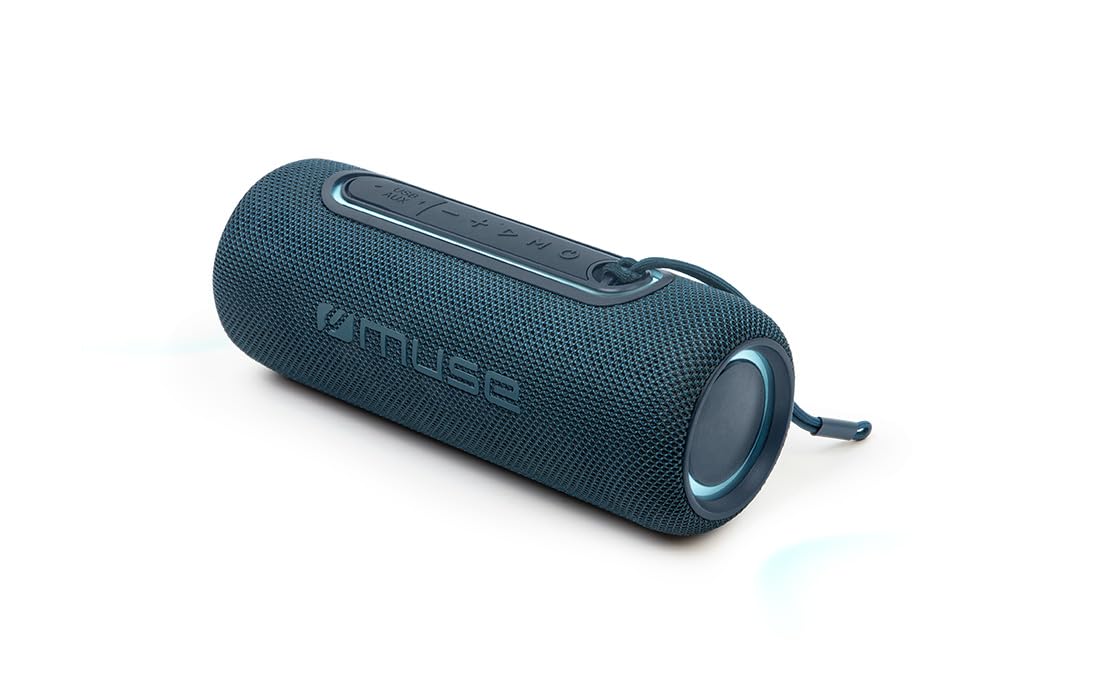
Figura 1: Davant view of the Muse M-780 BTB Bluetooth Speaker, showing the speaker grille and control buttons on top.
Controls i indicadors:
- Botó d'encesa: Manteniu premut per activar/desactivar.
- Botó Reproduir/Pausa: Press to play or pause music. Answer/end calls.
- Puja el volum (+): Premeu per augmentar el volum. Mantingueu premut per a la pista següent.
- Baixar el volum (-): Premeu per baixar el volum. Mantingueu premut per passar a la pista anterior.
- Botó de mode (M): Press to switch between Bluetooth, Aux-in, and USB modes.
- Botó del mode de llum: Press to cycle through different colored light effects.
- Bluetooth Pairing LED Indicator: Mostra l'estat de la connexió Bluetooth.
- Indicador LED de càrrega: Shows battery charging status.
Ports:
- Port de càrrega USB-C: Per carregar la bateria interna.
- Port AUX-IN: Per connectar dispositius d'àudio externs mitjançant un cable de 3.5 mm.
- Port USB: For MP3 playback from a USB flash drive.
Configuració
1. Càrrega inicial
Before first use, fully charge the speaker. Connect the supplied USB-C cable to the speaker's USB-C charging port and the other end to a USB power adapter (not included) or a computer's USB port. The Charging LED indicator will illuminate during charging and turn off when fully charged. A full charge provides up to 10 hours of music playback.
2. Encès / apagat
Manteniu premut el botó Botó d'engegada for approximately 3 seconds to turn the speaker ON or OFF.
Instruccions de funcionament
Emparellament Bluetooth
- Turn on the speaker. It will automatically enter Bluetooth pairing mode, and the Bluetooth Pairing LED indicator will flash.
- Enable Bluetooth on your smartphone, tablet, or other Bluetooth-compatible device.
- Cerca "M-780 BTB" in the list of available devices and select it to connect.
- Once successfully paired, the Bluetooth Pairing LED indicator will stop flashing and remain solid. You can now stream music wirelessly from your device within a range of up to 10 meters.
Auxiliary Input (AUX-IN)
- Connect one end of the supplied 3.5mm auxiliary cable to the AUX-IN port on the speaker.
- Connect the other end to the headphone jack or audio output of your external audio device.
- Premeu el botó Botó de mode (M) to switch to AUX-IN mode.
- Controla la reproducció i el volum des del teu dispositiu extern.
Reproducció de MP3 per USB
- Inseriu una unitat flash USB que contingui àudio MP3 files al port USB de l'altaveu.
- Premeu el botó Botó de mode (M) per canviar al mode USB.
- The speaker will automatically begin playing MP3 files de la unitat USB.
- Use the Play/Pause, Volume Up (+), and Volume Down (-) buttons to control playback.
Trucades mans lliures
Quan esteu connectat al telèfon intel·ligent mitjançant Bluetooth:
- Respondre/Finalitzar la trucada: Premeu el botó Botó Reproduir/Pausa una vegada.
- Rebutja la trucada: Manteniu premut el botó Botó Reproduir/Pausa durant 2 segons.
Stereo Pairing (TWS - True Wireless Stereo)
You can pair two M-780 BTB speakers together for a true wireless stereo sound experience.
- Ensure both M-780 BTB speakers are turned on and not connected to any Bluetooth device.
- En un altaveu (aquest serà l'altaveu principal), premeu i manteniu premut el botó Botó de mode (M) for 2-3 seconds until you hear a confirmation tone. The speakers will attempt to pair with each other.
- Once successfully paired, you will hear another confirmation tone. The Bluetooth LED on the primary speaker will flash, and the LED on the secondary speaker will be solid.
- Now, connect your Bluetooth device to the primary speaker as described in the "Bluetooth Pairing" section. Both speakers will play audio in stereo.
Llums de colors
Premeu el botó Botó de mode de llum to cycle through various colored light effects. Press again to change the effect or turn the lights off.
Carregant l'altaveu
When the battery is low, the speaker may emit an audible alert. Connect the USB-C charging cable to the speaker and a power source. The Charging LED indicator will show the charging status. Disconnect the cable once fully charged to preserve battery life.
Manteniment
- Neteja: Feu servir un drap suau i sec per netejar la superfície de l'altaveu. No utilitzeu productes de neteja abrasius ni dissolvents.
- Resistència a l'aigua: The M-780 BTB has an IPX5 splash-resistant rating, meaning it can withstand splashes of water. Do not submerge the speaker in water or expose it to running water. Ensure the port cover is securely closed to maintain water resistance.
- Emmagatzematge: Guardeu l'altaveu en un lloc fresc i sec quan no l'utilitzeu durant períodes prolongats.
Resolució de problemes
| Problema | Causa possible | Solució |
|---|---|---|
| L'altaveu no s'encén. | La bateria està esgotada. | Carregueu l'altaveu amb el cable USB-C. |
| Sense so. | El volum és massa baix o silenciat. Mode d'entrada incorrecte. | Increase volume on both the speaker and the connected device. Press the Mode button to select the correct input (Bluetooth, AUX, USB). |
| No es pot emparellar per Bluetooth. | L'altaveu no està en mode d'emparellament. El dispositiu és massa lluny. Interferències. | Ensure speaker is in pairing mode (flashing LED). Move device closer to speaker (within 10m). Turn off other Bluetooth devices. |
| Stereo pairing not working. | Speakers not correctly paired. | Ensure both speakers are disconnected from other devices. Follow the stereo pairing instructions carefully. |
Especificacions
| Nom del model: | M-780 BTB |
| Marca: | Musa |
| Potència de sortida: | 20 watts |
| Connectivitat: | Bluetooth, USB, AUX-IN |
| Rang Bluetooth: | Fins a 10 metres (33 peus) |
| Resistència a l'aigua: | IPX5 Splash-Resistant |
| Temps de reproducció: | Fins a 10 hores (a un volum moderat) |
| Port de càrrega: | USB-C |
| Dimensions (L x A x A): | 24.2 x 9.2 x 9.2 cm (9.5 x 3.6 x 3.6 polzades) |
| Pes: | 1 kg (2.2 lliures) |
| Dispositius compatibles: | Telèfons intel·ligents, tauletes, ordinadors portàtils |
| Característiques especials: | Colored Lights, Hands-Free Calling, Stereo Pairing (TWS) |
Garantia i Suport
This product is covered by a standard manufacturer's warranty. For detailed warranty terms and conditions, please refer to the warranty card included with your purchase or contact your retailer. For technical support or service inquiries, please contact Muse customer service through their official weblloc web o la informació de contacte proporcionada amb el vostre producte.


