The Roku 65-Inch Pro Series 4K QLED RokuTV is designed to elevate your entertainment experience. It offers a powerfully simple streaming interface combined with brilliant 4K picture quality, immersive audio, and an elegant design. Key features include a bright, colorful QLED display with Dolby Vision IQ, razor-sharp details thanks to thousands of mini-LEDs, and a blazing-fast 120Hz refresh rate ideal for sports and gaming. Powered by AI, Roku Smart Picture Max optimizes visual content for superior clarity and color.
Què hi ha a la caixa
Desembaleu amb cura tots els components i assegureu-vos que teniu els elements següents:
Roku 65" Pro Series TV
Stands and screws
Roku voice remote (2nd Edition)
Guia d'inici ràpid
Cable de càrrega USB-A a USB-C
Image: Contents of the Roku 65-Inch Pro Series TV box.
Configuració
Connexió física
Place the TV on a stable surface or mount it securely to a wall. Connect the power cable to the TV and a power outlet. For external devices like gaming consoles or media players, use the HDMI ports. The Roku Pro Series TV features HDMI 2.1 ports (HDMI 1 and HDMI 2) that support 120Hz refresh rates, ideal for high-performance gaming. HDMI 4 also supports eARC for enhanced audio return channel functionality.
Imatge: Lateral view of the TV's input ports.
Engegada inicial i configuració de xarxa
After connecting the TV to power, press the power button on the remote. Follow the on-screen instructions to connect your TV to your home Wi-Fi network. This step is crucial for accessing streaming content and smart features.
Operating Your Roku TV
Roku Voice Remote Pro
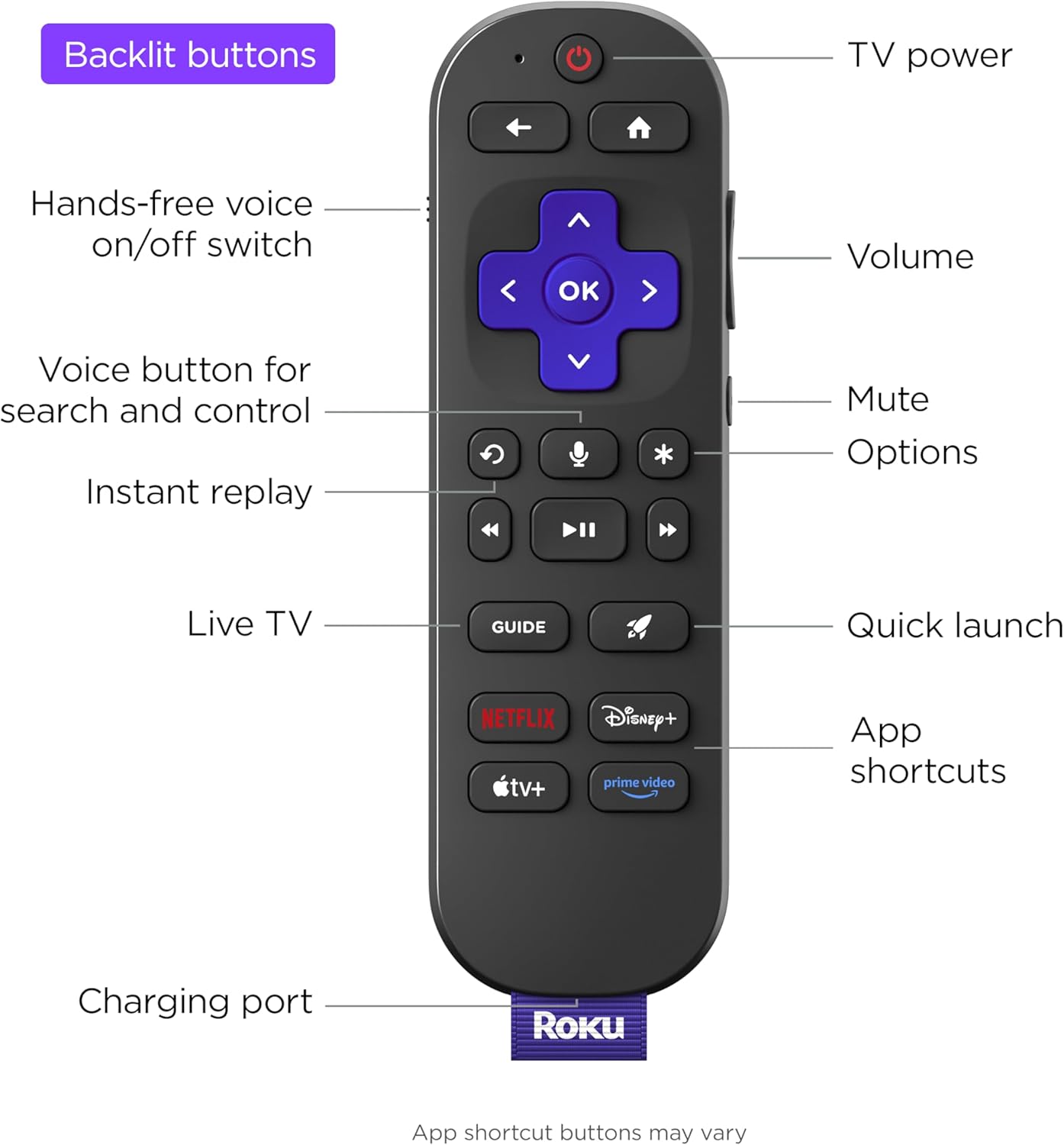
The included Roku Voice Remote Pro features backlit buttons for easy use in low light, a hands-free voice on/off switch, and dedicated app shortcuts for popular streaming services like Netflix, Disney+, Apple TV+, and Prime Video. It is rechargeable via USB-C.
Image: Roku Voice Remote Pro features.
Roku OS Navigation
The Roku OS provides a user-friendly interface for accessing all your entertainment. Navigate through the Home screen to find Live TV, search for content, explore featured free options, browse sports, and visit the Streaming Store to download new apps.
Image: Roku TV Home Screen.
Picture and Audio Features
Experience stunning visuals with 4K QLED technology, Dolby Vision IQ for exceptional clarity, and thousands of mini-LEDs for precise local dimming. The TV's Smart Picture Max, powered by AI, automatically refines color and sharpness for all content. Enjoy immersive audio with the TV's built-in sound system.
Image: Bright and clear picture quality.
Image: Immersive sound experience.
Smart Features and Gaming
The Roku TV adapts to your viewing with settings that set themselves, automatically adjusting to enhance your entertainment. Transform your TV into a digital gallery with Backdrops. For gamers, the 120Hz refresh rate ensures blistering speed and smooth action. The TV also integrates seamlessly with Roku Smart Home, Apple AirPlay, Apple Home, Alexa, and Google Home devices.
Image: Automatic picture settings adjustment.
Image: Roku TV Backdrops feature.
Image: Smart home integration.
Roku TV OS Overview
Vídeo: Un overview of the Roku TV operating system, demonstrating its user interface and various features.
Manteniment
Neteja de la pantalla: Netegeu suaument la pantalla amb un drap suau i sense borrissol. Per a marques difícils, netegeu lleugerament.ampNetegeu el drap amb aigua o un netejador específic per a pantalles. Eviteu productes químics agressius.
Neteja de l'armari: Use a soft, dry cloth to wipe dust from the TV's cabinet.
Actualitzacions de programari: The TV will automatically check for and install software updates when connected to the internet. Ensure your TV remains connected to receive the latest features and improvements.
Resolució de problemes
Sense energia: Assegureu-vos que el cable d'alimentació estigui connectat correctament tant al televisor com a una presa de corrent que funcioni. Proveu una altra presa de corrent.
Sense imatge/so: Verifiqueu que s'ha seleccionat la font d'entrada correcta. Comproveu si totes les connexions dels cables (HDMI, etc.) estan soltes o danyats.
El comandament a distància no respon: Ensure the remote is charged. If issues persist, try re-pairing the remote with the TV (refer to the Quick Start Guide for specific steps).
Problemes de connexió de xarxa: Restart your Wi-Fi router and the TV. Check your network settings on the TV to ensure the correct network is selected and the password is entered correctly.
Problemes de qualitat d'imatge: Adjust picture settings (brightness, contrast, color) in the TV menu. Ensure your content source is high quality (e.g., 4K content for 4K display).
Especificacions
Marca
Roku
Número de model
65R8B5
Mida de la pantalla
65 polzades
Tecnologia de visualització
QLED
Resolució
4K
Freqüència d'actualització
120 Hz
Dimensions del producte
1.91 "P x 57.21" W x 36" H
Pes de l'article
85.1 lliures
Tecnologia de connectivitat
Bluetooth, Wi-Fi, USB-C, Ethernet, HDMI
Característiques especials
Game Mode, Bezel-Less Design, Local Dimming, Ambient Light Sensor, Dolby Vision
Garantia i Suport
This product comes with a standard manufacturer's warranty. For detailed warranty information, product support, or to contact customer service, please visit the official Roku support weblloc web o consulteu la targeta de garantia inclosa a l'embalatge del producte.
Garantia limitada de Roku per a televisors: comprador original Aquest document descriu els termes i condicions de la garantia limitada per als televisors de la marca Roku proporcionats al comprador original. Detalla la cobertura, la durada, els procediments de servei, les exclusions i les limitacions legals que regeixen la legislació de Califòrnia.
Guia d'inici ràpid de Roku Ultra: configuració, funcions i assistència Comença ràpidament a utilitzar el teu reproductor de streaming Roku Ultra. Aquesta guia cobreix les funcions del comandament a distància, les ordres de veu, les instruccions de configuració, les preguntes freqüents i la informació de càrrega per a una experiència de streaming sense problemes.
Guia d'inici ràpid del televisor 4K de la sèrie Roku Select Comença ràpidament amb el teu televisor Roku Select Series 4K. Aquesta guia proporciona instruccions de configuració, què inclou, què necessites i detalls de connexió per al teu nou televisor.
Com configurar el reproductor de streaming Roku Ultra Una guia completa per configurar els reproductors de streaming Roku Ultra i Roku Ultra LT, que inclou la connexió de xarxa, les actualitzacions de programari, la configuració de la pantalla, la configuració remota i l'activació del compte.
Guia d'inici ràpid de la Roku Streambar: configuració i funcions Comença a utilitzar la teva Roku Streambar. Aquesta guia proporciona instruccions de configuració, explica funcions com ara HDMI-CEC i ARC, i ofereix consells per a la configuració del so i l'emparellament per Bluetooth.