1. Introducció
This manual provides detailed instructions for the installation, setup, and operation of your XTRONS IA72DLRLS Android 12 Car Stereo Multimedia Player. Please read this manual thoroughly before using the product to ensure proper functionality and to prevent damage. This unit is specifically designed for the Land Rover Freelander 2.
2. Informació de seguretat
- Instal·lació professional recomanada: A causa de la complexitat dels sistemes elèctrics dels cotxes, es recomana la instal·lació professional.
- Desconnecta la bateria: Always disconnect the vehicle's negative battery terminal before beginning any installation or wiring work to prevent electrical shorts and damage.
- Cablejat: Assegureu-vos que totes les connexions del cablejat estiguin ben fixades i degudament aïllades per evitar curtcircuits.
- Seguretat de conducció: No feu servir la unitat de manera que us distregui de la conducció. Prioritzeu sempre la seguretat viària.
- Temperatura: Eviteu exposar la unitat a temperatures extremes o a la llum solar directa durant períodes prolongats.
3. Contingut del paquet
Carefully unpack the box and verify that all items listed below are present and undamaged. If any items are missing or damaged, contact your retailer immediately.
- XTRONS IA72DLRLS Head Unit
- Tauler de control extern
- Arnès de cablejat d'alimentació
- Cables RCA
- Cables USB
- Antena GPS
- Antena 4G LTE
- Micròfon extern
- Manual d'usuari

4. Producte acabatview
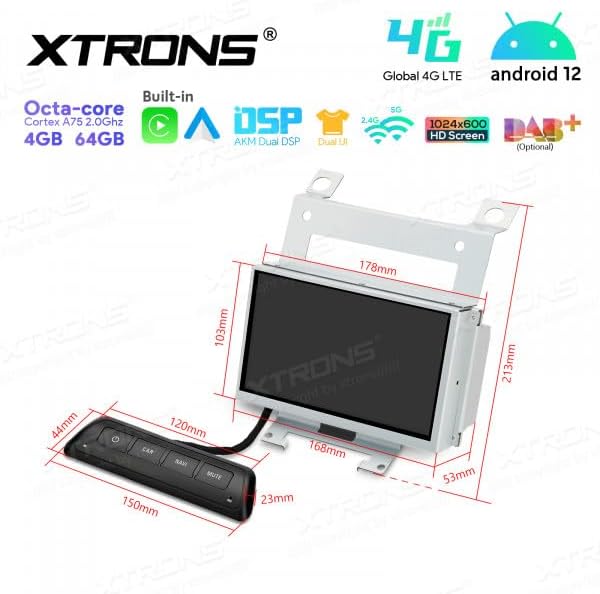
The XTRONS IA72DLRLS is an advanced Android 12 car stereo multimedia player designed to enhance your driving experience. It features a powerful Octa-core Cortex A75 2.0GHz processor, 4GB RAM, and 64GB ROM for smooth performance. The unit boasts a 1024x600 HD screen, built-in DSP for superior audio, and supports Global 4G LTE connectivity. Integrated CarPlay and Android Auto provide seamless smartphone integration.

5. Instal·lació
This section provides general guidelines for installing the XTRONS IA72DLRLS unit. For specific vehicle disassembly instructions, consult your Land Rover Freelander 2 service manual or a qualified installer.
5.1. Notes de compatibilitat
Before installation, it is crucial to verify compatibility with your vehicle's existing setup:
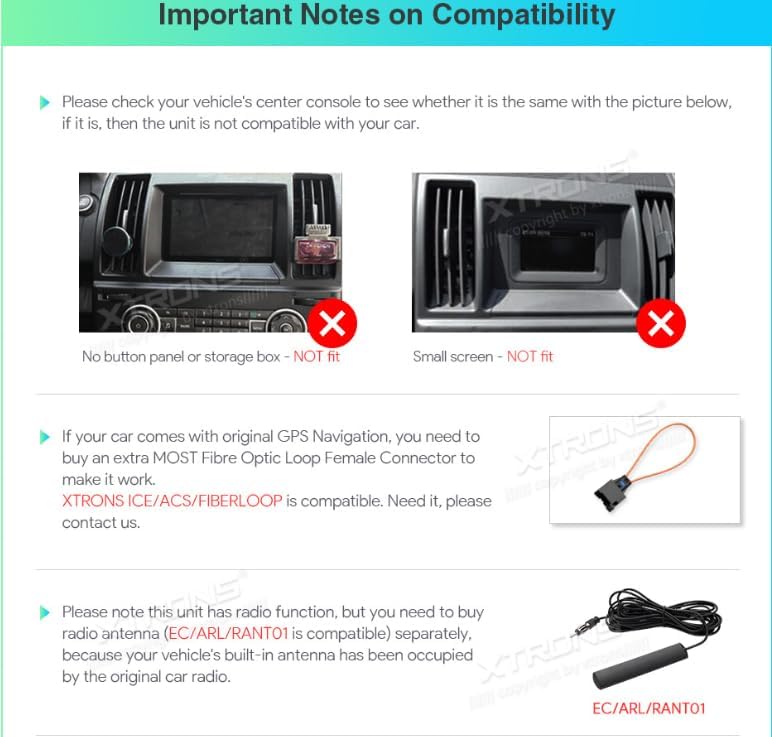
- Center Console Configuration: This unit is not compatible with Land Rover Freelander 2 models that have a button panel or storage box in the center console, or those with a small factory screen. Refer to Figure 5.1 for visual examples.
- Original GPS Navigation: If your vehicle is equipped with original GPS navigation, an additional MOST Fibre Optic Loop Female Connector (XTRONS ICE/ACS/FIBERLOOP compatible) may be required to ensure proper functionality.
- Funció de ràdio: If your vehicle's original antenna is already occupied, you may need to purchase a separate radio antenna (model EC/ARL/RANT01) to enable the radio function on the XTRONS unit.
5.2. Passos generals d'instal·lació
- Preparar el vehicle: Desconnecteu el terminal negatiu de la bateria del cotxe.
- Remove Factory Unit: Carefully remove the existing factory car stereo and trim panels.
- Connecteu el cablejat: Connect the XTRONS wiring harnesses to the vehicle's wiring. Ensure all connections are secure. Connect the GPS antenna, 4G LTE antenna, and external microphone.
- Mount Unit: Securely mount the XTRONS IA72DLRLS head unit into the dashboard opening.
- Torneu a connectar la bateria: Torneu a connectar el terminal negatiu de la bateria del cotxe.
- Funcionalitat de prova: Turn on the vehicle and test all functions of the new unit before reassembling the dashboard trim.
6. Configuració
Després d'una instal·lació correcta, seguiu aquests passos per a la configuració inicial:
- Engegada inicial: The unit will power on and display the XTRONS logo, then proceed to the Android home screen.
- Llengua i temps: Navigate to 'Settings' to set your preferred language, time zone, and date.
- Connexió de xarxa: Connect to a Wi-Fi network or insert a 4G SIM card (if applicable) to enable internet access for app downloads and online services.
- Compte de Google: Log in with your Google account to access the Google Play Store and synchronize data.
- Calibratge GPS: Ensure the GPS antenna is properly positioned for optimal signal reception. The system will automatically calibrate the GPS.
- CarPlay/Android Auto: Connect your smartphone via USB or wirelessly (if supported) to activate CarPlay or Android Auto. Follow the on-screen prompts.
7. Instruccions de funcionament
The XTRONS IA72DLRLS operates like a standard Android tablet, with additional car-specific functionalities. Use the touchscreen interface and the external control panel for navigation.
7.1. Home Screen and Navigation
The home screen provides quick access to frequently used applications. Swipe left or right to access additional app pages. Use the 'Navi' icon to launch your preferred navigation application.
7.2. Ràdio
Tap the 'Radio' icon to access the FM/AM tuner. You can scan for stations, save presets, and switch between bands. If a DAB+ module is installed (optional), you can access digital radio stations.
7.3. Reproducció multimèdia
La unitat admet diverses fonts multimèdia:
- USB: Connect USB drives to play audio and video files.
- Música Bluetooth: Stream music from your smartphone via Bluetooth.
- Transmissió en línia: Download streaming apps from the Google Play Store (e.g., Spotify, YouTube).
7.4. Telèfon Bluetooth
Pair your smartphone via Bluetooth to make and receive hands-free calls. Access your phonebook and call history directly from the unit.
7.5. CarPlay / Android Auto
Once connected, CarPlay or Android Auto will mirror essential smartphone apps (Navigation, Music, Messages, Phone) onto the unit's screen, optimized for driving. Use voice commands for safe operation.
7.6. Configuració
Access the 'Settings' menu to customize various aspects of the unit, including display, sound (DSP settings), network, connected devices, and system information.
8. Manteniment
- Neteja: Feu servir un drap suau i sec per netejar la pantalla i la unitat. Eviteu productes de neteja o dissolvents abrasius.
- Actualitzacions de programari: Periodically check for system software updates via the 'Settings' menu to ensure optimal performance and access to new features.
- Còpia de seguretat de dades: Regularly back up important data if stored on the unit.
9. Solució De Problemes
If you encounter issues with your XTRONS IA72DLRLS unit, refer to the following common problems and solutions:
| Problema | Causa possible | Solució |
|---|---|---|
| La unitat no s'encén | Connexió d'alimentació fluixa, fusible cremat, problema amb la bateria del vehicle | Check power wiring, inspect fuses, verify vehicle battery voltage. |
| Sense so | Volum massa baix, font d'àudio incorrecta, cables d'altaveu solts, ampqüestió de lifier | Increase volume, select correct audio source, check speaker connections, verify amppotència de lificació. |
| Senyal GPS feble o perdut | GPS antenna obstructed or improperly placed, faulty antenna | Ensure clear line of sight for GPS antenna, reposition if necessary, check antenna connection. |
| La pantalla tàctil no respon | System freeze, software glitch | Restart the unit (if possible), perform a factory reset (data will be lost). |
| Problemes de connexió Bluetooth | Device not in pairing mode, interference, incorrect pairing process | Ensure both devices are in pairing mode, delete previous pairings and re-pair, move closer to the unit. |
Si el problema persisteix després d'intentar aquestes solucions, poseu-vos en contacte amb el servei d'atenció al client de XTRONS per obtenir més ajuda.
10. Especificacions
| Característica | Especificació |
|---|---|
| Marca | XTRONS |
| Model | IA72DLRLS |
| Sistema operatiu | Android 12 |
| Processador | Octa-core Cortex A75 2.0GHz |
| RAM | 4 GB |
| ROM (emmagatzematge intern) | 64 GB |
| Mostra | LCD, 1024x600 HD |
| Connectivitat | USB, 4G LTE, Wi-Fi, Bluetooth |
| Característiques especials | CarPlay, Android Auto, Built-in DSP, GPS |
| Dispositius compatibles | Smartphone |
| Tipus de muntatge | In-dash |
| Mode de sortida d'àudio | Digital or Stereo |
| Interfície d'entrada | Pantalla tàctil |
11. Garantia i Suport
XTRONS products are covered by a manufacturer's warranty. For specific warranty terms and conditions, please refer to the warranty card included with your product or visit the official XTRONS website. For technical support, troubleshooting assistance, or inquiries regarding parts and accessories, please contact XTRONS customer service through their official channels.