
1. Introducció
The CG MOBILE Guess Bluetooth Wireless Earbuds combine sophisticated design with advanced audio technology, reflecting the iconic Guess brand DNA. Experience superior sound quality with clear, powerful audio, deep bass, and crisp highs. Equipped with Bluetooth 5.3, they offer universal compatibility with iOS and Android devices for a stable and seamless connection. Enjoy up to 6 hours of listening time, with the charging case providing additional power and fully recharging in just 2 hours.
2. Informació de seguretat
- No exposeu els auriculars ni l'estoig de càrrega a temperatures extremes, humitat o líquids.
- Eviteu deixar caure o aplicar una força excessiva al dispositiu.
- Do not attempt to disassemble or modify the earbuds or charging case. This may void the warranty and cause damage.
- Mantenir fora de l'abast dels nens i mascotes.
- Feu servir només el cable de càrrega proporcionat o un equivalent certificat.
- Escoltar durant molt de temps a nivells de volum alts pot causar danys auditius. Ajusteu el volum a un nivell segur.
3. Contingut del paquet
Si us plau, comproveu el paquet per veure si hi ha els elements següents:
- CG MOBILE Guess Bluetooth Wireless Earbuds (Left and Right)
- Estoig de càrrega
- Cable de càrrega
- Manual d'usuari (aquest document)
4. Producte acabatview
Familiarize yourself with the components of your CG MOBILE Guess Bluetooth Wireless Earbuds.

Figura 4.1: Earbuds in open charging case. This image displays the left and right earbuds nestled within their charging case, which is open. The Guess logo is visible on each earbud, along with the charging contacts. The interior of the case also shows model information.
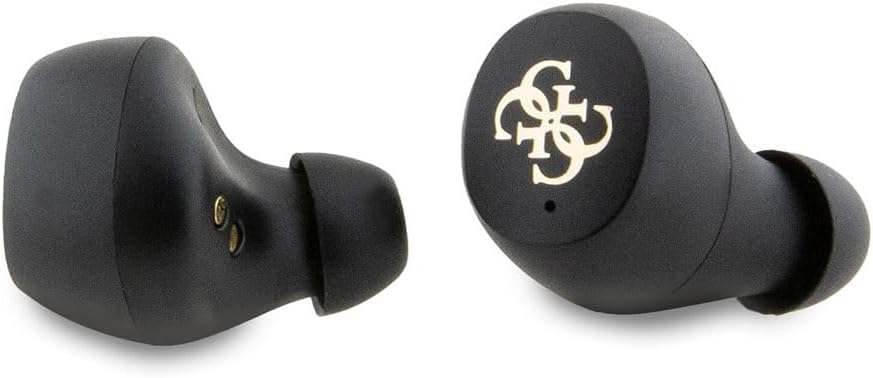
Figura 4.2: Individual earbuds. This close-up image highlights the design of the individual left and right earbuds, showcasing their ergonomic shape and the Guess logo on the outer surface.
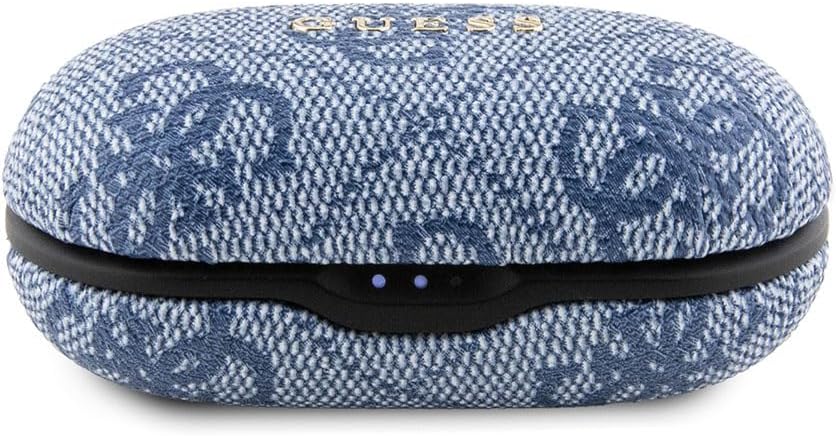
Figura 4.3: Closed charging case. This image shows the charging case in its closed state, featuring its distinctive textured exterior and the front-facing LED indicators that display charging status.
5. Configuració
5.1 Càrrega dels auriculars i l'estoig
- Càrrec inicial: Abans del primer ús, carregueu completament els auriculars i l'estoig de càrrega.
- Connectar: Plug the provided charging cable into the charging port on the case and connect the other end to a USB power source (e.g., computer, wall adapter).
- Indicadors de càrrega: The LED indicators on the charging case will illuminate to show the charging status. A full charge for the case takes approximately 2 hours.
- Càrrega dels auriculars: Place the earbuds into the charging case. They will automatically begin charging. The case holds multiple charges for the earbuds, providing up to 6 hours of listening time per earbud charge.
5.2 Emparellament amb un dispositiu Bluetooth
- Encès: Obre l'estoig de càrrega. Els auriculars s'encendran automàticament i entraran en mode d'emparellament.
- Activa el Bluetooth: Al dispositiu (telèfon intel·ligent, tauleta, etc.), activeu el Bluetooth.
- Seleccioneu el dispositiu: In your device's Bluetooth settings, search for available devices. Select "CG MOBILE Guess Earbuds" (or similar name) from the list.
- Confirmeu la connexió: Once connected, you will hear an audible confirmation from the earbuds, and they will appear as "Connected" on your device.
- Reconnexió automàtica: After initial pairing, the earbuds will automatically connect to the last paired device when removed from the case, provided Bluetooth is enabled on the device.
6. Instruccions de funcionament
The CG MOBILE Guess Earbuds feature touch controls for easy management of music and calls.
6.1 Control de música
- Reproduir/pausa: Toqueu una vegada a qualsevol dels auriculars.
- Pista següent: Fes doble toc a l'auricular dret.
- Pista anterior: Fes doble toc a l'auricular esquerre.
- Pujar el volum: Toca tres vegades l'auricular dret.
- Baixar el volum: Toca tres vegades l'auricular esquerre.
6.2 Control de trucades
- Respondre/Finalitzar la trucada: Toqueu una vegada a qualsevol dels auriculars.
- Rebutja la trucada: Manteniu premut qualsevol dels auriculars durant 2 segons.
6.3 Assistent de veu
- Activa l'Assistent de veu: Prem i mantén premut qualsevol dels auriculars durant 3 segons (per exemple, Siri, Google Assistant).
7. Manteniment
- Neteja: Feu servir un drap suau, sec i sense borrissol per netejar els auriculars i l'estoig de càrrega. No utilitzeu productes de neteja abrasius ni dissolvents.
- Emmagatzematge: Quan no els utilitzeu, guardeu els auriculars a la seva funda de càrrega per protegir-los de la pols i els danys. Guardeu-los en un lloc fresc i sec.
- Resistència a l'aigua: The earbuds are rated as "Waterproof" (Étanche). However, this typically refers to resistance against splashes and sweat, not full submersion. Avoid prolonged exposure to water.
8. Solució De Problemes
| Problema | Solució |
|---|---|
| Els auriculars no s'aparellen |
|
| Sense so ni volum baix |
|
| Els auriculars no es carreguen |
|
| Connexió intermitent |
|
9. Especificacions
| Número de model | GUTWSP4EGB |
| Marca | CG MÒBIL |
| Tecnologia sense fils | Bluetooth 5.3 |
| Earbud Type | True Wireless, In-ear |
| Tipus de control | Control tàctil |
| Composició de la bateria | Ió de liti |
| Temps de càrrega (cas) | Aproximadament 2 hores |
| Durada de la bateria (auriculars) | Fins a 6 hores |
| Pes | 80 grams |
| Material | Plàstic |
| Nivell de resistència a l'aigua | Impermeable (Étanche) |
| Característiques especials | Cancel·lació de soroll |
| Resposta de freqüència | 20000 Hz |
| Impedància | 16 ohms |
10. Informació de la garantia
CG MOBILE products are manufactured to the highest quality standards. This product is covered by a limited warranty against manufacturing defects from the date of purchase. Please retain your proof of purchase for warranty claims. For specific warranty terms and conditions, refer to the warranty card included in your product packaging or contact CG MOBILE customer support.
11. Atenció al client
If you encounter any issues or have questions regarding your CG MOBILE Guess Bluetooth Wireless Earbuds, please contact our customer support team. Contact information can typically be found on the product packaging or on the official CG MOBILE weblloc.