1. Introducció
This manual provides detailed instructions for the Formuler Z11 Pro Android 11 4K Streaming Media Player. Please read this manual thoroughly before using your device to ensure proper operation and to maximize your user experience. Keep this manual for future reference.
The Formuler Z11 Pro is a high-performance streaming media player designed to deliver 4K resolution content. It operates on Android 11 and comes equipped with 2GB RAM and 16GB ROM. The package includes a Universal Bluetooth Voice Remote Control (BT1 Edition), a protective case cover for the remote, an extra air remote keyboard with backlighting, and an extra magnetic mount.

Image 1.1: Formuler Z11 Pro and included accessories.
2. Contingut del paquet
Verifiqueu que tots els elements siguin presents al vostre paquet:
- Formuler Z11 Pro BT1 Edition Streaming Device
- Cable HDMI
- Cable d'alimentació
- Bluetooth Voice Remote Control (BT1 Edition)
- Case Cover for Bluetooth Remote Control
- Extra Air Remote Keyboard (Backlit)
- Extra Magnetic Mount
- 2 AA batteries (for BT1 Remote Control)

Image 2.1: Formuler Z11 Pro device and BT1 remote control.
3. Guia de configuració
3.1 Connexió del dispositiu
- Connectar-se al televisor: Use the provided HDMI cable to connect the HDMI port on the Formuler Z11 Pro to an available HDMI input on your television.
- Connectar l'alimentació: Plug the power adapter into the DC IN port on the Formuler Z11 Pro, then plug the adapter into a wall outlet. The device will power on automatically.
- Connexió de xarxa (opcional):
- Ethernet: For a wired connection, connect an Ethernet cable from your router to the Gigabit LAN port on the Formuler Z11 Pro.
- Wi-Fi: For a wireless connection, you will configure Wi-Fi during the initial setup process.
3.2 Configuració del control remot
The Formuler Z11 Pro comes with two remote controls: the Bluetooth Voice Remote Control (BT1 Edition) and an extra Air Remote Keyboard.
3.2.1 Bluetooth Voice Remote Control (BT1 Edition)
- Insereix les piles: Open the battery compartment on the back of the BT1 remote and insert the two AA batteries provided, ensuring correct polarity.
- Maridatge: The BT1 remote should automatically pair with the Z11 Pro upon first boot. If not, navigate to Configuració > Comandaments a distància i accessoris > Afegeix accessori on the Z11 Pro and follow the on-screen instructions to pair the remote.
- Remote Case Cover: Slide the protective case cover onto the BT1 remote for added protection.

Image 3.1: BT1 Remote Control with protective case cover.
3.2.2 Extra Air Remote Keyboard
- Insert USB Dongle: Locate the small USB dongle included with the air remote keyboard. Insert this dongle into an available USB port on the Formuler Z11 Pro.
- Connexió automàtica: The air remote keyboard should connect automatically once the dongle is inserted.

Image 3.2: Extra Air Remote Keyboard with USB dongle.
3.3 Configuració inicial del programari
Upon first boot, the Formuler Z11 Pro will guide you through an initial setup wizard. Follow the on-screen prompts to:
- Seleccioneu el vostre idioma.
- Connecteu-vos a una xarxa Wi-Fi (si no feu servir Ethernet).
- Sign in with your Google Account (recommended for app access).
- Accepteu els termes i condicions.
- Install essential updates.
4. Instruccions de funcionament
4.1 Using the BT1 Voice Remote Control
The BT1 remote is your primary interface for the Formuler Z11 Pro. It features universal TV control, voice search, and programmable buttons.
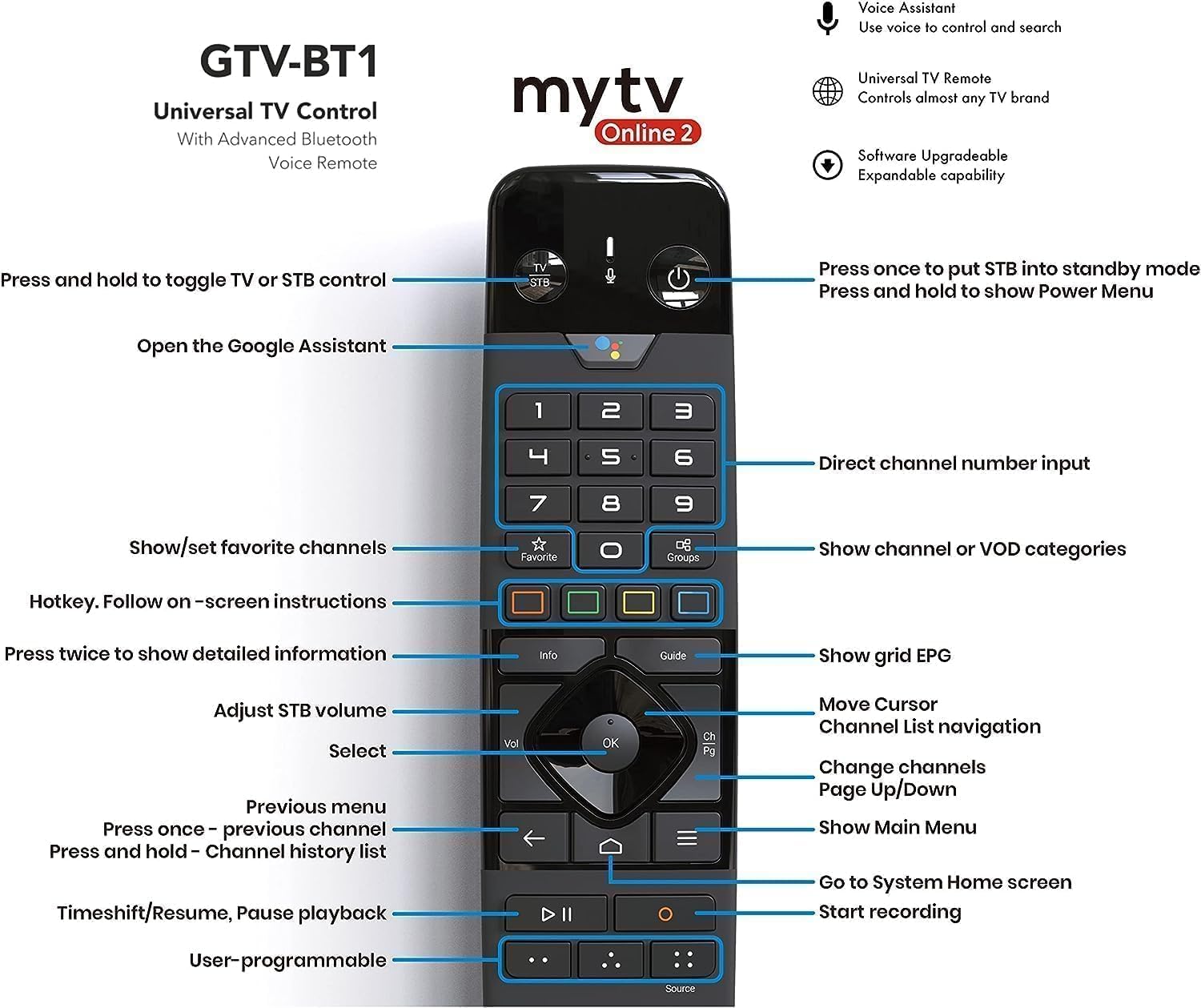
Image 4.1: BT1 Remote Control Button Layout and Functions.
- Botó d'encesa: Press once to put the device into standby mode. Press and hold to show the Power Menu.
- TV/STB Toggle: Press and hold to switch control between TV and Set-Top Box.
- Botó de l'Assistent de Google: Open Google Assistant for voice commands and search.
- Teclat de navegació (Amunt/Avall/Esquerra/Dreta/D'acord): Navega pels menús i selecciona elements.
- Volume (Vol): Adjust STB volume.
- Channel (CH): Change channels, navigate channel lists.
- Back (Arrow Left): Tornar al menú anterior.
- Inici (icona de casa): Go to the System Home screen.
- Menu (Three Lines): Show Main Menu.
- Informació: Press twice for detailed information.
- Guia: Show grid EPG (Electronic Program Guide).
- Preferit: Show/set favorite channels.
- Grups: Show channel or VOD categories.
- Bloc numèric: Direct channel number input.
- Playback Controls (Play/Pause, Rewind, Fast Forward): Controla la reproducció multimèdia.
- Registre (punt vermell): Comença a gravar.
- Font: Canvia la font d'entrada.
- User-programmable Buttons: Customize these buttons for quick access to functions or apps.
4.2 Using the Extra Air Remote Keyboard
The backlit air remote keyboard is ideal for text input, such as searching for content or entering login details. It also functions as a mouse with its air mouse feature.
- Keyboard Side: Use for typing text. The backlight activates automatically in low light conditions.
- Remote Side: Provides basic navigation and media control buttons.
- Ratolí d'aire: Move the remote in the air to control a cursor on the screen. Press the dedicated mouse button to activate/deactivate the air mouse function.
4.3 Navigating Android 11 Interface
The Formuler Z11 Pro runs on Android 11, offering a user-friendly interface. You can:
- Instal·leu aplicacions: Baixeu i instal·leu aplicacions des de Google Play Store.
- Personalitza la pantalla d'inici: Arrange apps and widgets for quick access.
- Configuració d'accés: Adjust display, sound, network, and device preferences.
5. Manteniment
5.1 Neteja del dispositiu
- Assegureu-vos que el dispositiu estigui apagat i desconnectat abans de netejar-lo.
- Use a soft, dry, lint-free cloth to wipe the exterior of the device and remotes.
- No utilitzeu netejadors líquids, aerosols ni materials abrasius.
5.2 Actualitzacions de programari
Regular software updates are released to improve performance, add features, and enhance security. It is recommended to keep your device's software up to date.
- Navega a Configuració > Quant a > Actualització del sistema on your Formuler Z11 Pro.
- Comproveu si hi ha actualitzacions disponibles i seguiu les instruccions que apareixen a la pantalla per instal·lar-les.
- Ensure a stable internet connection during updates. Do not power off the device during an update.
5.3 Gestió d'emmagatzematge
The device has 16GB of internal storage. To maintain optimal performance:
- Regularly uninstall unused applications.
- Esborra les dades de la memòria cau de les aplicacions a Configuració > Aplicacions.
- Consider using external storage (Micro SD card or USB drive) for large media files.
6. Solució De Problemes
If you encounter issues with your Formuler Z11 Pro, refer to the following common problems and solutions:
6.1 Sense alimentació / El dispositiu no s'encén
- Ensure the power cable is securely connected to the device and the wall outlet.
- Verifiqueu que la presa de corrent de la paret funciona connectant-hi un altre dispositiu.
- Proveu una presa de corrent diferent.
6.2 Sense senyal / Pantalla en blanc
- Check that the HDMI cable is securely connected to both the Formuler Z11 Pro and your TV.
- Assegureu-vos que el televisor estigui configurat a la font d'entrada HDMI correcta.
- Prova un altre cable HDMI o port HDMI al televisor.
- Restart the Formuler Z11 Pro by unplugging and re-plugging the power cable.
6.3 El comandament a distància no respon
- BT1 Remote:
- Substituïu les piles AA.
- Re-pair the remote: Go to Settings > Remotes & Accessories i seguiu les instruccions d'aparellament.
- Air Remote Keyboard:
- Ensure the USB dongle is securely inserted into a USB port on the Z11 Pro.
- Try inserting the dongle into a different USB port.
- Check the batteries in the air remote keyboard.
6.4 Problemes de connexió de xarxa
- Wi-Fi:
- Assegureu-vos que el vostre encaminador Wi-Fi estigui activat i funcioni.
- Vés a Configuració > Xarxa i Internet > Wi-Fi and ensure Wi-Fi is enabled and you are connected to the correct network.
- Prova d'oblidar-te de la xarxa i tornar-te a connectar.
- Restart your router and the Formuler Z11 Pro.
- Ethernet:
- Ensure the Ethernet cable is securely connected to both the device and the router.
- Comproveu el cable per si hi ha danys.
- Prova un cable o port Ethernet diferent al teu encaminador.
6.5 Device Performance Issues
- Tanca les aplicacions que no s'utilitzen i que s'executen en segon pla.
- Esborrar les memòries cau de les aplicacions (Configuració > Aplicacions > [Nom de l'aplicació] > Esborra la memòria cau).
- Assegureu-vos que el programari del dispositiu estigui actualitzat.
- Si els problemes persisteixen, considereu un restabliment de fàbrica (Configuració > Sistema > Opcions de restabliment > Esborra totes les dades (restabliment de fàbrica)). Avís: This will delete all data and settings on the device.
7. Especificacions
Key technical specifications for the Formuler Z11 Pro:
| Característica | Especificació |
|---|---|
| Resolució de sortida | 4K (3840 x 2160) |
| RAM | 2GB DDR @2400MHz |
| Emmagatzematge | eMMC de 16 GB |
| Sistema operatiu | Android 11 |
| Xarxes sense fils | Dual-Band 2x2 AC Wireless |
| Bluetooth | 5.0 |
| Ethernet | 1000 M (Gigabit) |
| Ports | 1x USB 3.0, 1x USB 2.0, 1x HDMI, 1x Gigabit LAN, 1x Micro SD Card, 1x IR Extension, 1x Power Input |
| Dimensions (L/W/T) | 105mm / 105mm / 21mm |
| Color | Negre |
| Pes de l'article | 1.72 lliures |
8. Informació de la garantia
Formuler products typically come with a limited manufacturer's warranty. The specific terms and duration of the warranty may vary by region and retailer. Please refer to the warranty card included with your product or visit the official Formuler weblloc web per obtenir informació detallada sobre la garantia i els procediments de registre.
Conserva el comprovant de compra (rebut o factura), ja que serà necessari per a qualsevol reclamació de garantia.
9. Atenció al client
For further assistance, technical support, or inquiries not covered in this manual, please contact Formuler customer support through their official website. You may find FAQs, troubleshooting guides, and contact information for support channels there.
Before contacting support, please have your device model (Z11 Pro) and serial number ready.


