Introducció
This instruction manual provides comprehensive guidance for the setup, operation, and maintenance of the SYNLETT QF29 Wireless Motion Sensor. This device is designed as an accessory for fall prevention and elderly monitoring, specifically intended to be paired with SYNLETT M091B or SP30 Pagers. It functions by detecting movement and sending a signal to the paired pager, alerting caregivers to activity.
Producte acabatview
The SYNLETT QF29 Wireless Motion Sensor is a compact and versatile device for remote monitoring. It is designed to enhance caregiver freedom by providing silent alerts when movement is detected in a monitored area, such as by a bed or doorway. The sensor features a rotatable bracket for flexible installation and operates wirelessly, transmitting signals to a compatible SYNLETT pager.
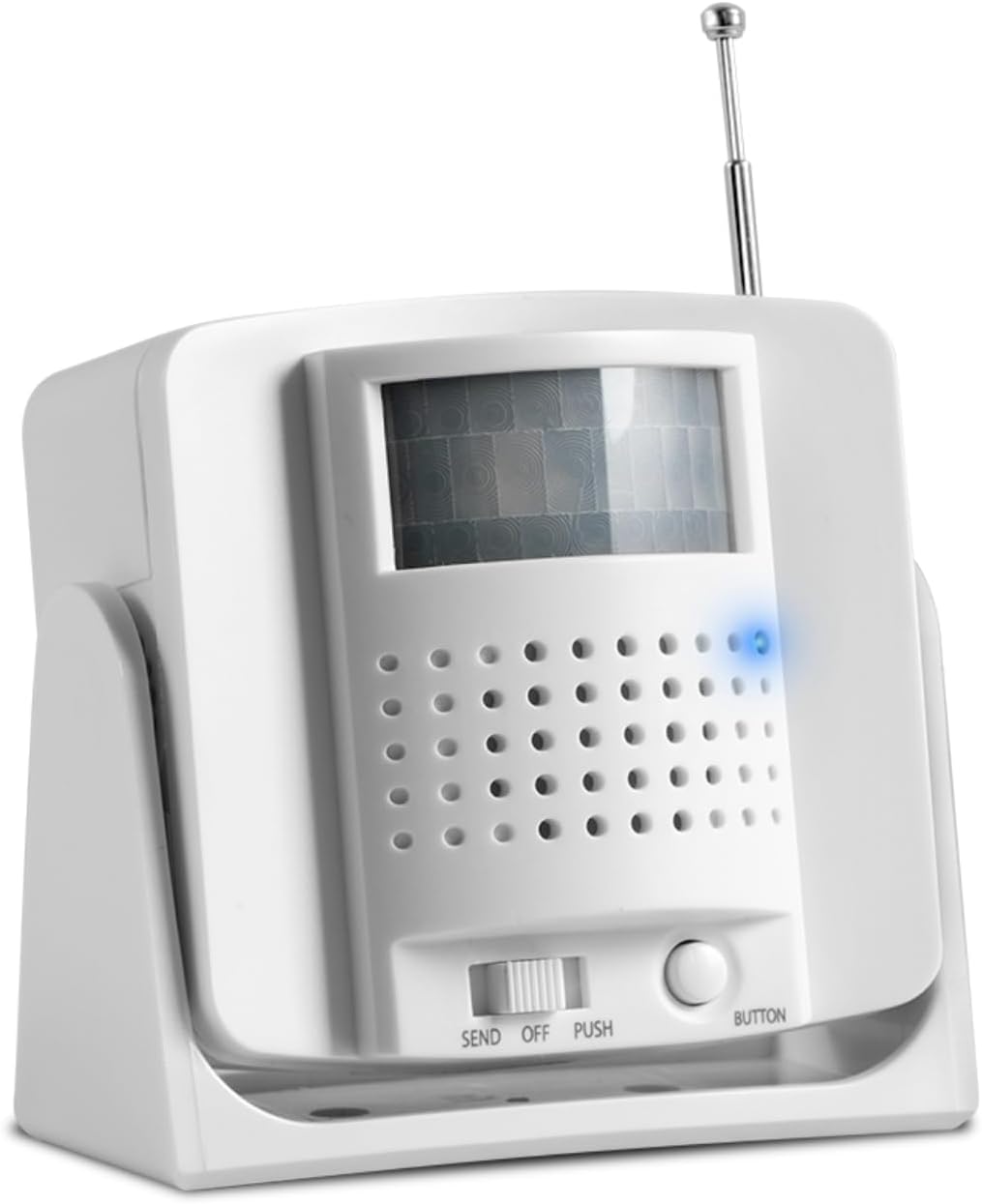
Figura 1: Frontal view of the SYNLETT QF29 Wireless Motion Sensor, showing the motion detection window and control buttons.
Les característiques clau inclouen:
- Funcionament sense fil: Transmits signals to compatible SYNLETT pagers (M091B or SP30).
- Col·locació flexible: Can be wall-mounted with screws, attached with adhesive tape, or placed on a flat surface.
- Sensibilitat ajustable: Allows for fine-tuning of motion detection.
- De llarg abast: Operates up to 300 feet in open areas, providing caregivers with freedom of movement.
- Funciona amb bateria: Uses 3 AA batteries (included).
Informació de seguretat
Please read and understand all safety instructions before using the SYNLETT QF29 Wireless Motion Sensor. Failure to follow these instructions may result in injury or damage to the device.
- No exposeu el dispositiu a l'aigua ni a una humitat excessiva.
- No intenteu obrir ni reparar el dispositiu. Encarregueu totes les tasques de manteniment a personal qualificat.
- Use only the specified battery type (3 AA Alkaline batteries).
- Eliminar les bateries usades d'acord amb la normativa local.
- Mantingueu el dispositiu fora de l'abast dels nens i les mascotes.
- Ensure the device is placed in a stable location to prevent accidental falls.
- Environmental factors such as concrete or brick walls and heavy electronic equipment may affect the signal range.
Contingut del paquet
Verifiqueu que tots els elements que s'enumeren a continuació siguin presents al vostre paquet:
- 1 x SYNLETT QF29 Wireless Motion Sensor
- 3 piles alcalines AA (preinstal·lades o incloses per separat)
- 2 x Screws for wall mounting
- 2 x Anchors for wall mounting
- 2 x Adhesive Tapes for surface attachment
- 1 x Manual d'usuari (aquest document)

Figure 2: Contents of the SYNLETT QF29 Wireless Motion Sensor package, including the sensor, batteries, screws, anchors, and adhesive tape.
Configuració
Follow these steps to set up your SYNLETT QF29 Wireless Motion Sensor:
- Instal·lació de la bateria:
Locate the battery compartment on the back of the motion sensor. Insert 3 AA Alkaline batteries, ensuring correct polarity (+/-). The batteries are typically included.
- Opcions de muntatge:
The QF29 sensor offers flexible mounting options:
- Muntatge a la paret (cargols): Use the provided screws and anchors to securely mount the sensor to a wall. The rotatable bracket allows for optimal positioning.
- Cinta adhesiva: For a less permanent solution, use the included adhesive tapes to attach the sensor to a clean, dry surface.
- Col·locació de la superfície: The sensor can also be placed directly on a flat surface, such as a bedside table or shelf.

Figure 3: Diagram illustrating the various mounting options (screw mounting, adhesive patch, surface placement) and key features like the antenna and sensitivity adjustment.
- Pairing with Pager:
The SYNLETT QF29 Motion Sensor MUST be paired with a compatible SYNLETT M091B or SP30 Pager to function. It is NOT compatible with the SYNLETT wireless call system - CMU.
Refer to your M091B or SP30 Pager's instruction manual for specific pairing procedures. Generally, this involves setting the pager to a pairing mode and then activating the sensor's "SEND" function or button to transmit a pairing signal.

Figure 4: Visual representation of the SYNLETT QF29 Motion Sensor's compatibility, showing it pairs with SYNLETT M091B and SP30 pagers, but not with the CMU system.

Figure 5: Detailed compatibility chart showing the SYNLETT Caregiver Pager M091B and Companion Pager SP30 are compatible with Motion Sensor QF029 and Call Button F100.
- Positioning for Optimal Detection:
Place the motion sensor in an area where it can effectively detect movement, such as beside a bed to monitor bed exits or near a doorway. Ensure the detection field is clear of obstructions. The rotatable bracket allows for precise aiming of the sensor's field of view.

Figure 6: Illustration demonstrating the wireless range of the motion sensor and its typical placement near a bed to detect movement and alert a caregiver.
Instruccions de funcionament
Once the motion sensor is set up and paired with your pager, it operates automatically to detect movement.
- Detecció de moviment: The sensor continuously monitors its detection field. When movement is detected within this field, it sends a wireless signal to the paired SYNLETT M091B or SP30 Pager.
- Pager Alert: Upon receiving a signal, the pager will activate its alert (audible alarm, vibration, or visual indicator, depending on the pager model and settings), notifying the caregiver of activity. The motion sensor itself is silent to avoid disturbing the resident.
- "SEND" and "PUSH" Functions:
- SEND Mode: This mode is typically used for transmitting a signal upon movement detection.
- Polsador: The "BUTTON" or "PUSH" function allows for manual transmission of a signal to the pager by pressing the button on the sensor. This can be used for testing or manual alerts.
- Ajust de la sensibilitat: The motion sensor may have an adjustment for sensitivity (refer to Figure 3). This allows you to fine-tune how easily the sensor triggers, reducing false alarms or ensuring detection of subtle movements.

Figure 7: The motion sensor positioned to detect a bed exit, sending a wireless signal to the caregiver's pager, enabling timely intervention.
Manteniment
Proper maintenance ensures the longevity and reliable operation of your motion sensor.
- Substitució de la bateria: When the batteries are low, the sensor's indicator light (if present) may signal this, or the pager may stop receiving signals. Replace all 3 AA batteries with new alkaline batteries simultaneously.
- Neteja: Wipe the exterior of the sensor with a soft, dry cloth. Do not use abrasive cleaners, solvents, or immerse the device in water. Ensure the motion detection window is clean and free of dust or smudges for optimal performance.
- Emmagatzematge: Si guardeu el dispositiu durant un període prolongat, traieu-ne les piles per evitar fuites. Guardeu-lo en un lloc fresc i sec.
Resolució de problemes
If you experience issues with your SYNLETT QF29 Wireless Motion Sensor, refer to the following common problems and solutions:
| Problema | Causa possible | Solució |
|---|---|---|
| Sensor not triggering pager. |
|
|
| Falses alarmes. |
|
|
| Pager not receiving signal. |
|
|
If the problem persists after attempting these solutions, please contact SYNLETT customer support.
Especificacions
| Marca | SYNLETT |
| Número de model | QF29 |
| Color | Blanc o Gris |
| Font d'alimentació | Funciona amb bateria |
| Tipus de bateria | 3 piles alcalines AA (incloses) |
| Interval màxim | 300 Feet (in open areas) |
| Tipus de muntatge | Wall Mount, Surface Placement |
| Dispositius compatibles | SYNLETT simple caregiver pager M091B, SP30 Pager |
| Pes de l'article | 6.7 unces |
| Dimensions del producte | 3.25 x 1.78 x 3 polzades |
| Temperatura de funcionament | 6E+1 Degrees Fahrenheit (approx. 61°F) |
| UPC | 768561405275 |
Informació de la garantia
Specific warranty terms and conditions for the SYNLETT QF29 Wireless Motion Sensor are provided by the manufacturer. Please refer to the warranty card included with your product or visit the official SYNLETT weblloc web per obtenir informació detallada sobre la cobertura de la garantia, la durada i els procediments de reclamació.
Atenció al client
For technical assistance, troubleshooting, or any inquiries regarding your SYNLETT QF29 Wireless Motion Sensor, please contact SYNLETT customer support. You can find contact information on the official SYNLETT weblloc web o a través de la vostra plataforma de compra.
Visit the official SYNLETT Store for more products and information: SYNLETT Store on Amazon

