1. Producte acabatview
The LIORQUE Digital Kitchen Timer Model YGH5249 is a multi-functional device designed to assist with various timing needs. It features a large LCD display, adjustable alarm volume, and multiple placement options. This timer can function as a countdown timer, a count-up stopwatch, and a digital clock.

Imatge 1.1: Frontal view of the LIORQUE Digital Kitchen Timer, highlighting its large LCD screen and control buttons.
Característiques principals:
- Funcionalitat 3 en 1: Timer, Stopwatch, and Clock modes.
- Pantalla LCD gran: Ensures clear readability of time.
- Volum d'alarma ajustable: Three levels (Mute, Low, High) to suit different environments.
- Mode personalitzat: Save frequently used countdown times for quick access.
- Col·locació versàtil: Magnetic back, foldable stand, and lanyard hole for flexible use.
- Recordatori de retard: Automatically starts counting up after countdown finishes.
- Restauració automàtica: Remembers the last set countdown time.

Image 1.2: Visual representation of the timer's main features and functions.
2. Configuració i instal·lació de la bateria
The timer requires 2 AAA batteries (included) for operation. Follow these steps to install them:
- Locate the battery compartment cover on the back of the timer.
- Feu lliscar la coberta oberta.
- Introduïu dues piles AAA, assegurant-vos de la polaritat correcta (+ i -) tal com s'indica a l'interior del compartiment.
- Tanqueu bé la tapa del compartiment de la bateria.
El temporitzador s'encendrà automàticament un cop instal·lades les piles.
3. Instruccions de funcionament
3.1 Switching Modes (Timer/Stopwatch/Clock)
The LIORQUE timer offers three modes: Timer (countdown), Stopwatch (count-up), and Clock. To switch between Timer mode and Clock mode, press and hold the ST/SP button for 2 seconds. The timer will display the current time in Clock mode or the timer interface in Timer mode.

Image 3.1: Switching between Counting Mode and Clock Mode.
3.2 Setting Countdown Timer
- Ensure the timer is in Timer mode (displaying H:M:S).
- Utilitza el 1H, 5M, 1M, i 5S botons per configurar el temps de compte enrere desitjat. Cada pulsació afegeix l'increment de temps corresponent.
- Premeu el botó ST/SP botó per iniciar el compte enrere.
- Per aturar el compte enrere, premeu ST/SP de nou. Premeu-lo una vegada més per reprendre.
- To reset the timer to zero, press the RESET botó.
- When the countdown reaches zero, the alarm will sound for 1 minute.
3.3 Using Stopwatch (Count-Up)
- Ensure the timer is in Timer mode and reset to 00:00:00.
- Premeu el botó ST/SP botó per començar a comptar ascendentment.
- Per aturar el cronòmetre, premeu ST/SP de nou. Premeu-lo una vegada més per reprendre.
- Per posar el cronòmetre a zero, premeu la tecla RESET botó.

Image 3.2: Illustration of Count-up and Countdown modes.
3.4 Shortcut Setting
The timer allows for quick setting of common intervals:
- Premeu 1H durant 1 hora.
- Premeu 5M durant 5 minuts.
- Premeu 1M durant 1 minut.
- Premeu 5S durant 5 segons.

Imatge 3.3: Ex.amples of using shortcut buttons for quick time setting.
3.5 Mode personalitzat
The Custom Mode allows you to save a frequently used countdown time for instant recall.
- In Timer mode, set your desired countdown time using the 1H, 5M, 1M, i 5S botons.
- Manteniu premut el botó PERSONALITZAT button for 2 seconds. The timer will remember this setting.
- Each subsequent short press of the PERSONALITZAT button will automatically load the saved time.

Image 3.4: Setting and recalling a custom timer value.
3.6 Ajust del volum de l'alarma
The timer features a 3-level alarm volume adjustment (Mute, Low, High). A switch on the side of the timer allows you to select the desired volume level.

Image 3.5: Volume adjustment switch and its three settings.
3.7 Opcions de col·locació
El temporitzador LIORQUE ofereix opcions de col·locació flexibles:
- Magnètic: Attach the timer to metal surfaces like refrigerators using its strong magnetic back.
- Stand: Use the integrated foldable stand to place the timer on any flat surface, such as a countertop or desk.
- Forat del cordó: Hang the timer using a rope through the designated lanyard hole.
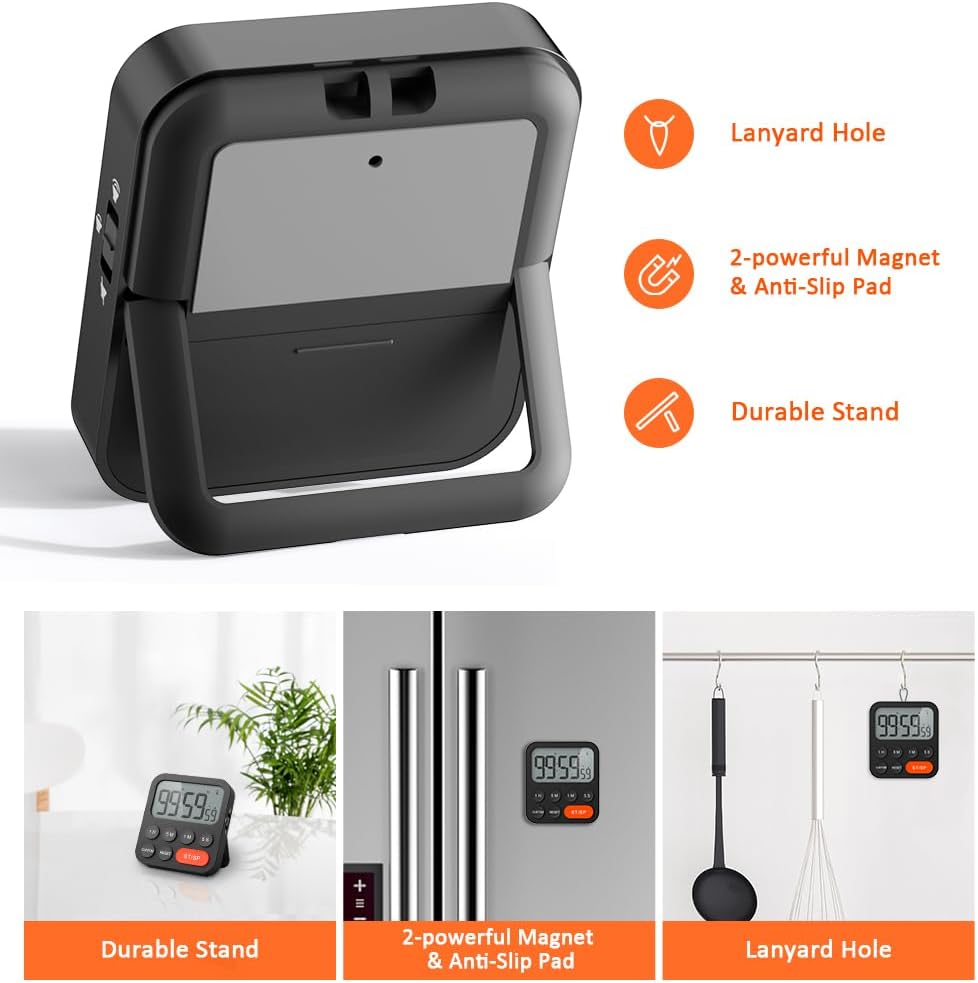
Image 3.6: Various ways to place and use the timer.
3.8 Funcions addicionals
- Recordatori de retard: After a countdown finishes, the timer will automatically start counting up, indicating the elapsed time since the alarm.
- Restauració automàtica: Once a countdown is complete and the alarm has sounded, pressing the ST/SP button will restore the timer to the last set countdown time, making it convenient for repetitive tasks.

Image 3.7: Explanation of Delay Reminder and Auto-restore features.
4. Manteniment
- Netegeu el temporitzador amb un drap suau i sec. No utilitzeu productes de neteja abrasius ni el submergiu en aigua.
- Replace batteries when the display becomes dim or the timer functions erratically.
- Guardeu el temporitzador en un lloc fresc i sec quan no l'utilitzeu durant períodes prolongats.
5. Solució De Problemes
- El temporitzador no respon: Comproveu si les piles estan correctament instal·lades i tenen prou càrrega. Substituïu-les si cal.
- Alarm too quiet/loud: Adjust the volume switch on the side of the timer to your preferred level.
- La pantalla està en blanc: Ensure batteries are installed and functional. If the issue persists, contact customer support.
6. Especificacions
| Característica | Detall |
|---|---|
| Marca | LIORQUE |
| Número de model | YGH5249 |
| Color | Negre |
| Dimensions del producte | 0.94" de profunditat x 0.94" d'alçada |
| Pes de l'article | 4.2 unces |
| Font d'alimentació | 2 piles AAA (incloses) |
| Nombre de configuracions | 3 (Volum) |
| Mida de la pantalla | 1E+1 centímetres |
7. Garantia i Suport
For warranty information or technical support, please refer to the product packaging or contact LIORQUE customer service through their official website or the retailer where the product was purchased. Keep your purchase receipt for warranty claims.


