1. Introducció
Thank you for choosing the goobay Digital Timer 64900. This programmable timer socket is designed to automate the switching of electrical appliances, enhancing convenience and security in your home or office. With its precise minute-by-minute programming, random mode for burglary protection, and a reliable battery backup, this device offers flexible control over your connected devices. Please read this manual carefully before use to ensure proper operation and to maximize the benefits of your new digital timer.
2. Instruccions de seguretat
- This device is designed for indoor use only (IP20 protection class). Do not expose it to moisture or extreme temperatures.
- Ensure the total load of connected appliances does not exceed the maximum capacity of 3680 W (230 V AC, 16 A). Overloading can cause damage to the device and pose a fire hazard.
- Do not disassemble or modify the timer. Repairs should only be performed by qualified personnel.
- Mantenir fora de l'abast dels nens.
- Always unplug the timer from the wall socket before cleaning. Clean only with a dry, soft cloth.
- If the device is damaged, discontinue use immediately and contact customer support.
3. Contingut del paquet
Please check the package contents upon unpacking.
- goobay Digital Timer 64900
- Manual d'usuari (aquest document)
4. Característiques del producte
- Digital timer with earthing contact connection (Type F).
- Up to 10 different programs per day and 16 total settings.
- Individual program execution on pre-defined days of the week.
- Large, easy-to-read LCD screen (4.8 x 3.8 cm).
- 8 control buttons for easy operation.
- Indicador LED d'estat.
- Format horari de 24 hores.
- Random mode for simulating presence and burglary protection.
- Fixed emergency NiMH battery for over 100 days of program backup during power outages.
- Maximum load capacity: 3680 W at 230 V (AC) and 16 A.
- Reduces power consumption by interrupting standby mode.
5. Producte acabatview

Figura 1: Davant view of the goobay Digital Timer, showing the LCD display, control buttons, and power socket. The display shows "7:05" and "AUTO".
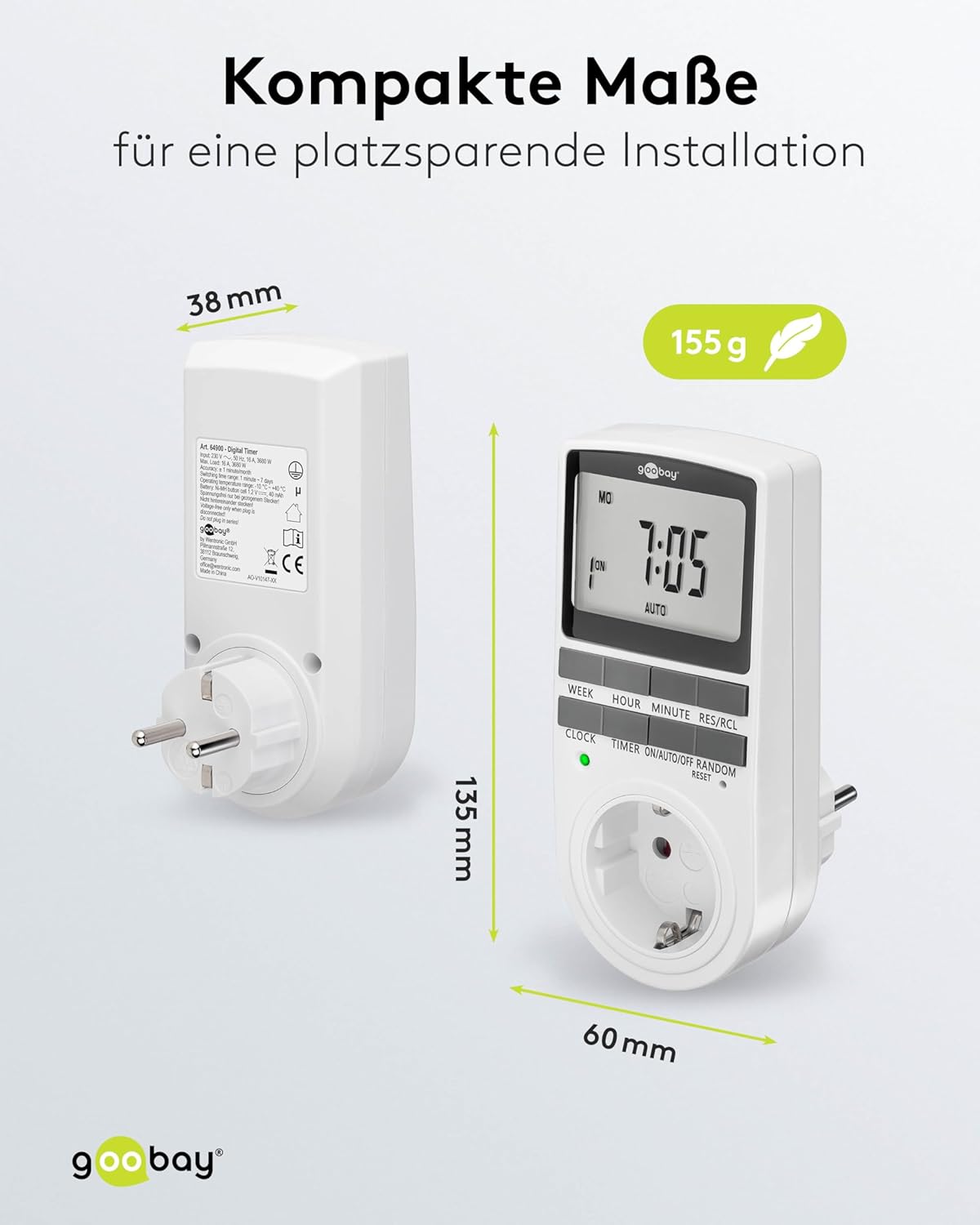
Figura 2: Lateral i frontal view of the goobay Digital Timer illustrating its compact dimensions: 135 mm height, 60 mm width, and 38 mm depth. The weight is 155g.
6. Configuració
6.1 Càrrega inicial
Before first use, plug the timer into a live wall socket for at least 4 hours to charge the internal NiMH battery. This battery retains your programmed settings for over 100 days in case of a power outage o quan el temporitzador està desendollat.
6.2 Restablir el temporitzador
To clear all previous settings and reset the timer to its default state, locate the small "RESET" button (usually a recessed pinhole) on the front panel. Use a pointed object (like a pen tip) to press and hold the button for a few seconds until the display clears.
6.3 Configuració de l'hora actual
- Premeu el botó RELOJ botó. La pantalla mostrarà l'hora actual.
- Mentre sosteniu el RELOJ botó, premeu SETMANA button to select the current day of the week (MO, TU, WE, TH, FR, SA, SU).
- Mentre sosteniu el RELOJ botó, premeu HORA botó per ajustar l'hora actual (0-23).
- Mentre sosteniu el RELOJ botó, premeu MINUT per ajustar els minuts actuals (0-59).
- Allibera el RELOJ botó. L'hora ja està configurada.
7. Instruccions de funcionament
7.1 Programació dels temps d'encesa/apagada
El temporitzador permet fins a 10 programes d'encesa/apagada. Cada programa consta d'una hora d'encesa i una hora d'apagada.
- Premeu el botó TEMPORIZADOR button once. The display will show "1 ON". This is for the first ON time setting.
- Premeu SETMANA per seleccionar el(s) dia(es) d'aquest programa. Les opcions inclouen:
- MO, TU, WE, TH, FR, SA, SU (all days)
- MO TU WE TH FR SA SU (individual days)
- MO TU WE TH FR (weekdays)
- SA SU (weekend)
- MO TU WE TH FR SA
- MO WE FR
- TU TH SA
- MO TU WE
- TH FR SA
- And other combinations.
- Premeu HORA per configurar l'hora d'encesa desitjada.
- Premeu MINUT per ajustar el minut d'encesa desitjat.
- Premeu el botó TEMPORIZADOR button again. The display will show "1 OFF". This is for the first OFF time setting.
- Repeat steps 2-4 to set the desired OFF day(s), hour, and minute.
- Premeu el botó TEMPORIZADOR button to cycle through "2 ON", "2 OFF", and so on, up to "10 ON" and "10 OFF". Repeat the setting process for each program.
- Després de configurar tots els programes desitjats, premeu el botó RELOJ botó per tornar a la visualització de l'hora actual.
Note: If you do not need all 10 programs, simply press the RELOJ button to exit programming mode after setting your last required program.
7.2 Accionament manual (ON/AUTO/OFF)
El ON/AUTO/OFF button allows you to manually control the timer's output.
- Premeu ON/AUTO/OFF repeatedly to cycle through the modes:
- ACTIVITAT: L'aparell connectat està contínuament encès, anul·lant tots els programes.
- DESACTIVAT: L'aparell connectat està contínuament apagat, anul·lant tots els programes.
- AUTOMÀTIC: El temporitzador funciona segons els temps d'encesa/apagada programats. Aquest és el mode de funcionament estàndard per al control automatitzat.
7.3 Random Mode (Burglary Protection)
The random mode is designed to simulate presence by randomly switching connected lighting or other appliances ON and OFF, deterring potential intruders.
- Premeu el botó ALEATÒRIA button. The display will show "RANDOM".
- In this mode, the timer will randomly turn the connected appliance ON and OFF within a certain time window (e.g., 10-31 minutes ON, 26-42 minutes OFF).
- To deactivate random mode, press the ALEATÒRIA button again. The "RANDOM" indicator will disappear from the display.
Note: Random mode typically overrides programmed settings while active. Ensure the timer is in AUTO mode before activating RANDOM mode for optimal effect.
7.4 Clearing Programs
To clear a specific program:
- Premeu el botó TEMPORIZADOR button repeatedly until the desired program number (e.g., "3 ON") appears on the display.
- Premeu el botó RES/RCL button. The program will be cleared.
- Premeu RELOJ per sortir.
8. Manteniment
- Clean the timer regularly with a dry, soft cloth. Do not use abrasive cleaners or solvents.
- No submergiu el dispositiu en aigua o cap altre líquid.
- The internal battery is designed for long-term use and does not require replacement under normal conditions. If the battery backup fails to hold settings, the unit may need servicing.
9. Solució De Problemes
| Problema | Causa possible | Solució |
|---|---|---|
| La pantalla està en blanc o no respon. | Battery not charged or completely drained. | Plug the timer into a live wall socket for at least 4 hours to charge the internal battery. Press the RESET button. |
| L'aparell no s'encén/apaga a les hores programades. | Timer is not in AUTO mode. Incorrect program settings. | Premeu ON/AUTO/OFF fins que es mostri "AUTO". Review and correct program settings (Section 7.1). Ensure the appliance is properly connected and functional. |
| El mode aleatori no funciona. | Mode aleatori no activat. | Premeu el botó ALEATÒRIA button until "RANDOM" appears on the display. |
| Timer loses settings after unplugging. | Internal battery not sufficiently charged or faulty. | Ensure the timer is plugged in for at least 4 hours to fully charge the battery. If the issue persists, the battery may be faulty; contact customer support. |
10. Especificacions
- Model: 64900
- Vol. Operatiutage: 230 V (CA)
- Max. Switching Capacity: 3680 W / 16 A.
- Power Consumption (Zero Load): 1 W màx.
- Classe de protecció: IP20 (només per a ús interior)
- Còpia de seguretat de la bateria: NiMH, >100 days
- Dimensions del producte: 7.6 x 6 x 13.5 cm (P x A x A)
- Pes de l'article: 155 g
- Color: Blanc
- Material: Resina
11. Garantia i Suport
goobay products are manufactured with quality and reliability in mind. For information regarding warranty terms and conditions, please refer to the warranty card included with your purchase or visit the official goobay weblloc.
For technical support, troubleshooting assistance, or spare parts, please contact your local goobay dealer or visit the goobay support portal. When contacting support, please have your product model number (64900) and purchase details ready.
Weblloc: www.goobay.de (This is a general link, specific support links may vary by region.)


