1. Introducció
Welcome to the user manual for your Natec FURY SHOBO SH4F RGB MIDI TOWER PC Case. This guide provides essential information for the proper assembly, installation, operation, and maintenance of your new computer chassis. Please read this manual thoroughly before beginning installation to ensure optimal performance and longevity of your components.
2. Pautes de seguretat
- Always disconnect the power supply from the wall outlet before installing or removing any components inside the PC case.
- Handle components with care to avoid damage from electrostatic discharge (ESD). Consider using an anti-static wrist strap.
- Keep small parts, such as screws, away from children.
- Assegureu-vos que hi hagi una ventilació adequada al voltant de la carcassa de l'ordinador per evitar el sobreescalfament.
- Do not expose the case to extreme temperatures, humidity, or direct sunlight.
- Eviteu col·locar objectes pesats a sobre de la carcassa.
3. Contingut del paquet
Si us plau, verifiqueu que tots els elements siguin presents al vostre paquet:
- Natec FURY SHOBO SH4F RGB MIDI TOWER PC Case
- Accessory box (containing screws, cable ties, and other small parts)
- Manual d'usuari (aquest document)
4. Producte acabatview
The Natec FURY SHOBO SH4F is a MIDI TOWER PC case designed for gaming and general-purpose computing, offering ample space for components and efficient cooling. It features a modern design with RGB lighting.
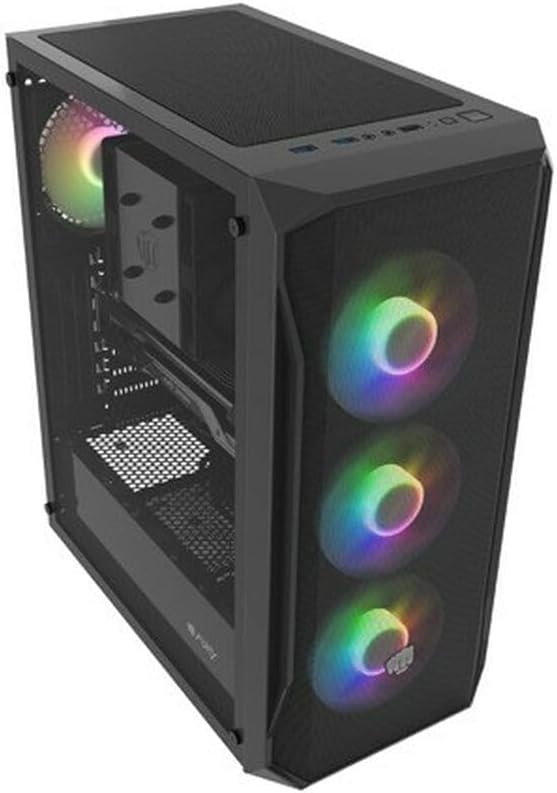
Figura 4.1: Un angle view of the Natec FURY SHOBO SH4F RGB MIDI TOWER PC Case, showcasing its black metal and tempered glass construction. The front panel features a mesh design with three illuminated RGB fans, and a single RGB fan is visible at the rear exhaust. The top panel includes I/O ports and a mesh filter.
4.1 Panell frontal d'E/S
- Botó d'engegada
- Botó de restabliment
- Port USB 2.0 (x1)
- Audio Jacks (Headphone/Microphone)
- RGB Control Button (if applicable)
4.2 Disseny intern
The case supports Micro ATX and Mini ATX motherboards and features a bottom-mounted power supply bay. It includes dedicated areas for storage drives and efficient cable management.
5. Configuració i instal·lació de components
Follow these steps to install your PC components into the FURY SHOBO SH4F case.
5.1 Preparació del cas
- Col·loqueu la caixa sobre una superfície plana i estable.
- Remove the side panels. Typically, the tempered glass side panel is secured with thumbscrews.
5.2 Instal·lació de la placa base
- Instal·leu la protecció d'E/S (si no està preinstal·lada a la placa base) a l'obertura posterior de la carcassa.
- Ensure the motherboard standoffs are correctly aligned for your Micro ATX or Mini ATX motherboard. Adjust or install additional standoffs if necessary.
- Carefully place the motherboard onto the standoffs, aligning the screw holes.
- Secure the motherboard with the provided screws. Do not overtighten.
5.3 Instal·lació de la font d'alimentació
- Locate the power supply bay at the bottom rear of the case.
- Slide your power supply unit (PSU) into the bay from the rear of the case, ensuring the fan faces downwards (if the case has a bottom vent) or upwards.
- Fixeu la font d'alimentació amb els cargols de la part posterior de la carcassa.
5.4 Instal·lació de la unitat d'emmagatzematge
Refer to your case's specific drive bay design for 2.5" SSDs and 3.5" HDDs. Typically, these involve trays or direct screw mounting.
5.5 Expansion Card Installation (e.g., Graphics Card)
- Traieu les cobertes de les ranures PCI-E necessàries de la part posterior de la carcassa.
- Insert your expansion card into the corresponding PCI-E slot on the motherboard.
- Secure the card with a screw or the case's retention mechanism.
5.6 Gestió de cables
Aprofita els retalls i els punts d'amarratge que hi ha darrere de la safata de la placa base per encaminar i fixar els cables. Això millora el flux d'aire i l'estètica.
5.7 Connecting RGB Fans
The pre-installed RGB fans typically connect to a central RGB controller or directly to your motherboard's RGB headers. Consult your motherboard manual for specific RGB header locations and software control. Ensure all fan power cables are connected to appropriate fan headers on the motherboard or a fan hub.
6. Funcionament de la caixa de l'ordinador
6.1 Engegada/apagada
After all components are installed and cables connected, plug your power supply into a wall outlet. Press the power button on the front I/O panel to turn on your system. To turn off, use the operating system's shutdown function or press and hold the power button for several seconds.
6.2 Control d'il·luminació RGB
If your case features an RGB control button on the front I/O panel, press it to cycle through various lighting modes and colors. For advanced customization, use your motherboard's RGB software (e.g., ASUS Aura Sync, MSI Mystic Light, Gigabyte RGB Fusion) if the fans are connected to compatible headers.
7. Manteniment
Un manteniment regular ajuda a garantir un rendiment òptim i allarga la vida útil dels components del teu PC.
7.1 Neteja del filtre de pols
The FURY SHOBO SH4F case includes dust filters (e.g., on the top and bottom). Periodically remove and clean these filters by rinsing them with water and allowing them to dry completely before re-installing. This prevents dust buildup and maintains airflow.
7.2 Neteja exterior
Netegeu l'exterior de la carcassa amb un drap suau iamp drap. Eviteu productes de neteja abrasius o dissolvents que puguin danyar l'acabat o el vidre temperat.
8. Solució De Problemes
Si teniu problemes, consulteu els passos habituals següents per a la resolució de problemes:
- Sense energia: Ensure the power supply is properly connected to the wall outlet and the motherboard. Check all internal power cables (24-pin ATX, 8-pin CPU, GPU power). Verify the power button cable is correctly connected to the motherboard's front panel header.
- Els ventiladors no giren: Check if fan power cables are securely connected to the motherboard or fan hub. Ensure the power supply is functioning.
- La il·luminació RGB no funciona: Verify RGB cables are correctly connected to the RGB controller or motherboard header. If using a button, try cycling through modes. If using software, ensure it's installed and configured correctly.
- Sobreescalfament: Ensure all fans are spinning correctly and oriented for proper airflow (intake/exhaust). Clean dust filters and internal components. Verify CPU cooler and GPU cooler are properly installed.
9. Especificacions
| Marca | Natec |
| Sèrie | SH4F |
| Número de model | NFO-2154 |
| Tipus de cas | Torre del Midi |
| Compatibilitat amb la placa base | Micro ATX, Mini ATX |
| Color | Negre |
| Material | Metall |
| Dimensions del producte (LxWxH) | 19.69 x 16.93 x 9.84 polzades (50 x 43 x 25 cm) |
| Pes de l'article | 9.46 lliures (4.3 quilograms) |
| Tipus de muntatge de la font d'alimentació | Muntatge inferior |
| Mètode de refrigeració | Aire |
| Nombre de ports USB 2.0 | 1 |
10. Garantia i Suport
Natec products are manufactured to high-quality standards. For information regarding warranty terms and conditions, please refer to the warranty card included with your product or visit the official Natec website. If you encounter any issues not covered in this manual or require further assistance, please contact Natec customer support through their official channels.
Fabricant: Natec