1. Introducció
This manual provides detailed instructions for the Yahboom MicroROS Robot Pi5 AI Visual ROS2 Smart Robot Car Kit. This kit is designed for STEM education, offering a platform for learning about robotics, autonomous driving, AI visual recognition, and the Robot Operating System (ROS2) with Raspberry Pi 5.
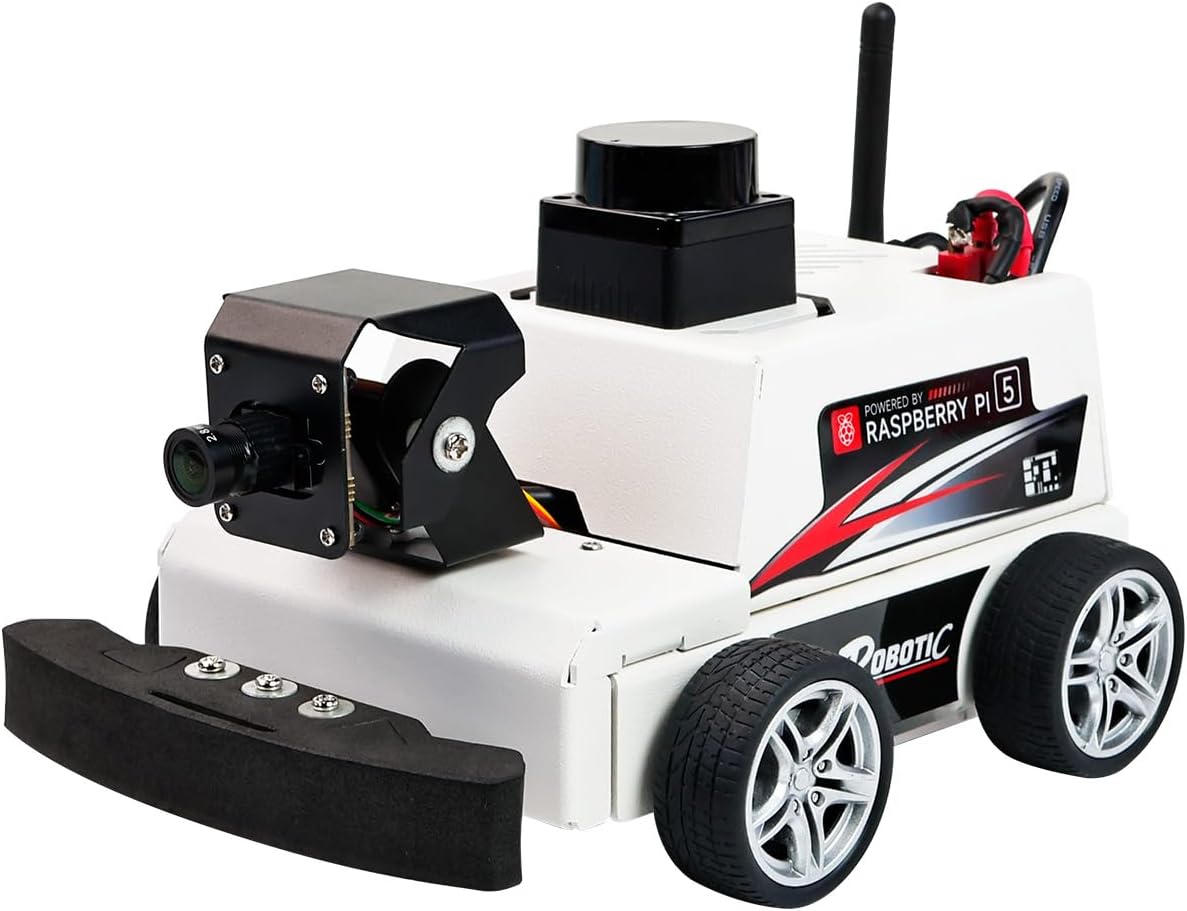
Image 1.1: The Yahboom MicroROS Robot Pi5 Smart Robot Car Kit.
2. Producte acabatview
The Yahboom MicroROS Robot Pi5 is an advanced educational robot kit built around the Raspberry Pi 5. It integrates various high-performance components to facilitate comprehensive learning and experimentation in robotics.
2.1 Característiques clau
- Developed for Raspberry Pi 5: Utilizes the latest Raspberry Pi 5, requiring specific power solutions for optimal performance.
- ROS2-Humble and MicroROS System: Based on the stable ROS2 Humble version, featuring MicroROS communication between control and driver boards for extensive learning.
- MS200 Lidar: High-performance TOF laser radar for indoor/outdoor mapping, navigation, path planning, and obstacle avoidance.
- AI Visual Gameplay: Equipped with a 2-degree-of-freedom (2DOF) 2MP HD camera gimbal for AI visual development, including face/QR code/posture recognition, object tracking, line-following, and gesture control.
- Kit complet: Includes a metal chassis, pre-installed components, expansion board with ESP coprocessing and six-axis IMU, 310 encoder-reduced motors, 7.4V rechargeable battery, and optional Raspberry Pi 5.

Imatge 2.1: acabatview of the Yahboom MicroROS Robot Pi5's key features and capabilities.
2.2 Dual Controller Architecture
The robot employs a dual-controller system for efficient collaborative work:
- Upper-level (Supervisory Device): ROS controller (Raspberry Pi 5) handles visual image processing, deep neural networks, high-level artificial intelligence algorithms, and real-time positioning and mapping.
- Lower-level (Subordinate Device): ESP32 coprocessor manages motor PID control, servo control, IMU data acquisition, and lidar/camera drive.

Image 2.2: Diagram illustrating the dual controller architecture with Raspberry Pi 5 and ESP32 coprocessor.
3. Configuració
The Yahboom MicroROS Robot Pi5 kit comes with most components pre-installed, simplifying the initial setup process. Ensure you have a Raspberry Pi 5 (if not included in your version of the kit) and a suitable power supply.
3.1 Components inclosos
- Metal chassis structure (mostly pre-assembled)
- Expansion board with onboard ESP coprocessing and six-axis IMU
- 310 encoder-reduced motors
- Bateria recarregable de 7.4 V
- MS200 Lidar module
- 2DOF camera gimbal
- Raspberry Pi 5 (depending on kit version)
- Pi 5 active heat sink
- Micro SD card with pre-installed code (for versions without Raspberry Pi 5)
3.2 Engegada i configuració inicials
- Ensure all connections are secure, especially power cables and sensor connections.
- If your kit did not include a Raspberry Pi 5, install your own Raspberry Pi 5 into the designated slot.
- Insert the provided Micro SD card (or your own with the necessary OS and software) into the Raspberry Pi 5.
- Connect the 7.4V rechargeable battery to the robot's power input.
- Power on the robot. The Raspberry Pi 5 requires a specific 5.1V/5A power supply protocol to ensure stable operation and prevent issues like freezes or restarts.
- Follow the provided software documentation (often available online from Yahboom) for initial network configuration and software setup.

Image 3.1: The Raspberry Pi 5 integrated into the robot, highlighting its role as the main control board.
4. Instruccions de funcionament
The Yahboom MicroROS Robot Pi5 offers a wide range of functionalities, from basic movement to advanced AI and autonomous navigation.
4.1 ROS2 System Operation
The robot operates on the ROS2 Humble version, providing a robust framework for robotics development. Familiarity with ROS2 concepts is beneficial for maximizing the robot's potential.

Image 4.1: The ROS2 Humble operating system, which forms the core of the robot's software.
4.2 AI Visual Gameplay
The 2DOF camera gimbal enables various AI visual applications:
- Reconeixement de codis QR: Identify and interpret QR code content.
- AR Vision: Utilize augmented reality effects with chessboard patterns.
- MediaPipe Pose Detection: Track 33 key points of the human body.
- MediaPipe Face Detection: Mark 68 facial landmark points.
- Seguiment d'objectes: Follow specific objects using color or KCF algorithms.
- Line Following: Autonomous driving along detected lines.
- Reconeixement de gestos: Control robot movement through predefined gestures.

Imatge 4.2: Ex.amples of AI visual gameplay, including QR code recognition, AR vision, and pose detection.
4.3 Lidar Gameplay
The MS200 Lidar provides advanced environmental perception capabilities:
- Lidar Mapping: Generate environmental maps using gmapping and cartographer algorithms.
- Path Planning and Navigation: Plan paths and navigate autonomously while avoiding obstacles.
- Evitació d'obstacles: Detect and react to obstacles in real-time.
- Tracking and Patrol: Follow targets or patrol designated areas.

Image 4.3: Illustrations of Lidar functions such as mapping and obstacle avoidance, alongside AI visual capabilities.
4.4 Mètodes de control
The robot can be controlled using various methods:
- Keyboard Control: Use a computer keyboard for basic movements and functions.
- Control de maneig: Utilize a game controller for intuitive and responsive control.
- Control de l’APP: A dedicated mobile application allows for remote control and real-time image display.

Image 4.4: Depiction of keyboard, handle, and mobile application control methods for the robot.
5. Manteniment
Regular maintenance ensures the longevity and optimal performance of your Yahboom MicroROS Robot Pi5.
- Neteja: Keep the robot free from dust and debris. Use a soft, dry cloth to wipe surfaces. Avoid using liquids directly on electronic components.
- Connexions: Periodically check all cable connections to ensure they are secure. Loose connections can lead to intermittent functionality.
- Cura de la bateria: Follow proper charging procedures for the 7.4V lithium battery. Do not overcharge or fully discharge the battery frequently. Store the battery in a cool, dry place when not in use.
- Actualitzacions de programari: Regularly check for and apply software updates for the Raspberry Pi 5 operating system and ROS2 packages to ensure compatibility and access to new features or bug fixes.
- Inspecció mecànica: Inspect wheels, motors, and the camera gimbal for any signs of wear or damage. Ensure smooth movement of mechanical parts.
6. Solució De Problemes
Aquesta secció ofereix solucions a problemes comuns que podeu trobar.
6.1 Problemes generals
- Robot does not power on:
- Check if the battery is charged and properly connected.
- Assegureu-vos que l'interruptor d'alimentació estigui a la posició "ON".
- Verify the Raspberry Pi 5 has a stable power supply (5.1V/5A recommended).
- Motors not responding:
- Check motor connections to the expansion board.
- Ensure the control software is running and commands are being sent correctly.
- Verify the ESP32 coprocessor is functioning.
- Camera feed is not displayed:
- Check the camera cable connection to the Raspberry Pi 5.
- Ensure the camera module is enabled in the Raspberry Pi configuration.
- Verify that the visual processing software is running.
- Lidar not detecting obstacles or mapping:
- Ensure the Lidar module is properly connected and powered.
- Check Lidar software nodes in ROS2 for errors.
- Verify the Lidar's rotation mechanism is unobstructed.
- Robot unstable or behaving erratically:
- Check for loose mechanical parts, especially wheels.
- Ensure the IMU is calibrated correctly.
- Review your ROS2 code for logical errors or incorrect parameters.
For more detailed troubleshooting or specific technical support, please refer to the official Yahboom documentation or contact their customer support.
7. Especificacions
| Característica | Detall |
|---|---|
| Nom del model | MicroROS robot Pi5 |
| Sistema operatiu | Ubuntu 20.04 LTS |
| RAM | LPDDR4 |
| Marca del processador | Broadcom |
| Pes de l'article | 3.96 lliures |
| Dimensions del producte | 9 x 6 x 9 polzades |
| Bateries | 1 bateria de 9 V (inclosa) |
| Tecnologia de connectivitat | Bluetooth, Ethernet, USB, Wi-Fi |
| Càmera | 2MP-120° High frame rate camera |
| Motor | 310 metal motor with encoder (x4) |
| Velocitat del motor | 450 ± 10 rpm |
| Parell motor | 4Kg.cm |
| Pla d'energia | 7.4V 2000mAh 2S lithium battery |
| Interfície d'alimentació | T-shaped power supply interface, DC4.0*1.7 charging interface |
| Lidar | MS200 TOF laser radar |
8. Garantia i Suport
For warranty information, technical assistance, or customer support, please refer to the official Yahboom website or contact their customer service department directly. Details regarding specific warranty periods and support channels are typically provided with your purchase or on the manufacturer's official resources.