1. Producte acabatview
The FEELWORLD P6XL is a compact and versatile 6-inch camera monitor designed to enhance your video production workflow. It features a high-brightness 1200nit Full HD IPS display, a responsive touchscreen interface, and a built-in rechargeable battery for portability. The monitor supports 4K HDMI input, HDR monitoring, and custom 3D-LUTs, providing essential tools for accurate image analysis and color grading in the field.

Image: FEELWORLD P6XL monitor highlighting its main features.
Característiques principals:
- 6-inch Full HD IPS Screen: 1920x1080 resolution for clear and detailed visuals.
- 1200nit High Brightness: Ensures visibility in various lighting conditions, including outdoors.
- Built-in 22.2Wh/7.4V Battery: Provides approximately 2 hours of runtime at 100% brightness.
- Sensitive Touch Screen Control: Intuitive interface for easy navigation and function control.
- 4K HDMI Input: Supports 3840x2160p at 30/29.97/25/24/23.98 frame rates.
- Custom 3D LUTs: Supports uploading up to 32 custom .cube files via USB-C for real-time color grading.
- HDR Monitoring: Enhances dynamic range for more accurate exposure and color representation.
- Lleuger i portàtil: Weighs only 332g with a slim 17mm thickness.
2. Configuració i instal·lació
2.1 Desembalatge i inspecció inicial
Carefully unpack all components and inspect for any damage. Ensure all accessories are present:
- FEELWORLD P6XL Monitor
- Cable mini/micro HDMI a HDMI
- Adaptador USB-A a USB-C
- Para-sol
- Braç inclinat
2.2 Charging the Built-in Battery
The P6XL features a built-in 22.2Wh/7.4V rechargeable battery. To charge:
- Connect the included charging cable to the USB Type-C port on the monitor.
- Connect the other end of the charging cable to a 9V charger (not included).
- The charging indicator light will illuminate. Charging is complete when the indicator light turns green. Note that the battery level display may show 100% before full charge; rely on the indicator light.

Image: Monitor ports, including the Type-C charging port.

Image: Charging the P6XL monitor.
2.3 Muntatge del monitor
The P6XL can be mounted to your camera rig using the included tilt arm:
- Attach the tilt arm to the monitor's mounting point.
- Secure the tilt arm to your camera's hot shoe or another compatible mounting point.
- Adjust the monitor's angle using the tilt arm, which offers 180° viewing angle adjustment and 360° base rotation.

Image: Monitor mounting options with tilt arm.
2.4 Connexió a una càmera
Connect your camera's HDMI output to the monitor's HDMI IN port using the provided HDMI cable. The monitor supports 4K HDMI signals.

Image: Connecting the monitor to a camera via HDMI.
3. Instruccions de funcionament
3.1 Encès/Apagat
Premeu i manteniu premut el botó d'engegada situat al lateral del monitor per encendre'l o apagar-lo.
3.2 Touch Screen Control
The P6XL features a sensitive touchscreen for intuitive control:
- Toca: Tap icons or menu options to select them.
- Swipe Up/Down (Left Half): Ajusteu la brillantor de la llum de fons.
- Swipe Up/Down (Right Half): Ajustar el volum.
- Swipe from Edge: Access various monitoring functions and settings.
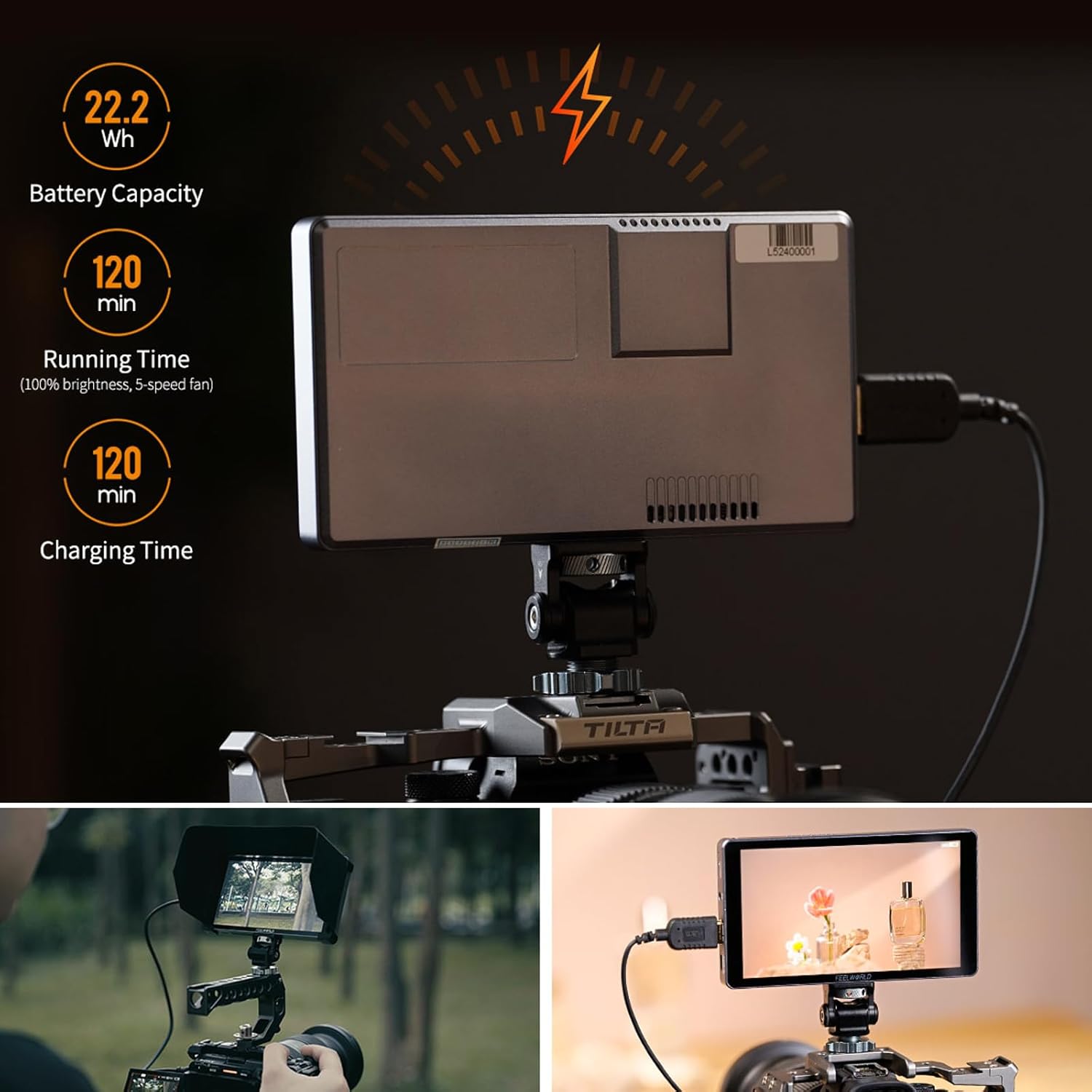
Image: Touch screen gestures for brightness and volume control.
3.3 Funcions de monitorització
The monitor offers a comprehensive suite of monitoring tools. Access these functions via the touchscreen interface:
- LUT 3D: Apply custom Look-Up Tables for real-time color preview.
- Forma d'ona: Analyze video signal levels.
- Exposició: Check exposure levels.
- Histograma: Visualize tonal distribution.
- Nou quadrícula: Assist with composition.
- Sobreexploració: Adjust display area.
- Ratio Marker: Display various aspect ratio guides.
- Pixel-to-Pixel: View the image at its native resolution.
- Ampliar: Magnify parts of the image for critical focus.
- Àmbit vectorial: Analyze color saturation and hue.
- Camp de verificació: Isolate color channels (Red, Green, Blue).
- Falsos colors: Aid in exposure setting.
- Filtre de pic: Highlight in-focus areas.
- Àudio incrustat: Monitor audio levels.
- Screen Marker: Display safe area markers.
- Flip de la imatge: Flip the image horizontally or vertically.
- Imatge congelada: Pause the live video feed.
- Mode anamòrfic: De-squeeze anamorphic footage.

Imatge: Més deview of monitoring functions.
3.4 Loading Custom 3D LUTs
The P6XL supports up to 32 custom 3D LUTs for on-set color grading:
- Save your custom .cube LUT files onto a USB flash drive.
- Connect the USB flash drive to the monitor's Type-C port using the included USB-A to USB-C adapter.
- Navigate to the LUTs menu on the monitor and select the option to import LUTs.
- Choose the desired LUT files from the USB drive to load them onto the monitor.
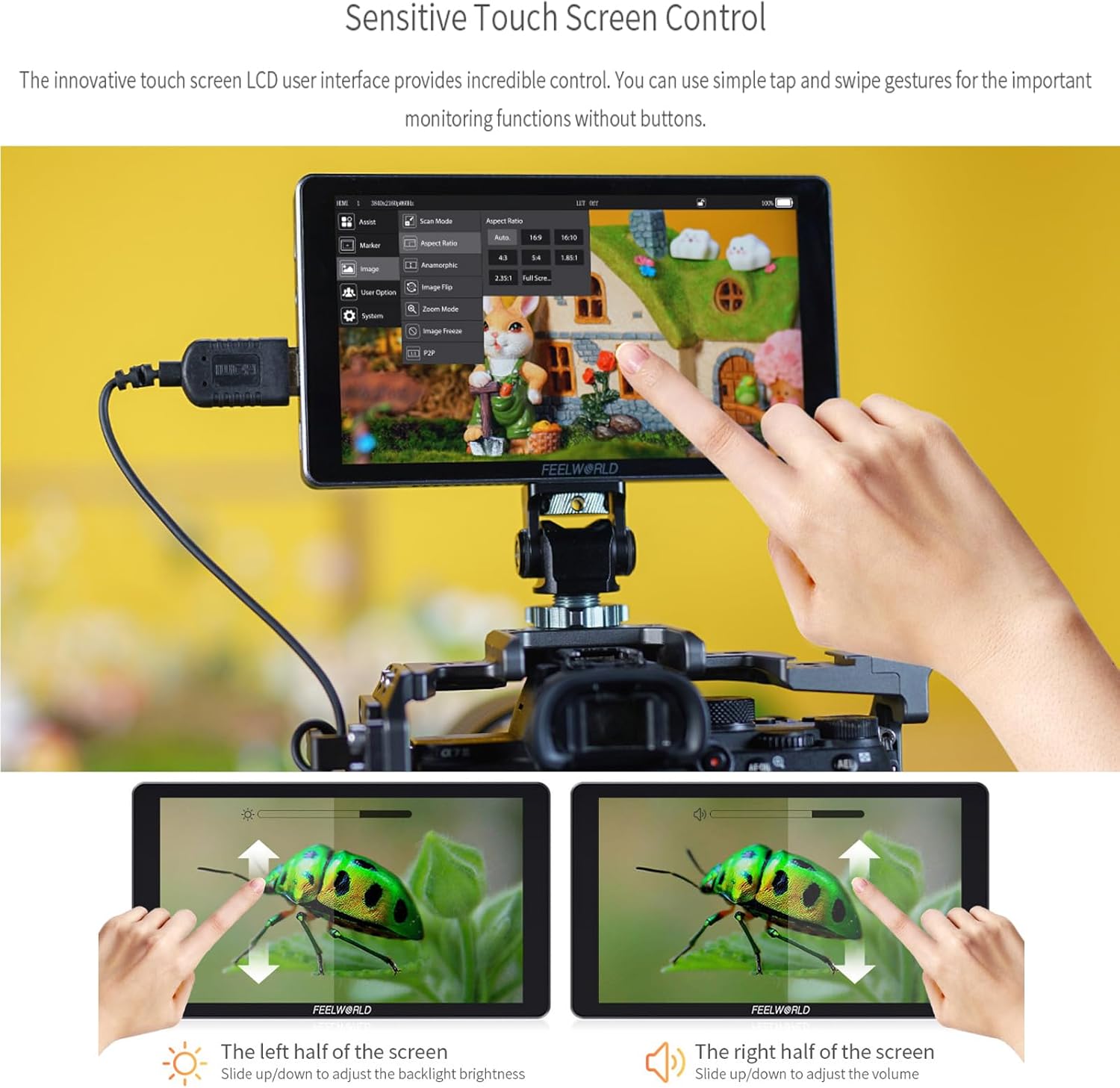
Image: Loading custom 3D LUTs.
3.5 Screenshot and Image Overlay
The P6XL allows you to capture screenshots and overlay images for composition comparison:
- Captura de pantalla: Capture the current display and save it to a USB flash drive.
- Image Overlay: Import a JPG image (via USB flash drive) and superimpose it over the live video feed. This feature assists in comparing composition and correcting displacement during shooting.

Image: Screenshot and image overlay function.
4. Manteniment
4.1 Neteja del monitor
- Use a soft, lint-free cloth to gently wipe the screen and body of the monitor.
- Per a taques persistents, lleugerament dampRenta el drap amb aigua o una solució netejadora de pantalles. Evita productes químics agressius o materials abrasius.
- Ensure the monitor is powered off and disconnected from any power source before cleaning.
4.2 Cura de la bateria
- Carregueu la bateria regularment, fins i tot si no l'esteu fent servir, per mantenir-ne el bon estat.
- Eviteu descarregar completament la bateria amb freqüència.
- Store the monitor in a cool, dry place away from direct sunlight and extreme temperatures to prolong battery life.
4.3 Sunshade Installation and Removal
The included sunshade helps reduce glare in bright conditions:
- Instal·lació: Align the sunshade with the monitor's frame and gently snap it into place.
- Eliminació: Carefully detach the sunshade by applying gentle pressure to release the clips.

Image: Sunshade for the P6XL monitor.
5. Solució De Problemes
5.1 Monitor Does Not Power On
- Comproveu el nivell de la bateria: Ensure the built-in battery is sufficiently charged. Connect the monitor to a 9V charger and wait for the indicator light to turn green.
- Botó d'encesa: Confirm the power button is pressed and held for a few seconds to initiate power on.
- Problema de càrrega: If the monitor does not charge, try a different USB-C cable and a compatible 9V charger.
5.2 No Signal on Screen
- Cable HDMI: Ensure the HDMI cable is securely connected to both the camera's output and the monitor's HDMI IN port. Try a different HDMI cable if available.
- Sortida de la càmera: Verify that your camera's HDMI output is active and configured correctly (e.g., resolution, frame rate).
- Entrada del monitor: Check the monitor's input settings to ensure it is set to the correct HDMI source.
5.3 La pantalla tàctil no respon
- Restart Monitor: Power off and then power on the monitor.
- Pantalla neta: Assegureu-vos que la pantalla estigui neta i lliure de brutícia o humitat que puguin interferir amb l'entrada tàctil.
- Actualització del firmware: Check the FEELWORLD website for any available firmware updates that might address touchscreen issues.
6. Especificacions
| Característica | Especificació |
|---|---|
| Model | FEELWORLD P6XL |
| Mida de la pantalla | 6 polzades |
| Resolució | 1920 x 1080 (FHD 1080p) |
| Brillantor de la imatge | 1200 nits |
| Bateria | Built-in 22.2Wh/7.4V Lithium Ion (approx. 2 hours run-time at 100% brightness) |
| Ports d'entrada | HDMI IN, USB Type-C (for charging/LUTs) |
| Dimensions del producte | 154 mm x 87 mm x 17 mm (6.06 x 3.43 x 0.67 polzades) |
| Pes de l'article | 332 g (0.73 lliures) |
| Fabricant | SENTAR MÓN |
Nota: Les dimensions i el pes del producte són aproximats i poden variar lleugerament.

Image: P6XL weight comparison and dimensions (154mm x 87mm x 17mm).
7. Informació de la garantia
Specific warranty details for the FEELWORLD P6XL monitor are typically provided with the product packaging or can be obtained directly from the manufacturer or authorized reseller at the time of purchase. Please retain your proof of purchase for warranty claims.
8. Atenció al client
For technical assistance, troubleshooting beyond this manual, or service inquiries, please contact FEELWORLD customer support. You may find contact information on the official FEELWORLD weblloc web o a través del venedor a qui vau comprar el producte.
Visit the official FEELWORLD store for more information: FEELWORLD Store


