1. Introducció
Thank you for choosing the Machenike K600T Tri-Mode Gaming Keyboard. This high-performance keyboard is designed for an optimal gaming and typing experience, featuring versatile connectivity options and customizable RGB lighting. Please read this manual carefully to ensure proper use and maintenance of your device.

Image 1.1: Machenike K600T Tri-Mode Gaming Keyboard in Green.
2. Característiques clau
- Connectivitat trimodal: Supports wired USB, 2.4G wireless, and Bluetooth wireless connections.
- Disseny de muntatge de junta: Provides a flexible and cushioned typing feel, reducing vibrations and improving sound.
- Interruptors intercanviables en calent: Easily change switches without soldering to customize your typing experience.
- Il·luminació RGB: Features 16 pre-set lighting effects and an audio visualizer for dynamic illumination.
- Tecles duradors: OMA Profile Doubleshot ABS / MDA Profile Dye-sub PBT Keycaps for longevity and comfort.
- Bateria de 4000 mAh: Long-lasting battery life for extended wireless use.
- Anti-ghosting & N-key Rollover: Ensures every keystroke is registered accurately during intense gaming sessions.

Image 2.1: Visual representation of the K600T's key features, including Gasket Mount, Flex Cut PCB, and Tri-mode connectivity.

Imatge 2.2: Desplegada view illustrating the multi-layered gasket mount design for enhanced typing feel.
3. Configuració
Before using your Machenike K600T keyboard, please ensure it is adequately charged. The keyboard supports three connection modes:
- Connexió USB amb cable:
- Connect the provided USB-C cable to the keyboard's port and the other end to an available USB port on your computer.
- Turn the connection mode switch knob on the keyboard to the 'USB' position.
- El sistema reconeixerà automàticament el teclat.
- Connexió sense fil 2.4G:
- Locate the 2.4G USB receiver (dongle) usually stored in a compartment on the keyboard.
- Connecteu el receptor USB de 2.4 G a un port USB disponible de l'ordinador.
- Turn the connection mode switch knob on the keyboard to the '2.4G' position.
- The keyboard should connect automatically. If not, press Fn + R for 3 seconds to initiate pairing.
- Connexió sense fil Bluetooth:
- Turn the connection mode switch knob on the keyboard to the 'Bluetooth' position (indicated by *1, *2, or *3 for different profiles).
- A l'ordinador o dispositiu, activeu el Bluetooth i cerqueu dispositius nous.
- Select 'Machenike K600T' from the list of available devices.
- Si se us demana, introduïu el codi d'emparellament que es mostra a la pantalla.
- To switch between Bluetooth profiles (up to 3 devices), press Fn + Q, Fn + W, or Fn + E.
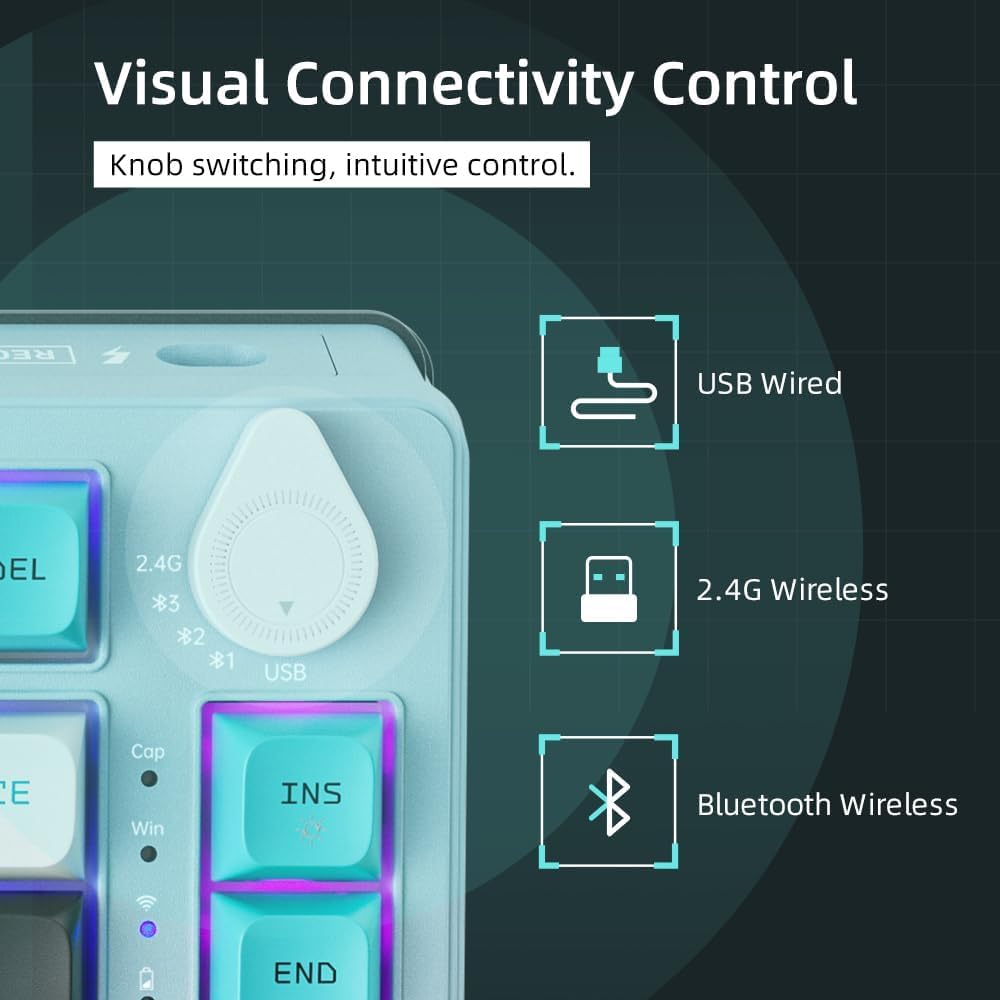
Image 3.1: The connection mode switch knob for selecting USB, 2.4G, or Bluetooth.
4. Instruccions de funcionament
The Machenike K600T keyboard offers various functions and shortcuts to enhance your experience.
4.1. Control de la il·luminació RGB
The keyboard features dynamic RGB lighting. Use the following key combinations to control the lighting effects:
- Fn + \|: Cycle through different lighting modes.
- Fn + <: Reduir la brillantor de la il·luminació.
- Fn + >: Augmentar la brillantor de la il·luminació.
- Fn + Fletxa amunt: Increase lighting speed/animation speed.
- Fn + Fletxa avall: Decrease lighting speed/animation speed.
- Fn + Barra espaiadora: Change lighting color (for static modes).

Image 4.1: The K600T keyboard showcasing its vibrant RGB lighting capabilities.
4.2. Tecles multimèdia i de funció
Many keys have secondary functions accessible via the Fn key. Refer to the keycaps for specific icons.
- Fn + F1-F12: Standard multimedia and function keys (e.g., volume control, play/pause).
- Fn + INS: Toggle between different lighting effects.
- Fn + Supr: Reset lighting effects.
5. Manteniment
Proper maintenance will extend the lifespan of your keyboard.
- Neteja: Use a soft, dry cloth to wipe the keyboard surface. For deeper cleaning, use compressed air to remove dust and debris from between the keycaps. You may carefully remove keycaps for thorough cleaning.
- Emmagatzematge: Guardeu el teclat en un lloc fresc i sec, allunyat de la llum solar directa i de temperatures extremes.
- Cura de la bateria: Avoid fully discharging the battery frequently. Charge the keyboard when the battery indicator is low.
6. Solució De Problemes
If you encounter issues with your keyboard, try the following solutions:
- El teclat no respon:
- Assegureu-vos que el teclat estigui carregat.
- Check the connection mode switch knob is set correctly (USB, 2.4G, or Bluetooth).
- Per a una connexió amb cable, proveu un port o cable USB diferent.
- For 2.4G wireless, ensure the receiver is securely plugged in and try re-pairing (Fn + R for 3 seconds).
- For Bluetooth, ensure Bluetooth is enabled on your device and try re-pairing.
- Claus que no es registren:
- Netegeu al voltant de la tecla afectada per eliminar qualsevol residu.
- If the key is hot-swappable, try removing and re-inserting the switch. If the issue persists, consider replacing the switch.
- La il·luminació RGB no funciona:
- Assegureu-vos que el teclat estigui encès.
- Try cycling through lighting modes (Fn + \|) or increasing brightness (Fn + >).
7. Especificacions
| Característica | Detall |
|---|---|
| Marca | Machenike |
| Número de model de l'article | ff66e88b-1447-4dac-a121-895c5f2bb82e |
| Color | K600T Green |
| Tecnologia de connectivitat | Bluetooth, 2.4G Wireless, Wired USB |
| Nombre de claus | 82 |
| Compatibilitat amb el color de la retroiluminació del teclat | RGB (Xarxa, Green, Blue) |
| Característiques especials | Backlit, Ergonomic Design, Hot-Swappable, Programmable Keys |
| Usos recomanats | Gaming, Business |
| Dispositius compatibles | Computer (Windows 10) |
| Font d'alimentació | Funciona amb bateria |
| Piles incloses | Yes (1 A battery) |
| Contingut d'energia de la bateria de liti | 2 watts-hora |
| Nombre de cel·les d'ions de liti | 1 |
| Pes de l'article | 1.07 quilos |
| Dimensions del paquet | 37.5 x 20.5 x 6.5 cm |
| Data de primera disponibilitat | 28 de febrer de 2024 |
8. Garantia i Suport
Specific warranty information and detailed support contacts are not provided within this manual. For warranty claims, technical support, or further assistance, please refer to the official Machenike website or contact the retailer from whom you purchased the product. Keep your proof of purchase for warranty purposes.


