Introducció
Thank you for choosing the HiFuture Yacht TWS Qualcomm Bluetooth 5.2 Earbuds. This manual provides essential information for setting up, operating, and maintaining your earbuds to ensure optimal performance and longevity. Please read these instructions carefully before use.
Contingut del paquet
- HiFuture Yacht TWS Earbuds (Left and Right)
- Estoig de càrrega
- Cable de càrrega USB tipus C (no apareix explícitament a la llista però és estàndard)
- Manual d'usuari (aquest document)
- Eartips (various sizes, not explicitly listed but standard)
Configuració
1. Càrrega dels auriculars i l'estoig
Before first use, fully charge the earbuds and the charging case. Connect the provided USB Type-C cable to the charging port on the case and a compatible USB power source. The charging indicators on the case will show the charging status. A full charge typically takes approximately 2 hours.
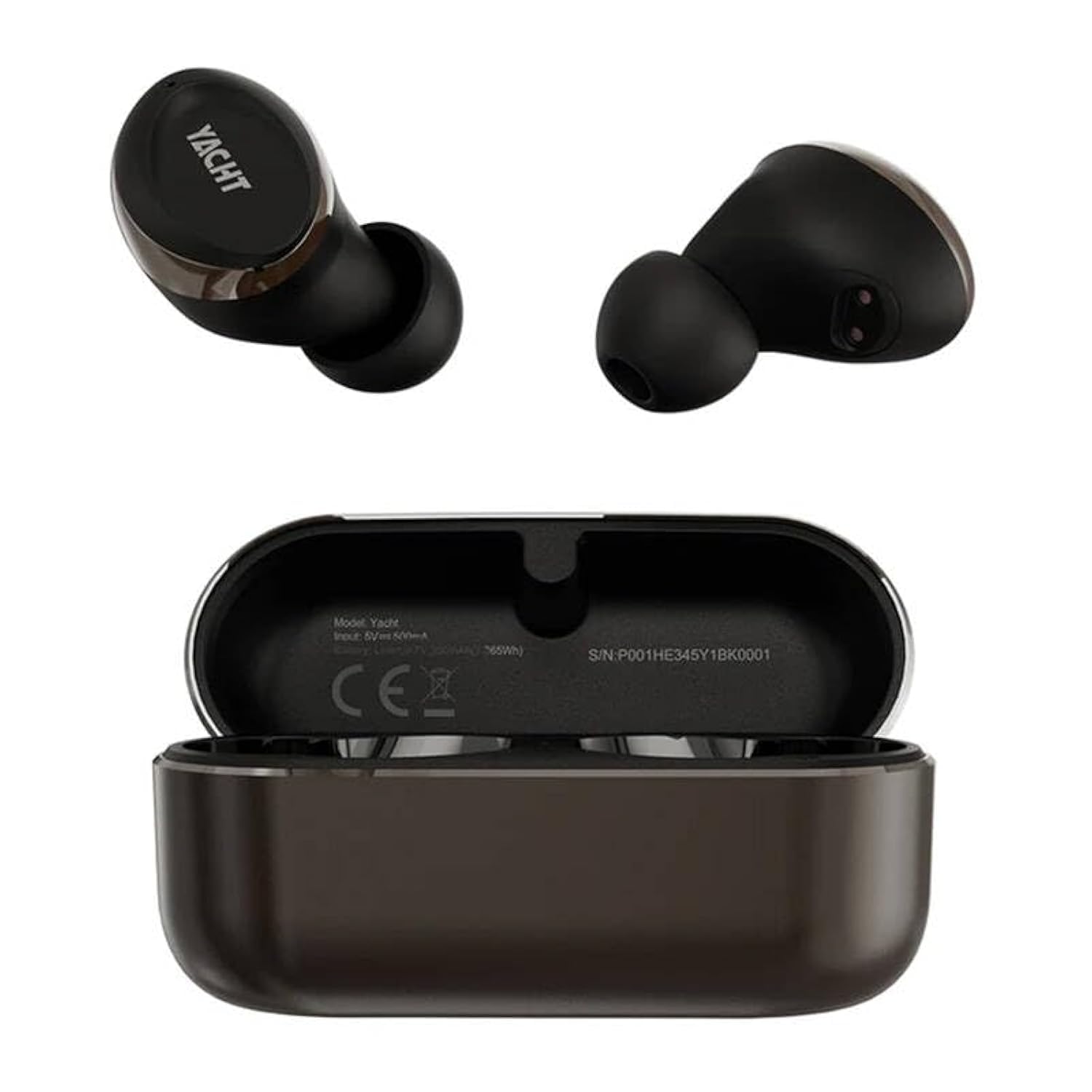
Image: The HiFuture Yacht TWS earbuds, one removed from the charging case and one placed inside the open charging case. The earbuds and case are black and gold. The charging case displays model information and a serial number.
2. Vinculació amb un dispositiu
- Assegureu-vos que els auriculars estiguin carregats.
- Open the charging case. The earbuds will automatically enter pairing mode, indicated by a flashing LED light (specific color/pattern not provided, refer to LED behavior section if available).
- Al telèfon intel·ligent, la tauleta o un altre dispositiu compatible amb Bluetooth, aneu a la configuració de Bluetooth.
- Cerca available devices and select "HiFuture Yacht" from the list.
- Once connected, the LED indicator on the earbuds will stop flashing, and you will hear a confirmation tone.
Els auriculars es tornaran a connectar automàticament a l'últim dispositiu emparellat quan es treguin de l'estoig, si el Bluetooth està activat al dispositiu.
3. Posar-se els auriculars
Gently insert the earbuds into your ears. Adjust them for a comfortable and secure fit. A proper fit is crucial for optimal sound quality and noise isolation.
Instruccions de funcionament
Encès/Apagat
- Encès: Obriu la funda de càrrega i els auriculars s'encendran automàticament.
- Apagar: Torneu a col·locar els auriculars a l'estoig de càrrega i tanqueu la tapa. S'apagaran automàticament i començaran a carregar-se.
Touch Controls (Remote Control Method)
The HiFuture Yacht earbuds feature touch-sensitive controls on each earbud. Specific functions may vary, but common controls include:
- Reproduir/pausa: Un sol toc a qualsevol dels auriculars.
- Pista següent: Toqueu dues vegades l'auricular dret.
- Pista anterior: Toqueu dues vegades l'auricular esquerre.
- Respondre/Finalitzar la trucada: Toqueu un sol cop a qualsevol dels auriculars durant una trucada entrant o activa.
- Rebutja la trucada: Premeu i manteniu premut qualsevol dels auriculars durant 2 segons durant una trucada entrant.
- Activa l'Assistent de veu: Toqueu tres vegades qualsevol dels auriculars.
Funcions de trucada
The CVC8.0 wind noise cancellation feature enhances call clarity by reducing background wind noise.
- Answer/End calls using the touch controls as described above.
- Ensure the microphone on the earbuds is not obstructed for clear communication.
Manteniment
Neteja
- Netegeu regularment els auriculars i l'estoig de càrrega amb un drap suau, sec i sense borrissol.
- No utilitzeu productes químics aggressivs, dissolvents de neteja o detergents forts.
- Gently remove any earwax or debris from the eartips and speaker mesh using a small, soft brush or cotton swab.
Emmagatzematge
Quan no els utilitzeu, guardeu els auriculars a la seva funda de càrrega per protegir-los de la pols i els danys, i per mantenir-los carregats.
Resistència a l'aigua (IPX5)
The earbuds are rated IPX5 water resistant, meaning they can withstand splashes of water and sweat. They are not designed for submersion in water. Avoid exposing them to heavy rain, showering, or swimming.
Resolució de problemes
- Auriculars que no s'emparellan:
- Assegureu-vos que els dos auriculars estiguin carregats.
- Desactiva el Bluetooth al dispositiu i torna'l a activar.
- Forget/delete "HiFuture Yacht" from your device's Bluetooth list and try pairing again.
- Torneu a col·locar els auriculars a la funda, tanqueu la tapa, espereu uns segons i, a continuació, obriu-la per reiniciar el mode d'emparellament.
- Només funciona un auricular:
- Assegureu-vos que els dos auriculars estiguin carregats.
- Try resetting the earbuds (refer to specific reset instructions if available, otherwise, place them back in the case and re-pair).
- Netegeu els contactes de càrrega dels dos auriculars i de l'interior de la funda.
- Sense so o volum baix:
- Comprova el nivell de volum tant del dispositiu com dels auriculars.
- Assegureu-vos que els auriculars estiguin connectats correctament al dispositiu.
- Netegeu la malla de l'altaveu per detectar qualsevol obstrucció.
- Problemes de càrrega:
- Assegureu-vos que el cable de càrrega estigui connectat correctament tant a la carcassa com a la font d'alimentació.
- Prova un cable USB tipus C i un adaptador de corrent diferents.
- Netegeu els contactes de càrrega dels auriculars i de l'interior de la funda.
Especificacions
| Nom del model | Iot |
| Versió Bluetooth | 5.2 |
| Tecnologia de connectivitat | Sense fil |
| Tipus de controlador d'àudio | Conductor dinàmic |
| Durada de la bateria (auriculars + funda) | Fins a 32 hores |
| Temps de càrrega | Aprox. 2 hores |
| Nivell de resistència a l'aigua | IPX5 (resistent a l'aigua) |
| Mètode de control | Comandament a distància (controls tàctils) |
| Material | Plàstic |
| Pes de l'article | 80 grams |
| Dimensions del producte (LxWxH) | 10 x 5 x 1.3 centímetres |
| Característiques especials | Lightweight, Qualcomm Chipset, APTX Adaptive, CVC8.0 Wind Noise Cancellation |
Garantia i Suport
HiFuture products are designed for reliability and performance. For warranty information, please refer to the warranty card included with your purchase or visit the official HiFuture website. For technical support or further assistance, please contact HiFuture customer service through their official channels.
Podeu trobar més informació i suport a HiFuture Store on Amazon.