1. Introducció
Thank you for choosing the Gosund SP111 Smart WiFi Plug. This device allows you to control your electronic appliances remotely via a smartphone application or voice commands, and to set schedules for automated operation. Please read this manual carefully before use to ensure proper installation and operation.
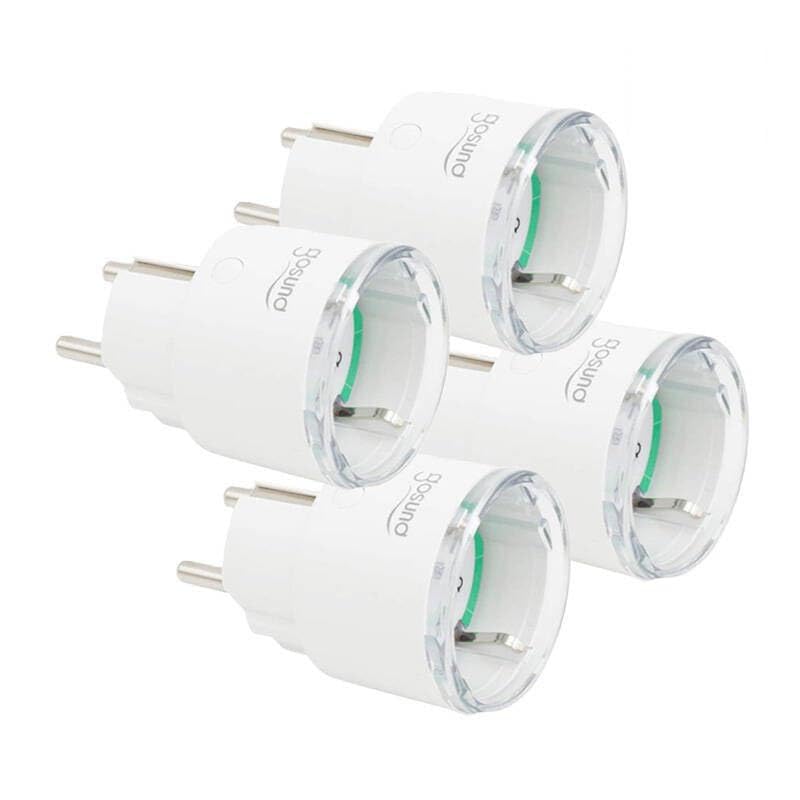
This image displays four white Gosund SP111 Smart WiFi Plugs. Each plug features a standard European Type F (Schuko) plug on one side and a corresponding socket on the other, with the Gosund logo printed on the side. A small indicator light and a button are visible on the top surface of each plug.
2. Informació de seguretat
- Do not exceed the maximum load current of 16A or power of 3680W.
- No desmunteu ni modifiqueu el dispositiu.
- Mantingueu el dispositiu allunyat de l'aigua, la humitat i les altes temperatures.
- Només per a ús interior.
- Assegureu-vos que l'endoll estigui completament inserit a la presa de corrent.
- Do not connect appliances that could cause a fire hazard if left unattended (e.g., irons, heaters).
3. Contingut del paquet
El paquet inclou els articles següents:
- 4 x Gosund SP111 Smart WiFi Plugs
- 1 x Manual d'usuari (aquest document)
4. Producte acabatview
Familiarize yourself with the components of your Gosund SP111 Smart WiFi Plug:
- Botó d'encesa: Press to manually turn the plug on/off. Press and hold for 5 seconds to enter pairing mode.
- Llum indicadora: Indicates the status of the plug (e.g., solid blue for ON, flashing blue for pairing mode, off for OFF).
- Type F (Schuko) Socket: Per connectar el vostre aparell.
- Type F (Schuko) Plug: For inserting into a wall outlet.
5. Configuració
5.1 Descarrega l'aplicació
The Gosund SP111 Smart WiFi Plug works with the Tuya Smart or Smart Life app. Download the app from the App Store (iOS) or Google Play Store (Android).
- Cerca "Tuya Smart" or "Smart Life".
- Instal·leu l'aplicació i registreu un compte.
5.2 Afegir dispositiu
- Plug the Gosund SP111 Smart WiFi Plug into a wall outlet.
- The indicator light should flash rapidly (approximately twice per second), indicating it's in pairing mode. If not, press and hold the power button for 5 seconds until it flashes rapidly.
- Obriu l'aplicació Tuya Smart o Smart Life.
- Toqueu la icona "+" a la cantonada superior dreta per afegir un dispositiu.
- Seleccioneu "Presa elèctrica" o "Presa (Wi-Fi)".
- Confirm that the indicator light is flashing rapidly.
- Enter your 2.4 GHz Wi-Fi network password (5 GHz Wi-Fi is not supported).
- Wait for the device to connect. Once connected, you can rename the plug.
6. Funcionament
6.1 Control manual
Press the power button on the plug to manually turn the connected appliance on or off.
6.2 Control d'aplicacions
- Encès/apagat remot: Tap the plug icon in the app to turn it on or off from anywhere.
- Programació: Set timers or schedules for the plug to turn on or off automatically at specific times.
- Compte enrere: Set a countdown timer for the plug to turn off after a set duration.
- Monitorització energètica: (If supported by the specific SP111 variant) View real-time and historical power consumption.
6.3 Control de veu
The Gosund SP111 Smart WiFi Plug can be integrated with voice assistants like Amazon Alexa and Google Assistant via the Tuya Smart or Smart Life app. Follow the instructions within the app to link your smart home assistant account.
- Examples ordres:
- "Alexa, activa [Nom del connector]"
- "Ei Google, apaga [Nom de l'endoll]"
7. Manteniment
- Desconnecteu el dispositiu abans de netejar-lo.
- Wipe the surface with a soft, dry cloth. Do not use liquid cleaners or abrasive materials.
- Emmagatzemar en un lloc fresc i sec quan no s'utilitzi durant períodes prolongats.
8. Solució De Problemes
| Problema | Solució |
|---|---|
| Plug cannot connect to Wi-Fi. |
|
| La llum indicadora està apagada. |
|
| Appliance connected to the plug does not turn on. |
|
9. Especificacions
| Model: | SP111-4 |
| Entrada Voltage: | 230 V CA, 50/60 Hz |
| Corrent de càrrega màxima: | 16A |
| Potència màxima: | 3680W |
| Tipus sense fil: | Wi-Fi de 2.4 GHz (802.11 b/g/n) |
| Suport de l'aplicació: | Tuya Smart / Smart Life |
| Temperatura de funcionament: | De 0 °C a 40 °C (32 °F a 104 °F) |
10. Garantia i Suport
Gosund products are designed and manufactured to the highest quality standards. For warranty information and technical support, please refer to the official Gosund weblloc web o contacteu amb el vostre distribuïdor. Conserveu el rebut de compra com a comprovant de compra.
Per obtenir més ajuda, visiteu: www.gosund.com/support


