1. Introducció
Thank you for choosing the Luxbird Terrarium Heating Pad with Thermostat Controller. This product is designed to provide a stable and controlled heating environment for your reptiles, amphibians, and other small animals, ensuring their comfort and well-being. Please read this manual thoroughly before installation and operation to ensure safe and efficient use.

Image: The Luxbird heating pad is ideal for various animals including reptiles, lizards, amphibians, and small animals.
2. Informació important de seguretat
Per evitar lesions o danys al producte, seguiu sempre les següents pautes de seguretat:
- Aquesta estora tèrmica només és per a ús domèstic/interior.
- Do not use pins or other metallic tools to fasten this pad.
- Do not immerse the heating pad or thermostat controller in water. This product is not designed for submersion.
- Do not fold, crush, or sit on the heating pad to avoid sharp folds or damage to internal wiring.
- Inspect the power cord and heating pad periodically for any signs of damage or fraying. Do not use if the cord is damaged.
- Ensure the product is used with a proper voltage supply (220-230VAC for heating pad, 100-240VAC for thermostat).
- Mantenir fora de l'abast dels nens i mascotes.
- Only for glass terrariums.

Image: The heating pad is waterproof, but should not be immersed. It features a 3M adhesive paper for secure attachment.
3. Contingut del paquet
Si us plau, reviseu el paquet per assegurar-vos que tots els articles hi són i no estan danyats:
- 2 x Luxbird Terrarium Heating Pads (8" x 12" / 20 x 30 cm)
- 1 x Luxbird Thermostat Controller
- 2 x Temperature Probes with Suction Cups

Image: Complete package contents including heating pads, thermostat, and probes.
4. Producte acabatview
The Luxbird heating system consists of a durable heating pad and a precise digital thermostat controller. The heating pad provides uniform heat distribution, while the thermostat allows for accurate temperature regulation to create an ideal environment for your pets.

Imatge: Detallada view of the thermostat controller, highlighting the display for current and set temperatures, control buttons (Setting, Down, Up), probe sockets (P1, P2), and thermostat sockets (WORK1, WORK2).

Imatge: Un cop mésview of the heating pad, thermostat, and probes, showing how they connect.
5. Instruccions de configuració
Follow these steps to properly set up your Luxbird heating system:
- Prepare the Terrarium: Ensure the bottom or side of your glass terrarium is clean and dry where you intend to place the heating pad.
- Attach the Heating Pad: Peel off the protective film from the adhesive side of the heating pad. Carefully press the heating pad onto the fora bottom or side of the glass terrarium. Ensure it is firmly attached and free of air bubbles.
- Connecteu les sondes de temperatura: Insert the temperature probes into the P1 and P2 sockets on the thermostat controller. Use the provided suction cups to secure the probes inside the terrarium, ensuring they are in the desired temperature monitoring areas and not directly on the heating pad.
- Connect Heating Pads to Thermostat: Plug the power cords of the heating pads into the WORK1 and WORK2 thermostat sockets on the controller.
- Encès: Plug the thermostat controller's power cord into a suitable electrical outlet. The display will light up, showing the current temperature.

Image: Proper placement of the heating pad on the outside of a glass terrarium for uniform heating.
6. Instruccions de funcionament
The thermostat controller allows for precise temperature management.
- Visualització: The large digital display shows the current temperature measured by the probes.
- Configuració de la temperatura: Use the 'Setting' button to enter temperature adjustment mode. Use the 'Up' and 'Down' arrows to set your desired temperature. Press 'Setting' again to confirm.
- Rang de control de temperatura: The thermostat can control temperatures within a range of 32°F to 113°F (0°C to 45°C).
- Interval de visualització de temperatura: The display shows temperatures from 23°F to 122°F (-5°C to 50°C).
- Alarma de temperatura alta/baixa: If the temperature deviates beyond the preset safe range, the thermostat will emit an audible alarm. This alerts you to take protective measures to prevent discomfort or vitality loss for your animals due to extreme temperatures.
- Indicador de calefacció: The display includes an indicator to show when the heating pads are actively working.

Image: The thermostat ensures constant temperature maintenance within the optimal range for your terrarium.
7. Manteniment
Proper maintenance ensures the longevity and optimal performance of your heating system:
- Neteja: Disconnect from power before cleaning. Wipe the heating pad and thermostat controller with a damp tela. No utilitzeu netejadors abrasius ni submergiu en aigua.
- Inspecció del cable: Regularly check the power cords and heating pad for any signs of wear, cuts, or damage. Replace if necessary.
- Neteja de la sonda: Clean the temperature probes periodically to ensure accurate readings.
8. Solució De Problemes
Si teniu problemes, consulteu els següents problemes i solucions habituals:
| Problema | Causa possible | Solució |
|---|---|---|
| Heating pad not heating | Not plugged in; Thermostat setting too low; Faulty connection; Damaged unit. | Ensure all plugs are secure; Adjust thermostat to desired temperature; Check for loose connections; Contact support if damaged. |
| La lectura de la temperatura no és precisa | Probe not properly placed; Dirty probe; Damaged probe. | Reposition probe away from direct heat or cold spots; Clean probe; Replace probe if damaged. |
| Thermostat alarm sounds | Temperature outside set range; Probe issue. | Check terrarium temperature and adjust as needed; Verify probe placement and function. |
| Heating pad not sticking | Surface not clean/dry; Adhesive worn out. | Clean and dry surface thoroughly before application; Use additional adhesive if needed (ensure it's safe for terrarium use). |
9. Especificacions
Detailed specifications for the Luxbird Terrarium Heating Pad and Thermostat Controller:
| Component | Especificació |
|---|---|
| Mat. De calor | |
| Mida | 8" x 12" (20 x 30 cm) |
| Poder | 16W |
| Voltage | 220-230VAC |
| Longitud del cable | 59 polzades (1.5 metres) |
| Controlador de termòstat | |
| Voltage | 100~240VAC |
| Màx. Carrega | 500W |
| Longitud del cable | 59 polzades (1.5 metres) |
| Interval de control de temperatura | 0 °C - 45 °C |
| Interval de visualització de temperatura | -5 °C - 50 °C |
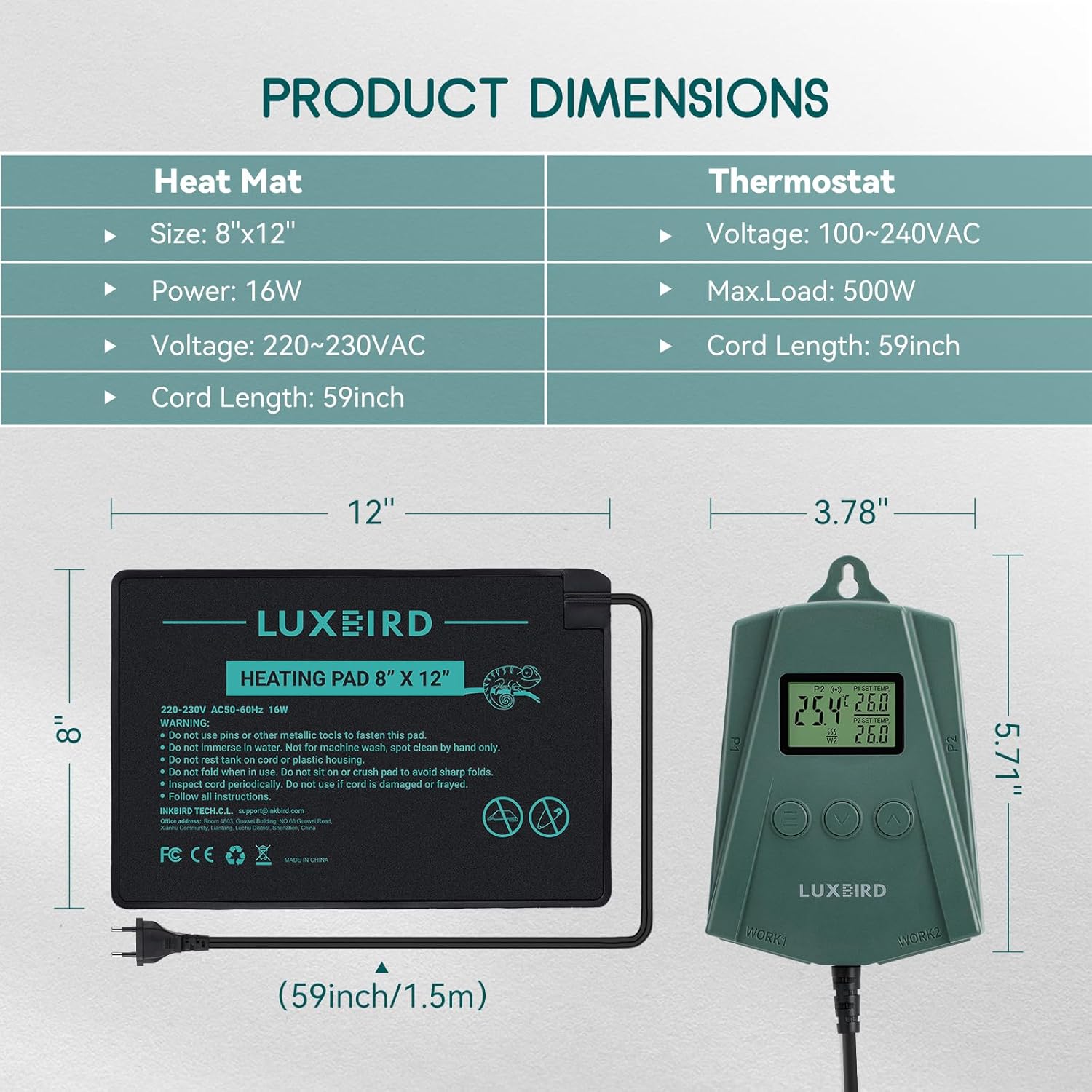
Image: Product dimensions for both the heating mat and the thermostat.

Image: Detailed dimensions of the 8"x12" heating pad.
10. Garantia i Suport
Luxbird products are manufactured with quality and reliability in mind. For any questions, technical support, or warranty inquiries, please contact Luxbird customer service through the retailer's platform or the contact information provided with your purchase. Please retain your proof of purchase for warranty claims.