1. Introducció
Thank you for choosing the Baseus Bowie E12 True Wireless Earphones. This manual provides detailed instructions on how to set up, operate, and maintain your earphones to ensure optimal performance and longevity.
1.1 Contingut del paquet
- Auriculars sense fil Baseus Bowie E12 (esquerra i dreta)
- Estoig de càrrega
- Cable de càrrega USB-C
- Manual d'usuari
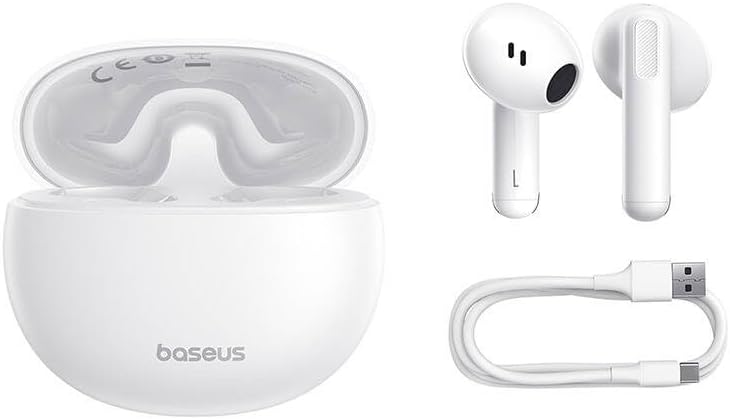
Figure 1.1: Package contents including the earphones, charging case, and USB-C charging cable.
2. Configuració
2.1 Càrrega inicial
Abans del primer ús, carregueu completament els auriculars i l'estoig de càrrega.
- Col·loqueu els dos auriculars a la caixa de càrrega.
- Connecteu el cable de càrrega USB-C al port de càrrega de la funda i l'altre extrem a un adaptador de corrent USB (no inclòs) o al port USB d'un ordinador.
- The indicator light on the charging case will show charging status. A full charge typically takes approximately 1.5 hours for the case and 1 hour for the earphones.

Figure 2.1: Earphones placed inside the charging case.
2.2 Vinculació amb un dispositiu
Els auriculars entraran automàticament en mode d'emparellament quan es treguin de l'estoig de càrrega.
- Assegureu-vos que els auriculars estiguin carregats.
- Obriu l'estoig de càrrega i traieu els dos auriculars. S'encendran automàticament i entraran en mode d'emparellament.
- Al dispositiu (telèfon intel·ligent, tauleta, ordinador), activeu el Bluetooth.
- Cerca "Baseus Bowie E12" in the list of available Bluetooth devices and select it to connect.
- Un cop connectat, un missatge de veu confirmarà l'emparellament correcte.
Note: The earphones will automatically reconnect to the last paired device when removed from the case, if Bluetooth is enabled on the device.
3. Instruccions de funcionament
3.1 Controls tàctils
The Baseus Bowie E12 earphones feature touch-sensitive areas on each earbud for easy control of music playback and calls.
| Acció | Auricular esquerre | Auricular dret |
|---|---|---|
| Reproduir/Pausa | Un sol toc | Un sol toc |
| Pista següent | Fes doble toc | |
| Pista anterior | Fes doble toc | |
| Respondre/Finalitzar la trucada | Un sol toc | Un sol toc |
| Rebutja la trucada | Mantén premut (2 s) | Mantén premut (2 s) |
| Activa l'Assistent de veu | Triple toc | Triple toc |
3.2 Com posar-se els auriculars
For optimal sound quality and comfort, ensure the earphones are properly seated in your ears.
- Identifica els auriculars esquerre (E) i dret (R).
- Introduïu suaument cada auricular al canal auditiu corresponent.
- Ajusta l'angle fins que et sentis segur i còmode, i el so sigui clar.

Figura 3.1: Detallada view of an earbud, highlighting the design for proper fit.
4. Manteniment
4.1 Neteja
Una neteja regular ajuda a mantenir la qualitat del so i la higiene.
- Feu servir un drap suau, sec i sense borrissol per netejar els auriculars i l'estoig de càrrega.
- Per a la brutícia persistent, lleugerament dampen the cloth with water or a mild, non-abrasive cleaner. Avoid getting moisture into openings.
- Gently clean the speaker mesh with a dry cotton swab or a small, soft brush to remove earwax or debris.
- No utilitzeu productes químics agressius, alcohol ni materials abrasius.
4.2 Emmagatzematge
Quan no els utilitzeu, guardeu els auriculars a la seva funda de càrrega per protegir-los i mantenir-los carregats.
- Emmagatzemar en un lloc fresc i sec, allunyat de la llum solar directa i de temperatures extremes.
- Avoid dropping or subjecting the earphones and case to strong impacts.
5. Solució De Problemes
If you encounter issues with your Baseus Bowie E12 earphones, refer to the following common solutions:
5.1 Sense so o connexió intermitent
- Comproveu la bateria: Assegureu-vos que els auriculars i l'estoig de càrrega estiguin prou carregats.
- Torna a emparellar: Disconnect "Baseus Bowie E12" from your device's Bluetooth settings, then re-pair following the instructions in Section 2.2.
- Distància: Ensure the earphones are within the Bluetooth range (typically 10 meters) of your device.
- Interferència: Move away from strong Wi-Fi signals, other Bluetooth devices, or microwave ovens that might cause interference.
5.2 Only One Earphone Working
- Comproveu la bateria: Assegureu-vos que tots dos auriculars estiguin carregats.
- Restablir: Place both earphones back into the charging case, close the lid for 5 seconds, then open and remove them. This often re-syncs them.
- Torna a emparellar: If the issue persists, try unpairing and re-pairing the earphones as described above.
5.3 Els auriculars no es carreguen
- Comproveu el cable: Ensure the USB-C charging cable is securely connected to both the case and the power source. Try a different cable or power adapter.
- Contactes nets: Gently clean the charging contacts on both the earphones and inside the charging case with a dry cotton swab.
- Bateria de la caixa: Assegureu-vos que la caixa de càrrega tingui prou energia.
6. Especificacions
Detailed technical specifications for the Baseus Bowie E12 True Wireless Earphones.
| Característica | Especificació |
|---|---|
| Marca | Baseus |
| Nom del model | Bowie E12 |
| Número de model | A00059801216-Z1 |
| Factor de forma | Intraauricular (In-Ear) |
| Dimensions del producte | 10 x 5 x 1.27 cm |
| Pes de l'article | 100 g |
| Color | Blanc |
| Components inclosos | 1 pack (Earphones, Charging Case, USB-C Cable) |
| Piles necessàries | No (bateries recarregables integrades) |
Nota: les especificacions estan subjectes a canvis sense previ avís.
7. Garantia i Suport
Baseus products are designed with quality and reliability in mind. For warranty information and customer support, please refer to the official Baseus weblloc web o poseu-vos en contacte amb el vostre distribuïdor local.
You can also download the official Baseus app for additional features and support:
Per obtenir més ajuda, visiteu el lloc web oficial de Baseus. website or contact their customer service directly. Contact information may also be found on the product packaging.

Figure 7.1: Product packaging with support information and QR code for app download.


