1. Introducció
The PUTORSEN 36-Inch Clamp-on Cable Management Net is designed to organize and conceal wires, cables, and power strips under your desk. This solution helps maintain a tidy and efficient workspace by keeping electrical clutter out of sight and off the floor. Its clamp-on design eliminates the need for drilling, making installation straightforward and suitable for various desk types.
2. Informació de seguretat
Please read all instructions carefully before installation and use. Ensure the product is securely attached to prevent accidental detachment. Do not overload the net beyond its specified weight capacity. The mesh material is flame-resistant, reducing fire risk, and its vented design promotes airflow to prevent overheating of electronic components.

Figure 2.1: Flame-resistant material and vented design for safety and airflow.
3. Contingut del paquet
Verifiqueu que tots els components siguin presents abans de començar la instal·lació:
- 1 x 36-inch Mesh Cable Management Net
- 2 x Clamp-on Brackets
- 5 x Reusable Cable Ties
- Necessary Connectors and Support Bars
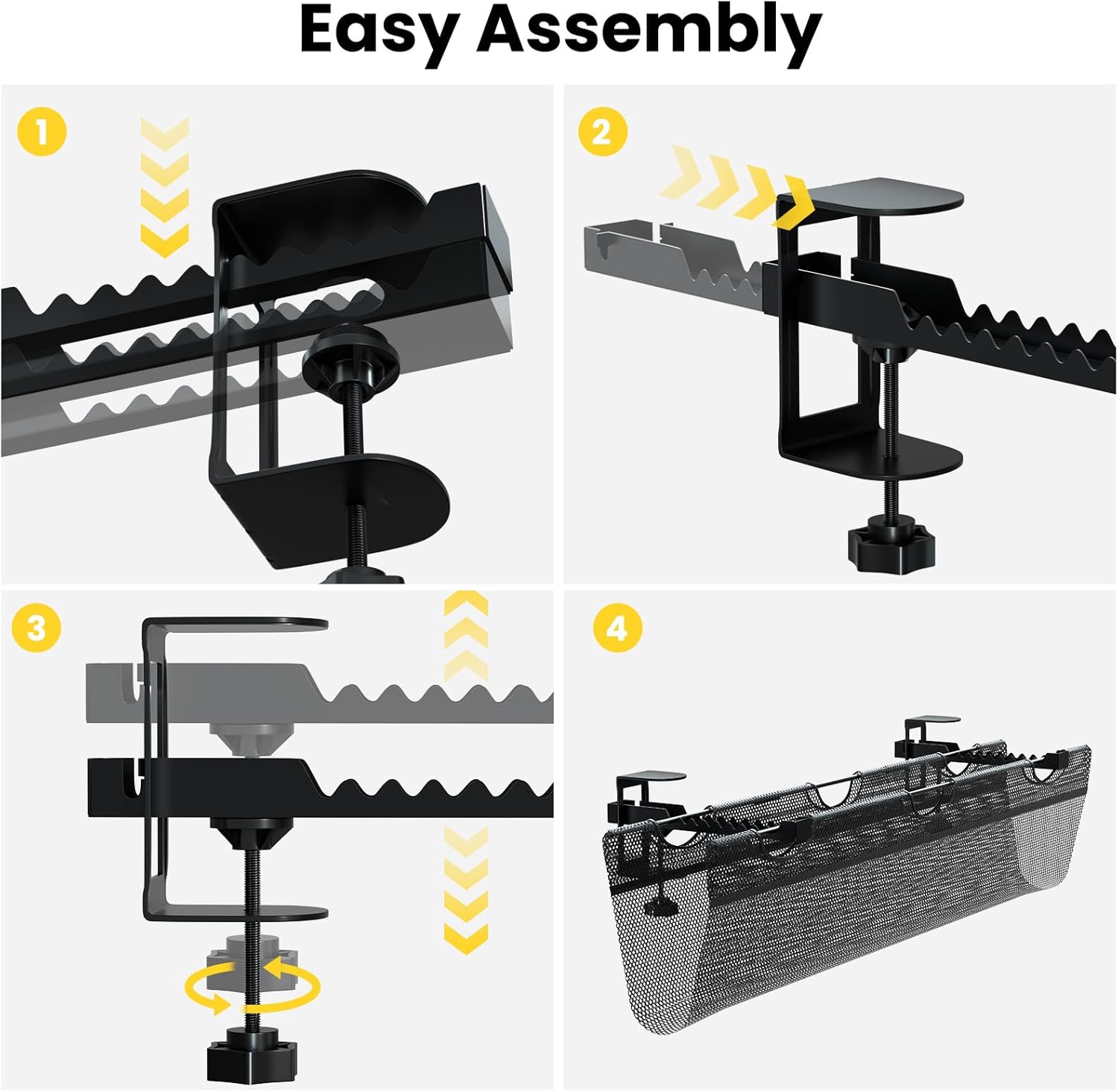
Figura 3.1: Tots els components inclosos al paquet.
4. Especificacions
| Característica | Detall |
|---|---|
| Dimensions del producte | 36" de llargada x 15.4" d'amplada |
| Pes de l'article | 3.12 lliures |
| Material | Flame-resistant Mesh |
| Capacitat de càrrega | Fins a 11 lliures (5 kg) |
| Desk Thickness Compatibility | 0.6" a 2.8" |
| Color | Negre |

Figure 4.1: Product dimensions and load capacity.
5. Configuració i instal·lació
The PUTORSEN Cable Management Net features an easy, no-drill assembly process. Follow these steps for installation:
- Connecteu els connectors: Securely attach the provided connectors to the support bars.
- Feed Bars Through Mesh: Carefully feed the assembled support bars through the designated holes in the mesh panel.
- Secure C-Clamps: Posicioneu el C-clamps on your desk surface. Ensure your desk thickness is between 0.6” and 2.8”. Tighten the clamps to firmly secure the entire assembly to the desk. The clamps have selectable slots to adjust the mesh basket position and depth.

Figure 5.1: Step-by-step easy assembly guide.

Figura 5.2: Detall del cl ajustableamp mount design.
Vídeo d'instal·lació
Video 5.1: An animation demonstrating the installation process of the cable management net.
Video 5.2: A demonstration of organizing cables with a mesh cable organizer, showing before and after results.
6. Instruccions de funcionament
Once installed, the cable management net provides ampespai per a diversos elements:
- Col·locació del cable: Place loose cables, power cords, and adapters directly into the mesh net.
- Power Strips: The large storage capacity allows for power strips to be securely held within the net.
- Profunditat ajustable: Utilize the selectable slots on the clamps to adjust the depth of the mesh basket, accommodating different sizes of items and optimizing space.
- Brides de cable: Use the included reusable cable ties to further secure and bundle loose cables for a more organized appearance.

Figure 6.1: Organized cables under the desk, creating more desktop space.

Figure 6.2: Large storage capacity and adjustable depth of the net.

Figure 6.3: Before and after comparison of cable organization.
7. Manteniment
To maintain the cleanliness and functionality of your cable management net, simply wipe the mesh material with a damp cloth as needed. Avoid using harsh chemicals or abrasive cleaners that could damage the material.
8. Solució De Problemes
- Caiguda de la xarxa: If the net appears to sag, ensure that the clamps are tightened sufficiently and that the weight inside the net does not exceed the 11 lbs capacity. Redistribute items if necessary.
- Clamps Not Secure: Comproveu dues vegades que el C-clamps are properly aligned with the desk edge and fully tightened. Ensure your desk thickness is within the compatible range of 0.6” to 2.8”.
- Cables Falling Out: Use the provided reusable cable ties to bundle smaller cables together, preventing them from slipping through the mesh openings.
9. Garantia i Suport
PUTORSEN is committed to customer satisfaction. If you have any questions, concerns, or require assistance with your cable management net, please do not hesitate to contact our professional customer service team. We are available 7 days a week, 24 hours a day to provide support.