1. Introducció
The DALY Smart BMS (Battery Management System) 16S 48V 100A is designed to protect and manage LifePO4 lithium battery packs. This system ensures safe and efficient operation by continuously monitoring various battery parameters and providing essential protection against common battery issues. This manual provides detailed instructions for the proper installation, operation, maintenance, and troubleshooting of your DALY Smart BMS.
2. Producte acabatview
The DALY Smart BMS offers advanced features for comprehensive battery management:
- Enhanced Battery Safety: Provides protection against overcharging, over-discharging, overcurrent, short circuits, and extreme temperatures, ensuring the longevity and safety of your battery pack.
- 2-in-1 Bluetooth/Wi-Fi Dongle: Facilitates easy connection to a mobile application via Bluetooth for local monitoring. For long-distance control, the Wi-Fi module allows remote monitoring and parameter adjustment when connected to a Wi-Fi router.
- Strong Overcurrent Capability: Utilizes high-performance MOSFETs and high-power TVS in hardware to quickly absorb surge voltage and control regenerative current, protecting both the BMS and batteries. Software features optimized absorption and release logic to prevent power-off issues from regenerative current.
- Multiple Interface Functions: Supports dual UART communication and is compatible with BT&WIFI modules and touch displays. Includes a Bluetooth activation-free function, allowing BMS wake-up simply by opening the app.

Image: DALY Smart BMS 16S 48V 100A unit, including the WiFi module, sampling cables, and an example app interface.
Vídeo: Un overview of the DALY K-series Smart BMS, highlighting its features such as smart functionality, waterproofing, parallel connection support, and compact size. This video demonstrates the product's capabilities and various applications.
3. Contingut del paquet
Upon opening your DALY Smart BMS package, please verify that all the following items are included:
- 16S 48V 100 amp Smart BMS (x1)
- B-P-Output Line (x1)
- 2-in-1 BT/Wi-Fi Dongle (x1)
- Sampling Cable (x1)
- NTC (Temperature Sensor) (x1)
- CAN/485 5-pin Communication Cable (x1)
- Manual d'instruccions (x1)

Image: Visual representation of the DALY BMS package contents, including the BMS unit, cables, and communication modules.
4. Especificacions
Key technical specifications for the DALY Smart BMS 16S 48V 100A:
- Dimensions del producte: 4.84 x 2.56 x 0.55 polzades (123 x 65 x 14 mm)
- Pes de l'article: 13.4 ounces (approximately 170-210g)
- Entrada Voltage: 48 Volts
- Vol. De sortidatage: 48 Volts
- Corrent de descàrrega: 100A
- Overdischarge Current: 150 ± 3A
- Corrent de càrrega: 100A
- Overcharge Current: 150 ± 3A
- Sobrecàrrec Voltage: 3.75V ± 0.05V (per cell, configurable)
- Overdischarge Voltage: 2.2V ± 0.05V (per cell, configurable)
- Volum de càrregatage: 58.4V (for 16S LifePO4)
- Output Wire: 7AWG/100 mm
- Cable: 24AWG/450 mm
- Temperatura de funcionament: Charging: -35 to 75°C, Discharging: -35 to 75°C
- Temperatura d'emmagatzematge: -40 a 85 °C
- Passive Equalization Function: 100 ± 30mA balance current (for LifePO4)
- Protecció contra curtcircuits: 10-500µs delay, released by removing load.

Image: A table detailing the electrical specifications, including discharge current, charging current, overcharge/overdischarge voltages, and other parameters for the LifePO4 16S 100A BMS.

Image: A table outlining the passive equalization function parameters, single cell over-charge/over-discharge protection, charge/discharge over-current protection, and temperature protection ranges.
5. Instal·lació i cablejat
Proper installation is crucial for the safe and effective operation of your BMS. Follow these steps carefully. The wiring diagram below uses a K series 60A BMS as an example, but the principles apply to the 16S 48V 100A model.
- Step 1: Solder the Sampling Cables. The first black cable in the sampling cable set connects to the overall negative terminal (B-) of the battery pack. Subsequent red cables connect to the positive terminal of each series cell, starting from the first string, then the second, and so on, until all cables are connected to their respective cell positive terminals.
- Step 2: Check the Cables. After connecting the cables, use a multimeter to measure the voltage between two adjacent cells, starting from the header. Ensure there are no wrong connections or missing connections.
- Step 3: Connect Output Wires. Connect the B- wire of the BMS to the total negative terminal of the battery pack. Then, plug the sampling cable into the BMS. After activating the BMS, verify that the battery voltage (between B+ & B-) and the voltage between P+ & P- are consistent.
Safety Warning: Incorrect wiring can damage the BMS, battery, and connected equipment. Always double-check all connections before applying power.

Image: A detailed wiring diagram illustrating the connection of the sampling cables to the battery pack and the main output wires to the BMS. This diagram is essential for correct installation.
6. Funcionament
The DALY Smart BMS can be monitored and configured via a mobile application or PC software using the provided 2-in-1 Bluetooth/Wi-Fi dongle.
6.1. App Connection and Monitoring
- Connexió Bluetooth: Plug in the Bluetooth/Wi-Fi dongle to the appropriate UART port on the BMS. Ensure Bluetooth is enabled on your mobile device. Open the DALY Smart BMS app (available for iOS and Android). The app should automatically detect and connect to the BMS (Bluetooth activation-free function).
- Connexió Wi-Fi: For remote monitoring, connect the Wi-Fi dongle to a Wi-Fi router. Configure the Wi-Fi settings within the app to establish a long-distance connection. This allows you to monitor battery status and adjust parameters from anywhere with internet access.
- Paràmetres de seguiment: The app displays real-time data such as State of Charge (SOC), total voltage, vol cel·lular individualtages, current, temperature, and cycle count. It also provides alarms for protection events.
- Ajust de paràmetres: The app allows you to customize various protection parameters, such as overcharge/overdischarge voltage limits, overcurrent thresholds, and balancing settings.
6.2. CAN/485 Communication
The BMS supports CAN and RS485 communication protocols, allowing integration with other systems or devices. Use the provided CAN/485 5-pin cable to connect to compatible equipment. Refer to the specific documentation of your external system for detailed communication setup.

Imatge: Primer pla view of the BMS interface ports, including NTC (temperature sensor), UART (for Bluetooth/Wi-Fi module), and CAN/485 communication ports.
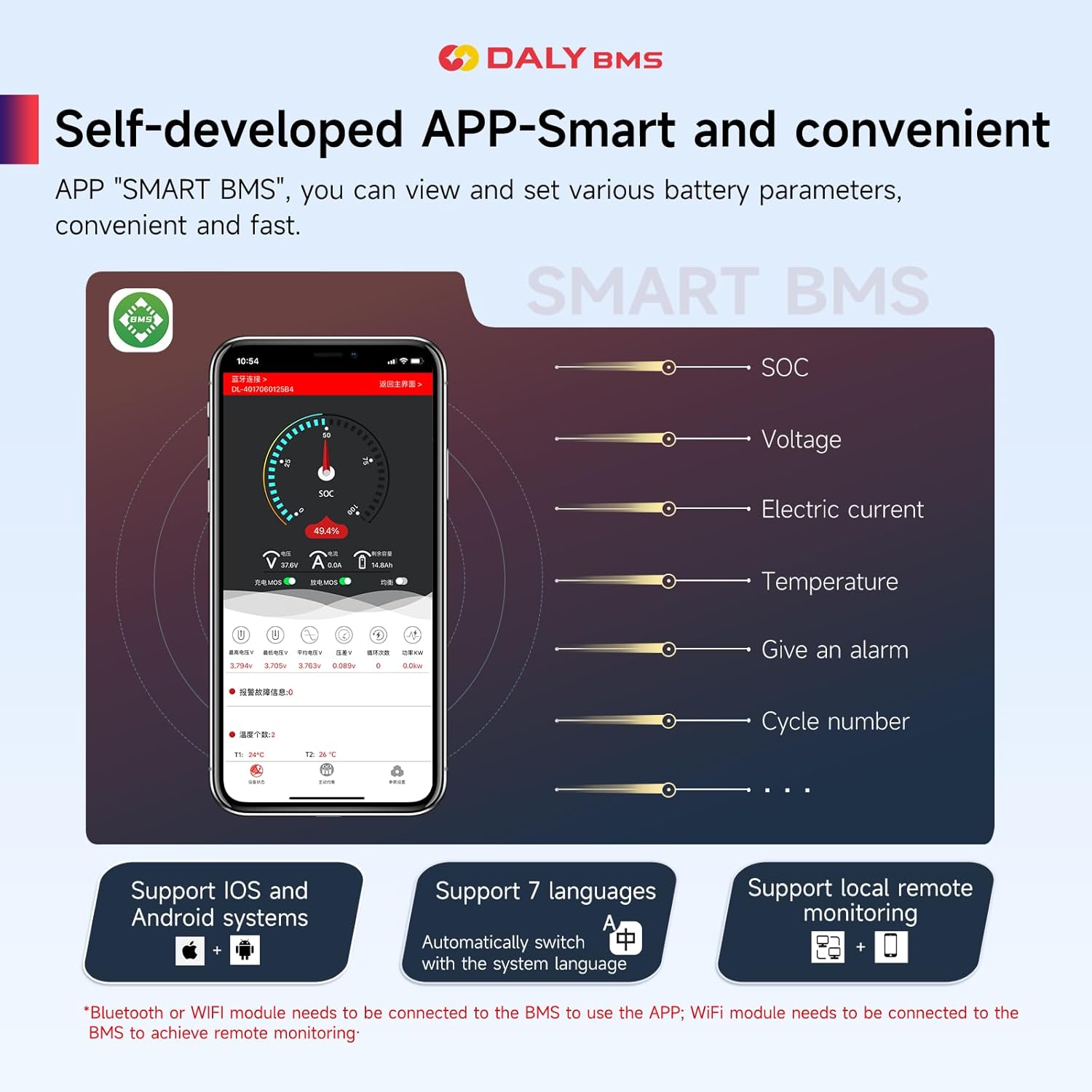
Image: Screenshot of the DALY Smart BMS mobile application, displaying various battery parameters such as SOC, voltage, current, temperature, and options for active balancing and parameter settings.
7. Manteniment
Regular maintenance helps ensure the longevity and optimal performance of your battery pack and BMS.
- Seguiment: Regularly check battery parameters via the mobile app. Pay attention to cell voltage balance, temperature, and any protection alarms.
- Equilibri: The DALY Smart BMS features passive equalization with a balance current of 100 ± 30mA. This function helps to equalize cell voltages over time, especially during charging. Ensure the battery pack is allowed sufficient time for balancing, particularly after deep discharges.
- Connexions: Periodically inspect all wiring connections for tightness and corrosion. Loose connections can lead to increased resistance, heat, and potential system failure.
- Medi ambient: Operate the battery pack and BMS within the recommended temperature ranges. Avoid exposure to excessive moisture or extreme temperatures.

Image: A graphic illustrating key features of the DALY BMS, including passive equalization, which helps maintain cell balance within the battery pack.
8. Solució De Problemes
This section addresses common issues you might encounter with your DALY Smart BMS.
- BMS Not Activating/No Power Output:
- Verify all wiring connections, especially the B- and P- connections, and the sampcable ling.
- Ensure the battery pack voltage is within the operational range.
- Check for any active protection triggers (e.g., over-discharge, short circuit) via the app.
- Bluetooth/Wi-Fi Connection Issues:
- Ensure the dongle is correctly plugged into the UART port.
- For Bluetooth, ensure your mobile device's Bluetooth is on and within range. Try restarting the app or your device.
- For Wi-Fi, confirm the dongle is connected to a stable Wi-Fi network and configured correctly in the app.
- If the BMS is unresponsive, sometimes applying a load or charge can wake it up and re-enable Bluetooth broadcasting.
- Vol inexactetage Readings or Protection Triggers:
- Recheck all sampling cable connections to individual cells for proper contact.
- Ensure the BMS firmware is up to date (if applicable, check app for updates).
- Si els problemes persisteixen, contacteu amb l'assistència tècnica.
- Regenerative Current Issues (e.g., in golf carts):
- The DALY BMS is designed with strong overcurrent capability to handle regenerative currents. If you experience unexpected power-offs, ensure the BMS is correctly configured for your application and that the battery pack can accept the regenerative current.
For complex issues not covered here, please refer to the manufacturer's official support channels.
9. Informació de seguretat
Always observe the following safety precautions when working with lithium battery systems:
- Seguretat elèctrica: Lithium battery packs store significant energy. Always disconnect the battery pack from any loads or chargers before performing installation or maintenance. Use insulated tools.
- Cablejat correcte: Follow the wiring diagram precisely. Incorrect wiring can lead to short circuits, fire, or damage to the BMS and battery.
- Ventilació: Ensure adequate ventilation around the battery pack to prevent heat buildup.
- Temperatura: Do not operate or store the battery pack and BMS outside the specified temperature ranges.
- Danys físics: Protect the BMS and battery pack from physical impact or puncture.
- Exposició a l'aigua: While the BMS may have some moisture resistance, avoid direct exposure to water or other liquids.
10. Garantia i Suport
The DALY Smart BMS 16S 48V 100A comes with a 3 any de garantia from the date of purchase. This warranty covers manufacturing defects and ensures the product meets its specified performance under normal use conditions.
For warranty claims, technical assistance, or further inquiries, please contact your retailer or the manufacturer, Dongguan Daly Electronics Co., Ltd. Provide your product model number and purchase details when seeking support.


