1. Introducció
This manual provides essential information for the safe and effective installation, operation, and maintenance of your DALY Smart BMS 4S 12V 400A. Please read this manual thoroughly before using the product to ensure optimal performance and longevity of your LifePO4 lithium battery pack.
2. Producte acabatview
The DALY Smart BMS (Battery Management System) is designed to protect and manage 4-series (4S) 12V LifePO4 lithium battery packs with a 400A current rating. It integrates advanced protection features, communication capabilities via WiFi and CAN 485, and remote monitoring through a dedicated mobile application or PC software. This system ensures the safety, stability, and extended lifespan of your battery.

Image 1: DALY Smart BMS 4S 12V 400A with WiFi module and mobile application interface.
3. Característiques clau
- Enhanced Battery Safety: Offers comprehensive protection against overcharging, over-discharging, overcurrent, short circuits, and extreme temperatures, safeguarding your battery pack.
- 2-in-1 Bluetooth/Wi-Fi Dongle: Enables easy connection to the mobile app via Bluetooth for local control. For long-distance monitoring and control, switch to Wi-Fi (requires connection to a Wi-Fi router).
- Remote Monitoring & Parameter Adjustment: Monitor battery status and adjust parameters remotely via the mobile app or PC software, suitable for various applications including home use, travel, or trolling motors.
- Parallel Circuit Support: The built-in parallel circuit supports the parallel use of multiple battery packs and 485/CAN Bus parallel communication, ensuring compatibility with mainstream inverters.
- Disseny robust: Features high current resistance, small size for easy installation, and low temperature rise during operation.
- Llum indicadora integrada: Provides visual feedback on the BMS's working condition.
4. Contingut del paquet
En desempaquetar, comproveu que tots els elements que s'enumeren a continuació hi són presents i en bon estat:

Image 2: Visual representation of the DALY Smart BMS 4S 12V 400A package contents.
| Item | Quantitat |
|---|---|
| S-type Smart BMS (4S 12V 400A) | 1 |
| Manual | 1 |
| B-P-Output Line | 2 |
| 2-in-1 BT/Wi-Fi Dongle | 1 |
| Sampling Cable | 1 |
| NTC (Temperature Sensor) | 1 |
| CAN/485 5-pin Cable | 1 |
5. Setup: Installation and Wiring
Careful installation and wiring are crucial for the proper function and safety of your BMS. Follow these steps precisely:

Image 3: Detailed wiring diagram for the DALY Smart BMS 4S 12V 400A.
- Solder Sampling Cables: The first black cable in the sampling cable set connects to the negative terminal of the battery (B-). The second cable (red) connects to the positive terminal of the first string of batteries. Continue this pattern for all subsequent strings until all cables are connected to their respective positive terminals.
- Comproveu els cables: After connecting the sampling cables, use a multimeter to measure the voltage between two adjacent cables starting from the header. Ensure there are no incorrect connections or missing connections.
- Connect Output Wires: Connect the B- wire of the BMS to the total negative terminal of the battery pack. Then, plug the sampling cable into the BMS. After activating the BMS, confirm that the voltage (bateria voltage) between B+ and B- and the voltage between P+ and P- are consistent.
Important: The BMS will not activate until a charge is applied to the battery pack through the BMS. Ensure your cells are pre-charged for storage before connecting.
6. Instruccions de funcionament
The DALY Smart BMS offers intelligent monitoring and control through its dedicated application and communication modules.
6.1 Mobile Application and PC Software

Image 4: Screenshot of the DALY Smart BMS mobile application, displaying various battery parameters.
The 'SMART BMS' app allows you to view and set various battery parameters. It supports both iOS and Android systems and automatically switches with the system language. The app displays key information such as:
- Estat de càrrec (SOC)
- Voltage
- Corrent elèctric
- Temperatura
- Estat d'alarma
- Número de cicle
Connect the 2-in-1 Bluetooth/Wi-Fi dongle to the BMS. Use Bluetooth for local monitoring. For remote monitoring, connect the dongle to a Wi-Fi router, and the BMS data will be accessible via the cloud platform.
6.2 Connexió paral·lel
The BMS supports parallel connection of multiple battery packs, allowing for safe expansion of your energy storage system. This feature, combined with 485/CAN Bus parallel communication, ensures compatibility with various inverter systems.
Vídeo 1: Un overview of the DALY S-series Smart BMS features, including parallel connection, high current resistance, and smart monitoring capabilities.
7. Manteniment
To ensure the longevity and optimal performance of your DALY Smart BMS and battery pack, consider the following maintenance guidelines:
- Seguiment periòdic: Periodically check the battery parameters via the mobile app or PC software to identify any anomalies early.
- Condicions ambientals: Ensure the BMS operates within its specified temperature range (charging: -35 to 75°C, discharging: -35 to 75°C) and avoid exposure to excessive moisture or dust. The BMS is designed to be moisture-proof and anti-vibration.
- Integritat de la connexió: Periodically inspect all wiring connections for tightness and corrosion. Loose connections can lead to poor performance or safety hazards.
- Actualitzacions de programari: Keep the mobile application and BMS firmware updated to benefit from the latest features and improvements.
- Neteja: Gently clean the exterior of the BMS with a dry, soft cloth if necessary. Do not use liquids or abrasive cleaners.
8. Solució De Problemes
If you encounter issues with your DALY Smart BMS, refer to the following common troubleshooting steps:
- BMS Not Activating: Ensure a charge is applied to the battery pack through the BMS. The BMS typically requires an initial charge to 'wake up' and become operational.
- Problemes de connexió de l'aplicació:
- For Bluetooth: Ensure the dongle is properly connected, Bluetooth is enabled on your device, and you are within range.
- For Wi-Fi: Verify the dongle is connected to a stable Wi-Fi network and the network has internet access for remote monitoring.
- Vol incorrectetage Readings/Balancing Issues: Double-check all sampling cable connections to the battery cells. Incorrect wiring is a common cause of inaccurate readings or poor cell balancing.
- Battery Shutting Down Unexpectedly: This could indicate a protection trigger (e.g., over-discharge, overcurrent, temperature). Check the app for alarm messages. Ensure your load is within the BMS's specified limits.
- BMS Not Detected by App: If the BMS has been idle for an extended period, it might enter a deep sleep mode. Try pressing the button on the Bluetooth/Wi-Fi module to wake it up.
If the problem persists after following these steps, please contact DALY customer support for further assistance.
9. Especificacions
Detailed technical specifications for the DALY Smart BMS 4S 12V 400A:
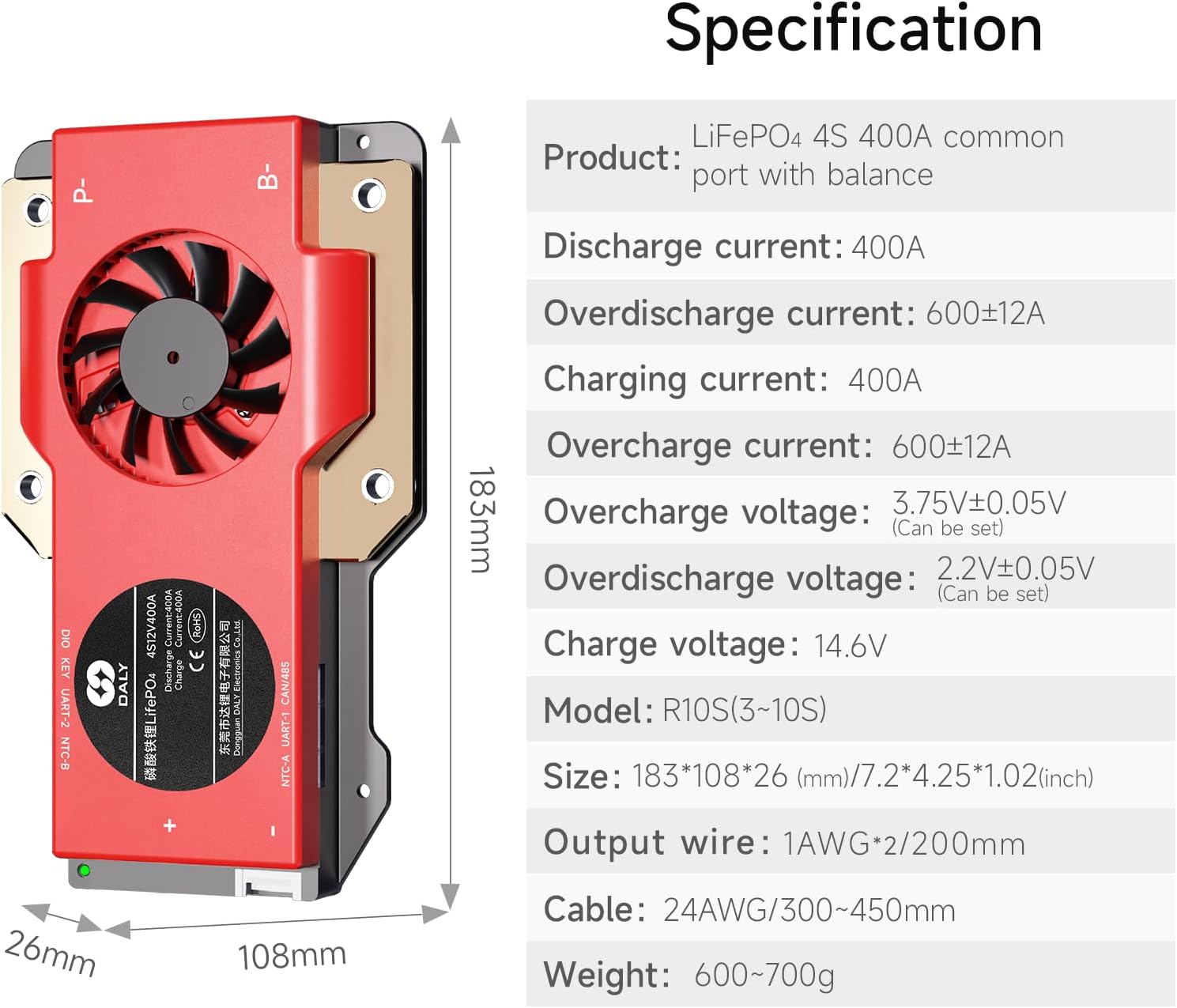
Image 5: Visual representation of the DALY Smart BMS 4S 12V 400A specifications.
| Paràmetre | Valor |
|---|---|
| Tipus de producte | LiFePO4 4S 400A common port with balance |
| Corrent de descàrrega | 400A |
| Overdischarge Current | 600 ± 12A |
| Corrent de càrrega | 400A |
| Overcharge Current | 600 ± 12A |
| Sobrecàrrec Voltage | 3.75V ± 0.05V (Can be set) |
| Overdischarge Voltage | 2.2V ± 0.05V (Can be set) |
| Volum de càrregatage | 14.6 V |
| Model | R10S (3~10S) |
| Dimensions (L x A x A) | 183 x 108 x 26 mm (7.2 x 4.25 x 1.02 polzades) |
| Fil de sortida | 1AWG*2/200mm |
| Cable | 24AWG/300~450mm |
| Pes | 600~700g (1.32~1.54 pounds) |
| Temperatura de funcionament | Charging: -35 to 75°C, Discharging: -35 to 75°C |
| Temperatura d'emmagatzematge | -40 a 85 °C |
| Certificacions | ISO/FCC/RoHS/PSE/CE APPROVED |
10. Garantia i Suport
The DALY Smart BMS 4S 12V 400A comes with a 3 any de garantia des de la data de compra. Aquesta garantia cobreix els defectes de materials i de mà d'obra en ús normal.
For technical support, warranty claims, or any questions regarding the product, please contact DALY customer service. Refer to the contact information provided with your purchase or visit the official DALY weblloc de recursos de suport.


