1. Producte acabatview
The PINEWORLD K1+K3 Biometric Gun Safe offers secure storage for handguns and valuables with multiple quick-access options. The K3 model features 4 access methods: fingerprint, passcode, key, and a mobile application. The K1 model provides 3 access methods: fingerprint, passcode, and key. Both models are constructed from durable alloy steel and include internal foam padding to protect contents.
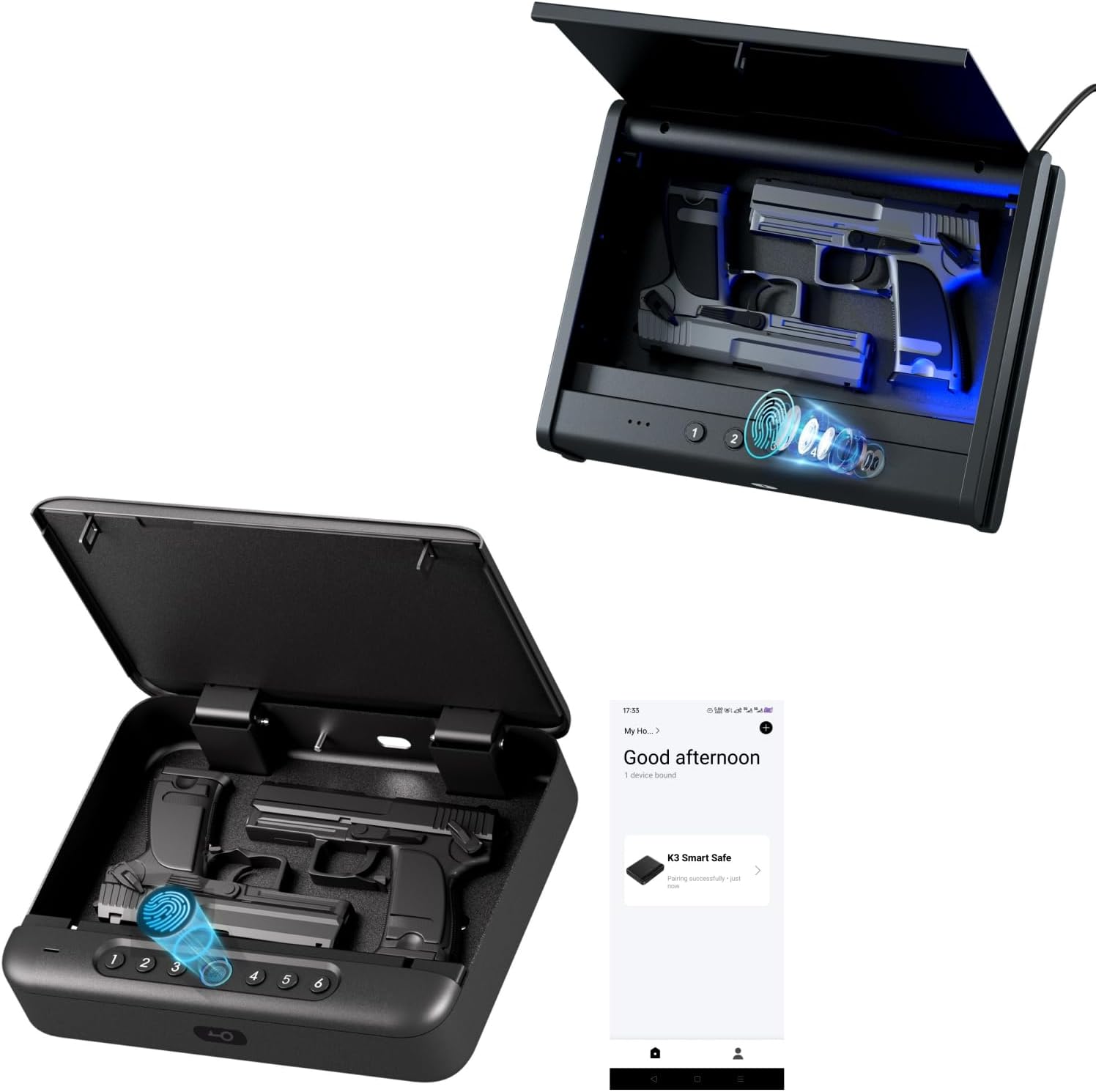
Image 1.1: PINEWORLD K1+K3 Biometric Gun Safes (K1 bottom left, K3 top right) with various access methods.
2. Contingut del paquet
Si us plau, verifiqueu que tots els elements que s'enumeren a continuació estiguin inclosos al vostre paquet:
- Segur de pistoles biomètriques PINEWORLD K1
- PINEWORLD K3 Biometric Gun Safe (with App functionality)
- Emergency Keys (2 sets)
- Security Steel Cable
- Tornavís (per al compartiment de la bateria)
- USB-C Cable (for emergency power)
- Manual d'usuari
3. Instruccions de configuració
3.1 Instal·lació de la bateria
- Locate the battery compartment, typically on the underside or inside the safe.
- Feu servir el tornavís proporcionat per obrir la tapa del compartiment de la bateria.
- Inseriu 4 piles AAA, assegurant la polaritat correcta.
- Replace the battery compartment cover and secure it with the screwdriver.
3.2 Setting a Passcode
The safe comes with a default passcode (e.g., 111111). It is highly recommended to change this immediately.
- Open the safe using the emergency key or default passcode.
- Locate the 'Set' button inside the safe (often near the battery compartment or control panel).
- Press and hold the 'Set' button until you hear a beep or see an indicator light.
- Enter your desired 6-digit passcode using the numeric keypad.
- Press the 'Set' button again to confirm. The safe will beep to indicate successful setup.
3.3 Setting a Fingerprint
The safe can store up to 50 unique fingerprints for quick access.
- Open the safe using a registered access method (passcode or key).
- Locate the 'Set' button inside the safe.
- Press the 'Set' button once.
- Place your finger on the fingerprint sensor. Lift and place your finger multiple times (typically 3-5 times) from different angles as prompted by the safe's voice guide or indicator lights.
- The safe will confirm successful fingerprint registration with a green light or voice prompt.

Image 3.1: Registering a fingerprint on the biometric sensor.
3.4 Deleting Passcodes/Fingerprints
To delete a specific passcode or fingerprint, follow the instructions in your detailed user manual. To delete all registered passcodes and fingerprints and reset to factory default settings:
- Obre la caixa forta.
- Press and hold the 'Set' button for approximately 5 seconds until you hear a long beep or see a specific indicator. This will reset all user-defined settings.
3.5 App Access (K3 Model Only)
For the K3 model, download the PINEWORLD companion app from your smartphone's app store. Follow the in-app instructions to pair your safe and enable remote access features.

Image 3.2: Smartphone displaying the PINEWORLD safe's mobile application.
3.6 Password Setup Video Guide
Video 3.1: A short video demonstrating the process of setting up a password on a PINEWORLD safe.
4. Instruccions de funcionament
4.1 Obrir la caixa forta
- Empremta digital: Place a registered finger firmly on the biometric sensor. The safe will open within 0.5 seconds if the fingerprint is recognized.
- Contrasenya: Enter your registered passcode using the numeric keypad, then press the confirmation button.
- Clau: Insert the emergency key into the keyhole and turn it to unlock the safe.
- App (K3 Model Only): Use the PINEWORLD app on your smartphone to remotely unlock the safe.

Image 4.1: Visual representation of the three primary quick-access methods.
4.2 Energia d'emergència
If the internal batteries are depleted and you cannot access the safe, you can provide temporary power using the USB-C port. Connect a USB-C cable to the port and a power source (e.g., power bank, wall adapter). This will temporarily power the keypad and fingerprint sensor, allowing you to open the safe and replace the internal batteries.
4.3 Mode de silenci
The safe features a mute mode for silent operation. Refer to your detailed user manual for specific instructions on how to activate or deactivate this feature.
5. Característiques de seguretat
5.1 Steel Cable Installation
The included steel cable can be used to secure the safe to a stationary object, preventing unauthorized removal.
- Unscrew the cap from one end of the steel cable.
- Loop the cable around a secure, immovable object (e.g., car seat frame, bedpost).
- Feed the unscrewed end of the cable through the loop.
- Insert the unscrewed end into the designated cable port on the safe (usually on the side or back).
- Screw the cap back onto the cable end from inside the safe, securing it in place.

Image 5.1: PINEWORLD safe secured with a steel cable in a vehicle.
6. Manteniment
- Regularly check battery levels and replace all 4 AAA batteries when low to ensure continuous operation.
- Keep the fingerprint sensor clean and free from dirt or moisture for optimal performance.
- Store emergency keys in a secure location away from the safe.
- Eviteu exposar la caixa forta a temperatures o humitat extremes.
7. Solució De Problemes
- Safe not opening with fingerprint: Ensure your finger is clean and dry. Try repositioning your finger on the sensor. If issues persist, re-register your fingerprint or use an alternative access method.
- Safe not opening with passcode: Double-check the entered passcode. Ensure batteries are not low.
- Sense alimentació/Caixa forta no respon: Replace the internal AAA batteries. If still unresponsive, use the USB-C emergency power feature to gain access and then replace batteries.
- Forgotten passcode/fingerprint: Use the emergency key to open the safe, then follow the instructions in Section 3.4 to reset or re-register access methods.
8. Especificacions
| Característica | Detall |
|---|---|
| Marca | MÓN DE PINES |
| Número de model | K1+K3 |
| Tipus de bloqueig | Key, Biometric (Fingerprint), Passcode, App (K3 only) |
| Material | Acer d'aliatge |
| Capacitat d'empremta digital | Fins a 50 |
| Capacitat de contrasenya | Fins a 50 |
| Velocitat d'accés | 0.5 seconds (Fingerprint) |
| Font d'alimentació | 4 x AAA Batteries (not included), USB-C for emergency power |
| Tipus de muntatge | Autònom, sobretaula |
| Nivell de resistència a l'aigua | No resistent a l'aigua |
9. Garantia i Suport
PINEWORLD provides a 1-year warranty service for all gun safe series. Free returns are available within 30 days of purchase. For any questions or support needs, please contact PINEWORLD customer service. Your satisfaction is our priority.


