Introducció
This manual provides essential information for the setup, operation, and maintenance of your Arducam USB 3.0 Camera Module B0497C. This high-speed 4K camera features an 8.3MP IMX678 sensor, designed for superior low-light performance and wide-angle capture on Windows and Linux systems.
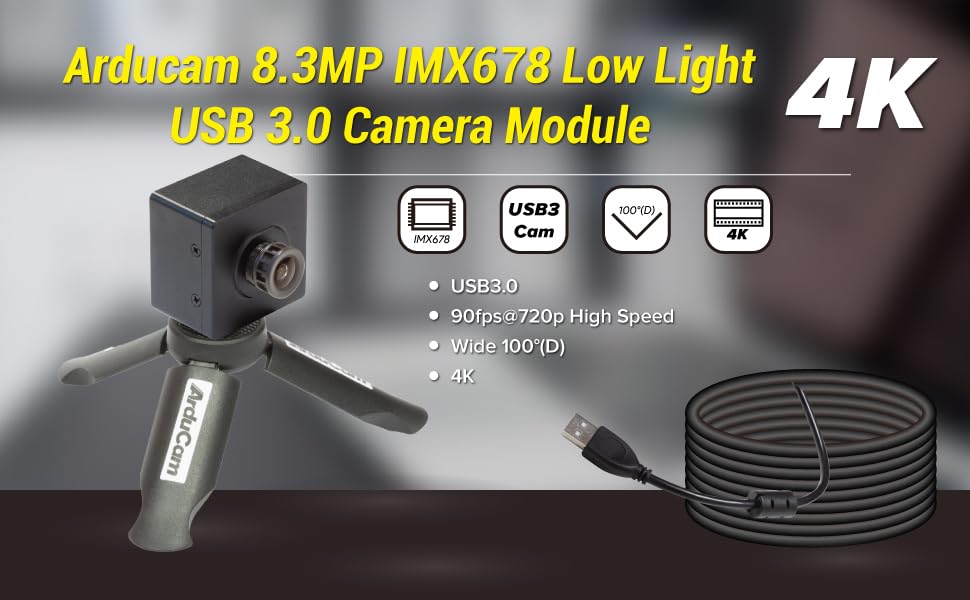
Image: Arducam 8.3MP IMX678 Low Light USB 3.0 Camera Module B0497C highlighting its 4K resolution, USB 3.0 connectivity, 90fps@720p high speed, and 100°(D) wide-angle lens.
Què hi ha a la caixa
Verifiqueu que tots els components siguin presents en desembalar:
- 1 x IMX678 USB3.0 Camera Module with Back Cover and Tripod Adapter
- 1 x 1m USB A to Type-C Cable

Image: Contents of the Arducam USB 3.0 Camera Module package, showing the camera module and the USB Type-C cable.
Instruccions de configuració
- Connecteu el cable USB: Insert the USB Type-C end of the provided 1m cable into the camera module's Type-C port.
- Connexió a l'ordinador: Plug the USB-A end of the cable into an available USB 3.0 port on your Windows or Linux computer. For optimal performance, use a USB 3.0 port.
- Instal·lació del controlador (Plug and Play): The camera is designed for plug-and-play operation. No additional drivers are typically required for Windows and Linux operating systems. The system should automatically detect and install the necessary components.
- Muntatge (opcional): The camera module includes a tripod adapter. You can attach it to a standard tripod or mounting bracket for stable positioning.

Image: Detail of the USB Type-C port on the Arducam camera module, indicating USB 3.0 connectivity.

Image: The Arducam camera module attached to a tripod, demonstrating a typical setup configuration. Note: Tripod is not included.
Instruccions de funcionament
Compatibilitat de programari
The Arducam B0497C is compatible with standard webcam software on both Windows and Linux operating systems. It functions as a UVC (USB Video Class) device.
- Windows: Use built-in camera applications, OBS Studio, VLC Media Player, or other third-party software that supports UVC cameras.
- Linux: Utilize applications like Cheese, OBS Studio, VLC Media Player, or custom applications that interface with V4L2 (Video for Linux Two) devices.

Image: Visual representation of the camera module's compatibility with Windows and Linux operating systems.
Funcionament bàsic
- Programari de llançament: Open your preferred camera application on your computer.
- Selecciona la càmera: If you have multiple cameras, select "Arducam USB Camera" or a similar identifier from the device list within your software.
- Ajustar la configuració: Most applications allow you to adjust resolution, frame rate, brightness, contrast, and other image parameters. The camera supports resolutions up to 3840x2160 (4K) and frame rates up to 90fps at 720p.
- Rendiment amb poca llum: The IMX678 sensor provides enhanced low-light capabilities. For optimal results in dim environments, ensure your software settings are configured to utilize these features.

Image: A visual comparison demonstrating the superior low-light performance of the Arducam 4K IMX678 camera compared to a standard camera.

Imatge: Examples illustrating the camera's effective performance in low-light conditions, such as indoor and outdoor night scenes.
Manteniment
- Neteja de la lent: Use a soft, lint-free cloth specifically designed for optical lenses to gently wipe the camera lens. Avoid abrasive materials or harsh chemicals.
- Cleaning the Module: For the camera body, use a dry, soft cloth to remove dust. Do not use liquid cleaners directly on the module.
- Emmagatzematge: When not in use, store the camera module in a clean, dry environment, away from extreme temperatures and direct sunlight.
- Manipulació: Handle the camera module by its edges to avoid touching the lens or the circuit board components.
Resolució de problemes
- Camera not detected by computer:
- Assegureu-vos que el cable USB estigui connectat correctament tant a la càmera com a l'ordinador.
- Prova un port USB diferent de l'ordinador, preferiblement un port USB 3.0.
- Prova amb un altre cable USB si està disponible.
- Reinicieu l'ordinador.
- Check your operating system's device manager (Windows) or
lsusbcommand (Linux) to see if the device is listed.
- Poor image quality or excessive noise:
- Ensure adequate lighting in the environment. While the camera has low-light capabilities, extreme darkness will still affect image quality.
- Adjust camera settings within your software (e.g., exposure, gain, white balance).
- Verify that the lens is clean and free from smudges or dust.
- Check for available firmware updates from Arducam's official website, as updates can improve image processing.
- Low frame rate:
- Ensure the camera is connected to a USB 3.0 port. USB 2.0 ports will limit bandwidth and frame rate.
- Reduce the resolution or disable certain image enhancements in your software to decrease bandwidth requirements.
- Close other applications that might be consuming significant system resources.
Especificacions
| Característica | Detall |
|---|---|
| Nom del model | B0497C |
| Sensor | CMOS IMX678 |
| Resolució | 8.3MP (3840x2160) |
| Velocitat de fotogrames | 90fps@720p |
| Tipus de lent | M12 Lens, F1.65 Aperture |
| Camp de View (FoV) | 100° (D) |
| Connectivitat | USB 3.0 (Type-C connector on camera) |
| Característiques especials | Low Light Performance, Onboard ISP (de-Bayer, gamma, BLC, AE, AWB, CCM, RGB2YUV) |
| Sistemes operatius | Windows, Linux (Plug and Play) |
| Pes de l'article | 3.53 unces |
| Dimensions del paquet | 1.34 x 1.34 x 1.34 polzades |
Garantia i Suport
Per obtenir informació sobre la garantia i assistència tècnica, consulteu la pàgina oficial d'Arducam. weblloc web o contacteu directament amb el servei d'atenció al client. Conserveu el rebut de compra per a reclamacions de garantia.
Arducam Official Weblloc: www.arducam.com


