Introducció
This manual provides comprehensive instructions for the installation, operation, and maintenance of the Aruba AP-503 Dual Band IEEE 802.11ax Wireless Access Point. The AP-503 is designed to deliver high-performance, cost-effective connectivity for environments with increasing device density, cloud adoption, and IoT integration.
Característiques clau
- Connectivitat d'alta velocitat: Provides a maximum real-world aggregate data rate of 1.49 Gbps (HE80/HE20) for reliable and fast wireless performance.
- Optimized User Experience: Features like Orthogonal Frequency-Division Multiple Access (OFDMA) and cellular optimization reduce airtime contention and improve efficiency.
- Aruba Air Slice™: Ensures application assurance by optimizing radio resources for specific traffic types, providing SLA-grade performance.
- Wi-Fi 6 Aware Client Optimization: Utilizes Aruba's AI-powered ClientMatch technology to steer Wi-Fi 6 capable devices to the best available access point.
- Automated RF Optimization: AirMatch uses machine learning to adapt the network to changing RF conditions, including noise, radar, and density.
- Advanced Cellular Coexistence (ACC): Minimizes interference from cellular networks and other external sources.
- Port Gigabit Ethernet: For ultra-fast wired network speeds.
- Font d'alimentació incorporada: Ensures accurate voltage supply to all components.
- Muntatge al sostre: Designed for convenient and discreet installation.
Producte acabatview

Figura 1: superior view of the Aruba AP-503, highlighting its sleek, circular design and the Aruba branding.
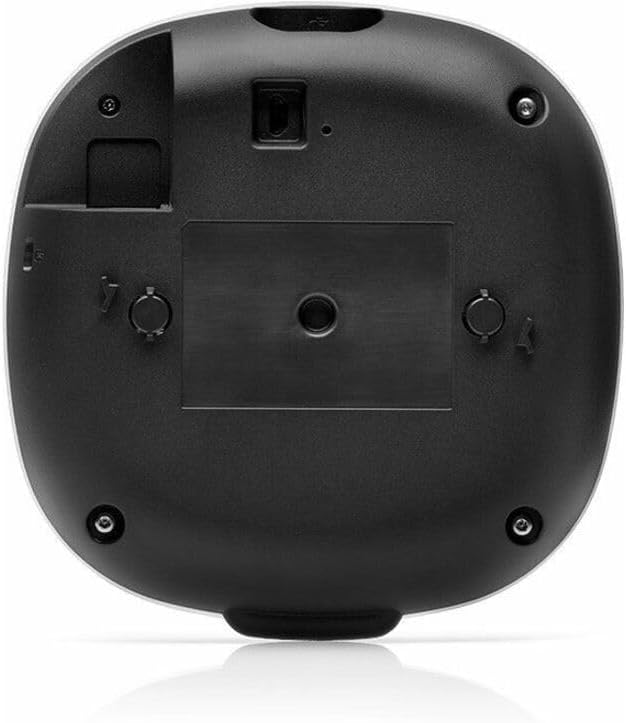
Figura 2: A baix view of the Aruba AP-503, illustrating the mounting mechanism and port locations for connectivity.
Configuració i instal·lació
The Aruba AP-503 is designed for easy deployment, typically ceiling-mounted. Ensure you have the necessary mounting hardware and network cables before beginning installation.
- Enquesta del lloc: Conduct a site survey to determine optimal placement for wireless coverage and minimize interference.
- Muntatge: Securely attach the access point to the ceiling or wall using the appropriate mounting bracket (sold separately or included depending on kit). Refer to the mounting guide for detailed instructions.
- Connexió d'alimentació: Connect the access point to a power source. The AP-503 supports Power over Ethernet (PoE) or an optional external power adapter.
- Connexió de xarxa: Connect the Gigabit Ethernet port of the AP-503 to your network switch or router.
- Configuració inicial: Access the access point's management interface via a web browser or dedicated Aruba management software to perform initial setup, including network settings, SSID configuration, and security protocols.
Instruccions de funcionament
Once installed and configured, the Aruba AP-503 operates automatically to provide wireless connectivity. Users can connect to the configured Wi-Fi networks using their devices.
- Dispositius de connexió: Cerca the configured Wi-Fi network (SSID) on your wireless devices (laptops, smartphones, tablets) and enter the password if required.
- Supervisió del rendiment: Use the Aruba management interface (e.g., Aruba Central or Instant GUI) to monitor network performance, connected clients, and troubleshoot any issues.
- Actualitzacions de firmware: Comproveu i apliqueu regularment les actualitzacions del firmware per garantir un rendiment òptim, seguretat i accés a noves funcions.
Manteniment
Regular maintenance ensures the longevity and optimal performance of your Aruba AP-503.
- Neteja: Gently wipe the exterior of the access point with a soft, dry cloth. Do not use liquid cleaners or aerosols.
- Gestió de firmware: Keep the device firmware updated to the latest stable version. This often includes security patches and performance enhancements.
- Condicions ambientals: Ensure the access point is operating within its specified temperature and humidity ranges to prevent overheating or damage.
- Monitorització de la xarxa: Periòdicament review network logs and performance metrics through the management interface to identify and address potential issues proactively.
Resolució de problemes
| Problema | Causa possible | Solució |
|---|---|---|
| No Power/LEDs Off | Power cable disconnected; PoE not active; faulty power adapter. | Check power connections. Ensure PoE switch port is active or use a functional power adapter. |
| No es pot connectar a la Wi-Fi | Incorrect Wi-Fi password; out of range; SSID hidden; AP not broadcasting. | Verify password. Move closer to AP. Check AP configuration for SSID broadcast. Restart AP. |
| Velocitat Wi-Fi lenta | Network congestion; interference; outdated firmware; poor AP placement. | Reduce number of connected devices. Check for interference sources. Update firmware. Re-evaluate AP placement. |
| Access Point Not Visible on Network | Network cable issue; IP address conflict; management interface misconfiguration. | Check Ethernet cable connection. Verify IP address settings. Ensure management interface is accessible. |
Especificacions
| Atribut | Detall |
|---|---|
| Marca | Aruba |
| Número de model | AP-503 |
| Estàndard sense fils | IEEE 802.11ax (Wi-Fi 6) |
| Classe de banda de freqüència | Doble banda (2.4 GHz, 5 GHz) |
| Velocitat de dades màxima | 1.49 Gbit/s (aggregate) |
| Tecnologia de connectivitat | Wi-Fi, Ethernet |
| Ports Ethernet | Gigabit Ethernet |
| Antenna Form Factor | Interna |
| Tipus de muntatge | Muntatge al sostre |
| Dimensions del producte | 5.7 x 5.7 x 1.4 polzades |
| Pes de l'article | 9 unces |
| Fabricant | HPE - ARUBA NON-INSTANT |
Garantia i Suport
For detailed warranty information and technical support, please refer to the official Aruba website or contact Aruba customer service. Keep your purchase receipt for warranty claims.
Official Aruba Weblloc: www.arubanetworks.com


