1. Introducció
The POLY Trio C60 is an IP conference phone designed to facilitate clear and effective communication in meeting environments, particularly optimized for Microsoft Teams. It ensures that all participants, whether local or remote, are heard with Poly's signature audio quality, enhanced by NoiseBlockAI technology for natural speech transmission without interruptions. The device supports Power over Ethernet (PoE/PoE+) for simplified installation and features an intuitive interface for one-touch meeting initiation.
Característiques principals:
- Unmistakable audio quality from Poly.
- One-touch meeting initiation for ease of use.
- Familiar, easy-to-use interface.
- Completely new design with fabric cover, light base, and integrated cable management.
- Supports PoE/PoE+ for power and network connectivity.
- Microsoft Teams Variant for seamless integration.

Image 1.1: The POLY Trio C60 IP Conference Phone, showcasing its central display and sleek design, ready for a Microsoft Teams meeting.
2. Configuració
Follow these steps to set up your POLY Trio C60 IP Conference Phone.
2.1 Desembalatge i col·locació
- Traieu amb cura tots els components de l'embalatge.
- Place the Trio C60 in the center of your conference room table for optimal microphone coverage. Ensure it is within reach of a network port that provides Power over Ethernet (PoE).
2.2 Connexió del dispositiu
- Connect an Ethernet cable from your network's PoE-enabled port to the LAN port on the Trio C60. The device will power on automatically.
- If PoE is not available, connect a compatible power adapter (sold separately) to the power port and then to an electrical outlet. Then, connect an Ethernet cable from your network to the LAN port.
- Espereu que el dispositiu s'iniciï. Això pot trigar uns minuts.
2.3 Initial Configuration for Microsoft Teams
- Once the device has booted, follow the on-screen prompts to select your language and region.
- The device will prompt you to sign in to your Microsoft Teams account. Use the on-screen keyboard to enter your credentials.
- After successful login, the device will synchronize with your Teams calendar and contacts, making it ready for use.

Imatge 2.1: De dalt a baix view of the POLY Trio C60, illustrating its design for optimal sound pickup and integrated cable management.
3. Instruccions de funcionament
The POLY Trio C60 offers an intuitive touch interface for managing your calls and meetings.
3.1 Unir-se a una reunió
- If a meeting is scheduled in your Microsoft Teams calendar, a "Join" button will appear on the device's home screen shortly before the meeting starts.
- Toqueu Uneix-te button to enter the meeting.
- Alternativament, podeu tocar el botó Calendari icona a view your schedule and join from there.
3.2 Fer una trucada
- From the home screen, tap the Trucades icona.
- Use the on-screen dial pad to enter a phone number or search for a contact.
- Toqueu Truca botó per iniciar la trucada.
3.3 In-Call Controls
During an active call or meeting, the following controls are available on the touch screen:
- Silencia/Activa el silenci: Tap the microphone icon to mute or unmute your audio. The LED lights on the device will indicate the mute status (e.g., red for muted).
- Control de volum: Utilitza el + i - buttons on the device's base or the on-screen slider to adjust speaker volume.
- End Call/Leave Meeting: Tap the red phone icon to disconnect from a call or leave a meeting.
- Comparteix contingut: If enabled, tap the Comparteix icon to share content from a connected device.
- Més opcions: Toqueu ... icon for additional meeting controls, such as managing participants or changing settings.
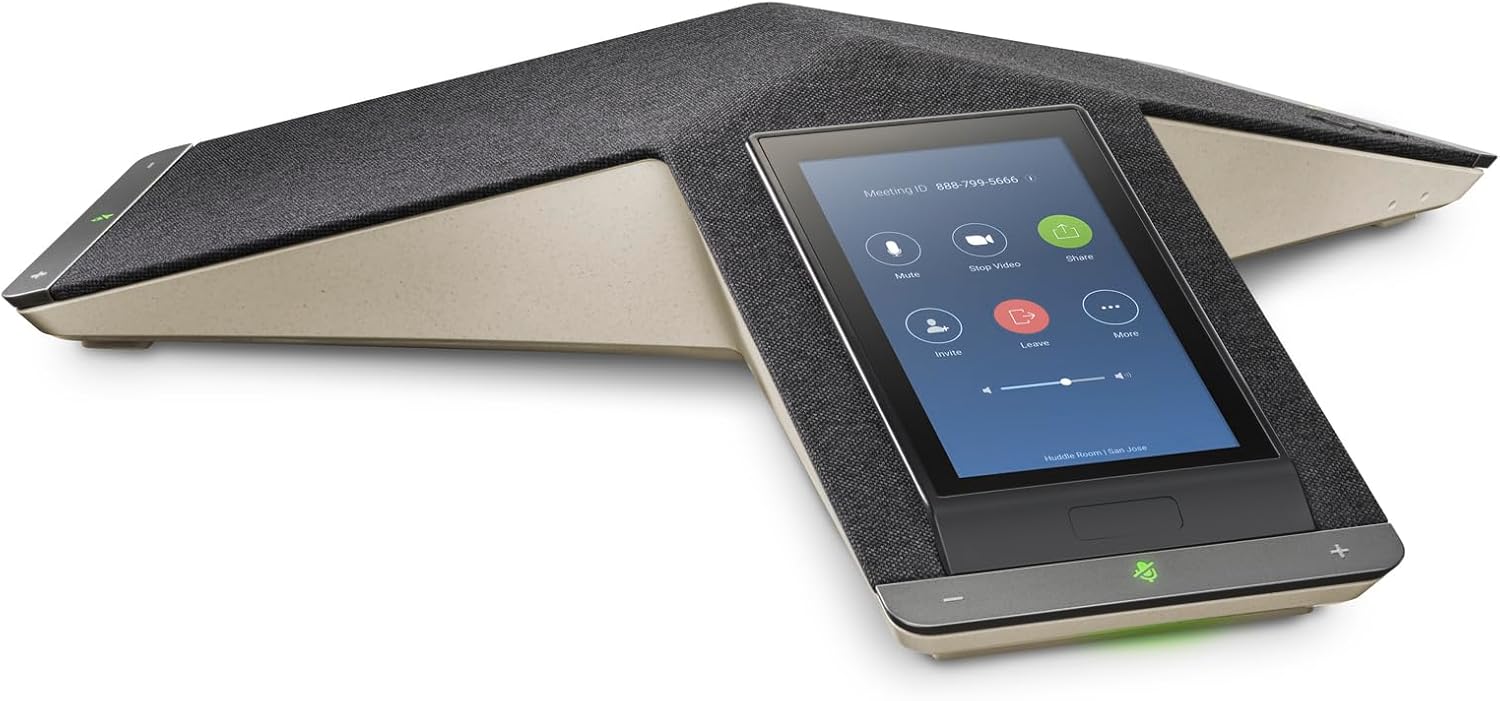
Image 3.1: The POLY Trio C60's touch screen interface, showing typical Microsoft Teams meeting controls like Mute, Stop Video, Share, Invite, and Leave.
4. Manteniment
Proper maintenance ensures the longevity and optimal performance of your POLY Trio C60.
4.1 Neteja del dispositiu
- Before cleaning, disconnect the device from its power source.
- Utilitzeu un drap suau i sense pelusa lleugerament dampened with water or a mild, non-abrasive cleaner to wipe the exterior surfaces.
- For the touch screen, use a screen-specific cleaning solution and a microfiber cloth.
- Avoid using harsh chemicals, abrasive cleaners, or spraying liquids directly onto the device.
4.2 Actualitzacions de programari
The POLY Trio C60 receives software updates automatically through your network connection. Ensure the device is connected to the internet to receive the latest firmware and feature enhancements. Do not power off the device during an update process.
5. Solució De Problemes
This section addresses common issues you might encounter with your POLY Trio C60.
5.1 El dispositiu no s'encén
- Comprovació de la connexió PoE: Ensure the Ethernet cable is securely connected to the LAN port and that the network port provides Power over Ethernet.
- Comprova l'adaptador de corrent: If not using PoE, verify that the power adapter is correctly connected to the device and a working electrical outlet.
- Reinicia: Disconnect and reconnect the power/Ethernet cable to restart the device.
5.2 Sense connectivitat de xarxa
- Comprovació del cable: Ensure the Ethernet cable is firmly connected at both ends (device and network port).
- Estat de la xarxa: Verify that your network is operational and other devices can connect.
- Restart Network Equipment: Try restarting your network switch or router.
5.3 Problemes d'àudio (sense so, àudio distorsionat)
- Ajust de volum: Increase the speaker volume using the + button or on-screen controls.
- Estat de silenci: Ensure the device is not muted. The LED lights should not be red.
- Obstrucció del micròfon: Assegureu-vos que els micròfons no estiguin coberts.
- Qualitat de la xarxa: Poor network connection can affect audio quality. Check your internet speed and stability.
5.4 Microsoft Teams Login Issues
- Credencials: Double-check your Microsoft Teams username and password.
- Estat del compte: Ensure your Teams account is active and has the necessary licenses.
- Accés a la xarxa: Confirm the device has internet access to reach Microsoft Teams services.
6. Especificacions
| Característica | Detall |
|---|---|
| Dimensions del producte | 13.15 x 15.08 x 3.03 polzades |
| Pes de l'article | 5.15 lliures |
| Fabricant | POLY |
| ASIN | B0CY5H44R5 |
| Número de model de l'article | 849B6AA |
| Data de primera disponibilitat | 11 de setembre de 2024 |
7. Informació de la garantia
POLY products are covered by a limited warranty. Specific warranty terms and conditions, including duration and coverage details, are typically provided with your product documentation or can be found on the official POLY weblloc web. Si us plau, conserveu el comprovant de compra per a reclamacions de garantia.
8. Suport
For further assistance, technical support, or to access additional resources such as FAQs and software downloads, please visit the official POLY support website. You may also find contact information for customer service in your region on their weblloc.
Official POLY Weblloc: www.poly.com


