1. Introducció
This manual provides detailed instructions for the SVANTTO Android Barcode Scanner, Model IPDA111-2D-US. This handheld device is designed for efficient data collection and inventory management in various professional environments, including warehouses, retail, and logistics. It features an Android 10 operating system, a full-size numeric keyboard, and a high-performance 1D/2D/QR barcode scanning engine.
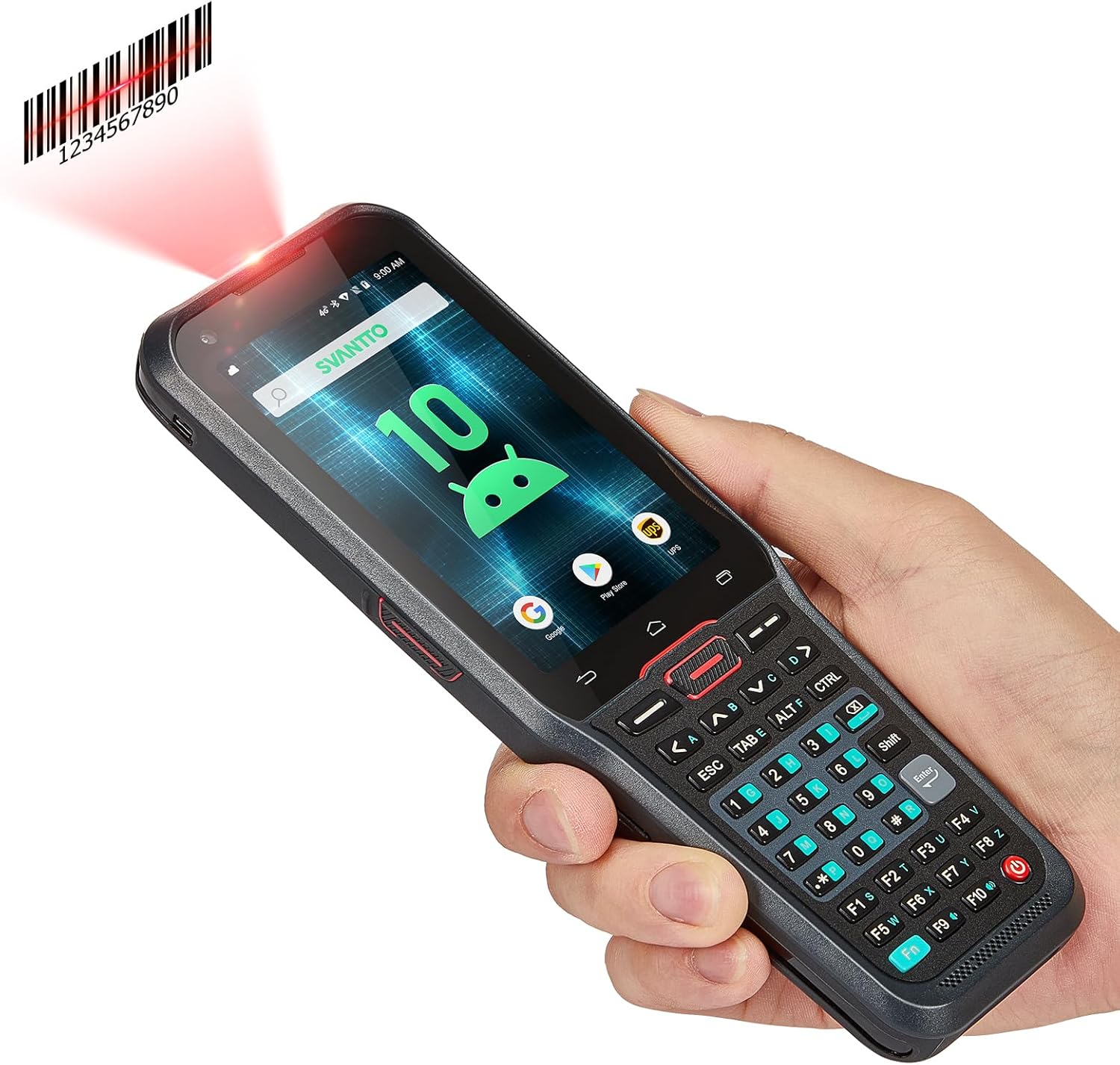
Image: The SVANTTO Android Barcode Scanner, showcasing its ergonomic design, vibrant display, and comprehensive numeric keyboard, held in a user's hand.
2. Producte acabatview
2.1 Característiques clau
- Sistema operatiu: Android 10 for enhanced privacy and smooth operation.
- Processador: 12nm Finfet Mt6762 Octa-core 64-bit CPU for efficient multitasking.
- Memòria: 4GB RAM and 64GB ROM for ample storage and smooth application performance.
- Scanning Engine: Honeywell N6602, supporting 1D, 2D, and QR barcodes (EAN-13, UPC-A, PDF417, Code128, etc.).
- Teclat: Full-size numeric keyboard (A-Z) with F1-F10 customizable keys for rapid data entry.
- Bateria: 5000mAh large-capacity battery, providing up to 13 hours of continuous work or 370 hours of standby time. Supports fast charging (under 3 hours).
- Connectivitat: 2G/3G/4G, Wi-Fi, and Bluetooth for versatile communication.
- Durabilitat: Designed to withstand 1.5-meter drops and operate in temperatures from -20°C to 55°C (-4°F to 131°F).
- Compatibilitat del programari: Compatible with Odoo, Zoho Inventory, Ocra Scan, and Finale inventory management software.
2.2 Components
The SVANTTO barcode scanner package typically includes the following items:
- SVANTTO Android Barcode Scanner Unit
- Cable de càrrega USB
- Adaptador d'alimentació
- Easy Setup Guide (Printed Manual)
- Protector de pantalla
- Hand Strap (often included for secure handling)
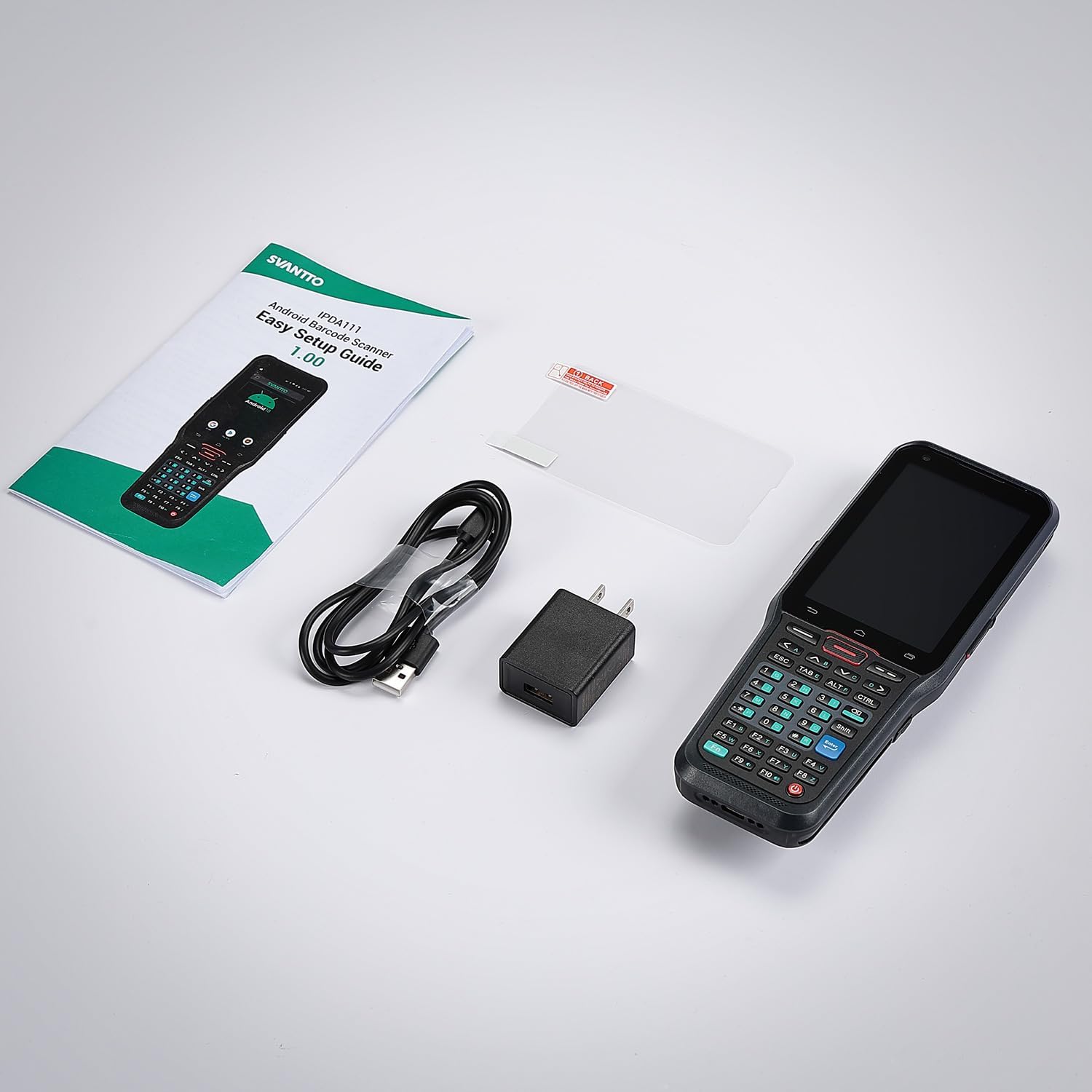
Image: The complete package contents of the SVANTTO barcode scanner, laid out to show the device, its charging accessories, and the user manual.
3. Configuració
3.1 Càrrega inicial
Before first use, fully charge the device. Connect the USB charging cable to the scanner's charging port and the power adapter to a wall outlet. The device supports fast charging and can be fully charged in less than 3 hours.

Imatge: Una imatge detallada view of the SVANTTO barcode scanner's removable battery, emphasizing its 5000mAh capacity for extended operation.
3.2 Engegada/apagada
- Per encendre: Press and hold the power button (usually on the side) until the SVANTTO logo appears on the screen.
- Per apagar: Press and hold the power button until a power-off menu appears. Select 'Power off' to shut down the device.
3.3 Installing SIM/SD Card (If Applicable)
Refer to the specific slot locations on your device for SIM card (for 2G/3G/4G connectivity) and microSD card (for expanded storage) installation. Ensure the device is powered off before inserting or removing cards.
4. Instruccions de funcionament
4.1 Navegació bàsica
The device runs on Android 10. Navigate using the touchscreen for app selection, settings, and general interaction. The physical keyboard provides additional input options.
4.2 Escaneig de codis de barres
The integrated Honeywell N6602 scanner engine is designed for fast and accurate scanning of various barcode types.
- Per escanejar: Point the scanner's head towards the barcode. Press the dedicated scan button (typically on the side or front) to activate the laser/light. Ensure the barcode is within the scanning range and properly aligned.
- Codis de barres compatibles: 1D (EAN-13, EAN-8, UPC-A, UPC-E, Code128, Code39, etc.), 2D (PDF417, Micro PDF417, QR Code, Data Matrix, GS1 Composite, etc.).

Image: A close-up of the Honeywell N6602 Scanner Engine, illustrating its capability to accurately read various 1D, 2D, and QR barcode formats.

Image: A user efficiently scanning a package in a warehouse environment, highlighting the practical use of the SVANTTO barcode scanner and the convenience of the included hand strap.
4.3 Ús del teclat
The full-size numeric keyboard allows for quick and accurate data input, especially beneficial for numerical data such as inventory counts.
- Entrada numèrica: Use the dedicated numeric keys for number entry.
- Alphabetical Input: The keyboard includes A-Z keys for text input.
- Tecles personalitzables: F1-F10 keys can be customized to perform specific functions based on your application needs. Refer to your software documentation for customization options.

Imatge: Una imatge detallada view of the SVANTTO barcode scanner's full-size numeric keyboard, showcasing its layout and the customizable F1-F10 function keys.
4.4 Connectivitat
- Wi-Fi: Connect to available Wi-Fi networks via Android settings for internet access and data synchronization.
- Bluetooth: Pair with Bluetooth-enabled devices (e.g., printers, headsets) through Android Bluetooth settings.
- Cellular (2G/3G/4G): If a SIM card is installed, the device can utilize cellular data for connectivity in areas without Wi-Fi.
4.5 Kit de desenvolupament de programari (SDK)
SVANTTO provides an SDK for developers to integrate the scanner's functionalities into custom applications. This includes tools, libraries, documentation, and code samples.

Image: An illustration explaining the comprehensive Software Development Kit (SDK) offered by SVANTTO, detailing its components for platform-specific development, code libraries, and development tools.
5. Manteniment
5.1 Neteja
- Utilitzeu un drap suau i sense pelusa lleugerament dampesbandiu amb aigua o un netejador de pantalles suau per netejar la pantalla.
- For the scanner window and device body, use a dry or slightly damp cloth. Avoid abrasive materials or harsh chemicals.
- Assegureu-vos que no entri líquid als ports o obertures.
5.2 Cura de la bateria
- Per allargar la durada de la bateria, eviteu descarregar-la completament amb freqüència.
- Guardeu el dispositiu en un lloc fresc i sec quan no el feu servir durant períodes prolongats.
- Use only the original or certified compatible charging accessories.
5.3 Consideracions ambientals
The device is designed for rugged use but should be protected from extreme conditions beyond its specified operating temperature range (-20°C to 55°C / -4°F to 131°F). Avoid prolonged exposure to direct sunlight or excessive moisture.
6. Solució De Problemes
6.1 Problemes comuns i solucions
| Problema | Causa possible | Solució |
|---|---|---|
| El dispositiu no s'encén | Bateria baixa; Fallada del sistema | Charge the device; Perform a forced restart (hold power button for 10-15 seconds). |
| No es poden escanejar codis de barres | Scanner not activated; Barcode damaged/unreadable; Incorrect symbology settings; Camera and scan engine running simultaneously. | Ensure scan button is pressed; Clean scanner window; Check barcode quality; Verify symbology settings in software; Note: The camera and scan engine cannot run at the same time. Close camera app if open. |
| Problemes de connectivitat Wi-Fi/Bluetooth | Out of range; Incorrect password; Device settings | Move closer to access point; Re-enter password; Toggle Wi-Fi/Bluetooth off and on; Restart device. |
| Device is slow/unresponsive | Massa aplicacions en execució; Poc emmagatzematge | Close unnecessary apps; Clear cache; Free up storage space. |
7. Especificacions
| Característica | Detall |
|---|---|
| Número de model | IPDA111-2D-US |
| Sistema operatiu | Android 10 |
| Processador | 12nm Finfet Mt6762 Octa-core 64-bit CPU |
| RAM | 4 GB |
| ROM | 64 GB |
| Scanner Engine | Honeywell N6602 (1D/2D/QR) |
| Capacitat de la bateria | Ió de liti de 5000 mAh |
| Connectivitat | Wi-Fi, Bluetooth, 2G/3G/4G |
| Protecció contra caigudes | 1.5 metres |
| Temperatura de funcionament | -20 °C a 55 °C (-4 °F a 131 °F) |
| Pes de l'article | 1.3 lliures |
| Dimensions del paquet | 10.51 x 4.72 x 3.15 polzades |
8. Garantia i Suport
SVANTTO is committed to providing excellent customer service and product support.
- Servei de devolució: 30-day no-questions-asked return service.
- Garantia: 2-year warranty service from the date of purchase.
- Suport tècnic: Lifetime online technical support is available.
For any questions or assistance, please contact SVANTTO customer support. They aim to reply promptly.

Imatge: Un cop mésview of SVANTTO's customer support offerings, including a 30-day return policy, a 2-year warranty, and lifetime online technical support.


