1. Producte acabatview
The Denafrips PONTUSII 12Th-1 is a high-performance Digital-to-Analog Converter (DAC) designed for audiophiles seeking exceptional sound quality. It features a proprietary R2R + DSD architecture, true balanced design, and advanced digital signal processing to deliver a pure and detailed audio experience.
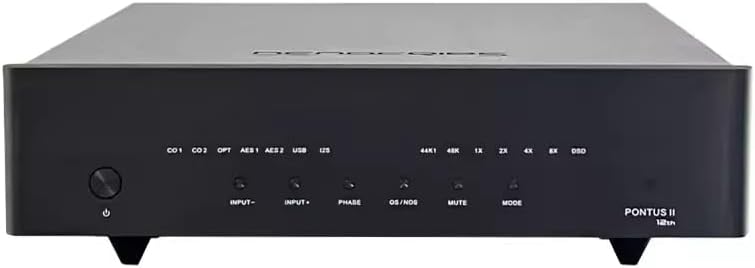
Figura 1.1: Frontal view of the Denafrips PONTUSII 12Th-1 DAC.
Característiques principals:
- Proprietary R2R + DSD Architecture for accurate digital-to-analog conversion.
- True balanced 24BIT R2R + 1BIT DSD with 32 steps FIR Filters.
- Native DSD decoding with 0.01% precision resistors.
- Equipped with FEMTO Crystal 45.1548MHz and 49.152Mhz for precise timing.
- Encapsulated Ultra Low Noise Power Supply for clean power delivery.
- Adaptive FIFO Buffer Reclocking to minimize jitter.
- New Improved DSP Digital Signal Processing FPGA Code.
- Supports DSD1024 and PCM1536 on USB & I2S Input.
- Proprietary USB Audio Solution via STM32F446 Advanced AMR Based MCU.
- Licensed Thesycon USB Driver for Windows Platform; driverless on Mac & Linux.
- Dual AES/EBU Input Support.
- Sharp/Slow Filters Option for sound customization.
- I2S Pinout and DSD Channel Swap Configuration.
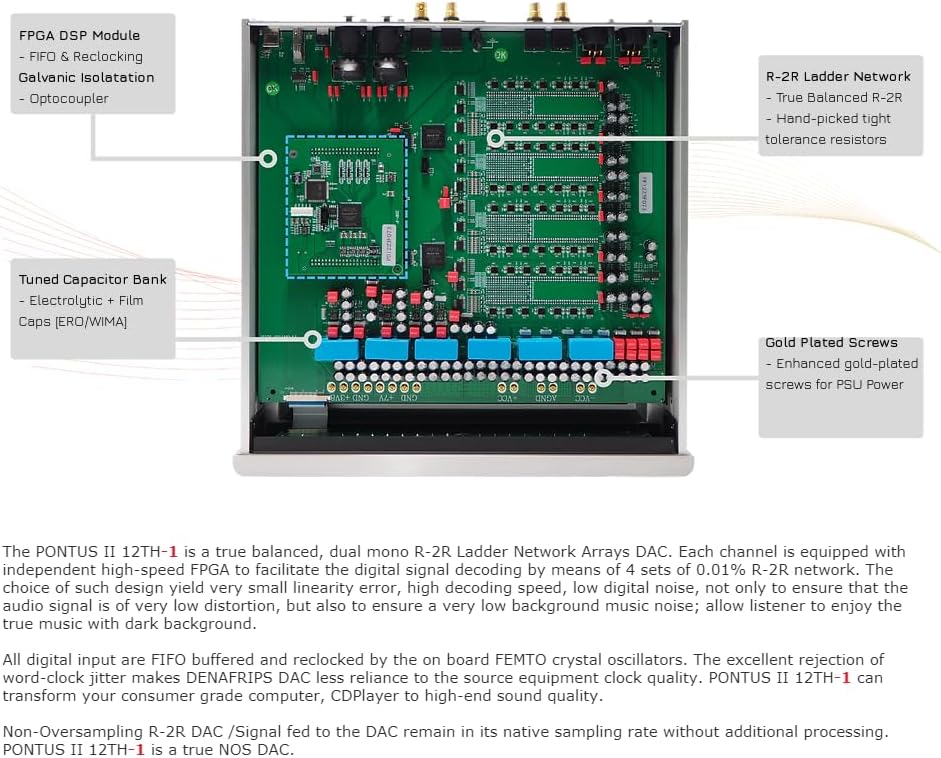
Figure 1.2: Internal components highlighting the FPGA DSP Module, R-2R Ladder Network, and Tuned Capacitor Bank.
2. Guia de configuració
2.1 Desembalatge
Carefully remove the PONTUSII 12Th-1 from its packaging. Inspect the unit for any signs of damage during transit. Retain the original packaging for future transport or storage.
2.2 Connexions
Ensure the DAC and all connected audio components are powered off before making any connections. Use high-quality cables for optimal performance.
- Sortida analògica: Connect the PONTUSII 12Th-1 to your amplifier o pre-amplifier using either RCA (single-ended) or XLR (balanced) cables.
- Entrades digitals: Connect your digital audio sources (e.g., CD player, streamer, computer) to the appropriate digital input ports:
- Coaxial (COAX 1, COAX 2): Via RCA or BNC 75Ω connectors.
- Optical (TOSLink): For optical digital audio signals.
- AES/EBU (AES 1, AES 2): For professional digital audio connections.
- USB: Connect to a computer for high-resolution audio playback.
- I2S (via HDMI LVDS): For compatible I2S sources. Note that I2S has no industrial standard, and compatibility with other I2S devices is not guaranteed by Denafrips.
- Alimentació CA: Connect the supplied power cable to the AC input on the rear panel. Ensure the voltage matches your local power supply (110-230V, 50/60Hz).

Figure 2.1: Rear panel connections including Analog Output (RCA, XLR), Digital Inputs (Coax, TOSLink, AES/EBU, USB, I2S), and AC Power Input.

Figura 2.2: Intern view highlighting the DUAL O-Core Shielded AC Transformer and SMART POWER management system.
2.3 Encès
After all connections are securely made, press the power button on the front panel to turn on the unit. Allow a few moments for the DAC to initialize.
3. Instruccions de funcionament
3.1 Controls del panell frontal
The front panel of the PONTUSII 12Th-1 features several buttons and indicators for easy operation:
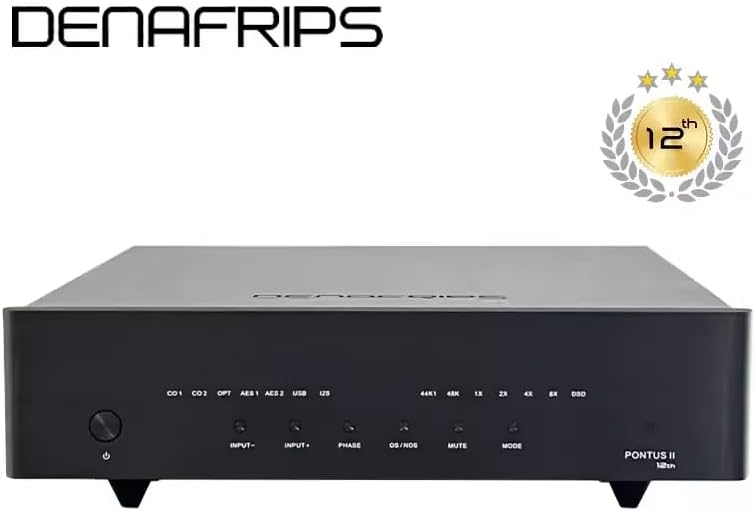
Figure 3.1: Front panel layout with controls and indicators.
- Botó d'encesa: Encén/apaga la unitat.
- INPUT +/-: Selects the desired digital input source (COAX 1, COAX 2, OPT, AES 1, AES 2, USB, I2S).
- FASE: Adjusts the output phase.
- OS/NOS: Toggles between Oversampling (OS) and Non-Oversampling (NOS) modes.
- MUT: Mutes/unmutes the audio output.
- Mode: Cycles through various settings or filter options.
3.2 Selecció d'entrada
Press the 'INPUT +' or 'INPUT -' buttons to cycle through the available digital input sources until your desired source is selected. The active input will be indicated by an LED on the front panel.
3.3 Sampling Modes (OS/NOS)
The PONTUSII 12Th-1 offers both Oversampling (OS) and Non-Oversampling (NOS) modes. Press the 'OS/NOS' button to switch between these modes. Experiment with both to determine your preferred sound signature.
- offampling (OS): Digital audio is upsampled to a higher rate before D/A conversion, often resulting in a smoother sound with less aliasing.
- No Oversampling (NOS): Digital audio is converted at its native sampling rate without additional processing, aiming for a more direct and natural sound.
3.4 Filter Options (Sharp/Slow)
The 'MODE' button allows you to select between different digital filter characteristics, typically 'Sharp' and 'Slow'. These filters affect the transient response and high-frequency roll-off. Refer to the specific LED indicators for the active filter mode.
3.5 I2S Pinout and DSD Channel Swap Configuration
For I2S input, the PONTUSII 12Th-1 provides configuration options for pinout and DSD channel swap to ensure compatibility with various I2S sources. Consult the detailed user manual provided by Denafrips for specific instructions on accessing and adjusting these settings, as they may involve specific button combinations or internal jumpers.
4. Manteniment i cura
- Neteja: Use a soft, dry cloth to clean the exterior of the unit. Avoid using abrasive cleaners, solvents, or chemical sprays, as they may damage the finish.
- Ventilació: Ensure adequate ventilation around the unit. Do not block any ventilation openings. Avoid placing the DAC in enclosed spaces or on soft surfaces that may impede airflow.
- Medi ambient: Operate the DAC in a clean, dry environment away from direct sunlight, heat sources, excessive dust, and moisture.
- Apagar: If the unit will not be used for an extended period, it is recommended to power it off and disconnect it from the AC outlet.
5. Solució De Problemes
| Problema | Causa possible | Solució |
|---|---|---|
| Sense poder | Power cable not connected; power outlet issue; unit fuse blown. | Check power cable connection; try a different outlet; contact support if fuse is suspected. |
| Sense sortida de so | Incorrect input selected; cables not connected properly; amplifier/pre-amp issue; DAC muted. | Verify input selection; check all audio cable connections; ensure amplifier is on and set correctly; check DAC mute status. |
| So distorsionat o sorollós | Poor cable quality/connection; ground loop; source issue; incorrect samptaxa de ling. | Use high-quality, shielded cables; ensure proper grounding; test with a different source; verify source output settings match DAC capabilities. |
| USB input not recognized by computer | Driver not installed (Windows); USB cable issue; incorrect USB port. | Install Thesycon USB driver (Windows); try a different USB cable or port; restart computer and DAC. |
| I2S input not working | Pinout incompatibility; DSD channel swap needed; source I2S issue. | Adjust I2S pinout/DSD channel swap settings on the DAC; consult source device manual for I2S compatibility. |
6. Especificacions tècniques
| Característica | Especificació |
|---|---|
| Model de producte | PONTUSII 12Th-1 |
| Font d'alimentació de CA | 110-230V, 50/60Hz |
| Consum d'energia | <30W |
| Resposta de freqüència | 0-70KHz (-3dB) |
| Analog Output (RCA) | 2.2 (+/-10%) V RMS (1KHz) |
| Analog Output (XLR) | 4.4 (+/-10%) V RMS (1KHz) |
| Supported DSD Formats | DSD64-DoP (All Inputs), DSD1024 (USB & I2S Only) |
| Supported PCM Formats | 24bit/44.1, 48, 88.2, 96, 176.4, 192KHz (All Inputs); 352.8, 384, 1536KHz (USB & I2S Only) |
| Signal to Noise Ratio (RCA) | 115 dB |
| Signal to Noise Ratio (XLR) | 114 dB |
| Dynamic Range (RCA) | > 117 dB |
| Dynamic Range (XLR) | > 121 dB |
| Stereo Crosstalk (RCA) | ≤ -100 dB |
| Stereo Crosstalk (XLR) | ≤ 100dB |
| Dimensions (L x P x A) | 320 x 330 x 80 mm |
| Pes | 8.5 kg (18.7 lliures) |
| Tecnologia de connectivitat | USB, HDMI (for I2S), XLR, Coaxial, Optical |
| Dispositius compatibles | Ampmés viu |
7. Garantia i Suport
Per obtenir informació sobre la garantia i assistència tècnica, consulteu la documentació que s'inclou amb la compra o poseu-vos en contacte directament amb el venedor/fabricant. Conserveu el comprovant de compra per a reclamacions de garantia.


