Producte acabatview
The DDPAI N5 Dual Dash Cam is a high-performance vehicle recording system designed to capture clear and detailed footage of your journeys. It features a sleek, screenless design with 7 high-quality optical lens groups and a 140° wide-angle vision, recording 2160P front and 1080P rear footage. Key functionalities include 5GHz WiFi Turbo technology for fast data transfer, built-in GPS for accurate location tracking, and advanced parking modes for enhanced vehicle security.

This image displays the DDPAI N5 Dual Dash Cam, including the front camera unit, the compact rear camera, and a smartphone screen showing the accompanying mobile application interface.
Configuració i instal·lació
1. Power Up the Dash Cam
- Take out the car charger and insert it into the cigarette lighter socket.
- Take out the Dash Cam and insert the memory card into the card slot.
- Use the included power cable to connect the Dash Cam to the car charger.
- Start the engine; the Dash Cam will power on successfully.
2. Activate the Dash Cam
For the first time you use it, you need to activate the Dash Cam before starting to record. Please follow the on-screen instructions to connect the dash cam to your phone using the DDPAI App.

Steps for connecting the DDPAI App via Bluetooth to your dash cam.
According to the on-screen instructions in the app, you can adjust the installation position of the Dash Cam for optimal viewing.
3. Install the Dash Cam
- After determining the installation position of the Dash Cam, attach the electrostatic sticker to the chosen position on the windshield.
- Traieu la pel·lícula de l'adhesiu 3M del suport i enganxeu el suport al centre de l'adhesiu electrostàtic.
- Hide the power cord in the plastic guard plate of the car by using the crowbar. Refer to the wiring diagram below for guidance.

Visual guide for easy installation and rear camera rotation.
Vídeo del tutorial d'instal·lació
This video provides a comprehensive installation guide for the DDPAI N5 Dual Dash Cam, covering initial power-up, app activation, dash cam mounting, and optional hardwire kit and rear camera installations.
Instal·lacions opcionals
1. Install the Hardwire Kit (For 24H Parking Monitor)
Notes:
- El kit de cablejat intel·ligent s'ha de comprar per separat o mitjançant la compraasing a package including the hardwire kit.
- This wiring operation requires some specialized knowledge related to the vehicle or electrical system and should be performed under the guidance of a professional.
- The vehicle should be stalled during the wiring process.
Diagrama de cablejat:
- Red wire (ACC) to an ACC fuse slot.
- Yellow wire (VCC) to a constant fuse slot/VCC.
- Black wire (GND) to a metal ground bolt/screw.
Passos d'instal·lació:
- Plug the Type-C connector into the Dash Cam power interface.
- Locate your vehicle's fuse box.
- Use a multimeter to test the fuse and find the VCC fuse that provides continuous power even when the vehicle engine is off.
- Find the ACC fuse that restores power when the engine is on and cuts power when it is off.
- Remove the original ACC fuse and VCC fuse.
- Connect the yellow wire (VCC) to the +12VDC power supply of the fuse box (this power supply is always on and not controlled by the ignition).
- Connect the red wire (ACC) to the +12VDC power supply control of the fuse box.
- Connect the black wire (GND) to the ground wire inside the vehicle fuse box.
- Hide the power cord in the plastic guard plate of the car by using the crowbar. Please refer to the wiring diagram above.
2. Instal·leu la càmera posterior
Passos d'instal·lació:
- Connect the rear power cable (rear).
- Connect the rear power cable to the Dash Cam.
- Attach the electrostatic sticker to the rear windshield.
- Peel off the film of the adhesive sticker, then fix the rear camera to the inner wall of the rear windshield. Please pay attention to the mounting direction of the rear camera and make sure that the lens of the rear camera is on the right side.
- Hide the power cord in the plastic guard plate of the car by using the crowbar. Please refer to the wiring diagram above.

This image illustrates the high-resolution video quality, showing a clear 4K front view i una part posterior de 1080P view captured by the DDPAI N5 Dual Dash Cam, highlighting its wide-angle capabilities.
3. Install the Radar Module (Optional)
Notes:
- The OBD hardwire kit needs to be purchased separately or by purchasing a package including the OBD power cable.
- The location of the OBD port is different depending on the car model. It is typically located beneath the steering wheel, within the footwell. Make sure to locate your OBD port before installing.
Passos d'instal·lació:
- Plug the Type-C connector of the OBD power cable into the Type-C port of the radar module.
- Connect the other end of the OBD power cable to the OBD port of the vehicle.
- Plug the Type-C connector of the radar cable into the Type-C port of the Dash Cam.
- Attach the electrostatic sticker to the recommended area on the windshield.
- Remove the protective film from the radar, attach the adhesive side to the windshield close to the Dash Cam. Make sure the indicator of the radar module is facing the windshield.
- Hide the power cord in the plastic guard plate of the car by using the crowbar. Please refer to the wiring diagram above.

This image highlights the advanced parking surveillance features, including G-sensor mode, time-lapse mode, and radar motion detection, enabling up to 72 hours of parking monitoring (requires additional modules).
Instruccions de funcionament
Image Quality and Features
The DDPAI N5 Dual's lens is equipped with seven high-quality optical lenses, providing 3840*2160P front and 1080P rear high-definition recording for exceptional image quality.

The DDPAI N5 Dual Dash Cam captures footage in stunning 4K resolution for the front camera.
The N5 Dual dash cam's lens distortion correction provides clearer, more accurate video footage, enhancing evidence credibility and viewexperiència.

Comparison showing lens correction for clearer, more accurate video footage.
Realcube's True Color for image processing ensures precise, vibrant color reproduction, enhancing the visual quality and realism of images.

Demonstration of Realcube's True Color technology for vibrant color reproduction.
NightVIS technology offers enhanced night vision capabilities, enabling clear and detailed video recording in low-light conditions. This ensures that you can clearly record the license plates of vehicles ahead even at night.

NightVIS technology provides clear and detailed video recording in low-light conditions.
Emmagatzematge
The N5 Dual dashcam comes with 32GB built-in eMMC storage and additionally supports up to 512GB TF card (512GB card Not Included). This dual-storage solution ensures both data security and ampl'espai de gravació.

The built-in 32GB eMMC storage offers innovative and reliable data storage.
Mode d'aparcament
In addition to G-sensor and time-lapse mode, the parking monitoring of dashcam also features radar motion detection. When radar detects movement, the car cam automatically records, saving 10 seconds of video. With energy-saving technology, it supports up to 72-hour parking monitoring while protecting your car battery via low-voltage cutoff. Note: 24H parking mode needs hardwire kit (ASIN:B0D12D7HSC). 72H parking mode needs radar module (ASIN:B0D4YNL8R8).

Radar Motion Detection Mode allows continuous monitoring even when the car is turned off.
Enregistrament en bucle
The loop recording feature automatically overwrites old footage with new recordings, ensuring continuous video capture without running out of storage space.
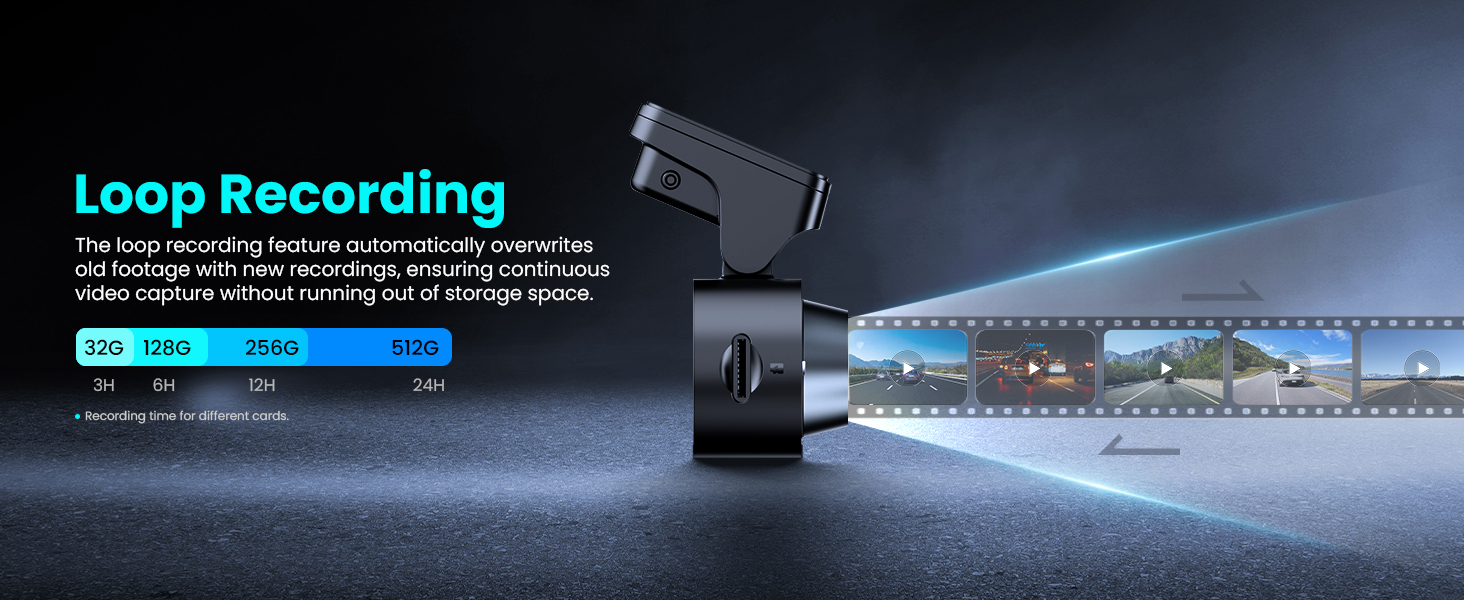
Loop recording ensures continuous video capture by overwriting older files.
Collision Lock (G-Sensor)
The collision lock function automatically saves and safeguards important footage during sudden collisions, preserving crucial evidence for accident reports and claims. These important videos are locked to ensure they are not overwritten.

The collision lock function automatically saves important footage during sudden collisions.

The G-Sensor detects sudden movements or impacts and automatically saves recorded footage.
Connectivitat
With built-in 5GHz WiFi Turbo technology, the DDPAI dash cam app enables instant viewing and management of car camera recordings on iOS and Android devices. Download 4K videos directly to your smartphone at speeds up to 10 MB/s, then easily share them on social media with your friends and family. Additionally, manage camera settings and update firmware over-the-air (OTA) via the app.

The 5G WiFi functionality offers significantly faster and more stable wireless connectivity.
The DDPAI N5 Dual features built-in GPS, allowing you to preview driving routes in the app and download route videos for easy tracking of each journey. It also supports one-click sharing to communities or social media platforms.

Built-in GPS allows for tracking driving routes and sharing videos.
App Control & SR Technology
The DDPAI app allows for instant video preview, editing, and downloading, making car camera management effortless. You can see the driving data just one glance like acceleration/deceleration, distance to the vehicle ahead, lane deviation (image) and GPS tracking. The bluetooth connection ensures faster and simpler access to features. This data not only enhances your scenic road trips but also serves as strong evidence during accident investigations.

The app control feature allows you to manage dash cam settings and access recorded videos.
The SR technology allows you to overlay information such as speed, route, time, and distance from the car ahead onto your video footage, enhancing the visual appeal and providing additional context to your recordings.
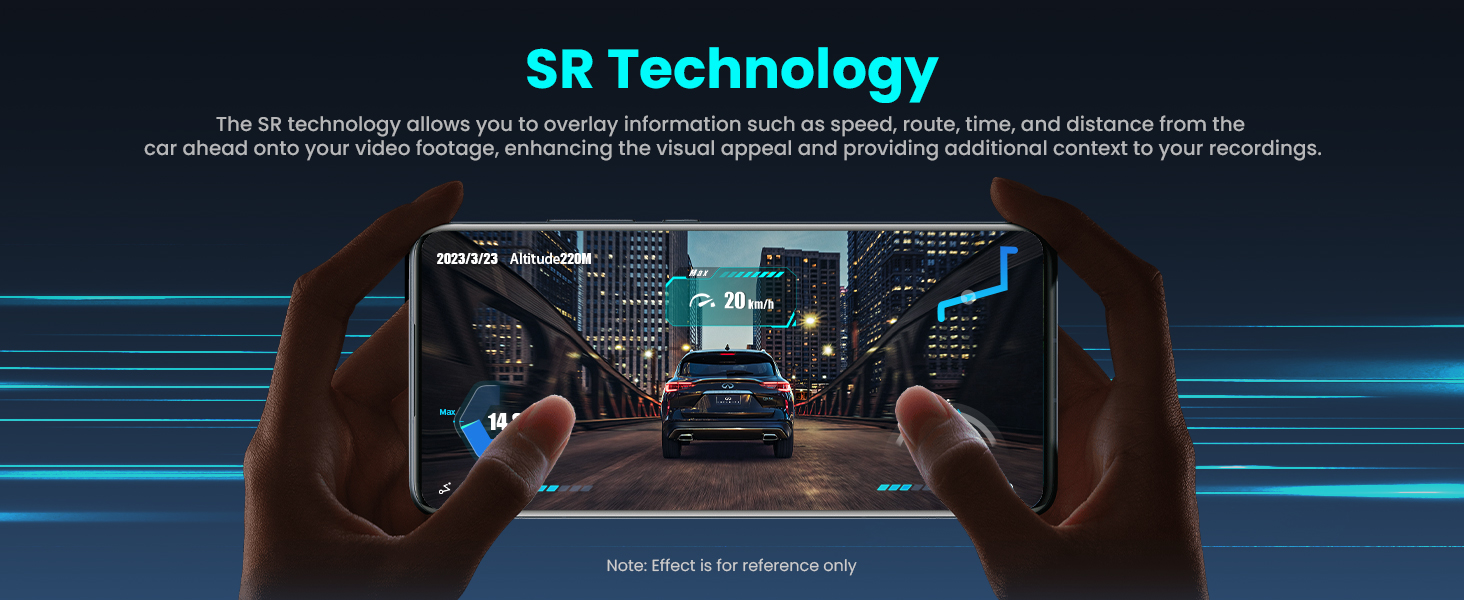
SR technology overlays driving data onto your video footage.
Smart Voice Reminder with ADAS
The N5 Dual dash camera is equipped with ADAS, providing reminders when the front vehicle starts moving and a fatigue driving reminder. This driver fatigue alarm is your safety guarantee for safe and easy driving, especially suitable for long-distance driving or night driving. If the vehicle ahead starts moving, the car camera N5 Dual will alert you to begin driving, helping you avoid being honked at by the car behind.

ADAS provides voice alerts for front vehicle start-up and fatigue driving.
Control de veu
When you encounter beautiful scenery or captivating moments on the road, simply say "take photo" to capture a snapshot and create a short video that includes 10, 20, or 30 seconds before and after the moment. The captured files are stored separately for easier searching and sharing.

Voice control allows for hands-free operation, such as taking photos.
Manteniment
To ensure optimal performance and longevity of your DDPAI N5 Dual Dash Cam, regular maintenance is recommended:
- Netegeu la lent: Gently wipe the camera lenses with a soft, lint-free cloth to remove dust or smudges that could affect video clarity.
- Comproveu les connexions: Periodically ensure all cables (power, rear camera, optional hardwire/radar module) are securely connected to prevent power interruptions or data loss.
- Formateu la targeta de memòria: Regularly format the eMMC storage and any inserted TF card (at least once a month) through the DDPAI app to prevent data corruption and ensure smooth recording. Back up any important footage abans de formatar.
- Actualitzacions de firmware: Check for and install firmware updates via the DDPAI app to benefit from new features, performance improvements, and bug fixes.
- Gestió de la temperatura: Avoid exposing the dash cam to extreme temperatures for prolonged periods. While designed to withstand car interior conditions, excessive heat can impact device lifespan.
Resolució de problemes
If you encounter any issues with your DDPAI N5 Dual Dash Cam, refer to the following common troubleshooting tips:
- La càmera no s'encén: Ensure the car charger is properly inserted into the cigarette lighter and the power cable is securely connected to the dash cam. Check if the vehicle's engine is running or if the car's power outlet is active.
- Problemes de connexió de l'aplicació: Verify that Bluetooth is enabled on your smartphone and the DDPAI app has necessary permissions. If using Wi-Fi, ensure you are connected to the dash cam's Wi-Fi network. Try restarting both the dash cam (by unplugging and replugging) and the app.
- Recording Problems (e.g., footage missing, corrupted): Ensure the memory card is properly inserted and formatted regularly. Check if the card is a high-speed Class 10 or U3 card. If issues persist, try a different compatible memory card.
- ADAS/Voice Control Not Working: Ensure these features are enabled in the DDPAI app settings. For ADAS, proper installation position and calibration are crucial. Check the app for specific calibration instructions.
- Mode d'aparcament no activat: Confirm that the optional hardwire kit or radar module is correctly installed and connected according to the instructions. Check the vehicle's battery voltage if low-voltage cutoff is preventing activation.
For further assistance, please contact DDPAI Customer Support at servicecenter@ddpai.com. They typically respond within 24 hours.
Especificacions
| Característica | Detall |
|---|---|
| Dimensions del producte | 5.8 x 8.9 x 5.8 polzades |
| Pes de l'article | 1.3 lliures |
| Nom del model | N5 Dual |
| Resolució de captura de vídeo | 4K (frontal), 1080P (posterior) |
| Tecnologia de connectivitat | Bluetooth, Wi-Fi (5 GHz) |
| Característiques especials | G-Sensor, Night Vision, App Control, Screenless design, Built-in 32G eMMC storage, Built-in GPS, ADAS, Voice Control, 24H Parking Monitoring, Loop Recording |
| Tipus de muntatge | Muntatge del parabrisa |
| Color | Negre |
| Fabricant | ddpai |
| Primera data disponible | 18 de març de 2024 |
Garantia i Suport
DDPAI offers an 18-month warranty for the N5 Dual Dash Cam. For any product-related inquiries, technical support, or warranty claims, please reach out to DDPAI Customer Support.
- Suport per correu electrònic: servicecenter@ddpai.com
- Temps de resposta: Inquiries are typically responded to within 24 hours. Live support is often available Mon-Fri 17PM-23:59PM PST.
- Període de garantia: 18 mesos des de la data de compra.
- Serveis addicionals: Lifelong consultation service is provided.


