Introducció
Welcome to your new LEVN CT002 Wireless Headset. This manual provides detailed instructions for setting up, operating, and maintaining your headset to ensure optimal performance.
Contingut del paquet
- LEVN CT002 Wireless Headset
- Dongle USB
- Cable de càrrega USB-C
- Manual d'usuari
Producte acabatview
Familiarize yourself with the components and controls of your LEVN CT002 Wireless Headset.

A clear image of the LEVN CT002 Wireless Headset, showcasing its sleek black design and adjustable microphone boom, ready for use.
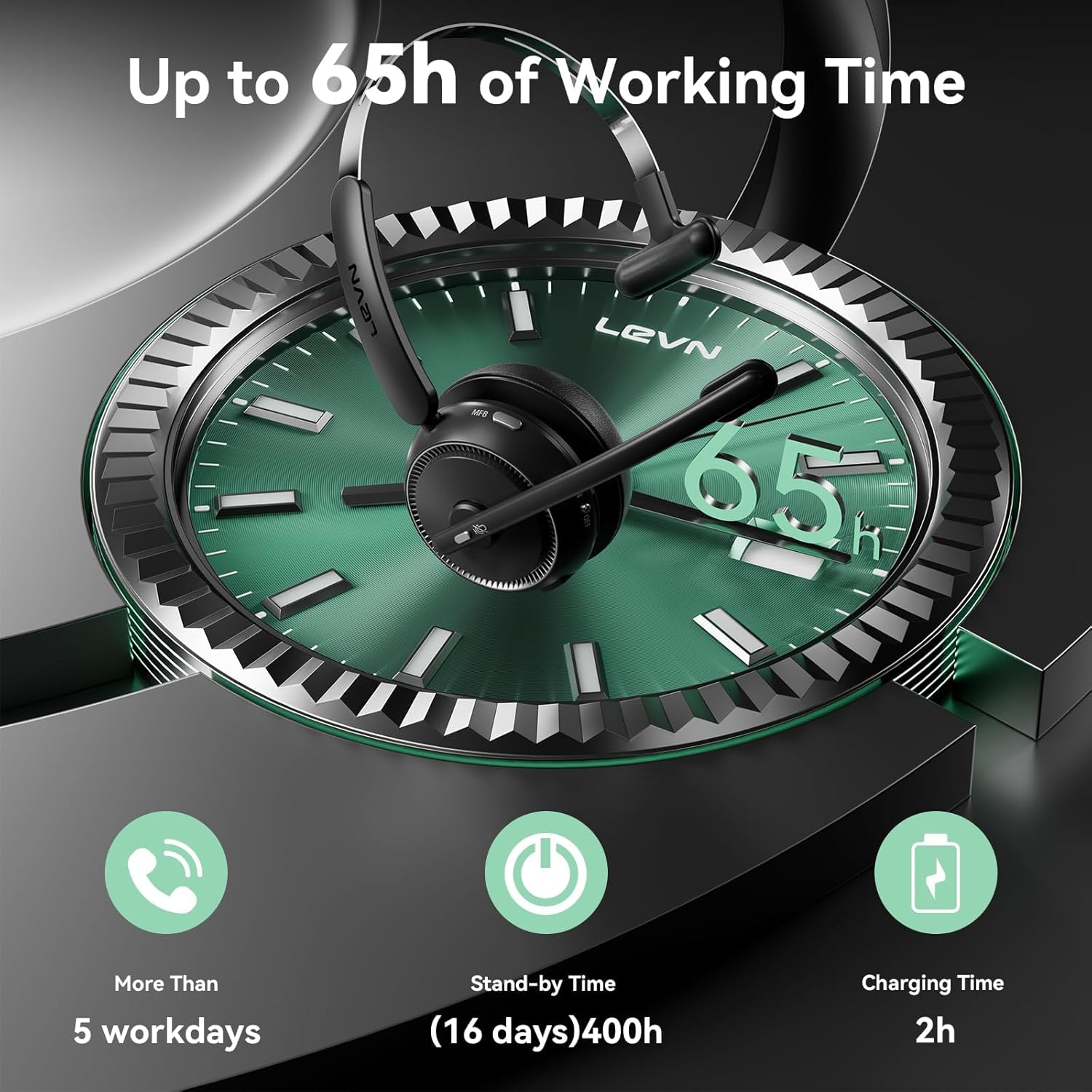
The image displays the LEVN CT002 headset with an overlay indicating its impressive battery life: up to 65 hours of working time, over 5 workdays, 400 hours (16 days) standby time, and a 2-hour charging time.

Un detallat view of the headset's features, including the microphone's 270-degree rotation for flexible positioning, a conveniently located one-click mute button for privacy during calls, and soft, comfortable earmuffs designed for extended wear.
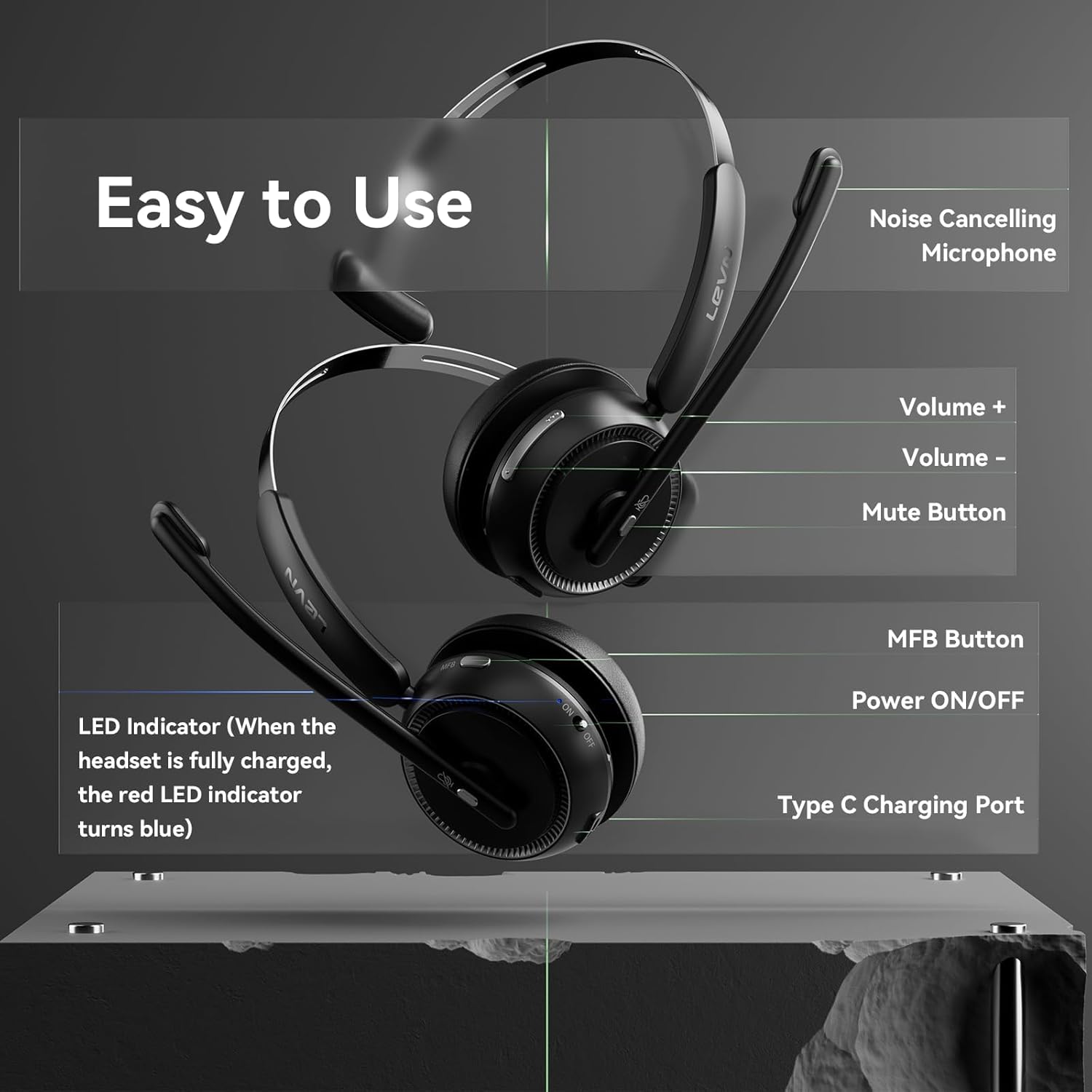
This diagram illustrates the various controls on the headset. It points out the noise-cancelling microphone, volume up and down buttons, the mute button, the Multi-Function Button (MFB), the Power ON/OFF switch, the Type-C charging port, and the LED indicator which turns blue when fully charged.
Official product video demonstrating the LEVN CT002 Wireless Headset, its features, and how to use it for work. This video provides a visual guide to the headset's functionality and design.
Configuració
1. Càrrega dels auriculars
Abans del primer ús, carregueu completament els auriculars.
- Connect the provided USB-C charging cable to the headset's charging port (refer to Product Overview per a la ubicació).
- Connecteu l'altre extrem del cable a una font d'alimentació USB (per exemple, un ordinador, un adaptador de paret).
- The LED indicator will show charging status and turn solid blue when fully charged. A full charge takes approximately 2 hours.
2. Connexió a dispositius
Your LEVN CT002 headset offers two connection methods: Bluetooth and USB Dongle.
Bluetooth Connection (for phones, tablets, or Bluetooth-enabled computers)
- Assegureu-vos que els auriculars estan apagats.
- Slide the Power ON/OFF switch to the "ON" position. The LED indicator will flash, indicating pairing mode.
- On your device, enable Bluetooth and search for "CT002".
- Select "CT002" from the list of available devices to connect. The LED will turn solid blue upon successful connection.
USB Dongle Connection (for computers without Bluetooth or for a more stable connection)
- Connecteu el dongle USB a un port USB disponible de l'ordinador.
- Assegureu-vos que els auriculars estan apagats.
- Slide the Power ON/OFF switch to the "ON" position. The headset will automatically connect to the USB dongle. The LED will turn solid blue upon successful connection.

The image illustrates the versatility of the headset, showing it can connect via Bluetooth 5.2 for mobile devices or a USB dongle for computers, offering flexible connectivity options.
Instruccions de funcionament
Encès/Apagat
Slide the Power ON/OFF switch located on the headset to turn it on or off.
Contestar/acabar trucades
- To answer an incoming call, press the Multi-Function Button (MFB) once.
- To end an active call, press the MFB once.
Ajust de volum
Use the Volume Control Buttons (+/-) on the headset to increase or decrease the audio volume.
Silencia / Silencia el micròfon
Press the Mute Button on the microphone boom to mute or unmute your microphone during a call.
Ajust del micròfon
The microphone is 270° rotatable. Adjust its position for optimal voice pickup.
Manteniment
- Mantingueu els auriculars nets netejant-los amb un drap suau i sec.
- Eviteu exposar els auriculars a temperatures extremes, humitat o substàncies corrosives.
- Guardeu els auriculars en un lloc fresc i sec quan no els feu servir.
Resolució de problemes
Sense poder
- Assegureu-vos que els auriculars estiguin completament carregats. Connecteu-los a una font d'alimentació amb el cable USB-C.
No es pot connectar mitjançant Bluetooth
- Make sure the headset is in pairing mode (LED flashing).
- Ensure Bluetooth is enabled on your device and "CT002" is selected.
- Prova de reiniciar tant els auriculars com el dispositiu.
Sense so
- Comproveu els nivells de volum tant dels auriculars com del dispositiu connectat.
- Ensure the headset is properly connected (Bluetooth or USB dongle).
- Verify the microphone is not muted.
Qualitat d'àudio deficient
- Move closer to your connected device to ensure you are within the operating range (up to 15 meters).
- Comproveu si hi ha interferències d'altres dispositius sense fil.
- Adjust the microphone position for clarity.
Especificacions
| Característica | Detall |
|---|---|
| Nom del model | CT002 |
| Tecnologia de connectivitat | Sense fil (Bluetooth 5.2) |
| Durada de la bateria | Fins a 65 hores |
| Temps de càrrega | Aproximadament 2 hores |
| Micròfon | Noise Cancelling, 270° Rotatable |
| Controls | Mute Button, Volume Control, MFB, Power ON/OFF |
| Pes | 7.4 unces (aprox. 210 g) |
| Dispositius compatibles | Computers, Laptops, Tablets, Telephones |
| Material | Metall, plàstic |
Garantia i Suport
For warranty information and customer support, please refer to the official LEVN weblloc web o contacteu directament amb el seu servei d'atenció al client.
Informació de seguretat
- No desmunteu ni modifiqueu els auriculars.
- Mantenir fora de l'abast dels nens.
- Eviteu escoltar música durant molt de temps a volums alts per evitar danys auditius.
- Eliminar el producte de manera responsable segons la normativa local.


