1. Introducció
Welcome to the user manual for your VGN N75 Gaming Keyboard. This manual provides essential information on setting up, operating, maintaining, and troubleshooting your new keyboard. The VGN N75 is a compact, numeric keyless mechanical keyboard designed for an optimal gaming and typing experience.

Figure 1.1: VGN N75 Gaming Keyboard with RGB lighting enabled.

Figura 1.2: Angle view of the VGN N75 keyboard, highlighting its compact form factor.
2. Informació de seguretat
Please read the following safety guidelines carefully before using your VGN N75 keyboard:
- Keep the keyboard away from liquids and excessive moisture to prevent damage.
- Eviteu exposar el teclat a temperatures extremes (calor o fred).
- Do not attempt to disassemble or modify the keyboard. This may void your warranty and cause damage.
- Use only the provided USB-C cable for connection.
- Manipuleu amb cura per evitar danys físics per caigudes o impactes.
3. Característiques del producte
The VGN N75 keyboard is engineered with several features to enhance your typing and gaming experience:
- Disseny compacte al 75%: The US82 key numeric keyless design offers a space-saving solution compared to full-size keyboards, providing more desk space for mouse movement.
- Advanced Internal Construction: Features multiple buffer layers and specially tuned stabilizers for a smooth, quiet, and consistent typing experience.
- VGN "Dynamic Silver" Mechanical Switches: Equipped with VGN's original linear mechanical switches, offering a responsive feel and vibrant RGB illumination.
- Disseny distintiu: The "Caribbean Blue" model features striking keycap colors, adding a unique aesthetic to your setup.
- Integrated Metal Volume Knob: A conveniently located metal rotary knob allows for quick and precise volume adjustments, useful for both work and gaming.
- Il·luminació RGB personalitzable: Enjoy dynamic and customizable RGB backlight options to personalize your keyboard's appearance.

Figure 3.1: The compact 75% layout of the VGN N75, demonstrating its space-saving advantage over a traditional full-size keyboard.

Figure 3.2: Detail of the VGN N75's unique "Dynamic Silver" mechanical switches, known for their linear feel and RGB compatibility.

Figure 3.3: An exploded diagram illustrating the multiple buffer layers and components within the VGN N75 keyboard, contributing to its smooth and quiet operation.

Figure 3.4: Close-up of the metal volume knob, providing convenient audio control.
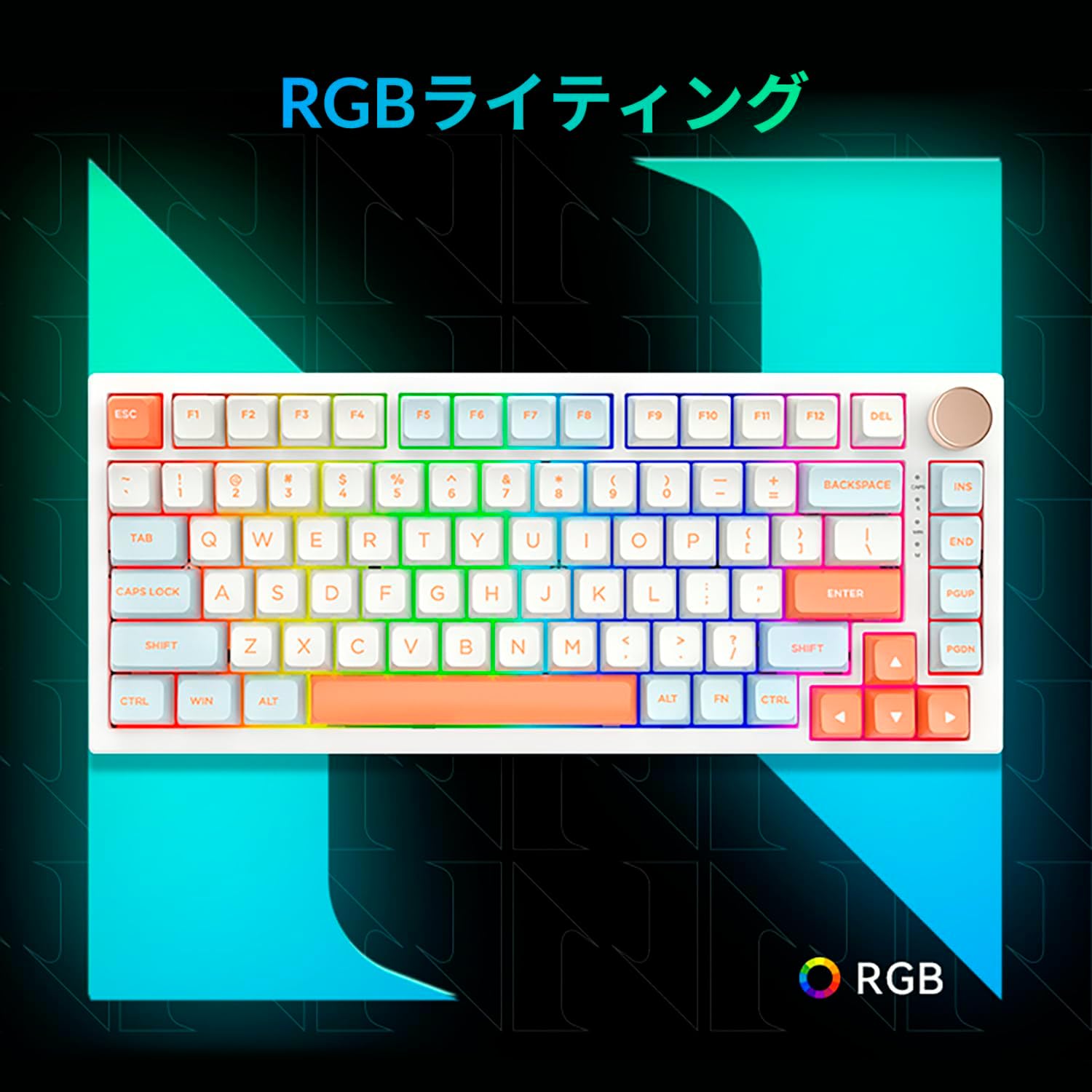
Figure 3.5: The VGN N75 keyboard displaying its customizable RGB lighting, enhancing the visual appeal.
4. Guia de configuració
Follow these steps to set up your VGN N75 keyboard:
- Descomprimir el teclat: Carefully remove the keyboard and all included accessories (USB cable, keycap puller, replacement key) from the packaging.
- Connecteu el cable USB-C: Insert one end of the provided USB-C cable into the USB-C port on the keyboard.
- Connecteu-vos al vostre dispositiu: Plug the other end of the USB-C cable into an available USB port on your computer or laptop.
- Instal·lació del controlador (automàtica): The keyboard is plug-and-play. Your operating system should automatically detect and install the necessary drivers. No manual driver installation is typically required.
- Prova inicial: Open a text editor or any application to test the keys and ensure all functions are working correctly.
5. Instruccions de funcionament
This section details the basic operation of your VGN N75 keyboard:
5.1. Funcions bàsiques de les tecles
The VGN N75 features a standard US82 key layout. All keys function as labeled. For specific key combinations or software-defined macros, refer to any accompanying software documentation (if applicable, not included in this manual).
5.2. Using the Rotary Knob
- Control de volum: Rotate the knob clockwise to increase volume and counter-clockwise to decrease volume.
- Silencia/Activa el silenci: Premeu el botó per silenciar o activar l'àudio.
5.3. Control de la il·luminació RGB
The VGN N75 supports RGB lighting. While specific key combinations for lighting modes are not provided in the product description, most RGB keyboards allow cycling through effects using function key combinations (e.g., Fn + F-keys or dedicated lighting keys). Experiment with the 'Fn' key in combination with other keys (like arrow keys or Ins/Del/Home/End/PgUp/PgDn) to discover lighting controls.
6. Manteniment
Proper maintenance will extend the lifespan of your keyboard:
- Neteja:
- Desconnecteu el teclat de l'ordinador abans de netejar-lo.
- Utilitzeu un drap suau i sense pelusa lleugerament dampEsbandiu amb aigua o una solució de neteja suau per netejar les tecles i el marc.
- Per a la pols i les restes entre les tecles, feu servir aire comprimit.
- No ruixeu líquid directament sobre el teclat.
- Keycap and Switch Replacement:
- The keyboard comes with a keycap puller and a replacement key.
- To remove a keycap, gently use the keycap puller to grip the keycap and pull upwards.
- To replace a keycap, align it with the switch stem and press down firmly until it clicks into place.
- Nota: The VGN N75 features hot-swappable switches, allowing for easy replacement without soldering. To remove a switch, use a switch puller (not explicitly listed as included, but implied by "hot-swappable") to gently pry it out. Align the new switch's pins with the sockets and press firmly until it seats correctly.
7. Solució De Problemes
If you encounter issues with your VGN N75 keyboard, try the following solutions:
- El teclat no respon:
- Assegureu-vos que el cable USB-C estigui connectat correctament tant al teclat com a l'ordinador.
- Prova de connectar el teclat a un port USB diferent de l'ordinador.
- Reinicieu l'ordinador.
- Prova el teclat en un altre ordinador per descartar un problema específic del sistema.
- Claus que no es registren:
- Comproveu si hi ha obstruccions físiques sota la tapa de les tecles.
- If a specific key is not working, consider replacing its switch if you have a switch puller and replacement switches.
- Problemes d'il·luminació RGB:
- Assegureu-vos que el teclat estigui correctament alimentat.
- Try cycling through lighting modes using the keyboard's function key combinations.
- Rotary Knob Not Working:
- Check for any physical obstructions around the knob.
- Assegureu-vos que el teclat estigui connectat correctament.
8. Especificacions
| Atribut | Detall |
|---|---|
| Marca | VGN |
| Número de model | N75BLUE |
| Sèrie | N75 |
| Color | Blau |
| Descripció del teclat | Mecànica |
| Nombre de claus | 82 |
| Tecnologia de connectivitat | USB-C |
| Tipus de font d'alimentació | Alimentació USB |
| Dispositius compatibles | Portàtil |
| Usos recomanats del producte | Jocs |
| Keyboard Backlight Colour Support | RGB |
| Material | Plàstic |
| Components inclosos | Keycap Puller, Replacement Key, USB Cable |
| Dimensions del paquet | 42.1 x 18.8 x 6.5 cm; 1.1 kg |
| Data de primera disponibilitat | 22 de març de 2024 |
9. Garantia i Suport
The VGN N75 Gaming Keyboard comes with a 1-year warranty from the date of purchase, as indicated in the product listing. This warranty covers manufacturing defects under normal use.
For warranty claims, technical support, or further inquiries, please contact your point of purchase or the official VGN support channels. Keep your proof of purchase for warranty validation.
Nota: El desmuntatge o la modificació no autoritzada del producte pot anul·lar la garantia.


