1. Producte acabatview
The TM613 is a high-performance 3-phase digital programmable timer switch designed for automated control of electrical equipment. It features a 7-day programming cycle with up to 16 ON/OFF settings per day/week. This intelligent controller is suitable for various industrial and home automation applications, providing reliable and stable performance for unmanned management of systems.

Figura 1: Frontal view of the TM613 Digital Timer Switch, showing the display, buttons, and wiring diagram for 3-phase input/output.
2. Característiques clau
- 3-Phase Direct Control: Designed for 3-phase systems with three FireWire inputs and three FireWire outputs, eliminating the need for a neutral line.
- Programmable Cycles: Offers 7-day programmable cycles with up to 16 ON/OFF switching settings per day/week.
- Aplicació àmplia: Ideal for controlling pumps, pond aerators, steaming machines, water heaters, billboards, neon signs, exhaust fans, and other electrical equipment.
- Panell de control intel·ligent: Equipped with a built-in intelligent control panel for easy time and program management.
- Potència OutagMemòria electrònica: Retains programmed settings for up to 180 days in case of power loss.
- Instal·lació de carril DIN: Designed for standard 35MM DIN rail mounting for easy integration into electrical panels.
- Rendiment fiable: Ensures safe, reliable, and stable operation for automated systems.
3. Especificacions
| Paràmetre | Valor |
|---|---|
| Voltage | 380V / 50-60Hz |
| Sortida de control | 16A (direct) |
| Configuració de la freqüència | 16 ON/OFF switches (day/week) |
| Minimum Set Time | 17 minuts |
| Maximum Set Time | 168 hores (7 dies) |
| Error de temps de viatge | ±1 second / 24 hours |
| Potència Outage Memòria | 180 dies |
| Mètode d'instal·lació | 35MM DIN Guide Rail |
| Dimensions del producte (aprox.) | 1.18 x 0.79 x 0.39 polzades (paquet) |
| Pes de l'article (aprox.) | 1.76 unces (paquet) |

Figure 2: Dimensional drawing of the TM613 timer switch, indicating 35mm DIN-rail mounting compatibility.
4. Informació de seguretat i instal·lació
Precaucions de seguretat importants:
- Desconnecteu sempre l'alimentació a l'interruptor principal abans de la instal·lació o el manteniment.
- La instal·lació l'ha de dur a terme un electricista qualificat d'acord amb els codis i les normatives elèctriques locals.
- Assegureu-vos de fer les connexions de cablejat adequades per evitar riscos elèctrics.
- No supereu el corrent nominal màxim de 16 A.
- This device is designed for indoor use in a dry environment.
Passos d'instal·lació:
- Mount the TM613 timer switch onto a standard 35MM DIN rail within an electrical enclosure.
- Identify the input (L1, L2, L3) and output (T1, T2, T3) terminals on the timer switch. Refer to the wiring diagram on the device.
- Connect the 3-phase power supply (380V) to the input terminals (L1, L2, L3).
- Connect the load (e.g., motor, pump) to the output terminals (T1, T2, T3).
- Assegureu-vos que totes les connexions estiguin segures i aïllades correctament.
- Verify all wiring before restoring power.
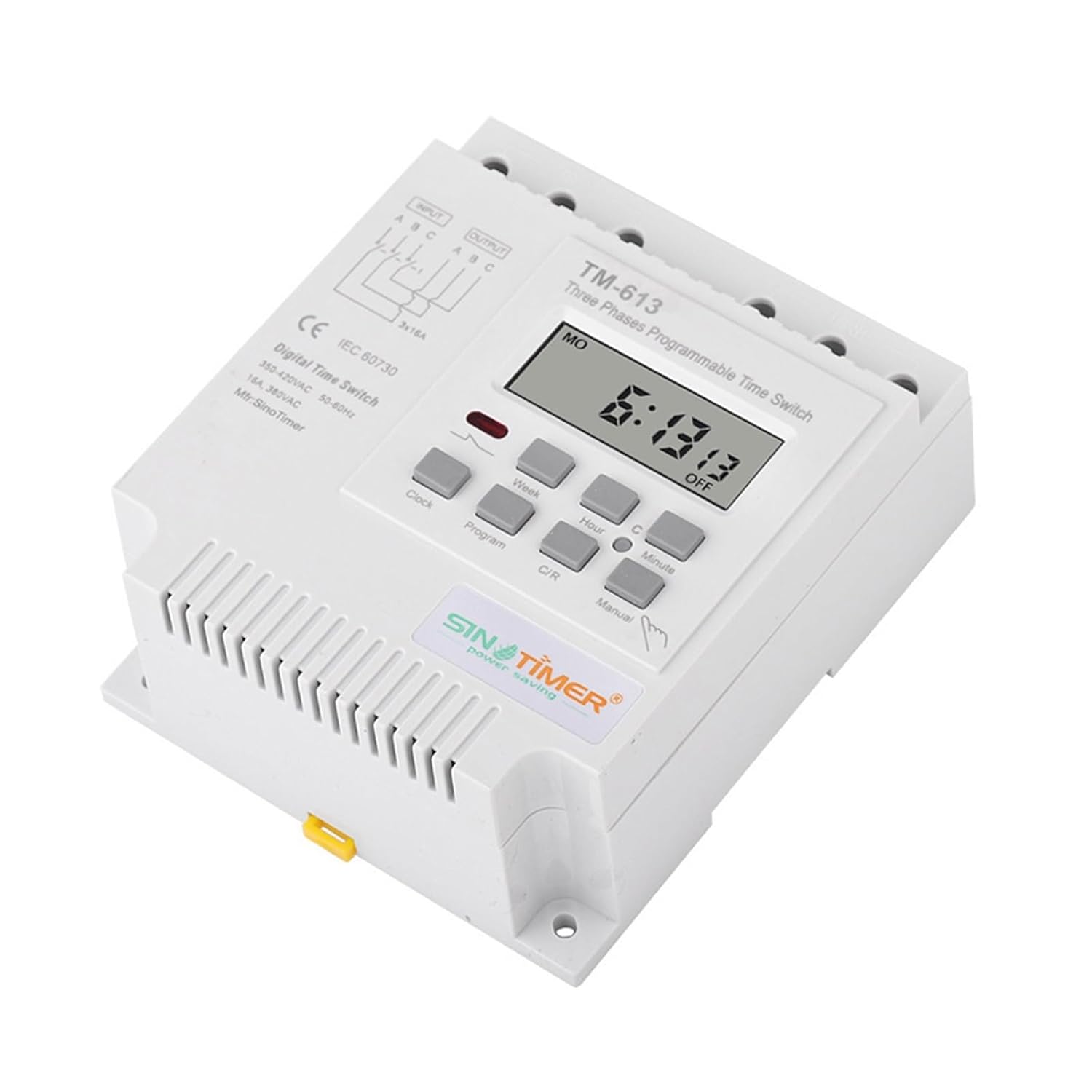
Figura 3: Angle view of the TM613 timer switch, highlighting the input and output wiring terminals for 3-phase connection.

Figura 4: posterior view of the TM613 timer switch, showing the DIN rail mounting clip and the product information label.
5. Instruccions de funcionament
The TM613 timer switch features an intuitive interface for setting the current time and programming ON/OFF cycles.

Figure 5: Close-up of the TM613 timer switch display and control buttons, including Clock, Program, Week, Hour, Minute, C/R, and Manual.
5.1 Configuració de l'hora actual
- Premeu el botó Rellotge botó.
- Mentre sosteniu el Rellotge botó, premeu Setmana per configurar el dia actual de la setmana.
- Mentre sosteniu el Rellotge botó, premeu Hora per configurar l'hora actual.
- Mentre sosteniu el Rellotge botó, premeu Minut per configurar el minut actual.
- Allibera el Rellotge botó per estalviar temps.
5.2 Programació de cicles d'encesa/apagada
El temporitzador admet fins a 16 programes d'encesa/apagada. Cada programa consta d'una hora d'encesa i una hora d'apagada.
- Premeu el botó Programa premeu el botó una vegada. La pantalla mostrarà "1 ON".
- Premeu Setmana to select the day(s) for the first ON event. You can choose individual days, weekdays, weekends, or all 7 days.
- Premeu Hora to set the hour for the first ON event.
- Premeu Minut to set the minute for the first ON event.
- Premeu Programa de nou. La pantalla mostrarà "1 OFF".
- Repeat steps 2-4 to set the day(s), hour, and minute for the first OFF event.
- Continueu prement Programa to cycle through "2 ON", "2 OFF", up to "16 ON", "16 OFF". Repeat steps 2-4 for each desired program.
- To exit programming mode and save settings, press the Rellotge botó.
5.3 Anulació manual
El Manual button allows you to temporarily override the programmed settings.
- Premeu Manual repeatedly to cycle through modes: ON (always on), AUTO (follows program), OFF (always off).
- When in AUTO mode, the timer will operate according to your programmed schedule.
5.4 Restablir el temporitzador
To clear all programmed settings and reset the timer to factory defaults, press the C/R (Clear/Reset) button using a pointed object (e.g., a pen tip).
6. Manteniment
The TM613 timer switch requires minimal maintenance. Follow these guidelines to ensure optimal performance and longevity:
- Neteja: Periodically wipe the exterior of the device with a soft, dry cloth. Do not use abrasive cleaners or solvents.
- Connexions: Annually check all wiring connections to ensure they are tight and secure. Loose connections can lead to overheating or malfunction.
- Medi ambient: Ensure the installation environment remains dry and free from excessive dust or corrosive gases.
- Bateria (interna): The internal battery for power outage memory is designed for long life and is not user-replaceable.
7. Solució De Problemes
| Problema | Causa possible | Solució |
|---|---|---|
| Display is blank or not lighting up. | No power supply to the timer. | Check the main circuit breaker and wiring connections to ensure power is supplied to the input terminals. |
| Load does not turn ON/OFF as programmed. | Incorrect programming; Timer is in Manual ON/OFF mode; Loose wiring. |
|
| El temps és inexacte. | Hora no configurada correctament. | Re-set the current time following the "Setting Current Time" instructions. |
| Cannot program new settings. | Timer might be locked or in an unexpected state. | Premeu el botó C/R button to reset the timer, then re-program. |
8. Garantia i Suport
This product is manufactured by NHJLFKSA. For any technical support, warranty claims, or inquiries, please contact your point of purchase or refer to the manufacturer's official weblloc per obtenir informació de contacte.
Si us plau, conserveu el rebut de compra com a comprovant de compra a efectes de garantia.

