Introducció
This user manual provides detailed instructions for the setup, operation, maintenance, and troubleshooting of your KLIM Smart Pill Dispenser. Please read this manual thoroughly before using the device to ensure safe and optimal performance.
The KLIM Smart Pill Dispenser is designed to help manage medication schedules for individuals, especially the elderly and those with memory impairments like Alzheimer's, by providing timely audio and visual reminders and secure, automatic dispensing.
Informació de seguretat
Si us plau, observeu les precaucions de seguretat següents:
- Keep the dispenser keys out of reach of children and pets to prevent unauthorized access to medication.
- Ensure the device is placed on a stable, flat surface to prevent accidental spills or damage.
- No submergiu el dispositiu en aigua ni l'exposeu a una humitat excessiva.
- Use only the specified power adapter for the device.
- Regularly check the dispenser for any signs of damage or malfunction. If damage is observed, discontinue use and contact support.
- Les declaracions sobre suplements dietètics no han estat avaluades per la FDA i no tenen la intenció de diagnosticar, tractar, curar o prevenir cap malaltia o afecció de salut.
Producte acabatview
The KLIM Smart Pill Dispenser is an automatic medication management system designed for ease of use and reliability. It features a secure, rotating carousel with multiple compartments, an integrated alarm system, and Wi-Fi connectivity for remote monitoring via a dedicated mobile application.
Característiques principals:
- Dispensació automàtica: Dispenses medication at pre-set times.
- Audio and Visual Alarms: Reminds users when it's time to take medication.
- Connectivitat Wi-Fi: Enables remote monitoring and scheduling via a smartphone app. Supports both 2.4 & 5.0 GHz networks.
- Bloqueig segur: Prevents unauthorized access to pills with included keys.
- Dosage Rings: Includes 9 different dosage rings for flexible scheduling (up to 28 days).
- Bateria de seguretat: Ensures uninterrupted operation during power outages.
Contingut del paquet:
- KLIM Smart Pill Dispenser Unit
- Adaptador d'alimentació
- 2 x Keys for Lock Feature
- 9 x Dosage Rings
- Manual d'usuari (aquest document)
Guia de configuració
Follow these steps to set up your KLIM Smart Pill Dispenser:
1. Descarrega l'aplicació:
Download the complimentary KLIM app (or Tuya app as indicated in some visuals) from the App Store (for iOS) or Google Play Store (for Android). Create an account if you don't already have one.

Image: The KLIM Smart Pill Dispenser shown alongside a smartphone displaying the companion app's interface, which allows for setting timed reminders, selecting alarm tones, and controlling volume. This visual highlights the integration of the physical dispenser with its digital control interface.
2. Connecteu-vos a l'alimentació:
Plug the power adapter into the dispenser and then into a wall outlet. The device has a built-in backup battery for uninterrupted functionality during power outages.
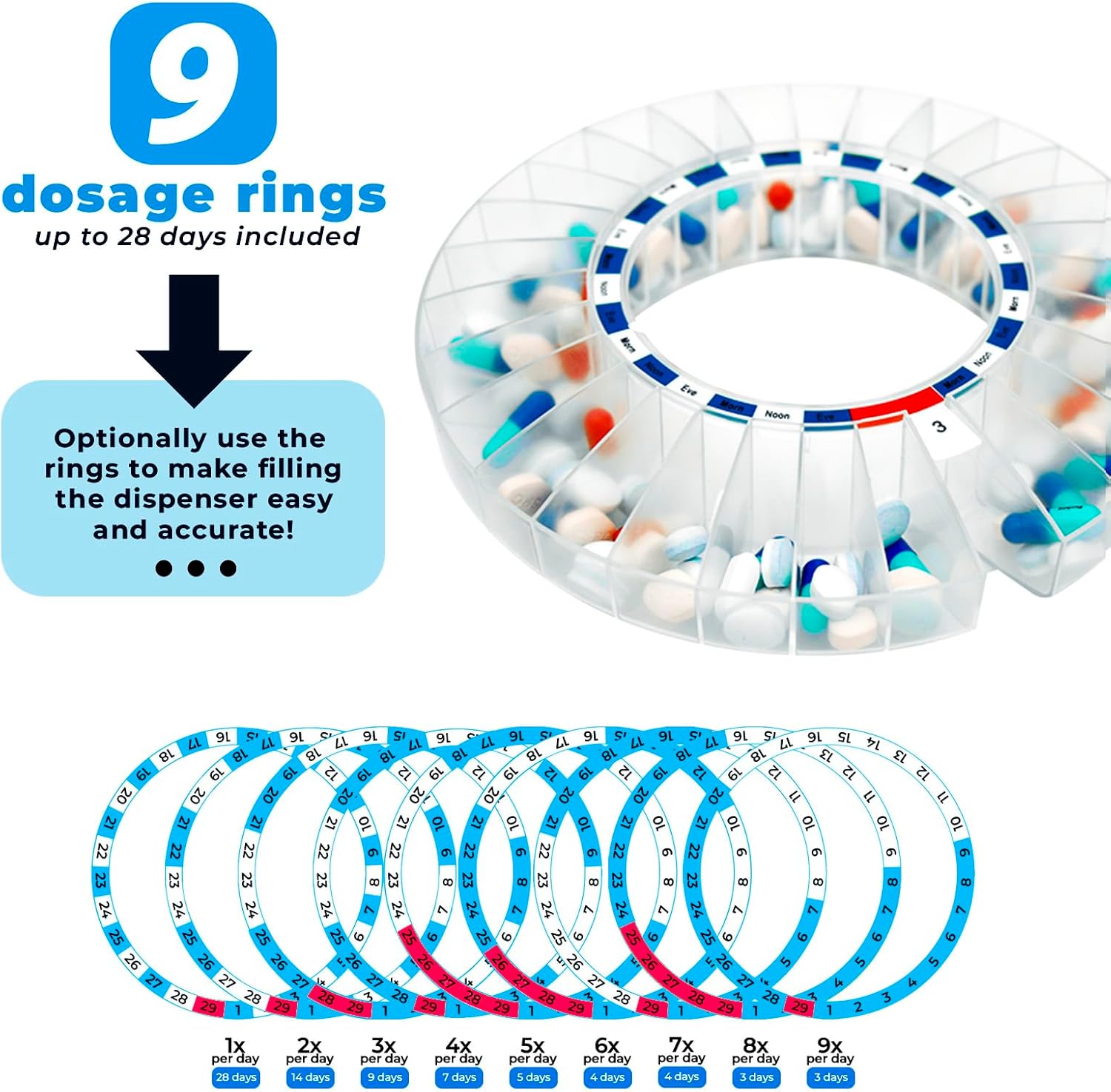
Image: A close-up of the KLIM Smart Pill Dispenser, emphasizing its robust power system. Text overlay states "UNINTERRUPTED POWER. UNINTERRUPTED REMINDERS." and describes the device's operation on electric power with a built-in backup battery for continuous functionality.
3. Pair with App (Wi-Fi Setup):
Open the app and follow the on-screen instructions to connect the dispenser to your home Wi-Fi network. The device supports both 2.4 GHz and 5.0 GHz Wi-Fi for reliable connectivity.

Image: A visual guide for Step 1 of setup, showing the KLIM Smart Pill Dispenser next to a smartphone screen with the Tuya app open, illustrating the process of downloading and pairing the app with the dispenser.
4. Install Dosage Ring and Fill Compartments:
Select the appropriate dosage ring (9 different rings are included for various daily intake frequencies, up to 28 days). Place the chosen ring into the dispenser. Then, fill each compartment with the prescribed medication.

Image: The KLIM Smart Pill Dispenser with an illustration of the 9 included dosage rings, designed to simplify the accurate filling of compartments for up to 28 days of medication.

Image: A visual guide for Step 2 of setup, demonstrating how to place the dosage rings into the dispenser and fill the compartments with medication, along with a reminder to set timing via the app.
5. Set Medication Schedule:
Using the app, effortlessly set the specific times for each dosage to be offered. You can program multiple dosage times per day.

Image: A smartphone screen displaying a calendar interface, illustrating how caregivers can remotely monitor and manage medication dosages. This image emphasizes the "Remote peace of mind" feature of the dispenser.

Imatge: Mostra de tres pantalles de telèfons intel·ligentsasing the app's functionalities: "Schedule" for setting alarms, "Get notified" for receiving alerts, and "Monitor" for tracking medication adherence. This highlights the ease of setup and comprehensive monitoring capabilities of the free app.
6. Secure the Dispenser:
For added safety and to restrict access to pills, use the included keys to lock the dispenser. This prevents tampering and ensures patient, child, and pet safety.

Imatge: Una imatge detallada view of the KLIM Smart Pill Dispenser highlighting its secure lock mechanism and the two included keys. The image also mentions "Reliable 5.0GHz connectivity" and emphasizes safety for children, patients, and pets.
Instruccions de funcionament
Receiving Medication:
When it's time for a dose, the dispenser will activate its audio and visual alarms. The alarm will sound for 30 minutes or until the dispenser is inverted to dispense medication.

Image: A four-panel graphic illustrating the medication reminder process: 1) User is alerted, 2) Caregiver receives a phone notification, 3) The dispenser emits visual and audible alarms, and 4) The app allows for monitoring the patient's progress.
To dispense the medication, press the "PRESS" button on the front of the dispenser to unlock the compartment, then gently tip the dispenser to allow the pills to fall out into your hand or a container.

Image: The KLIM Smart Pill Dispenser in use, with a hand receiving dispensed pills and a smartphone displaying the app's dashboard, showing the next dose time and cycle overview. This image demonstrates the core function of the dispenser.

Image: A visual guide for Step 4 of operation, showing the dispenser being flipped to release medication, alongside a smartphone screen displaying the patient's progress tracking in the app.
Remote Monitoring (for Caregivers):
- The app allows caregivers to remotely monitor when it's time for the patient to take their meds.
- You can confirm if medications have been taken and even check if the dispenser's lid has been opened.
- Invite other caregivers and family members to connect to the app for shared supervision.
- The app provides continuous progress monitoring and sends notifications if a dose is missed.
Manteniment
Neteja:
- Netegeu l'exterior del dispensador amb un drap suau iamp tela.
- No utilitzeu productes de neteja abrasius ni submergiu el dispositiu en aigua.
- Ensure the device is completely dry before reconnecting to power.
Cura de la bateria:
- The dispenser has a built-in backup battery. While designed for uninterrupted functionality, it is primarily intended to operate on electric power.
- Ensure the device is regularly plugged in to keep the backup battery charged.
Resolució de problemes
| Problema | Causa possible | Solució | ||||||||||
|---|---|---|---|---|---|---|---|---|---|---|---|---|
| Dispenser not turning on. | No connectat; apagadatage; battery depleted. | Ensure power adapter is securely plugged in. Check if there's a power outage. Allow time for backup battery to charge if depleted. | ||||||||||
| No alarm or missed dose notification. | Incorrect schedule in app; Wi-Fi connectivity issue; app notifications disabled. | Verify schedule settings in the app. Check Wi-Fi connection (2.4 & 5.0 GHz supported). Ensure app notifications are enabled on your smartphone. | ||||||||||
| Pills dispensing multiple doses or getting stuck between compartments. | Incorrect dosage ring; pills too large/small for compartment; dispenser not level. | Ensure the correct dosage ring is installed. Verify pills are appropriate size for compartments. Place the dispenser on a flat, stable surface. If issue persists, contact support. | ||||||||||
Lid not opening or closing properly or
Documents relacionats - KPDW1
|


