1. Introducció
The LTC GM022 is an ultralight 3-mode wireless gaming mouse designed for precision and versatility. It features a high-performance PAW3395 sensor, multiple connectivity options, and a convenient RGB charging dock. This manual provides instructions for setting up, operating, maintaining, and troubleshooting your GM022 mouse.
Contingut del paquet
- LTC GM022 Gaming Mouse
- Base de càrrega RGB
- Cable USB-C
- 2.4G USB Receiver (stored in mouse)

LTC GM022 Wireless Gaming Mouse with RGB Charging Dock and 2.4G USB Receiver.
2. Configuració i connectivitat
The LTC GM022 mouse offers three connectivity modes: 2.4GHz wireless, Bluetooth 5.0, and wired USB-C. Select the mode that best suits your needs.

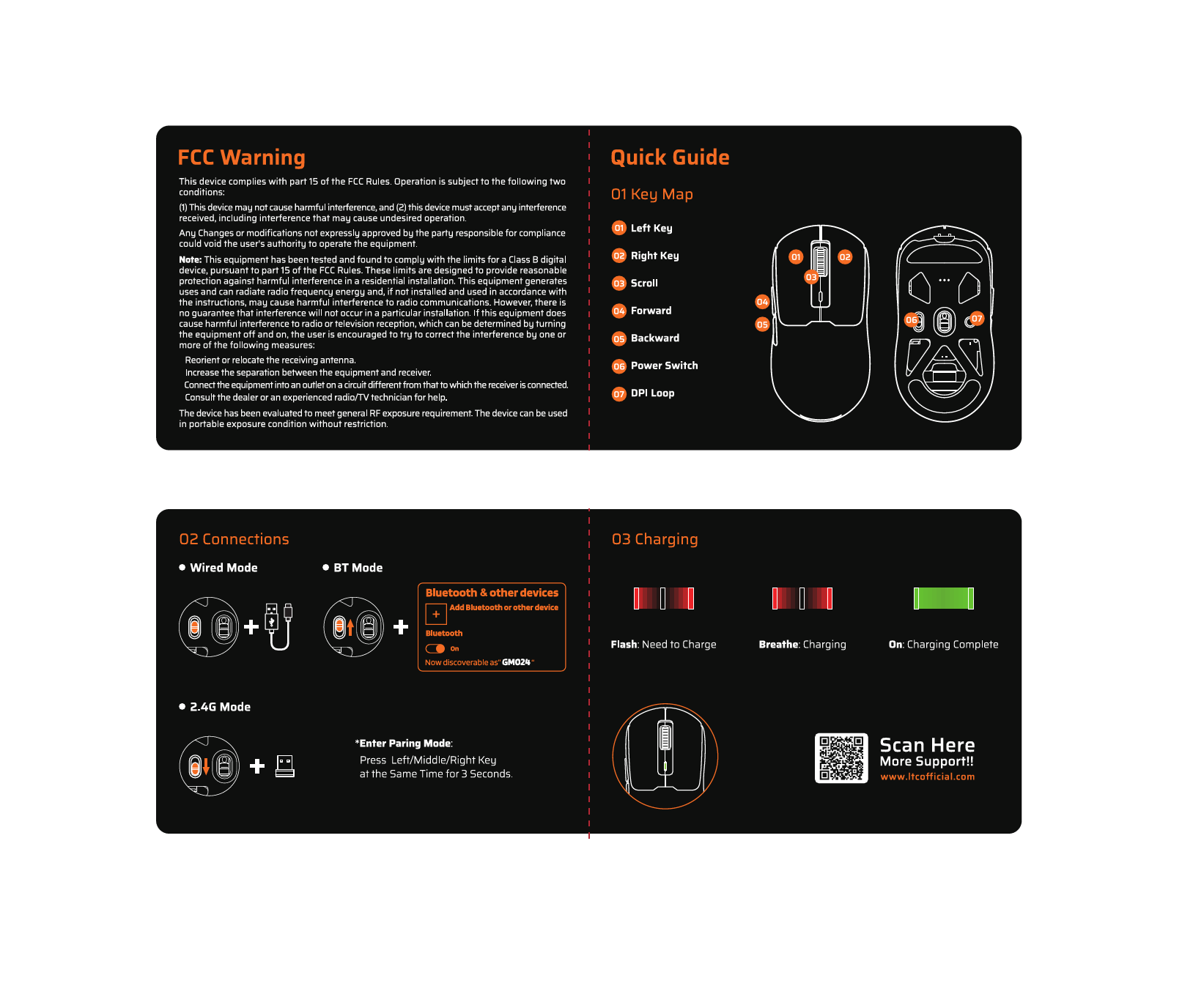
Diagram illustrating the three connectivity modes: 2.4GHz wireless, Bluetooth 5.1, and USB-C wired connection.
2.1. Mode sense fil de 2.4 GHz
- Localitzeu el receptor USB de 2.4 G que es troba al compartiment de la part inferior del ratolí.
- Connecteu el receptor USB a un port USB disponible de l'ordinador.
- Slide the mode switch on the bottom of the mouse to the "2.4G" position.
- El ratolí s'hauria de connectar automàticament a l'ordinador.
2.2. Mode Bluetooth 5.0
- Slide the mode switch on the bottom of the mouse to the "BT" position.
- A l'ordinador o dispositiu, obriu la configuració de Bluetooth i cerqueu dispositius nous.
- Select "LTC GM022" from the list of available devices to pair.
2.3. Wired USB-C Mode
- Connect the provided USB-C cable to the front port of the mouse.
- Connecteu l'altre extrem del cable USB-C a un port USB disponible de l'ordinador.
- El ratolí funcionarà en mode amb cable i es carregarà simultàniament.

Underside of the LTC GM022 mouse with labels for mode switch, dongle storage, PTFE feet, and DPI loop button.
3. Instruccions de funcionament
3.1. Funcions del botó
The LTC GM022 mouse features 5 programmable buttons:
- Clic esquerre: Acció primària.
- Clic dret: Menú contextual/d'acció secundària.
- Middle Click (Scroll Wheel): Scroll up/down, click for universal scroll or other assigned function.
- Botó Endavant: Navega cap endavant web navegadors o file exploradors.
- Botó enrere: Navega cap enrere web navegadors o file exploradors.

Illustration of the LTC GM022 mouse highlighting its five programmable buttons and their default assignments.
3.2. Ajust de DPI
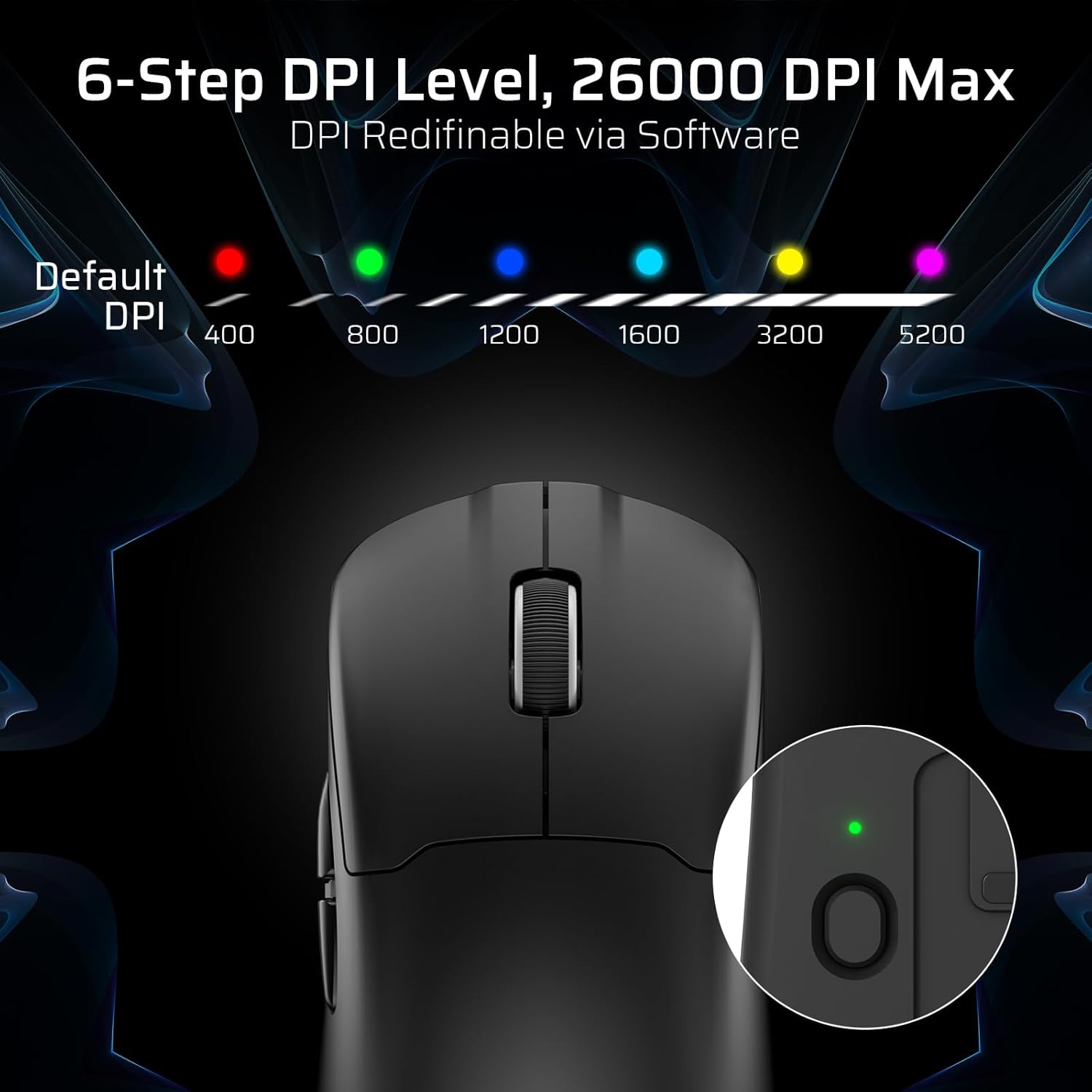
The mouse has a dedicated DPI button on its underside, allowing you to cycle through 6 preset DPI levels. Each level is indicated by a different LED color:
- 400 DPI (Red)
- 800 DPI (Green)
- 1200 DPI (Blue)
- 1600 DPI (Cyan)
- 3200 DPI (Yellow)
- 5200 DPI (Magenta)
These DPI levels can be further customized and redefined up to 26000 DPI using the LTC software.

Visual representation of the 6-step DPI levels (400, 800, 1200, 1600, 3200, 5200) and the corresponding LED indicator colors.
3.3. Personalització del programari
Download and install the official LTC software from the manufacturer's website to unlock full customization options. The software allows you to:
- Assignar macros als botons.
- Remap key functions.
- Redefine 6-step DPI levels up to 26000 DPI.
- Adjust polling rate (up to 1000Hz).
- Modify click and scroll speed.
- Monitor battery status.

Screenshot of the LTC software interface for customizing mouse settings, including key assignments, DPI, polling rate, and battery monitoring.
4. Càrrega del ratolí
The LTC GM022 mouse is equipped with a 400mAh battery and can be charged using the included magnetic RGB charging dock or directly via the USB-C cable.
4.1. Using the Magnetic Charging Dock
- Connect the USB-C cable to the charging dock and then to a power source (e.g., computer USB port, USB wall adapter).
- Place the mouse onto the charging dock. The magnetic connection will secure it in place, and charging will begin automatically.
- The RGB lighting on the dock will indicate charging status.
4.2. Direct USB-C Charging
- Connect the USB-C cable directly to the mouse's front port.
- Connecteu l'altre extrem del cable USB-C a una font d'alimentació.
- The mouse can be used in wired mode while charging.

The LTC GM022 mouse magnetically charging on its RGB illuminated dock, indicating a 400mAh battery.
5. Manteniment i cura
To ensure the longevity and optimal performance of your LTC GM022 mouse, follow these maintenance guidelines:
- Neteja: Feu servir un drap suau i sec per netejar la superfície del ratolí. Per a la brutícia persistent, netegeu lleugeramentampNetegeu el drap amb aigua o una solució de neteja suau. Eviteu productes químics agressius o materials abrasius.
- Cura del sensor: Keep the optical sensor on the underside of the mouse clean and free from dust or debris to maintain tracking accuracy.
- Peus de PTFE: The mouse comes with durable PTFE feet for smooth gliding. If they show significant wear, replacement feet may be available from the manufacturer.
- Emmagatzematge: Quan no l'utilitzeu durant períodes prolongats, guardeu el ratolí en un entorn net i sec.
Close-up of the mouse's underside, detailing the PTFE feet for smooth gliding and the inclusion of backup feet.
6. Solució De Problemes
If you encounter issues with your LTC GM022 mouse, refer to the following common problems and solutions:
| Problema | Possible solució |
|---|---|
| Mouse not responding in 2.4G wireless mode | Ensure the USB receiver is securely plugged in. Check if the mouse mode switch is set to "2.4G". Try a different USB port. Ensure the mouse battery is charged. |
| Mouse not connecting via Bluetooth | Ensure the mouse mode switch is set to "BT". Make sure Bluetooth is enabled on your device. Remove previous pairings and re-pair the mouse. Ensure the mouse battery is charged. |
| Mouse not charging | Ensure the USB-C cable is properly connected to both the dock/mouse and the power source. Verify the power source is active. Clean the charging contacts on the mouse and dock. |
| Seguiment inexacte o retard del cursor | Clean the optical sensor on the underside of the mouse. Ensure you are using the mouse on a suitable surface (e.g., a mouse pad). Check for interference in wireless modes. Adjust DPI settings. |
| Els botons no responen | Ensure the mouse is powered on and connected. If using software, check button assignments. Try restarting your computer. |
If the issue persists after trying these solutions, please contact LTC customer support for further assistance.
7. Especificacions
Key technical specifications for the LTC GM022 Ultralight 3-Mode Wireless Gaming Mouse:
- Model: GM022
- Connectivitat: Sense fil de 2.4 GHz, Bluetooth 5.0, USB-C amb cable
- Sensor: PixArt PAW3395 Optical Sensor
- DPI màxim: 26000 DPI (6-step re-definable via software)
- Taxa de votació: 1000 Hz
- Velocitat de seguiment: 650 IPS
- Acceleració: 50G
- Botons: 5 Botons programables
- Vida útil del canvi: 80 milions de clics
- Bateria: Polímer de liti de 400 mAh
- Pes: Aproximadament 55 grams (2.01 unces)
- Dimensions: 4.7 x 2.44 x 0.04 polzades
- Característiques especials: RGB Charging Dock, Ultralight Design, PTFE Feet

Detallada view of the PixArt PAW3395 sensor specifications including 26K DPI Max, 1000Hz Polling Rate, 650 IPS Tracking Speed, and 50G Acceleration.

Illustration highlighting the durable switches with an 80 million click lifespan.
8. Garantia i Suport
LTC products are designed and manufactured to the highest quality standards. For information regarding warranty coverage, technical support, or to download the latest software and drivers, please visit the official LTC weblloc o poseu-vos en contacte amb el seu departament d'atenció al client.
Conserveu el rebut de compra com a comprovant de compra per a reclamacions de garantia.