Introducció
Welcome to the Cinnado D1 5MP Indoor Security Camera user manual. This guide provides detailed instructions for setting up, operating, and maintaining your security camera. Please read this manual thoroughly before use to ensure proper functionality and to maximize your product experience.
Producte acabatview
Contingut del paquet
En obrir el paquet, comproveu que hi hagi tots els elements següents:
- 1x Cinnado D1 5MP Indoor Security Camera
- 1 x suport de muntatge
- Paquet de 1 cargols
- 1 cable tipus C
- 1x adaptador de corrent
- 1x Installation Guide (this manual)
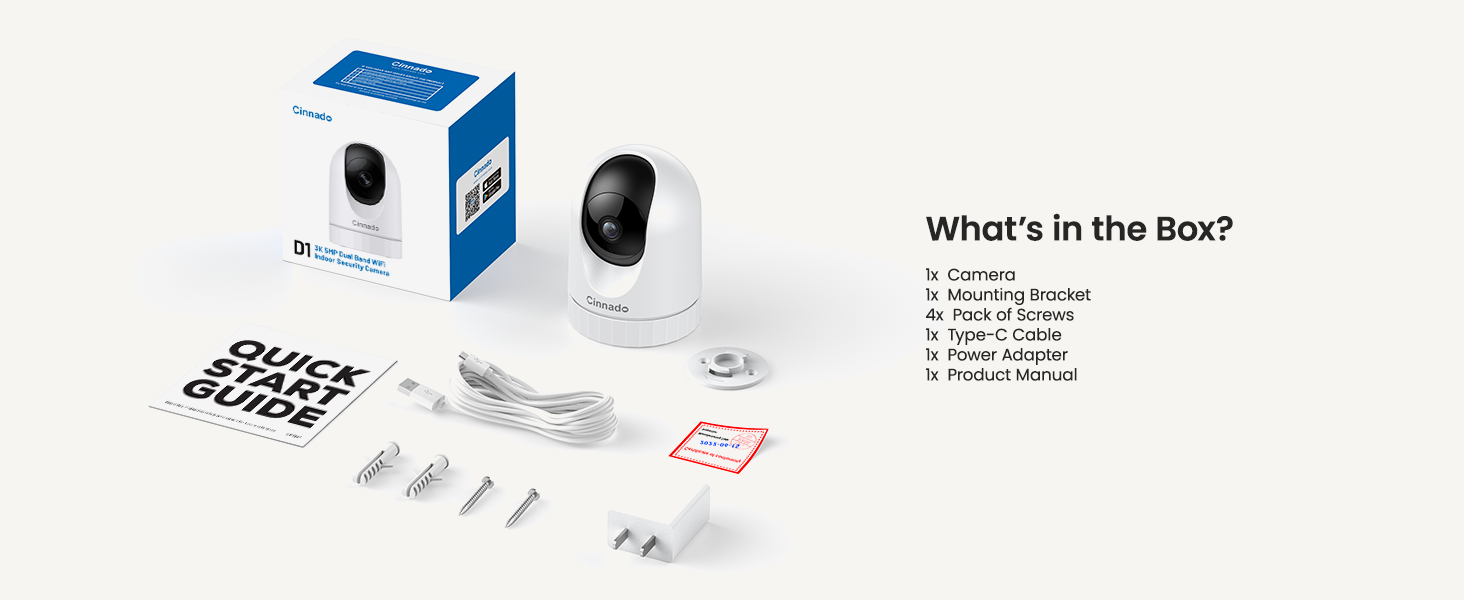
Image: Contents of the Cinnado D1 Security Camera package.
Característiques clau
- 5MP Super HD Resolution: Proporciona un vídeo clar i detallattage.
- Dual-Band WiFi (2.4Ghz/5Ghz): Ofereix una connectivitat de xarxa flexible i estable.
- Excel·lent visió nocturna: Equipped with 4x 940nm invisible IR lights for clear viewen condicions de poca llum.
- 360° Auto Tracking: Segueix automàticament el moviment detectat dins del seu camp de view.
- Smooth Two-Way Audio: Micròfon i altaveu integrats per a comunicació en temps real.
- Opcions d'emmagatzematge flexibles: Supports local SD card storage (up to 128GB, not included) and optional cloud storage.
- Accés multiusuari: Allows sharing camera access with family and friends.
- Compatibilitat amb la llar intel·ligent: Funciona amb Amazon Alexa i Google Home.
- Alertes de detecció de moviment: Sends instant notifications upon detecting movement.

Image: Cinnado D1 5MP Indoor Security Camera.
Guia de configuració
Pas 1: prepareu-vos per a la instal·lació
Before beginning the installation, ensure you have a stable 2.4Ghz or 5Ghz Wi-Fi network available. The camera requires a corded electric power source and is designed for indoor use only.
Pas 2: Baixeu i instal·leu l'aplicació
- Cerca the 'Wansview Cloud' app on the Apple App Store (for iOS devices) or Google Play Store (for Android devices).
- Descarregueu i instal·leu l'aplicació al vostre telèfon intel·ligent o tauleta.
- Obriu l'aplicació i creeu un compte nou o inicieu sessió si ja en teniu un.

Image: Download the companion app from your device's app store.
Pas 3: Connecteu la càmera
- Plug the Type-C cable into the camera and connect the power adapter to an electrical outlet. The camera will power on and initiate its startup sequence.
- Once the camera is ready (indicated by a specific LED status or voice prompt), open the Wansview Aplicació al núvol.
- A l'aplicació, toca la icona "+" per afegir un dispositiu nou.
- Follow the on-screen instructions to scan the QR code located on the camera or its packaging.
- Select your 2.4Ghz or 5Ghz Wi-Fi network and enter the password. Ensure your phone is connected to the same Wi-Fi network during this process.
- The camera will attempt to connect to your Wi-Fi network. Once connected, you will hear a confirmation sound or see a steady LED indicator.

Image: The Cinnado D1 camera supports both 2.4Ghz and 5Ghz Wi-Fi bands for flexible connectivity.
Pas 4: Muntatge de la càmera
The Cinnado D1 camera can be placed on a flat surface or mounted to a ceiling using the included mounting bracket and screws.
- Choose a suitable indoor location with a clear view and within Wi-Fi range.
- If mounting, use the bracket as a template to mark screw positions on the ceiling.
- Drill pilot holes and secure the mounting bracket with the provided screws.
- Attach the camera to the mounting bracket, ensuring it is securely fastened.
- Adjust the camera's angle as needed within the app after installation.
Instruccions de funcionament
Viu View i Seguiment
Obre el Wansview Cloud app and select your camera from the device list to access the live video feed. You can use the on-screen controls to pan (horizontal) and tilt (vertical) the camera to adjust its viewangle de ing.

Image: The camera offers 360-degree coverage with pan and tilt functionality.
Àudio bidireccional
La càmera té un micròfon i un altaveu integrats. Per utilitzar àudio bidireccional:
- Mentre està en directe view, toca la icona del micròfon a l'aplicació.
- Parla al micròfon del telèfon per transmetre la teva veu a través de l'altaveu de la càmera.
- Tap the speaker icon to hear audio from the camera's environment.

Image: Smooth two-way audio allows communication through the camera.
Detecció de moviment i alertes
The Cinnado D1 camera can detect motion and send alerts to your phone:
- Navigate to the camera settings in the app.
- Enable motion detection and adjust sensitivity levels as desired.
- Configure alert notifications to receive instant messages on your device when motion is detected.
- El 360° Auto Tracking feature, when enabled, will automatically pan and tilt the camera to follow detected movement.
Video Playback and Storage
La càmera admet dos mètodes d'emmagatzematge per a les gravacionstage:
- Emmagatzematge de targetes Micro SD: Insert a Micro SD card (up to 128GB, not included) into the camera's designated slot for 24/7 continuous recording.
- Emmagatzematge al núvol: An optional cloud storage service is available, often with a 30-day free trial. This allows for secure, off-site storage of your recordings.
A view foo gravattage, access the playback feature within the Wansview Cloud app. You can browse recordings by date and time.

Image: Flexible storage options including SD card and cloud storage.
Accés compartit
You can share access to your camera's live feed with family members or trusted individuals:
- A les Wansview Cloud app, go to the camera settings.
- Locate the 'Share Device' or similar option.
- Follow the prompts to invite other users, who will need their own Wansview Cloud accounts.
Integració de la llar intel·ligent
The Cinnado D1 camera supports integration with Amazon Alexa and Google Home. Refer to the respective smart home assistant's app or documentation for specific instructions on connecting your camera and using voice commands.
Manteniment
To ensure optimal performance and longevity of your Cinnado D1 camera:
- Neteja: Netegeu suaument la lent i el cos de la càmera amb un drap suau i sec. Eviteu utilitzar productes químics agressius o materials abrasius.
- Actualitzacions de firmware: Regularly check the Wansview Cloud app for available firmware updates. Keeping your camera's firmware up-to-date ensures access to the latest features and security enhancements.
- Col·locació: Ensure the camera is placed in a stable indoor environment, away from direct sunlight, extreme temperatures, and moisture.
Resolució de problemes
If you encounter issues with your Cinnado D1 camera, please refer to the following common solutions:
| Problema | Possible solució |
|---|---|
| La càmera no es connecta a la Wi-Fi | Ensure your Wi-Fi network is 2.4Ghz or 5Ghz. Verify the Wi-Fi password is correct. Move the camera closer to the router. Restart the camera and your router. |
| Poca qualitat de vídeo | Check your internet connection speed. Ensure the camera lens is clean. Adjust camera placement to avoid glare or insufficient lighting. |
| La detecció de moviment no funciona | Verify motion detection is enabled in the app settings. Adjust sensitivity levels. Ensure there are no obstructions in the camera's field of view. |
| Problemes d'àudio bidireccional | Check volume settings on your phone and in the app. Ensure microphone and speaker permissions are granted to the app. |
| Camera offline frequently | Improve Wi-Fi signal strength by moving the camera closer to the router or using a Wi-Fi extender. Ensure the power supply is stable. |
If these solutions do not resolve your issue, please contact Cinnado customer support for further assistance.
Especificacions
| Característica | Detall |
|---|---|
| Nom del model | D1 |
| Resolució | 5MP (3K) |
| Connectivitat | Dual-Band Wi-Fi (2.4Ghz/5Ghz) |
| Camp de View | 110 Degrees (Lens), 360 Degrees (Pan/Tilt Coverage) |
| Visió nocturna | 4x 940nm Invisible IR Lights |
| Opcions d'emmagatzematge | Targeta Micro SD (fins a 128 GB), emmagatzematge al núvol (opcional) |
| Font d'alimentació | Elèctric amb cable |
| Dispositius compatibles | iOS, Android |
| Dimensions (L x A x A) | 2.89 x 2.89 x 4.01 polzades |
| Pes de l'article | 10.2 unces |
| Tipus de muntatge | Ceiling Mount, Tabletop |
| Tipus d'alerta | Només moviment |
Garantia i Suport
Cinnado is committed to providing high-quality products and customer satisfaction. Your Cinnado D1 5MP Indoor Security Camera comes with lifelong technical support and after-sales service.
For any questions, technical assistance, or support needs, please do not hesitate to contact Cinnado customer service. Our team is available to provide professional guidance and resolve any issues you may encounter.
Please refer to the contact information provided with your product packaging or visit the official Cinnado weblloc per obtenir detalls de suport.


