1. Introducció
The LILYGO T-Beam V1.2 is a versatile development board integrating an ESP32 microcontroller with LoRa, WiFi, Bluetooth Low Energy (BLE), and GPS capabilities. It is designed for a wide range of applications, particularly those requiring long-range communication and location tracking, such as Meshtastic networks. This manual provides essential information for setting up, operating, and maintaining your T-Beam V1.2 board.
2. Informació de seguretat
Please read and understand the following safety precautions before using the LILYGO T-Beam V1.2 development board:
- Font d'alimentació: Use only recommended power sources (USB or 18650 battery). Ensure correct polarity when inserting the battery.
- Electricitat estàtica: Handle the board with care to avoid electrostatic discharge, which can damage electronic components.
- Medi ambient: Operate the board in a dry environment. Avoid exposure to moisture, extreme temperatures, or corrosive substances.
- Connexió d'antena: Always connect the LoRa antenna before powering on the device when using LoRa functionality to prevent damage to the LoRa transceiver.
- Modificacions: Do not attempt to modify the hardware unless you are an experienced user. Unauthorized modifications may void the warranty and cause damage.
3. Contingut del paquet
Verifiqueu que tots els elements siguin presents al vostre paquet:
- LILYGO T-Beam V1.2 Development Board
- LoRa Antenna (433Mhz)
- Pin Headers (unassembled)

Image: Contents of the LILYGO T-Beam V1.2 package, showing the development board, LoRa antenna, and pin headers.
4. Producte acabatview i Característiques
The LILYGO T-Beam V1.2 is a compact and powerful board designed for various wireless communication and IoT projects. Key components and features are detailed below:
4.1 Components clau
- ESP32 Microcontroller: Dual-core processor with integrated Wi-Fi and Bluetooth.
- LoRa Transceiver: SX1278 (for 433Mhz version) for long-range, low-power wireless communication.
- NEO-6M GPS Module: Provides accurate location data.
- AXP2101 Power Management Unit (PMU): Manages power from USB and 18650 battery, including charging.
- 18650 Battery Holder: Integrated holder for a single 18650 Li-ion battery (battery not included).
- Port USB-C: For power supply, data communication, and firmware uploading.
- Botons: Three onboard buttons for Power, IO38, and Reset functions.

Imatge: Superior view of the LILYGO T-Beam V1.2 board, showing the main components and antenna connection.

Image: Detailed feature summary highlighting the MCU, wireless protocols, PMU, GPS module, and LoRa transceiver.
4.2 Diagrama de pins
Understanding the pinout is crucial for connecting external sensors and peripherals. Refer to the diagram below for GPIO assignments and power pins.

Image: Comprehensive pinout diagram for the LILYGO T-Beam V1.2, indicating GPIOs, power, and communication interfaces.
5. Configuració
Follow these steps to prepare your LILYGO T-Beam V1.2 for use:
- Connecteu l'antena LoRa: Carefully screw the provided LoRa antenna onto the SMA connector on the board. Ensure it is finger-tight. Do not power on the board with LoRa enabled without the antenna connected.
- Font d'alimentació:
- Potència USB: Connect a USB-C cable from your computer or a 5V USB power adapter to the board's USB-C port.
- 18650 Bateria: Insert a charged 18650 Li-ion battery into the battery holder, observing the correct polarity (+ and - markings). The board supports charging the battery via the USB-C port.
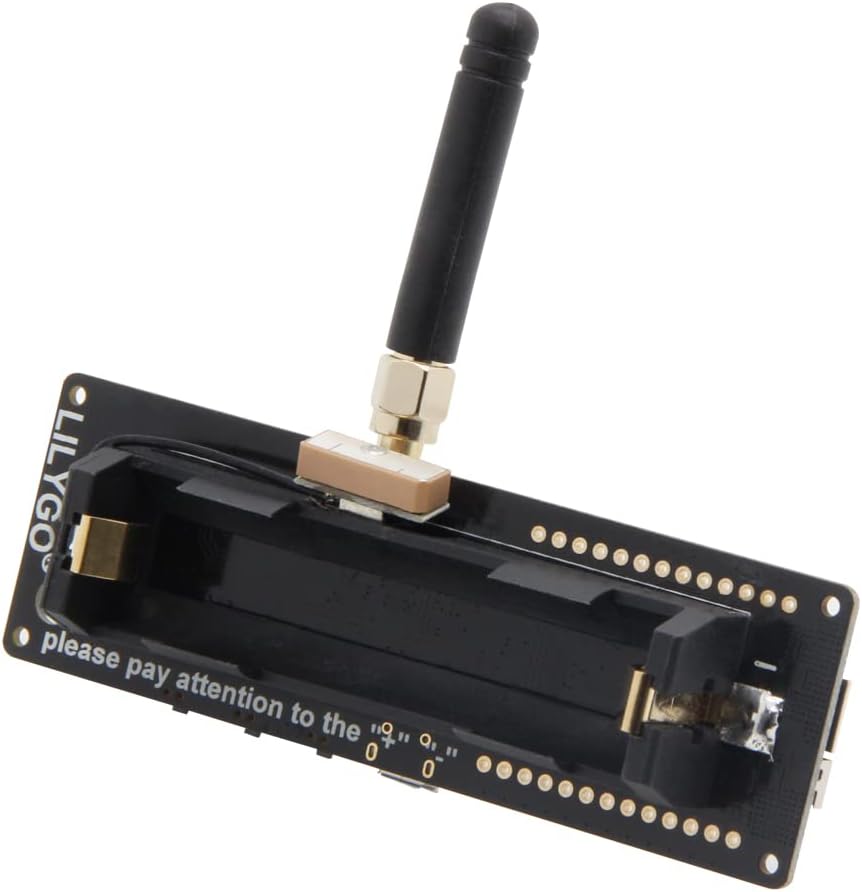
Imatge: Part posterior view of the T-Beam V1.2, highlighting the integrated 18650 battery holder.
- Software Setup (Firmware Upload):
- Conductors: Install the necessary USB-to-serial drivers (e.g., CH9102) for your operating system if the board is not recognized.
- Entorn de desenvolupament: For custom development, set up the Arduino IDE or PlatformIO with ESP32 board support.
- Meshtastic: For Meshtastic applications, download the Meshtastic firmware flasher from the official Meshtastic website and follow their instructions to flash the firmware onto the board.
6. Funcionament
Once the firmware is uploaded, the T-Beam V1.2 will begin operation. The specific functionality depends on the loaded firmware (e.g., Meshtastic, custom Arduino sketch).
- Encès/apagat: Use the dedicated power button (if available and configured by firmware) or connect/disconnect the power source.
- Adquisició GPS: The NEO-6M GPS module will attempt to acquire a satellite fix upon power-up. This may take several minutes, especially indoors or on first use.
- LoRa Communication: The LoRa module will transmit and receive data as programmed by the firmware. Ensure the antenna is properly connected for optimal performance.
- Wi-Fi/BLE: These modules enable network connectivity and short-range communication, typically used for configuration or data transfer with a smartphone/computer.
7. Manteniment
Proper care ensures the longevity of your LILYGO T-Beam V1.2:
- Neteja: Use a soft, dry cloth to clean the board. Avoid liquids or abrasive cleaners.
- Emmagatzematge: Store the board in a cool, dry place, away from direct sunlight and extreme temperatures. If storing for extended periods, remove the 18650 battery.
- Actualitzacions de firmware: Regularly check for firmware updates from the official LILYGO or Meshtastic repositories to benefit from new features and bug fixes.
- Cura de la bateria: If using an 18650 battery, ensure it is a high-quality cell and follow standard battery safety practices. Do not overcharge or deep discharge.
8. Solució De Problemes
Aquesta secció tracta els problemes habituals que podeu trobar:
| Problema | Causa possible | Solució |
|---|---|---|
| La placa no s'encén. | No power, incorrect battery insertion, faulty USB cable. | Check USB connection, ensure 18650 battery is charged and inserted correctly. Try a different USB cable/port. |
| Cannot upload firmware. | Missing/incorrect USB-to-serial drivers, incorrect COM port selected, board not in bootloader mode. | Install CH9102 drivers. Select correct COM port in IDE. Press and hold BOOT button while connecting USB or during upload if needed. |
| GPS not getting a fix. | Poor satellite visibility, first-time fix delay. | Move to an open outdoor area. Allow several minutes for initial fix. Ensure GPS antenna is not obstructed. |
| LoRa communication issues. | Antenna not connected, incorrect frequency, interference. | Ensure LoRa antenna is securely connected. Verify firmware is configured for 433Mhz. Check for local interference. |
9. Especificacions
Detailed technical specifications for the LILYGO T-Beam V1.2 433Mhz:
| Característica | Especificació |
|---|---|
| Microcontrolador | ESP32 (Espressif Systems) |
| Memòria Flash | 4 MB |
| PSRAM | 8 MB |
| Connectivitat sense fil | Wi-Fi (802.11 b/g/n), Bluetooth 4.2 BLE |
| LoRa Transceiver | SX1278 (433Mhz) |
| Mòdul GPS | NEO-6M |
| Gestió d'energia | AXP2101 PMU |
| Font d'alimentació | USB-C (5V), 18650 Battery |
| Suport del sistema operatiu | FreeRTOS, Zephyr |
| Dimensions (aprox.) | 100 mm (L) x 40 mm (A) x 26 mm (Al) |
10. Garantia i Suport
LILYGO products typically come with a manufacturer's warranty covering defects in materials and workmanship. For specific warranty terms and conditions, please refer to the official LILYGO weblloc web o poseu-vos en contacte amb el vostre punt de venda.
For technical support, firmware updates, and community resources, please visit the official LILYGO website or their GitHub repositories. Many open-source projects, such as Meshtastic, also provide extensive documentation and community forums for support related to their software.
You can find more information and contact LILYGO through their official Amazon store: LILYGO Amazon Store.


