1. Introducció
Thank you for choosing the CLABEL CT321D Desktop Bluetooth Thermal Label Printer. This device is designed for efficient and clear label printing without the need for ink or toner. It supports various label types and offers flexible connectivity options for both mobile and computer use. This manual provides detailed instructions for setup, operation, maintenance, and troubleshooting to ensure optimal performance.

Image 1.1: CLABEL CT321D printer in operation, connected via Bluetooth to a smartphone.
2. Informació de seguretat
Please read and follow these safety guidelines carefully before using the printer:
- Utilitzeu només l'adaptador d'alimentació subministrat.
- No exposeu la impressora a l'aigua ni a una humitat excessiva.
- Mantingueu la impressora allunyada de la llum solar directa i de fonts de calor.
- No intenteu desmuntar ni reparar la impressora vosaltres mateixos. Poseu-vos en contacte amb el servei d'atenció al client per obtenir ajuda.
- Ensure proper ventilation around the printer during operation.
3. Contingut del paquet
Verifiqueu que tots els elements siguin presents al paquet:
- CLABEL CT321D Thermal Label Printer
- Adaptador d'alimentació
- Cable USB-C
- 1 Roll of Thermal Labels
- Manual d'usuari (aquest document)
4. Producte acabatview
The CLABEL CT321D is a high-speed, direct thermal label printer designed for various labeling needs. It features 203 DPI printing for clear output and supports labels from 20mm to 80mm in width. Key features include:
- Impressió d'alta velocitat: Efficiently prints labels without ink or toner.
- Cost-Saving: Compatible with various brands of thermal labels, avoiding proprietary consumables.
- Versatile App: The 'clabel trade' app offers powerful templates and customization for QR codes, barcodes, text, and graphics.
- Múltiples opcions de connexió: Supports USB and Bluetooth connectivity for printing from PCs and smartphones.
- Etiquetes personalitzables: Edit labels with different fonts, graphics, and layouts using the app.

Image 4.1: The CLABEL CT321D printer connected to a laptop, demonstrating its use in an office setting.
5. Configuració
5.1. Desembalatge i col·locació
Carefully remove the printer and all accessories from the packaging. Place the printer on a stable, flat surface with adequate space for operation and ventilation.
5.2. Carregant etiquetes
- Obriu la coberta de la impressora.
- Insert the label roll into the label compartment, ensuring the labels feed smoothly from the bottom of the roll.
- Pull a few labels out past the print head.
- Close the printer cover firmly.

Image 5.1: Visual guide for loading labels into the printer for both computer and mobile printing setups.
5.3. Connexió d'alimentació
Connect the power adapter to the printer's power port and then plug it into a wall outlet. Turn on the printer using the power switch, usually located on the side or back of the device.
5.4. Software and App Installation
For Mobile Devices (Bluetooth Connection):
- Download the 'clabel trade' app from the Google Play Store (for Android) or the Apple App Store (for iOS).
- Assegureu-vos que el Bluetooth estigui habilitat al vostre dispositiu mòbil.
- Open the 'clabel trade' app and follow the on-screen instructions to connect to your printer. The printer will typically appear as 'CT321D' or a similar identifier.

Image 5.2: Instructions for downloading the 'clabel trade' app and establishing a Bluetooth connection.
For Computers (USB Connection):
- Connecteu la impressora a l'ordinador amb el cable USB-C proporcionat.
- Visit the official CLABEL website to download the appropriate printer driver for your operating system (Windows).
- Instal·leu el controlador seguint les instruccions de la pantalla.
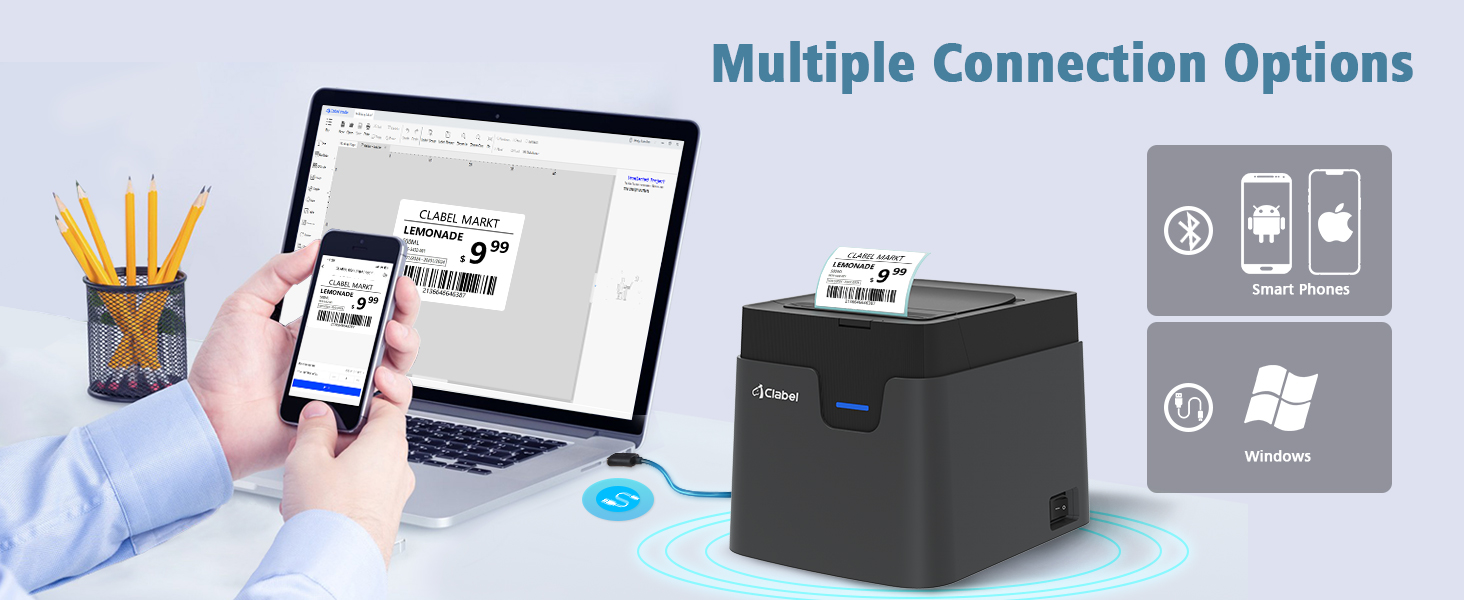
Image 5.3: The printer supports both USB connection to computers and Bluetooth connection to smartphones.
6. Instruccions de funcionament
6.1. Printing via Mobile App ('clabel trade')
- Ensure the printer is powered on and connected to your mobile device via Bluetooth.
- Open the 'clabel trade' app.
- Select or create a new label template. The app allows customization of text, barcodes, QR codes, images, and more.
- Adjust label size and content as needed.
- Tap the print icon to send the label to the printer.
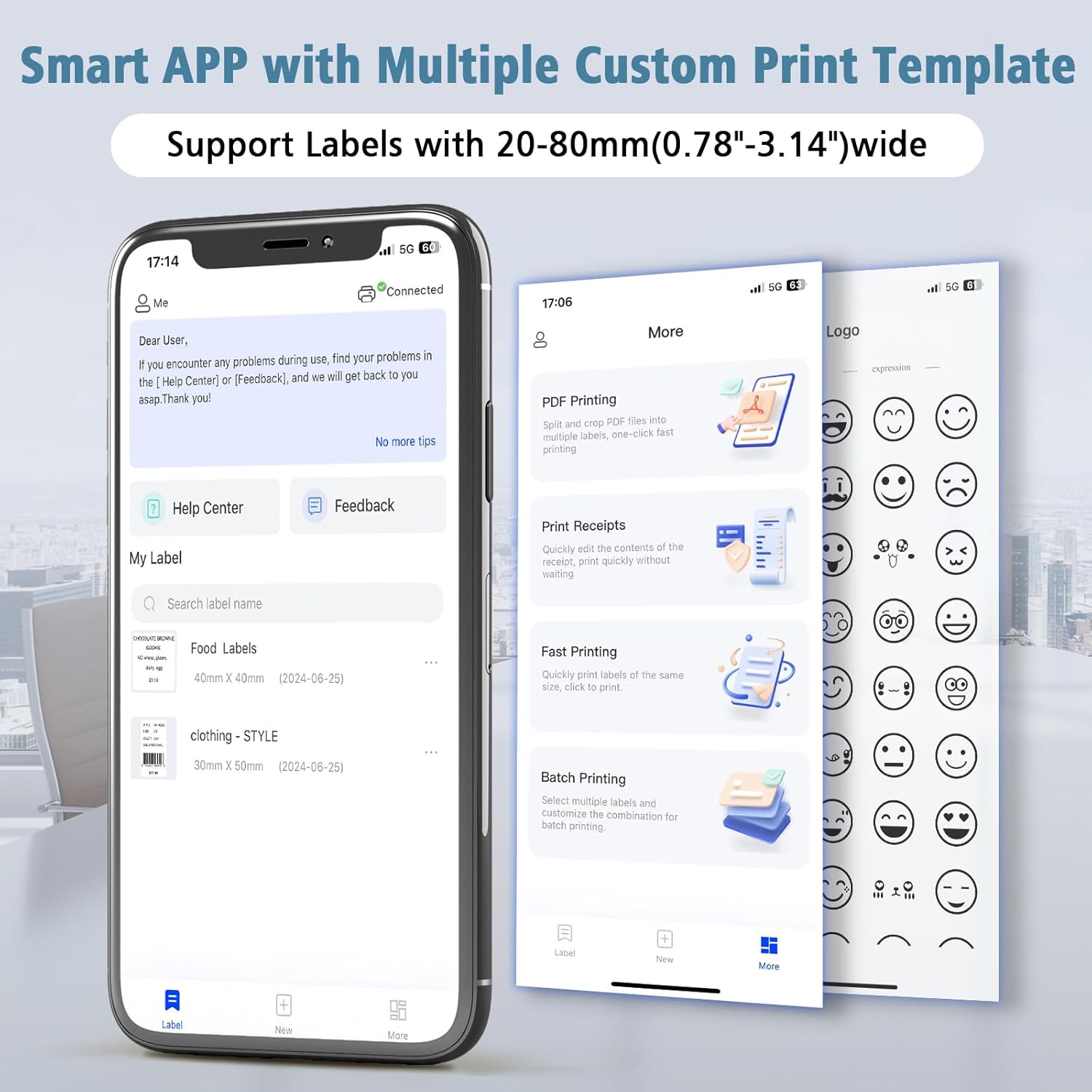
Image 6.1: The 'clabel trade' app offers various printing functionalities including PDF, receipt, fast, and batch printing.
6.2. Impressió a través de l'ordinador
- Ensure the printer is powered on and connected to your computer via USB.
- Open your preferred label design software or application.
- Design your label.
- Select the CLABEL CT321D printer from your printer options.
- Inicia l'ordre d'impressió.
6.3. Supported Label Sizes
The CLABEL CT321D printer supports thermal labels with widths ranging from 20mm to 80mm (0.78" to 3.14"). Ensure you use thermal labels of suitable size for optimal performance.

Image 6.2: The printer supports multiple label styles and widths, from 20mm to 72mm.
7. Manteniment
Regular maintenance helps ensure the longevity and optimal performance of your CLABEL CT321D printer.
7.1. Neteja del capçal d'impressió
The print head is a critical component. If print quality degrades, clean the print head using a cotton swab lightly dampened with isopropyl alcohol. Gently wipe across the print head surface. Allow it to dry completely before use.
7.2. Neteja de l'exterior
Wipe the exterior of the printer with a soft, dry cloth. Do not use abrasive cleaners or solvents.
7.3. Label Storage
Store thermal labels in a cool, dry place away from direct sunlight and heat to prevent premature discoloration or damage.
8. Solució De Problemes
If you encounter issues with your CLABEL CT321D printer, refer to the following common problems and solutions:
- Printer Not Turning On:
Ensure the power adapter is securely connected to both the printer and a working power outlet. Check if the power switch is in the 'On' position. - Sense sortida d'impressió:
Verify that labels are loaded correctly and that the printer cover is closed. Check the connection (USB or Bluetooth) to your device. Ensure the correct printer is selected in your software/app. - Poor Print Quality (Faded/Unclear):
The print head may be dirty; clean it as described in Section 7.1. Ensure you are using high-quality thermal labels. Adjust print density settings in the app or driver if available. - Desconnexió Bluetooth:
Some users report intermittent disconnections with the mobile app. Try restarting the app and the printer. Ensure your mobile device's Bluetooth and location permissions are enabled for the 'clabel trade' app. Keep the printer within range of your device. - Etiquetes que no alimenten correctament:
Check for any obstructions in the label path. Ensure the label roll is inserted properly and not jammed. - App Issues (e.g., Freezing, Errors):
Ensure your 'clabel trade' app is updated to the latest version. Try clearing the app's cache or reinstalling it.
9. Especificacions
Below are the technical specifications for the CLABEL CT321D Desktop Bluetooth Thermal Label Printer:
| Característica | Especificació |
|---|---|
| Marca | CLABEL |
| Nom del model | CT321D |
| Tecnologia d'impressió | Tèrmica |
| Tecnologia de connectivitat | Bluetooth, USB |
| Resolució màxima d'impressió en blanc i negre | 203 DPI |
| Velocitat màxima d'impressió (monocrom) | 70.0 mm/s |
| Mida màxima del suport | 20-80 mm (0.78-3.14 polzades) |
| Dimensions del producte | 8 "P x 2.5" W x 2" H |
| Pes de l'article | 3.03 lliures (1.38 quilograms) |
| Mètode de control | App (Android, iOS), PC Software |
| Color de tinta | GrayBlack (Monochrome Output) |
| Data de primera disponibilitat | 26 de febrer de 2023 |
10. Garantia i Suport
CLABEL provides customer support for its products. For warranty information, technical assistance, or service inquiries, please contact CLABEL customer support through their official website or the contact information provided with your purchase. Please have your model number (CT321D) and purchase date available when contacting support.


