1. Introducció
Welcome to the Genmitsu L8 Laser Engrave + MD18 Rotary Roller user manual. This guide provides essential information for the safe and effective operation of your new laser engraving and cutting machine. The Genmitsu L8 is a high-performance 20W laser cutter featuring a built-in acrylic enclosure, air assist pump, honeycomb table, and camera, designed for precision and versatility. The included MD18 Rotary Roller expands its capabilities to engrave cylindrical objects.
Please read this manual thoroughly before operating the device to ensure proper setup, safe usage, and optimal performance. Keep this manual for future reference.
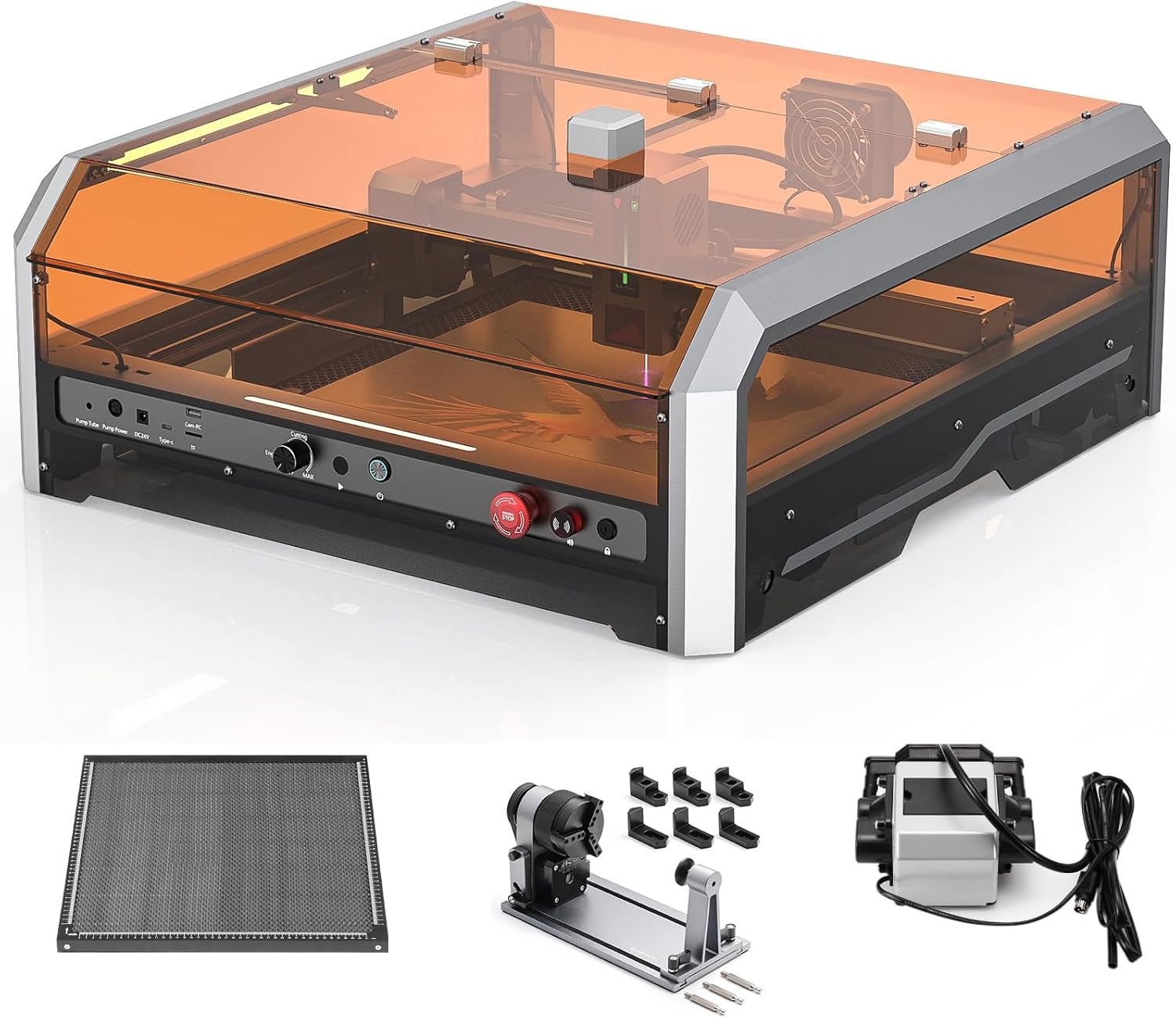
Figure 1.1: Genmitsu L8 Laser Engraver with included MD18 Rotary Roller, Air Assist Pump, and Honeycomb Table.
2. Informació de seguretat
Your safety is paramount. The Genmitsu L8 is a Class 1 laser product, designed with multiple safety features. However, improper use can lead to serious injury. Always adhere to the following safety guidelines:
- Protecció ocular: Although the enclosure provides protection, never look directly at the laser beam or its reflection. Always wear appropriate laser safety glasses when the enclosure is open or if there is any risk of laser exposure.
- Ventilació: Ensure adequate ventilation in your workspace. Laser engraving and cutting can produce fumes and particles that may be harmful if inhaled. The built-in vent and air assist system help, but additional room ventilation is recommended.
- Perill d'incendi: Laser processing can ignite flammable materials. Never leave the machine unattended during operation. Keep a fire extinguisher nearby.
- Compatibilitat de materials: Only engrave or cut materials approved for laser processing. Avoid materials that produce toxic fumes (e.g., PVC, vinyl) or are highly reflective.
- Parada d'emergència: Familiarize yourself with the location and function of the emergency stop button. In case of an emergency, press it immediately.
- Enclosure Safety: The machine incorporates a door sensor that halts operation when the cover is open. Do not bypass this safety feature.
- Pany de seguretat infantil: Utilize the child safety lock to prevent unauthorized operation.
- Superfície estable: Col·loqueu la màquina sobre una superfície estable, anivellada i no inflamable.
- Font d'alimentació: Use only the provided power adapter and ensure it is connected to a grounded outlet.

Figure 2.1: The Genmitsu L8 is Laser Safety Class 1 Certified, emphasizing user safety.

Figura 2.2: Mésview of the Genmitsu L8's comprehensive safety features, including flame monitoring, active position protection, security lock, and emergency stop button.
3. Producte acabatview i Característiques
The Genmitsu L8 is an advanced laser engraving and cutting machine designed for precision and ease of use. Key features include:
- 20W Optical Power Output: Capable of cutting through materials like 12mm pinewood and 8mm black acrylic in a single pass.
- High Engraving Speed: Achieves up to 40,000 mm/min for efficient project completion.
- Built-in Acrylic Enclosure: Provides 360° anti-laser protection and allows for easy monitoring of your work.
- Smart Air Assist System: Improves cutting performance and reduces burn marks.
- Integrated Honeycomb Table: A 481 x 473 mm built-in honeycomb table ensures optimal airflow and support for materials.
- Càmera integrada: LightBurn-compatible for real-time preview and easy project positioning.
- MD18 Rotary Roller: Included for engraving cylindrical objects with adjustable angle (0-30 degrees) and various jaw types.
- Adjustable Z-axis: Built-in height adjustment provides up to 80mm vertical space for diverse material needs.
- Múltiples característiques de seguretat: Door sensor, tilted automatic stop, active flame monitor, position protection limit switches, emergency stop, and child safety lock.
- Components preassemblats: Most components come pre-assembled for quick setup.

Figure 3.1: Key features of the Genmitsu L8, highlighting its laser power, speed, and integrated components.

Figure 3.2: Demonstrates the 20W laser's cutting capability on various materials in a single pass.

Figure 3.3: Speed comparison of the Genmitsu L8, highlighting its efficiency at 40,000 mm/min.

Figure 3.4: The MD18 Rotary Roller offers adjustable rotation angles for versatile engraving.
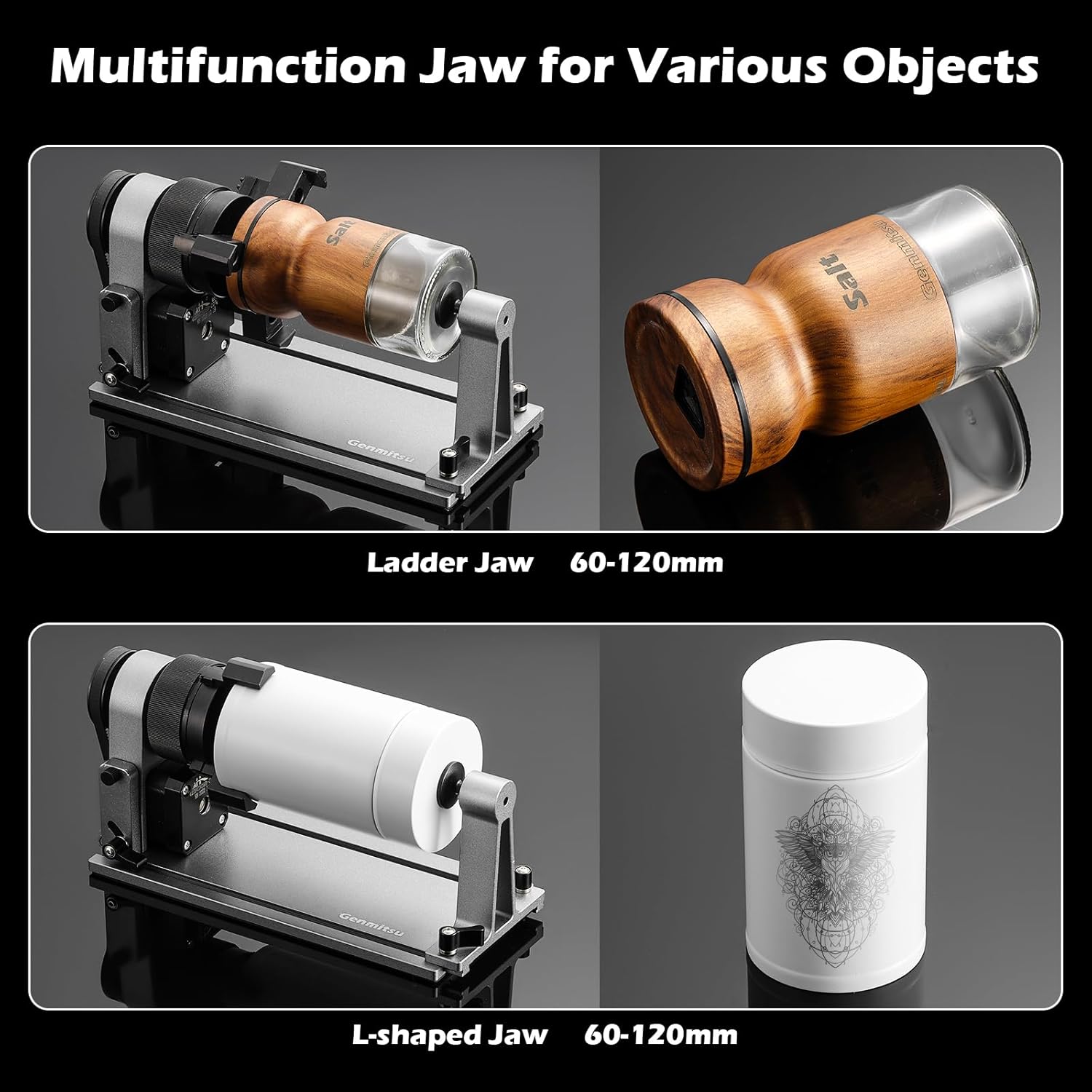
Figure 3.5: The MD18 Rotary Roller features various jaw types for different object shapes and sizes.

Figure 3.6: The MD18 Rotary Roller's multifunction jaw accommodates a wide range of object diameters.
4. Guia de configuració
The Genmitsu L8 comes largely pre-assembled, simplifying the setup process. Follow these steps to get your machine ready for operation:
- Desembalatge: Traieu amb cura tots els components de l'embalatge. Verifiqueu que hi hagi totes les peces que figuren a la llista d'embalatge.
- Col·locació: Place the Genmitsu L8 on a sturdy, level, and non-flammable surface in a well-ventilated area. Ensure there is enough space around the machine for safe operation and access.
- Connect Air Assist Pump: Connect the air assist pump to the designated port on the machine and plug it into a power source.
- Connectar l'alimentació: Connect the power adapter to the machine's power input and then plug it into a grounded electrical outlet.
- Connexió a l'ordinador: Use the provided USB cable to connect the machine to your computer.
- Instal·lació de programari: Install the recommended laser control software (e.g., LightBurn) on your computer. Follow the software's installation instructions.
- MD18 Rotary Roller Setup (Optional): If using the MD18 Rotary Roller, connect it to the machine's rotary axis port. Refer to the MD18's specific instructions for mounting and adjusting the jaws for your object.
- Ajust inicial de l'enfocament: The laser module features three preset focal lengths for effortless focusing. Select the appropriate focal length based on your material's thickness.

Figure 4.1: The Genmitsu L8 comes largely pre-assembled for quick and easy setup.

Figure 4.2: The laser module offers three preset focal lengths for easy material focusing.

Figure 4.3: The built-in adjustable Z-axis provides ample vertical space for various materials and the rotary roller.
5. Instruccions de funcionament
Once the machine is set up and software is installed, you can begin your engraving or cutting projects. Always ensure the enclosure door is closed during operation.
- Preparació del material: Place your material securely on the honeycomb table. For cylindrical objects, mount them on the MD18 Rotary Roller.
- Configuració del programari: Open your laser control software (e.g., LightBurn). Import or create your design.
- Posicionament: Use the built-in camera for real-time preview and precise positioning of your design on the material. Adjust the material or design as needed.
- Ajust de configuració: Configure laser power, speed, and passes based on your material type and desired outcome. Refer to material testing guides for optimal settings.
- Inici de l'operació: Ensure the enclosure door is closed. Initiate the engraving or cutting process from the software.
- Seguiment: Continuously monitor the machine during operation. The transparent acrylic enclosure allows for easy observation. The flame monitor will alert you to any potential fire hazards.
- Finalització: Once the process is complete, wait for the laser to stop and the machine to cool down before opening the enclosure and removing your material.

Figure 5.1: The built-in camera facilitates precise real-time preview and positioning of designs.

Figure 5.2: The Genmitsu L8 is capable of producing vibrant, multi-color engravings on various materials.
6. Manteniment
Regular maintenance ensures the longevity and optimal performance of your Genmitsu L8. Perform these tasks periodically:
- Neteja la lent làser: Regularly inspect and clean the laser lens using a lint-free cloth and lens cleaning solution. A dirty lens can reduce laser power and engraving quality.
- Clean Honeycomb Table: Remove debris and residue from the honeycomb table. A dirty honeycomb can affect airflow and cause back-reflection.
- Clean Enclosure: Wipe down the acrylic enclosure with a soft cloth and mild cleaner to maintain visibility.
- Lubricar les peces mòbils: Periodically apply a small amount of lubricant to the guide rails and lead screws to ensure smooth movement.
- Check Air Assist Nozzle: Ensure the air assist nozzle is clear of any blockages.
- Actualitzacions de firmware: Check the Genmitsu website for any available firmware updates for your machine.

Figure 6.1: The integrated Smart Air Assist and Honeycomb Table require regular cleaning for optimal performance.
Figure 6.2: Proper focus adjustment and lens cleanliness are crucial for maintaining engraving quality.
7. Solució De Problemes
This section addresses common issues you might encounter. If you experience problems not listed here, please contact Genmitsu support.
| Problema | Causa possible | Solució |
|---|---|---|
| El làser no dispara o la sortida és feble | Dirty laser lens; incorrect focus; low power setting; loose cable connection. | Clean the laser lens; adjust focus; increase power setting in software; check all cable connections. |
| La màquina no es connecta a l'ordinador | USB cable issue; driver not installed; incorrect COM port selected in software. | Try a different USB port/cable; install necessary drivers; select the correct COM port in your software. |
| Engraving/cutting quality is poor | Incorrect speed/power settings; material not flat; dirty lens; material not suitable. | Adjust settings; ensure material is flat and secured; clean lens; verify material compatibility. |
| La màquina s'atura a mitjan funcionament | Enclosure door opened; emergency stop pressed; power interruption; software error. | Ensure door is closed; check emergency stop button; verify power supply; restart software and machine. |
| Rotary roller not rotating correctly | Incorrect connection; software settings for rotary axis not configured; object not properly secured. | Check rotary roller cable connection; configure rotary axis settings in software; ensure object is firmly mounted. |
8. Especificacions
| Característica | Detall |
|---|---|
| Model | Genmitsu L8 Laser Engrave + MD18 Rotary Roller |
| Potència de sortida del làser | 20W (20000mW) Optical Power |
| Velocitat de gravat | Max. 40,000 mm/min |
| Precisió del gravat | Menys de 0.01 mm |
| Àrea de treball | Built-in Honeycomb Table (481 x 473 mm) |
| Classe de seguretat làser | Certificat classe 1 |
| Tancament | Built-in Acrylic Protective Cover |
| Assistència aèria | Integrated Smart Air Assist Pump |
| Càmera | Built-in, LightBurn-compatible |
| Rotary Roller (MD18) | Adjustable angle 0-30 degrees, various jaw types |
| Z-axis Adjustment | Built-in, up to 80mm vertical space |
| Connectivitat | USB |
| Data de primera disponibilitat | 29 de març de 2024 |
9. Garantia i Suport
Genmitsu products are backed by a manufacturer's warranty. For specific warranty terms and conditions, please refer to the warranty card included with your product or visit the official Genmitsu weblloc.
For technical support, troubleshooting assistance, or spare parts, please contact Genmitsu customer service through their official website or the contact information provided in your product packaging. When contacting support, please have your product model number and purchase date ready.
Recursos en línia:
- Genmitsu Official Store on Amazon
- Visit the Genmitsu official website for software downloads, FAQs, and community forums.


