Introducció
El HIFIMAN EF499 és un DAC i auriculars balancejats versàtils per a escriptori. amplifier, designed to deliver high-fidelity audio with support for various streaming media options. Featuring R2R architecture, it provides a naturally warm and full-range sound, closely resembling HIFIMAN's reference Hymalaya DACs. This manual provides essential information for setting up, operating, and maintaining your EF499 unit.

The HIFIMAN EF499 Desktop Balanced Headphone DAC & Ampvidador, espectacleasing its sleek vertical design and front panel controls.
Configuració
Before connecting your HIFIMAN EF499, ensure all components are present and the unit is placed on a stable surface. The EF499 operates on 110V power.
Contingut del paquet:
- Unitat HIFIMAN EF499
- Cable d'alimentació
- Manual d'usuari (aquest document)
Connecting for Streaming (Spotify/Tidal Example):
The EF499 supports streaming directly from your favorite apps via its network connection. Follow these steps to set up streaming:
- Connect the EF499 to your network router using an Ethernet cable via the Network Connector for Multimedia Streaming al panell posterior.
- Connect the EF499 to a power source using the provided power cable.
- Turn on the EF499 using the Interruptor d'alimentació al panell posterior.
- On your computer or mobile device, open your preferred streaming application (e.g., Spotify, Tidal).
- Ensure your computer or mobile device is connected to the same network as the EF499.
- Within the streaming app, locate the device selection or "Connect" icon (often looks like a speaker or cast icon).
- Select "HIFIMAN EF499" (or EF500 if applicable) from the list of available devices.
- Once selected, audio playback from your streaming app will be routed through the EF499.
Official video demonstrating how to connect the HIFIMAN EF499/EF500 for streaming via Spotify and Tidal from a computer or mobile device.
Connexions físiques:

Rear panel of the HIFIMAN EF499, showing various input and output ports.
The EF499 offers a variety of input and output options:
- Front Panel Outputs:
- Sortida d'auriculars d'un sol extrem de 6.35 mm
- XLR 4-Pin Balanced Headphone Output
- Rear Panel Outputs:
- XLR Balanced Output (R)
- XLR Balanced Output (L)
- RCA Single-ended Output (R)
- RCA Single-ended Output (L)
- Rear Panel Inputs:
- Network Connector for Multimedia Streaming
- Entrada tipus C
- Entrada coaxial
- Entrada USB-B
- Interruptors:
- Coaxial/NET+USB Function Switch (on rear panel)
- Power Switch (on rear panel)
Connect your audio sources (e.g., computer via USB-B or Type-C, digital audio player via Coaxial) to the appropriate input ports. Connect your headphones to the front panel outputs or external speakers/amplifiers to the rear panel outputs.
Instruccions de funcionament
The HIFIMAN EF499 is designed for intuitive operation. Familiarize yourself with the front panel controls:
- Interruptor de funció de 4 nivells: This knob allows you to select between different gain and oversampling modes:
- High Gain NOS (Non-OverSampling)
- High Gain OS (OverSampling)
- Low Gain OS (OverSampling)
- Low Gain NOS (Non-OverSampling)
Experiment with these settings to find the optimal sound profile for your headphones and music. NOS mode typically offers a more natural, unfiltered sound, while OS mode can provide a cleaner, more detailed presentation.
- Control de volum: Adjust the output volume for your connected headphones. Note that this volume knob may not control the volume for the XLR output on the back, requiring adjustment on your physical monitors if connected.
The EF499 features R2R Architecture, which contributes to its naturally warm and full-range sound. Its vertical design also allows it to function as a headphone stand, optimizing desktop space.
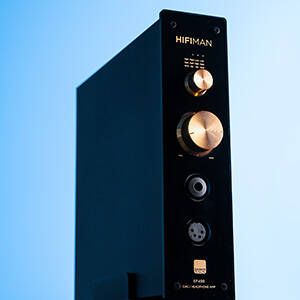
The EF499's vertical design allows it to serve as a convenient headphone stand.
Manteniment
Per garantir la longevitat i el rendiment òptim del vostre HIFIMAN EF499, seguiu aquestes pautes de manteniment:
- Mantingueu la unitat neta netejant-la amb un drap suau i sec. Eviteu utilitzar productes de neteja o dissolvents abrasius.
- Ensure proper ventilation around the unit. Do not block the ventilation openings.
- Avoid exposing the unit to excessive moisture, dust, or extreme temperatures.
- When not in use for extended periods, disconnect the power cable.
- Handle all cables and connectors with care to prevent damage.
Resolució de problemes
Si teniu problemes amb el vostre HIFIMAN EF499, consulteu els passos habituals següents per a la resolució de problemes:
| Problema | Causa possible | Solució |
|---|---|---|
| No power/Unit not turning on. | Power cable not properly connected; Power switch off; Power outlet issue. | Ensure power cable is securely connected. Check if the power switch on the rear panel is in the 'ON' position. Test the power outlet with another device. |
| No se sent so dels auriculars/altaveus. | Incorrect input selected; Volume too low; Cables not connected properly; Device not selected in streaming app. | Verify the correct input is selected using the Coaxial/NET+USB switch. Increase the volume. Check all audio cables for secure connections. Ensure "HIFIMAN EF499" is selected as the output device in your streaming application. |
| Streaming issues (e.g., device not found). | Problema de connexió de xarxa; Configuració de l'aplicació. | Ensure the EF499 is properly connected to your router via Ethernet. Restart your router and the EF499. Check your streaming app's settings for device visibility or connection options. |
| Volume knob does not control XLR output. | This is expected behavior for some units. | Adjust the volume directly on your connected external monitors or ampmés viu. |
| Compatibility with Linux. | Driver recognition. | The EF499 has been reported to work with Linux kernels without additional drivers. Ensure your Linux distribution is up-to-date. |
If the problem persists, please contact HIFIMAN customer support for further assistance.
Especificacions
- Model: EF499
- Tipus: Desktop Balanced Headphone DAC & Ampmés viu
- Arquitectura DAC: R2R
- Balanced Output Power: 4.35 W
- Entrada d'alimentació: 110 V
- Dimensions del paquet: 12.32 x 11.85 x 6.46 polzades
- Pes de l'article: 7.26 lliures
- Fabricant: HiFiMAN
- Data de primera disponibilitat: 19 d'abril de 2024
Garantia i Suport
For warranty information and technical support, please refer to the official HIFIMAN weblloc web o contacteu directament amb el servei d'atenció al client. Conserveu el comprovant de compra per a reclamacions de garantia.
Podeu trobar més informació i dades de contacte visitant la Botiga HIFIMAN a Amazon o la seva empresa oficial weblloc.

Product label with manufacturer information and model number.


