Introducció
The 1Mii SafeFly Min+ is a versatile 2-in-1 Bluetooth Transmitter and Receiver designed to enhance your audio experience across various devices. Whether you want to stream audio from non-Bluetooth sources like airplane entertainment systems or TVs to your Bluetooth headphones, or connect your phone to wired speakers or car stereos, the SafeFly Min+ provides a seamless wireless solution. Featuring an OLED display, Bluetooth 5.3 with aptX Low Latency, and dual-device connectivity, it offers high-quality audio and ease of use.
Característiques clau
- OLED Display & Volume Control: Provides clear connection status and allows for direct volume adjustment.
- 2-in-1 Bluetooth Transmitter/Receiver: Functions as both a transmitter (TX) for non-Bluetooth devices and a receiver (RX) for wired audio systems.
- Bluetooth 5.3 with aptX Low Latency: Ensures stable, fast connections and high-quality audio with minimal delay. Supports aptX HD and aptX Adaptive codecs.
- Capacitat de doble enllaç: Connects to two Bluetooth headphones simultaneously for shared listening.
- Àmplia compatibilitat: Works with 3.5mm AUX audio jacks on TVs, airplane/gym entertainment systems, car stereos, home stereos, wired headphones/speakers, MP3/MP4 players, and more.
- Llarga vida útil de la bateria: Up to 25 hours of playtime on a single 2-hour charge.
- Independent RESET Button: Helps resolve reconnection and compatibility issues efficiently.
Contingut del paquet
- 1Mii SafeFly Min+ Bluetooth Transmitter and Receiver
- Cable de càrrega USB tipus C
- Dual 3.5mm Airplane Adapter
- 3.5mm Female-to-Female Adapter
- Funda protectora
Producte acabatview
Familiarize yourself with the components and controls of your SafeFly Min+ device.

Figure 1: SafeFly Min+ Product Features and Controls
- Pantalla OLED: Displays connection status, battery level, and paired devices.
- Volume Down (<) Button: Disminueix el volum.
- Volume Up (>) Button: Augmenta el volum.
- OK/Multi-function Button: Power ON/OFF, Play/Pause, Pairing Mode activation.
- Commutació TX/RX: Slide switch to select Transmitter (TX) or Receiver (RX) mode.
- Botó de restabliment: Independent button for quick reset.
- Port de càrrega tipus C: Per carregar el dispositiu.
- Connexió d'àudio de 3.5 mm: Integrated audio jack for connecting to source/output devices.
Instruccions de configuració
1. Càrrega del dispositiu
Before first use, fully charge your SafeFly Min+ using the provided USB Type-C cable. Connect the cable to the device's Type C charging port and a standard USB power adapter (not included).
2. Selecció del mode de funcionament (TX/RX)
The SafeFly Min+ can operate in two modes: Transmitter (TX) or Receiver (RX). Use the slide switch on the side of the device to select the desired mode.
- Mode TX (transmissor): For sending audio from non-Bluetooth devices (e.g., TV, airplane entertainment) to Bluetooth headphones/speakers.
- Mode RX (receptor): For receiving audio from Bluetooth devices (e.g., smartphone, tablet) and playing it through wired speakers, car stereos, etc.

Figure 2: TX and RX Mode Applications
3. Pairing in TX Mode (Transmitter)
- Feu lliscar el commutador a TX mode.
- Plug the 3.5mm audio jack of the SafeFly Min+ into the audio output port of your non-Bluetooth device (e.g., airplane seat, TV headphone jack). For airplane use, you may need to attach the dual 3.5mm airplane adapter.
- Turn on your Bluetooth headphones or speaker and set them to pairing mode.
- The SafeFly Min+ will automatically search for nearby Bluetooth devices. The OLED screen will display available devices.
- Use the < and > buttons to navigate the list and the OK button to select your desired device for pairing.
- Once connected, the OLED screen will show the paired device name and the audio codec in use (e.g., aptX).

Figure 3: Using SafeFly Min+ in TX Mode for Airplane Entertainment
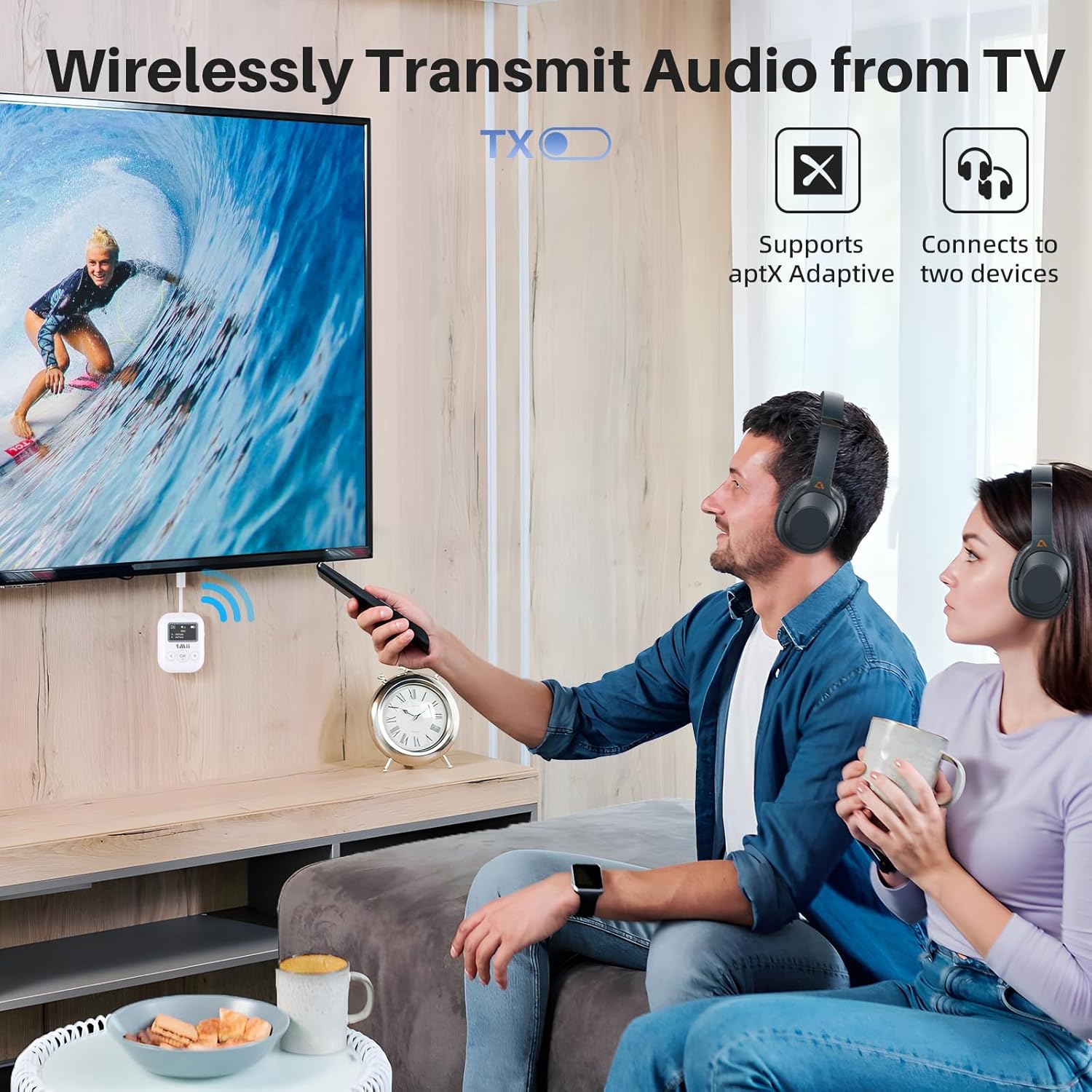
Figure 4: Using SafeFly Min+ in TX Mode for TV Audio
4. Pairing in RX Mode (Receiver)
- Feu lliscar el commutador a RX mode.
- Plug the 3.5mm audio jack of the SafeFly Min+ into the audio input port of your wired speaker, car stereo, or other audio system. You may use the 3.5mm female-to-female adapter if needed.
- Turn on Bluetooth on your smartphone, tablet, or other Bluetooth audio source.
- Cerca "1Mii SafeFly Min+" in your device's Bluetooth settings and select it to pair.
- Once connected, the OLED screen will display the paired device name.
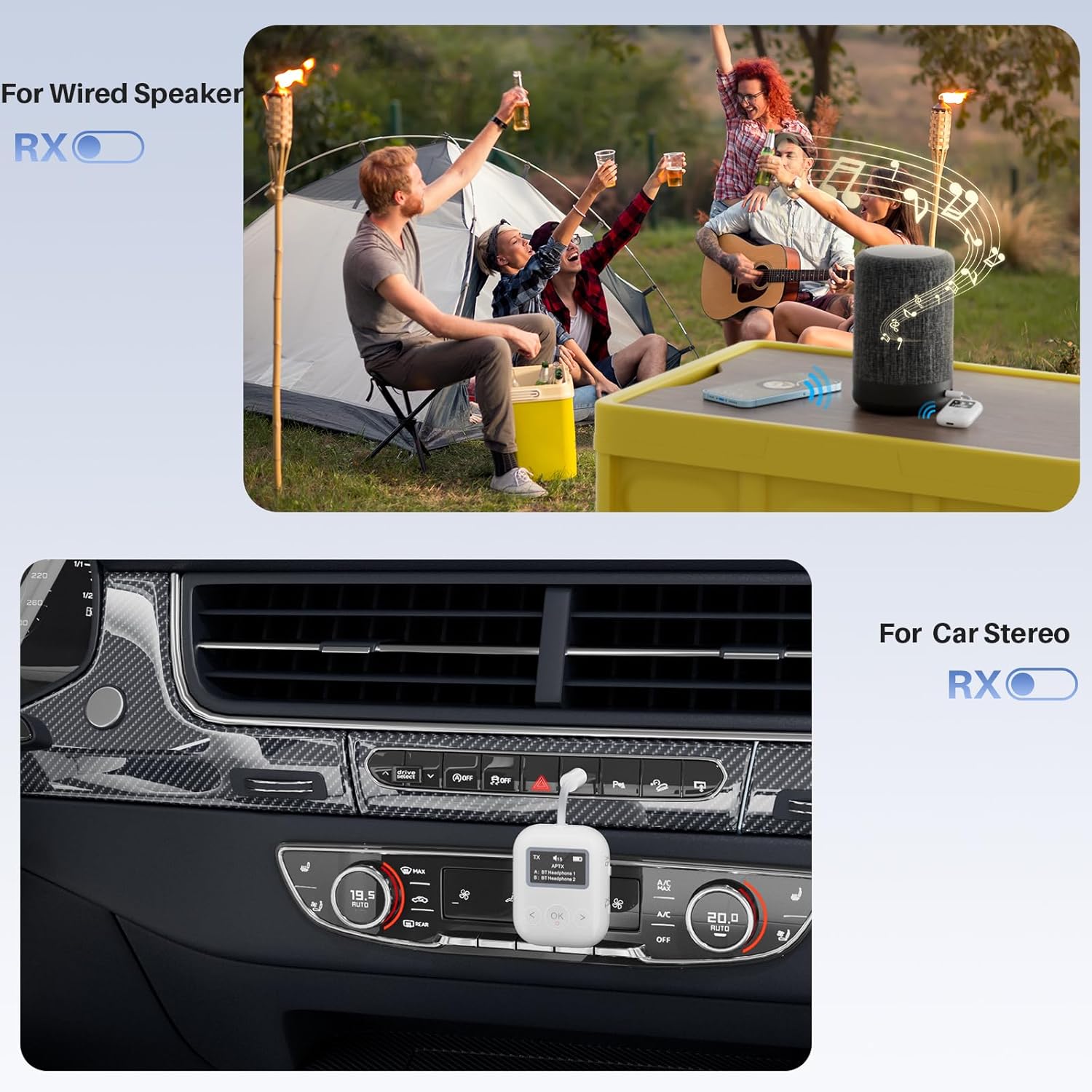
Figure 5: Using SafeFly Min+ in RX Mode for Wired Speakers and Car Stereos
Instruccions de funcionament
Encès/Apagat
Manteniu premut el botó OK button for approximately 3 seconds to power the device on or off.
Control de volum
Utilitza el < (Volume Down) and > (Volume Up) buttons to adjust the audio volume directly on the SafeFly Min+. The OLED screen will display the current volume level.
Dual Link Function (TX Mode)
In TX mode, the SafeFly Min+ can connect to two Bluetooth headphones simultaneously. After successfully pairing the first headphone, put the second headphone into pairing mode. The SafeFly Min+ will automatically search for and connect to the second device. Both paired devices will be displayed on the OLED screen.
Formats d'àudio compatibles
The SafeFly Min+ supports various audio codecs including SBC, aptX, aptX-LL (Low Latency), aptX-HD, and aptX-AD (Adaptive). For optimal audio quality and low latency, ensure your connected Bluetooth headphones or speakers also support the desired codec.
Bateria i càrrega
The SafeFly Min+ features a built-in rechargeable battery providing up to 25 hours of playtime. To charge, connect the included USB Type-C cable to the device and a USB power source. A full charge typically takes about 2 hours. The OLED display shows the battery level.
Nota:
- The battery level indicator on the OLED screen may not always be precisely linear. It is recommended to charge the device when the indicator shows a low battery to avoid unexpected power off.
Manteniment
- Mantingueu el dispositiu sec. Eviteu l'exposició a la humitat o a líquids.
- Netegeu el dispositiu amb un drap suau i sec. No utilitzeu productes químics agressius ni netejadors abrasius.
- Guardeu el dispositiu en un lloc fresc i sec quan no l'utilitzeu.
- Eviteu temperatures extremes.
Resolució de problemes
- Device not pairing or connecting:
- Ensure the SafeFly Min+ is in the correct TX or RX mode.
- Assegureu-vos que el dispositiu Bluetooth de destinació (auriculars/altaveu/telèfon) estigui en mode d'emparellament.
- Try pressing the independent RESET button on the SafeFly Min+. This can resolve many connection issues.
- Move the devices closer to each other to ensure they are within range.
- Clear previous pairings on both the SafeFly Min+ and your Bluetooth device, then try pairing again.
- Sense àudio o mala qualitat d'àudio:
- Check that the 3.5mm audio jack is fully inserted into the correct port on both the SafeFly Min+ and the source/output device.
- Ensure the volume on both the SafeFly Min+ and the connected audio device is turned up.
- Verify that the correct audio source is selected on your TV or other entertainment system.
- If using aptX codecs, ensure both devices support the specific codec (aptX LL/HD/Adaptive).
- Reduce interference by moving away from other wireless devices or strong electromagnetic fields.
- Inaccurate battery level display:
- The battery indicator provides an estimate. It is best practice to fully charge the device when the indicator shows a low level to prevent unexpected power off.
- Volume buttons require multiple presses:
- The device may enter a semi-sleep mode to conserve battery. A first press wakes the device, subsequent presses adjust the volume. This is normal operation.
Especificacions
| Marca | 1 Mii |
| Número de model | SafeFly Min+ |
| Tipus sense fil | Bluetooth 5.3 |
| Còdecs d'àudio compatibles | SBC, aptX, aptX-LL, aptX-HD, aptX-AD |
| Pes de l'article | 0.705 unces (20 g) |
| Dimensions del producte | 2.17 x 1.5 x 0.59 polzades |
| Durada de la bateria | Fins a 25 hores |
| Temps de càrrega | Aprox. 2 hores |
| Font d'alimentació | Funciona amb bateria (1 bateria de polímer de liti inclosa) |
| Color | Blanc |
Vídeos oficials de productes
1Mii SafeFly Min+ Bluetooth Transmitter and Receiver for Jet
This video demonstrates the 1Mii SafeFly Min+ in action, specifically highlighting its use as a Bluetooth transmitter for airplane entertainment systems. It shows how to connect the device to an in-flight screen and pair it with wireless headphones, enabling a personal audio experience during flights.
1Mii Bluetooth Transmitter
This video showcases the versatility of the 1Mii Bluetooth Transmitter, demonstrating its use in various scenarios such as connecting a smartphone to a car stereo and enabling wireless audio for gym equipment. It highlights the ease of switching between transmitter and receiver modes for different applications.
Informació de seguretat
May interfere with other wireless devices. Follow battery handling precautions.
Garantia i Suport
Per obtenir informació sobre la garantia i assistència tècnica, consulteu la pàgina oficial d'1Mii. weblloc web o contacteu directament amb el servei d'atenció al client. Conserveu el rebut de compra per a reclamacions de garantia.


