1. Introducció
The AJAZZ AK680 is a compact 65% wired mechanical gaming keyboard designed for efficiency and performance. Featuring 68 keys, hot-swappable switches, and customizable backlighting, it offers a versatile typing and gaming experience. This manual provides essential information for setting up, operating, maintaining, and troubleshooting your keyboard.

Imatge 1.1: acabatview of the AJAZZ AK680 keyboard highlighting its compact design and key features.
Característiques principals:
- Disseny compacte de 68 tecles: Saves desk space and enhances portability.
- Full Key Hot-Swappable: Compatible with most 3-pin mechanical switches for easy customization without soldering.
- Anti-ghosting i rollover de N-Key: Assegura que totes les pulsacions de tecles es registrin amb precisió, fins i tot durant l'entrada ràpida.
- EVA Sandwich Design: Reduces typing noise and provides a more solid feel.
- Mixed Color Backlighting: Features 19 different customizable lighting effects.
- Programmable Software: Allows for macro editing, light effect customization, and key redefinition.
- Disseny ergonòmic: Proporciona comoditat durant un ús prolongat.
2. Configuració
2.1 Contingut del paquet
- Teclat mecànic AJAZZ AK680
- Cable USB
- Keycap Puller / Switch Puller (may be combined)
- Manual d'usuari
2.2 Connexió del teclat
- Localitza el port USB-C al teclat i el port USB-A a l'ordinador.
- Connecteu l'extrem USB-C del cable proporcionat al teclat.
- Connecteu l'extrem USB-A del cable a un port USB disponible de l'ordinador.
- El sistema operatiu reconeixerà automàticament el teclat. Normalment no es necessiten controladors addicionals per a la funcionalitat bàsica.
Compatibilitat: The AK680 keyboard is compatible with Windows Vista/XP/7/8/10/11, MAC, Android, and Linux operating systems.
3. Instruccions de funcionament
3.1 Funcions bàsiques de les tecles
The AK680 features a 68-key layout. Many functions are accessed via the Fn key combined with other keys.

Image 3.1: The compact 65% layout of the AK680 keyboard, showing its dimensions and some Fn key functions.
Control de retroiluminació 3.2
The keyboard features mixed color backlighting with multiple effects.
- Premeu Fn + | to cycle through 19 different backlight modes and color designs.
- Specific key combinations for brightness and speed adjustment may vary; refer to the included quick guide or software for detailed controls.
3.3 Programari programable
To unlock the full customization potential of your AK680 keyboard, download and install the official AJAZZ software from the manufacturer's weblloc. El programari us permet:
- Edició de macros: Create and assign complex key sequences to a single key.
- Light Effect Customization: Fine-tune backlight patterns, colors, and speeds.
- Key Redefinition: Remap individual keys to perform different functions.
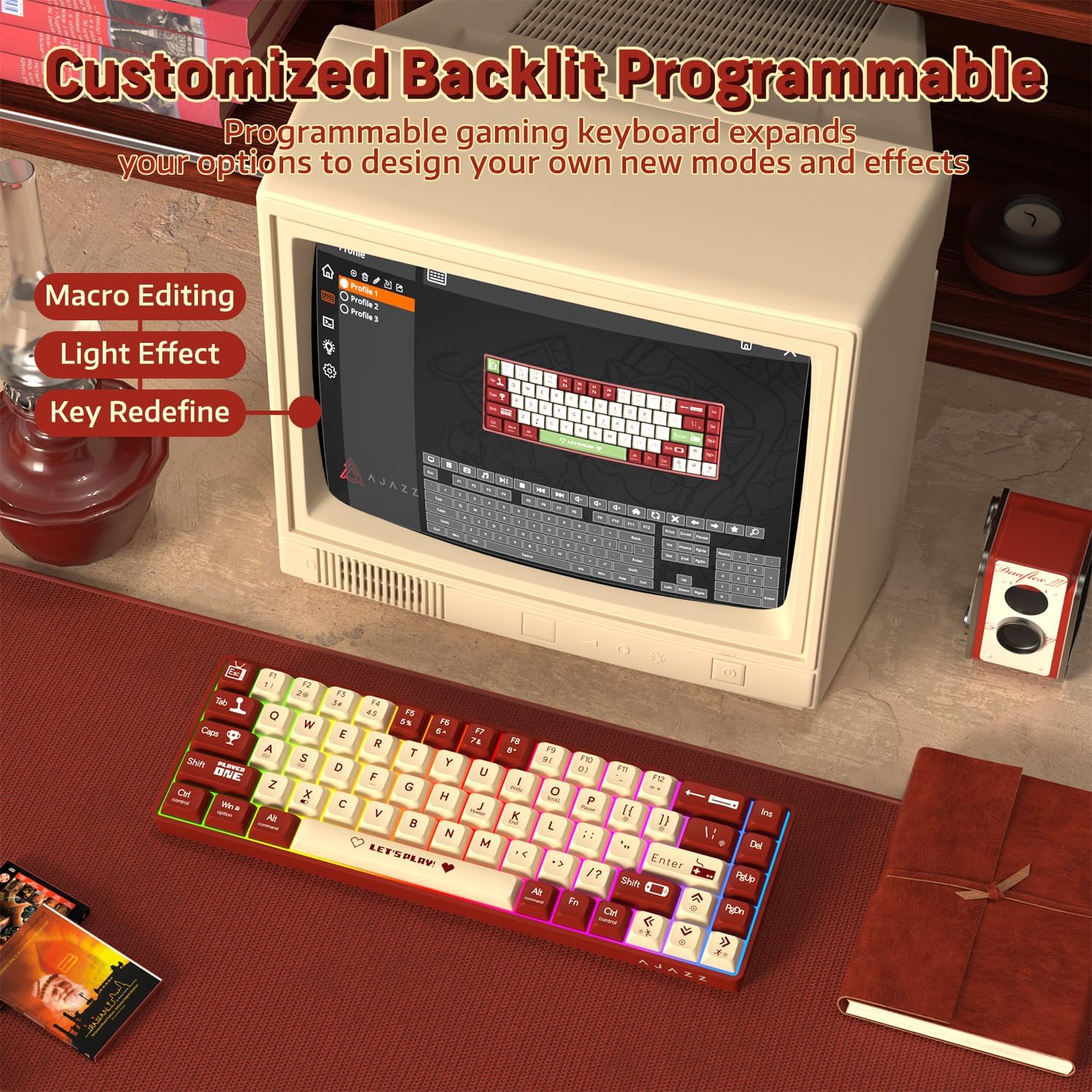
Image 3.2: The programmable software interface for customizing key functions and lighting effects.
4. Manteniment
4.1 Neteja del teclat
- Desconnecteu el teclat de l'ordinador abans de netejar-lo.
- Utilitzeu un drap suau i sense pelusa lleugerament dampRenteu-les amb aigua o una solució netejadora suau per netejar les tecles i el xassís.
- Per a la pols i les restes entre les tecles, feu servir aire comprimit o un raspall petit.
- Eviteu ruixar líquids directament sobre el teclat.
4.2 Substitució d'interruptors
The AK680 features hot-swappable sockets, allowing you to change switches without soldering.
- Feu servir l'extractor de tecles proporcionat per treure amb cura la tecla desitjada.
- Use the provided switch puller to gently grip the top and bottom clips of the switch.
- Estireu l'interruptor cap amunt per treure'l de la placa de circuit imprès.
- Alineeu els pins del nou interruptor de 3 pins amb els forats de la placa de circuit imprès.
- Premeu fermament el nou interruptor fins que faci clic. Assegureu-vos que les clavilles no estiguin doblegades.
- Torneu a col·locar la tapa de les tecles.

Image 4.1: Illustration of the hot-swappable switch mechanism and how to replace switches.
5. Solució De Problemes
5.1 El teclat no respon
- Assegureu-vos que el cable USB estigui connectat correctament tant al teclat com a l'ordinador.
- Prova de connectar el teclat a un port USB diferent de l'ordinador.
- Prova el teclat en un altre ordinador per descartar problemes específics del sistema.
- Reinicieu l'ordinador.
5.2 La retroiluminació no funciona o és incorrecta
- Assegureu-vos que el teclat estigui connectat correctament i que rebi alimentació.
- Premeu Fn + | per alternar entre els modes de retroiluminació.
- Check the programmable software for any disabled lighting effects or brightness settings.
5.3 Les tecles no es registren o es teclegen dues vegades
- This could indicate a faulty switch. Try replacing the affected switch as described in Section 4.2.
- Assegureu-vos que l'interruptor estigui completament col·locat a la seva base.
- Clean around the affected keycap and switch to remove any debris.

Image 5.1: The AK680 features full anti-ghosting to prevent key conflicts during rapid typing.
6. Especificacions
| Característica | Detall |
|---|---|
| Marca | AJAZZ |
| Número de model | AK680 |
| Disseny | 65% (68 tecles) |
| Connectivitat | Amb cable (USB) |
| Tipus de canvi | Mechanical (Red Switches, Hot-swappable 3-pin) |
| Llum de fons | Mixed Color / Rainbow RGB |
| Anti-fantasma | Anti-ghosting de clau completa |
| Compatibilitat | Windows, macOS, Android, Linux |
| Material | Plastic chassis, ABS keycaps |
| Dimensions (aprox.) | 32.7 x 13.8 x 4.4 cm (12.87 x 5.43 x 1.73 polzades) |
| Pes (aprox.) | 270 g (0.6 lliures) |
7. Garantia i Suport
7.1 Informació de la garantia
Please refer to the specific warranty terms provided by your retailer or the manufacturer at the time of purchase. Warranty periods and coverage may vary by region and seller. Typically, manufacturing defects are covered for a limited period.
7.2 Atenció al client
For technical assistance, product inquiries, or warranty claims, please contact the seller or visit the official AJAZZ weblloc web per a recursos de suport i informació de contacte.


