1. Producte acabatview
The XTRONS 12.3 Inch Android 14 Car Stereo is designed to upgrade the in-car entertainment system for specific BMW models. It features an Octa-Core processor, 4GB DDR4 RAM, 64GB Solid State ROM, and a 1920x720 12.3-inch IPS touch screen. This unit integrates seamlessly with the original car system, retaining essential OEM functions while adding modern connectivity and features.
Característiques principals:
- Pantalla IPS de 12.3 polzades: High-fidelity 1920x720 HD IPS display with 178° viewing angle, fully-laminated, ultra-slim design.
- 4G LTE global: Built-in 4G module for mobile network sharing via Micro-SIM card (not included), supporting 99% of worldwide carriers.
- Wireless CarPlay & Wireless/Wired Android Auto: Seamless smartphone integration for navigation, calls, music, and voice commands (Siri/Google Assistant).
- Latest Android 14 with Octa-Core: Octa-core processor with 4GB RAM and 64GB ROM for responsive performance and app downloads.
- Original Car Functions Retained: Integrates OEM car-centric functions like speed, fuel level, safety warnings, iDrive system, original fiber optic sound system, radio, CD player, and Bluetooth.
- DSP integrat: Enhances audio experience with sound adjustments.
- Banda Wi-Fi dual: Supports 2.4GHz or 5GHz bands for faster internet speed and flexibility.
- Pantalla multitasca i PIP: Run two applications simultaneously or watch videos while using other apps.
Applicable Models & Years:
- For BMW 1 Series F20 / F21 (2011-2016) with EVO System
- For BMW 2 Series F23 Cabrio (2013-2017) with EVO System
Important Note on Compatibility: This unit ONLY works with the original 1 Series F20 F21 / 2 Series F23 Cabrio NBT EVO system. If your car comes with NO audio AUX input, you may need an FM transmitter (XTRONS CA/ITR/FM02 and CA/ITR/FM03 are compatible) for audio functionality.
2. Què hi ha a la caixa
El paquet del producte inclou els components següents:
- 1 x Arnès de cablejat ISO
- 1 x cable d'àudio
- 1 x Antena GPS
- 1 x antena 4G
- 1 x cable USB
- 1 x pinces
- 1 x Instrucció d'instal·lació
- 1 x Manual d'usuari
- 1 minialtaveu

Image: All accessories included in the XTRONS 12.3 Inch Android 14 Car Stereo package.
3. Configuració i instal·lació
This section provides a general guide for installing your XTRONS 12.3 Inch Android 14 Car Stereo. Professional installation is recommended. Always ensure the vehicle's ignition is off and the battery is disconnected before beginning installation.
3.1 Esquema de cablejat

Image: Detailed wiring harness connections for the XTRONS car stereo.
- Mini altaveu
- Port ISO per connectar al reproductor de CD original
- Arnès de cablejat ISO
- Sortida d'àudio
- Entrada d'àudio
- Caixa d'àudio
- REVERSE-IN, cable de control de marxa enrere
- P. CAM, ACC de càmera
- ACC
- Micròfon, port de micròfon
- CAM IN, Entrada de càmera
- Connect to original USB port
- Port USB 1
- Port USB 2
- Antena 4G
- Antena GPS
- Port LVDS
- Ranura per a targeta SIM 4G
3.2 Passos d'instal·lació
- Treure els components originals: Carefully remove the original car stereo display and any surrounding trim panels to access the wiring. Disconnect all existing wiring harnesses from the original head unit.
Video: Installation guide for 12.3 Inch BMW 3&4 Series Android system, demonstrating removal of original components.
- Connecteu l'arnès de cablejat: Connect the provided ISO wiring harness to the car's existing wiring. Ensure all connections are secure. If your car has a fiber optic cable, adapt it to the XTRONS ISO harness as shown in the wiring diagram.
Video: Detailed steps on how to install the XTRONS car stereo, including wiring connections.
- Instal·lació d'antenes: Connect the GPS antenna and 4G antenna to the main unit. Route them to an optimal location for signal reception, typically on the dashboard or under the A-pillar trim.
- Connecteu els cables USB: Connect the USB cables to the main unit and route them to a convenient location, such as the glove compartment or center console, for easy access.
- Mount the New Display: Carefully align the new 12.3-inch display with the dashboard opening and secure it in place. Ensure all cables are neatly tucked away and not pinched.

Image: The 12.3-inch XTRONS car stereo display installed in a BMW dashboard, showing its large screen size compared to a 10.25-inch screen.
- Funcionalitat de prova: Before reassembling all trim panels, turn on the car and test all functions of the new stereo, including audio, touch screen, CarPlay/Android Auto, GPS, and original car functions.
- Reassemble Trim Panels: Once all functions are verified, carefully reassemble all removed trim panels and secure them.
4. Instruccions de funcionament
4.1 CarPlay sense fil i Android Auto
Connect your iPhone or Android smartphone wirelessly to access navigation, music, calls, and voice assistants directly on the stereo's large screen. For Android Auto, both wireless and wired connections are supported.

Image: Demonstrates the wireless CarPlay and Android Auto interfaces, along with screen mirroring.
Video: Shows the CarPlay functionality on an XTRONS QLB 14.9 Series unit, similar to this model.
4.2 Connectivitat 4G LTE global
Insert a Micro-SIM card into the dedicated slot to enable 4G mobile broadband connection. This allows for online navigation, streaming, and other internet-dependent applications directly from the head unit without relying on your phone's hotspot.

Image: Illustrates the 4G LTE capabilities and dual Wi-Fi band support for internet access.
4.3 Multi-tasking and Picture-in-Picture (PIP)
The large 12.3-inch IPS screen supports multi-tasking, allowing you to run two applications side-by-side. The Picture-in-Picture (PIP) feature enables you to watch videos in a small window while navigating or using other apps.
Image: Shows the multi-task display and PIP features, allowing simultaneous use of multiple applications.
4.4 Pantalla d'informació original del cotxe
The stereo seamlessly integrates with your BMW's original system, displaying essential car information such as speed, engine speed, fuel level, temperature, parking brake status, and seat belt reminders directly on the new screen.

Image: Displays various original car information on the XTRONS screen.
4.5 Retained Original Functions
The XTRONS unit retains full functionality of your original iDrive system, amplifier system, original radio, original CD player, Bluetooth, backup camera display, and steering wheel controls.
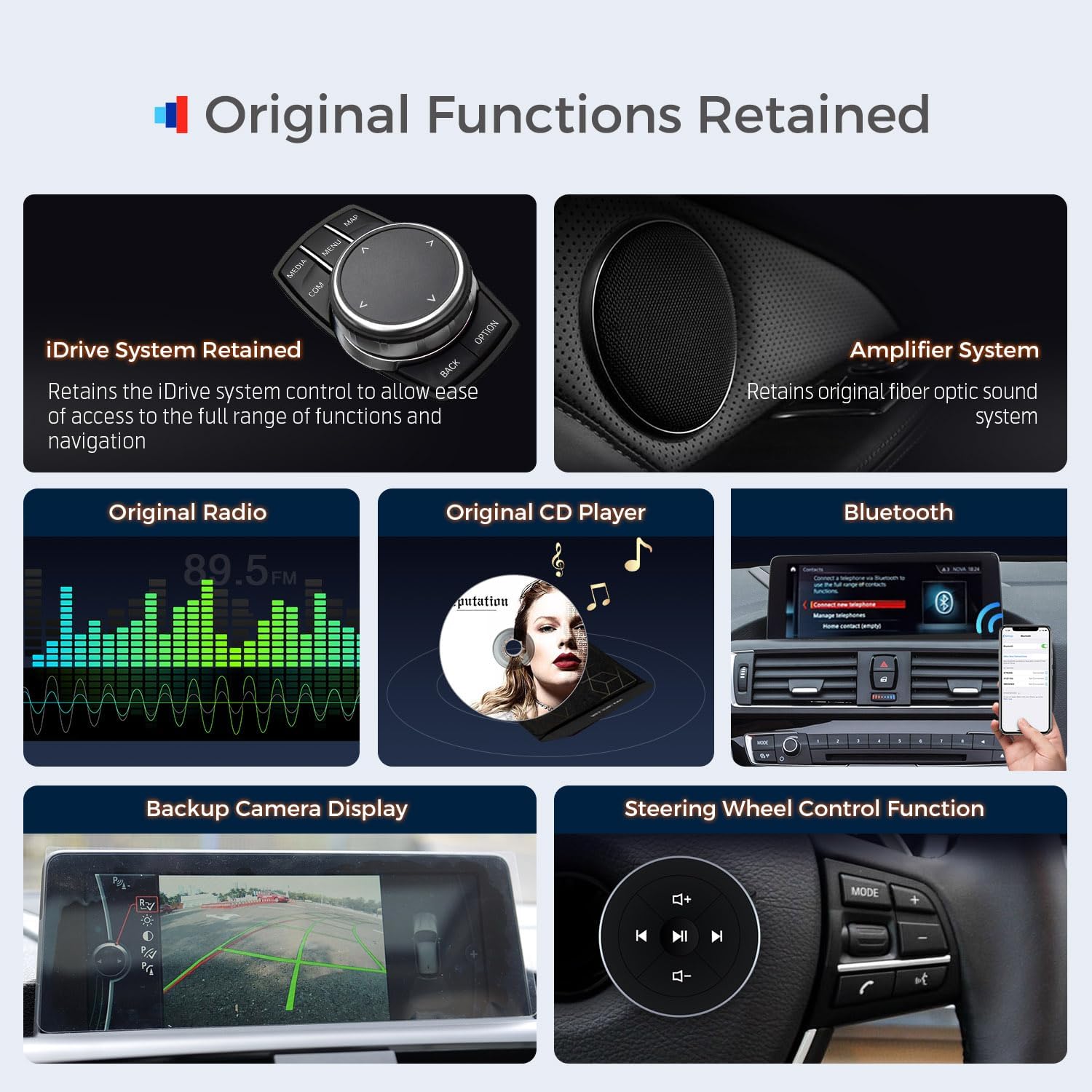
Image: Shows various original car functions that are retained and integrated with the new stereo.
5. Manteniment
- Neteja de pantalla: Feu servir un drap suau i sense borrissol per netejar suaument la pantalla. Per a taques difícils, fregueu lleugeramentampNetegeu el drap amb aigua o un netejador de pantalles. Eviteu productes químics agressius o materials abrasius.
- Actualitzacions de programari: Consulteu periòdicament la informació oficial de XTRONS website or contact customer support for available software updates to ensure optimal performance and access to new features.
- Gestió de cables: Ensure all cables remain securely connected and are not exposed to excessive heat, moisture, or physical stress.
- Condicions ambientals: Avoid exposing the unit to extreme temperatures or direct sunlight for prolonged periods, as this may affect its lifespan and performance.
6. Solució De Problemes
6.1 No Sound Issue
If you experience no sound from the stereo, follow these steps:
- Check OEM Bluetooth: Enter the OEM system, navigate to Multimedia > External Devices, and ensure that OEM Bluetooth is selected.
- Disconnect Phone Bluetooth: Go to Settings > System and turn off "Use Car's BT Channel". Disconnect your phone's Bluetooth from the car.
- Select AUX Feature: In the car's settings, select "Auto Switch to AUX" feature off.
- Ajustar el volum: Return to the original car interface, select AUX front, and click on music playback. If there is still no sound, adjust the volume knob on your original car stereo.
- Connect AUX Harness: If the issue persists, ensure the AUX harness is correctly connected.
- Check Ground Plugs: Verify the AB ground plugs are correctly connected or disconnected as per the installation guide.
- Check ISO Harness: Ensure the ISO harness is securely plugged in. Unplug and replug if necessary.
- Check Power/LVDS Cables: Confirm that the power cable and LVDS cable on the back of the machine are not loose. Re-plug them once if they are.
Video: Step-by-step guide on how to fix the "no sound" issue.
6.2 Screen Resolution Adjustment
If the screen displays incorrectly (e.g., distorted image, flickering), you may need to adjust the screen resolution:
- Accedir a la configuració del cotxe: Go to the stereo's settings menu and select "Car Settings".
- Ajusta la resolució: Find "Original Car's Screen Resolution" and select the appropriate resolution, typically "800x480" for older BMW models.
Video: Demonstrates how to adjust the screen resolution if display problems occur.
7. Especificacions
| Característica | Detall |
|---|---|
| Mida de la pantalla | 12.3 polzades |
| Resolució | 1920 x 720 |
| Sistema operatiu | Android 14 |
| Processador | Octa-Core |
| RAM | 4 GB DDR4 |
| ROM | 64 GB d'estat sòlid |
| Tecnologia de connectivitat | Bluetooth 5.0, USB, Wi-Fi (2.4GHz/5GHz), Global 4G LTE |
| Característica especial | Global 4G, Wireless CarPlay, Wireless/Wired Android Auto, Built-in DSP, Multi-task Display, PIP |
| Tipus de muntatge | Muntatge al quadre de comandament |
| Mode de sortida d'àudio | estèreo |
| Tipus de servei del vehicle | Cotxe |
8. Garantia i Suport
The XTRONS 12.3 Inch Android 14 Car Stereo comes with a 1 any de garantia del fabricant. For technical support, troubleshooting assistance, or warranty claims, please contact XTRONS customer service through their official channels or the retailer where the product was purchased.
Please refer to the included User Manual for more detailed information regarding warranty terms and conditions.