1. Introducció
The BSP D9 Game Controller is a versatile gaming accessory designed to enhance your mobile and PC gaming experience. It supports a wide range of devices including iPhones, iPads, Android phones and tablets, PCs, Nintendo Switch, and PlayStation consoles. Featuring advanced Hall Effect joysticks and triggers, programmable back buttons, and a stretchable design, the D9 controller provides precise control and comfortable gameplay across various platforms.
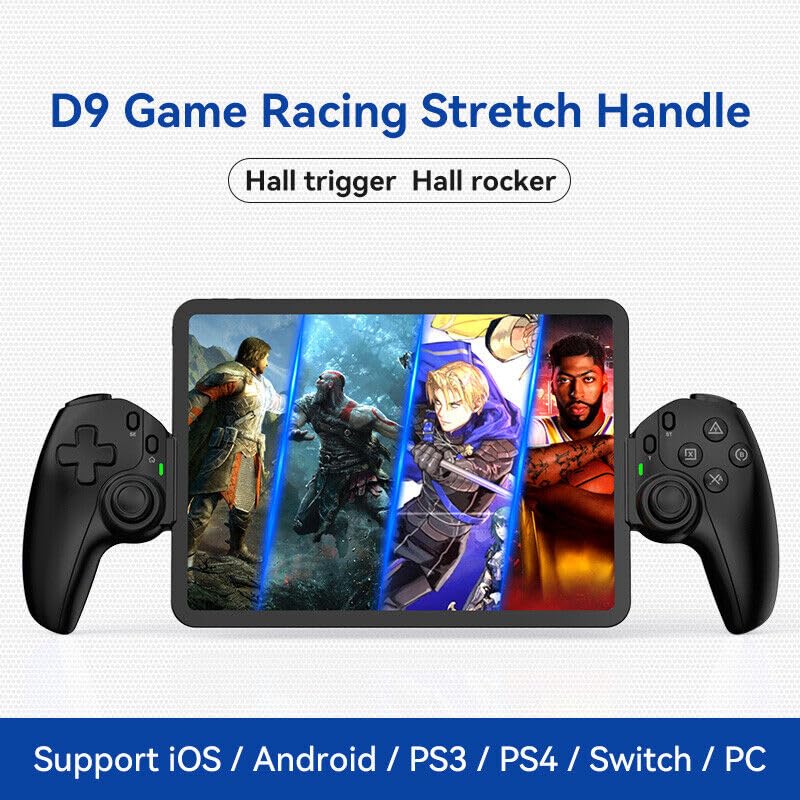
Figure 1.1: The BSP D9 Game Controller attached to a tablet, showcasing its design and compatibility with mobile gaming.
2. Producte acabatview: Key Details
Familiarize yourself with the various buttons and components of your D9 Game Controller.

Figure 2.1: Detailed diagram of the D9 controller's button layout, including the Cross Key, SELECT, HOME, START, A/B/X/Y buttons, L1/R1, L2/R2 triggers, M1/M2 back buttons, Left/Right Sticks (L3/R3), Status Indicator, and Charging Indicator.
- Cross Key (D-Pad): Entrada direccional.
- Left Stick/L3: Left analog joystick, press down for L3.
- Botó SELECCIÓ: Function button, typically for menu selection.
- Botó HOME: Power on/off, mode switching, return to home screen.
- Indicador d'estat: Shows connection status and mode.
- Indicador de càrrega: Mostra l'estat de càrrega de la bateria.
- Right Stick/R3: Right analog joystick, press down for R3.
- Botons A/B/X/Y: Botons d'acció estàndard.
- Botó INICI: Function button, typically for pausing or starting games.
- Botó TURBO: Activates/deactivates turbo function for assigned buttons.
- Botons L1/R1: Botons a l'espatlla.
- Disparadors L2/R2: Disparadors analògics.
- Botons M1/M2: Botons de retrocés programables.
3. Característiques
3.1 Hall Effect Triggers and Joysticks
The D9 controller is equipped with advanced Hall Effect technology for both its triggers and joysticks. This provides superior precision and durability compared to traditional potentiometers.

Figure 3.1: Explanation of Hall Effect Triggers and Joysticks, highlighting 0.1mm accuracy for triggers and benefits like no drift issues, no dead zone, long lifespan, and precise control for joysticks.
- Disparadors d'efecte Hall: Provide 0.1mm accuracy for precise micro-operations in games.
- Joysticks d'efecte Hall: Eliminate drift issues, maintain stable trajectory, offer precise positioning, and provide a smooth feel without stuttering.
3.2 Funció Turbo
The Turbo function allows you to set automatic rapid firing for specific buttons, giving you an advantage en jocs de ritme ràpid.

Figure 3.2: The Turbo function allows setting A/B/X/Y, L1/R1, L2/R2 buttons for rapid fire. Three adjustable turbo speeds are available: 8 shots/s, 15 shots/s, and 25 shots/s.
3.3 Macro Programming Function
The M1 and M2 back buttons can be programmed to execute complex key combinations with a single press, reducing repetitive actions and extending controller lifespan.

Figure 3.3: Instructions for setting and canceling macro programming on the M1 and M2 back buttons. Macros can be assigned to A/B/X/Y/L1/R1/L2/R2/Cross Key combinations.
3.4 Stretchable Design
The controller features a stretchable design to accommodate a wide range of smartphones and tablets, ensuring a secure fit and comfortable grip.

Figure 3.4: The controller supports device lengths from 130mm to 280mm (5-11 inches) and a maximum thickness of 13mm. It is perfectly compatible with iPhone 15 series and supports silicone & clear phone cases.
4. Compatibilitat
The BSP D9 Game Controller offers broad compatibility with various operating systems and gaming platforms, transforming your mobile device into a portable gaming console.

Figure 4.1: The controller supports streaming & cloud gaming (PS Remote Play, Xbox Game Pass, Steam Link, Rainway, NVIDIA GeForce NOW, Moonlight Game Streaming, Apple Arcade), direct play on iOS devices (Genshin Impact, Call of Duty Mobile, Diablo Immortal, Minecraft, Roblox), and direct play on Android devices (Call of Duty Mobile, Diablo Immortal, Minecraft, NBA 2K, Asphalt).
- Sistemes operatius: iOS, Android, Windows (PC).
- Consoles: Nintendo Switch, PlayStation (PS3, PS4, PS5 via remote play).
- Jocs al núvol: Supports services like Xbox Game Pass, PS Remote Play, Steam Link, NVIDIA GeForce NOW, and more.
- Reproducció directa: Compatible with popular mobile games on both iOS and Android.
5. Configuració
5.1 Càrrega del controlador
- Connect the provided USB-C charging cable to the charging port on the controller.
- Connecteu l'altre extrem del cable a una font d'alimentació USB (per exemple, un port USB de l'ordinador, un adaptador de paret).
- The Charging Indicator light will illuminate during charging and turn off when fully charged.
5.2 Inserting Your Device
- Gently pull the two sides of the controller apart to extend the stretchable mechanism.
- Carefully place your smartphone or tablet into the central slot, ensuring it is securely seated. The controller supports devices with lengths between 130mm and 280mm and a maximum thickness of 13mm.
- The controller is designed to accommodate devices with slim cases.
5.3 Connecting to Your Device (Bluetooth Pairing)
The connection method varies slightly depending on your device's operating system.
Per a dispositius Android:
- Manteniu premut el botó CASA button until the Status Indicator light begins to flash rapidly, indicating pairing mode.
- Al teu dispositiu Android, vés a Configuració > Bluetooth i activa el Bluetooth.
- Cerca available devices and select "BSP-D9" or similar from the list.
- Once connected, the Status Indicator light on the controller will become solid.
Per a dispositius iOS:
- Manteniu premut el botó CASA button until the Status Indicator light begins to flash rapidly.
- Al dispositiu iOS, aneu a Configuració > Bluetooth i activa el Bluetooth.
- Cerca available devices and select "Xbox Wireless Controller" or "DUALSHOCK 4 Wireless Controller" (depending on the mode the D9 emulates for iOS compatibility) from the list.
- Once connected, the Status Indicator light on the controller will become solid.
For PC/Switch/PS (Wired/Wireless):
Refer to the specific connection instructions provided with your controller for PC, Switch, or PS modes, as these may involve different button combinations or wired connections.
6. Instruccions de funcionament
6.1 Funcions bàsiques dels botons
Refer to Section 2, "Product Overview: Key Details," for the layout and basic functions of all buttons (Cross Key, A/B/X/Y, L1/R1, L2/R2, Joysticks, SELECT, START, HOME).
6.2 Ús de la funció Turbo
- Manteniu premut el botó TURBO botó.
- Mentre aguanta TURBO, press the button you wish to assign the turbo function to (e.g., A, B, X, Y, L1, R1, L2, R2). The button will now have turbo enabled.
- To adjust the turbo speed, press and hold TURBO and then press the Right Stick (R3) up or down to cycle through the 3 available speeds (8, 15, 25 shots/s).
- To cancel the turbo function for a specific button, press and hold TURBO and press the assigned button again.
- To clear all turbo settings, press and hold TURBO and then press the SELECT button.
6.3 Programming Macro Buttons (M1/M2)
The M1 and M2 back buttons can be programmed to store a sequence of button presses.
How to Set a Macro:
- Manteniu premut el botó SELECCIONA botó i el M1 (or M2) key for 2 seconds. The LED indicator light will flash quickly.
- Press the key(s) you want to set for the macro programming function (e.g., A+B+X+Y).
- After setting the sequence, press the M1 (or M2) key again. The LED light will become solid, indicating that the setting is complete.
- Once set, pressing M1 (or M2) will automatically execute the programmed key combination.
How to Cancel a Macro:
- Manteniu premut el botó SELECCIONA botó i el M1 (or M2) key for 2 seconds. The LED indicator light will flash quickly.
- Premeu el botó M1 (or M2) key again to clear the macro programming. (Note: Do not press other buttons at this time). The LED light will remain solid to confirm the setting is cleared.
7. Manteniment
- Neteja: Feu servir un drap suau i sec per netejar el controlador. No utilitzeu productes de neteja abrasius ni dissolvents.
- Emmagatzematge: Guardeu el controlador en un lloc fresc i sec, allunyat de la llum solar directa i de temperatures extremes.
- Cura de la bateria: Per allargar la durada de la bateria, eviteu descarregar completament el controlador amb freqüència. Carregueu-lo regularment, fins i tot si no l'utilitzeu durant períodes prolongats.
- Eviteu les gotes: Protegiu el controlador de caigudes i impactes, que poden danyar els components interns.
8. Solució De Problemes
| Problema | Causa possible | Solució |
|---|---|---|
| El controlador no s'encén. | Bateria baixa. | Charge the controller for at least 30 minutes. |
| No s'ha pogut emparellar per Bluetooth. | El comandament no està en mode d'emparellament; interferències de Bluetooth; Bluetooth del dispositiu desactivat. | Ensure controller is in pairing mode (flashing LED). Turn off and on Bluetooth on your device. Move closer to the device. |
| Els botons o els joysticks no responen. | Connection issue; software glitch; physical damage. | Reconnect the controller. Restart your device. If problem persists, contact customer support. |
| Device does not fit in the controller. | Device dimensions exceed supported limits. | Ensure your device length is between 130-280mm and thickness is max 13mm. Remove bulky cases. |
9. Especificacions
- Model: D9
- Marca: BSP
- Connectivitat: Bluetooth, Wired (for PC/Switch/PS, specific modes may vary)
- Supported Device Length: 130 mm - 280 mm (5 - 11 polzades)
- Supported Device Thickness: Fins a 13 mm
- Joystick/Trigger Technology: Efecte Hall
- Botons programables: M1, M2 (back buttons)
- Funció turbo: Yes, with 3 adjustable speeds
- Fabricant: Shenzhen ShanWan Technology Co., Ltd.
- Primera data disponible: 30 de març de 2024
10. Garantia i Suport
For warranty information and technical support, please refer to the documentation included with your purchase or visit the official BSP product support weblloc web. Conserveu el comprovant de compra per a reclamacions de garantia.
Nota: Els termes de la garantia i les dades de contacte d'assistència específiques poden variar segons la regió.


