1. Introducció
The WAVLINK UMD23M-10GB is a versatile 12-in-1 USB-C docking station designed to expand the connectivity and functionality of your laptop or compatible device. It integrates a built-in M.2 SSD enclosure, multiple display outputs, high-speed USB ports, network connectivity, and memory card readers, all while providing power delivery to your host device.

Imatge: Més deview of the WAVLINK 12-in-1 USB-C Docking Station, highlighting its various ports and the M.2 SSD enclosure. The device is shown in a sleek black and silver design.
2. Configuració
Follow these steps to set up your WAVLINK UMD23M-10GB docking station:
- Connexió d'alimentació: Connect the provided power adapter to the 20V DC In port on the docking station. Ensure the adapter is plugged into a power outlet.
- Connexió de l'amfitrió: Use the included USB-C to USB-C cable to connect the docking station's "Host USB-C" port to your laptop's full-function USB-C port (which supports video output and power delivery).
- Instal·lació del controlador: This docking station requires the DisplayLink driver for full functionality.
- Visit the official WAVLINK weblloc o Synaptics DisplayLink download page.
- Locate and download the latest DisplayLink USB Graphics Software for your operating system (Windows or macOS).
- Follow the on-screen instructions to install the driver. A system restart may be required.
- Connecteu els perifèrics: Once the driver is installed and the docking station is connected to your host device, you can connect your monitors, USB devices, Ethernet cable, and memory cards to the respective ports.
Video: Official WAVLINK video demonstrating the setup process of the 13-in-1 USB-C Hub with M.2 PCIe/SATA SSD Enclosure, including driver installation and connecting peripherals.
3. Funcionament
Modes de visualització
The docking station supports various display configurations for both Windows and macOS. Ensure your host device's Type-C port supports video output (DP Alt Mode) for display functionality.
Modes de visualització de Windows

Image: Visual representation of Windows display modes, showing dual 4K@60Hz and triple 1080P@60Hz configurations depending on DP version and DSC support.
| Monitors | DP1.4 amb DSC | DP1.4 sense DSC | DP1.2 |
|---|---|---|---|
| 1 Monitor | HDMI 1/HDMI 2/DP: 4K@60Hz | HDMI 1/2: 4K@60Hz; DP: 4K@30Hz | HDMI 1/HDMI 2/DP: 4K@30Hz |
| 2 monitors | Dual 4K a 60Hz | Dual 2560x1440@60Hz | Dual 1080P@60Hz |
| 3 monitors | Dual 4K@60Hz + One 4K@30Hz | Triple 1080P@60Hz | 2x1080P@60Hz + 1x Lower than 1080P |
Note: Some Windows laptops may only support 3 monitors (including the host screen) due to graphic card limitations.
Modes de visualització de macOS

Image: Visual representation of macOS display modes, showing triple 4K@60Hz and triple 4K@30Hz configurations. A note indicates macOS does not support MST for extended displays.
| Monitors | DP1.4 | DP1.2 |
|---|---|---|
| 1 Monitor | HDMI 1/HDMI 2/DP: 4K@60Hz | HDMI 1/HDMI 2/DP: 4K@30Hz |
| 2 monitors | Dual 4K@60Hz (A/B/B/B) | Dual 4K@30Hz (A/B/B/B) |
| 3 monitors | Triple 4K@60Hz (A/B/B/B) | Triple 4K@30Hz (A/B/B/B) |
Note: macOS laptops can only extend to one external display with different content (Non-Mirror Mode). MST (Multi-Stream Transport) is not supported by macOS.
Lliurament de potència (PD 100W)
The USB-C PD port supports up to 100W laptop charging. Connect your own PD charger (not included) to this port for continuous power to your laptop. The host's Type-C port must support charging.

Image: Diagram showing a laptop connected to the docking station, which is receiving 100W power input and delivering 100W output to the laptop via the USB-C PD port.
Transferència de dades d'alta velocitat
The docking station offers various high-speed data transfer options:
- Ports USB 3.2 Gen2: One USB-A and one USB-C port provide up to 10Gbps for fast file transfers, ideal for external hard drives and SSDs.
- Ports USB 3.0: Two additional USB-A ports offer 5Gbps for peripherals like keyboards, mice, or printers.
- Ranures per a targetes SD/TF: Simultaneous reading at up to 104MB/s for quick access to photos and videos.
- Gigabit Ethernet: Provides a fast and reliable wired internet connection at 1000Mbps.

Image: Illustration of 10Gbps USB 3.2 Gen2 transfer speeds, showing a laptop connected to the docking station with data flowing through USB-A and USB-C ports.
4. M.2 SSD Enclosure Installation
The docking station features a built-in M.2 SSD enclosure for expanding your storage. It supports both M.2 PCIe NVMe and M.2 SATA (B&M-Key) SSDs (sizes 2230/2242/2260/2280).
- Locate the M.2 SSD enclosure cover on the docking station.
- Gently open the cover to reveal the M.2 slot.
- Insert your M.2 SSD into the slot, ensuring it is properly aligned with the key.
- Secure the SSD with the provided screw or locking mechanism.
- Close the enclosure cover firmly.
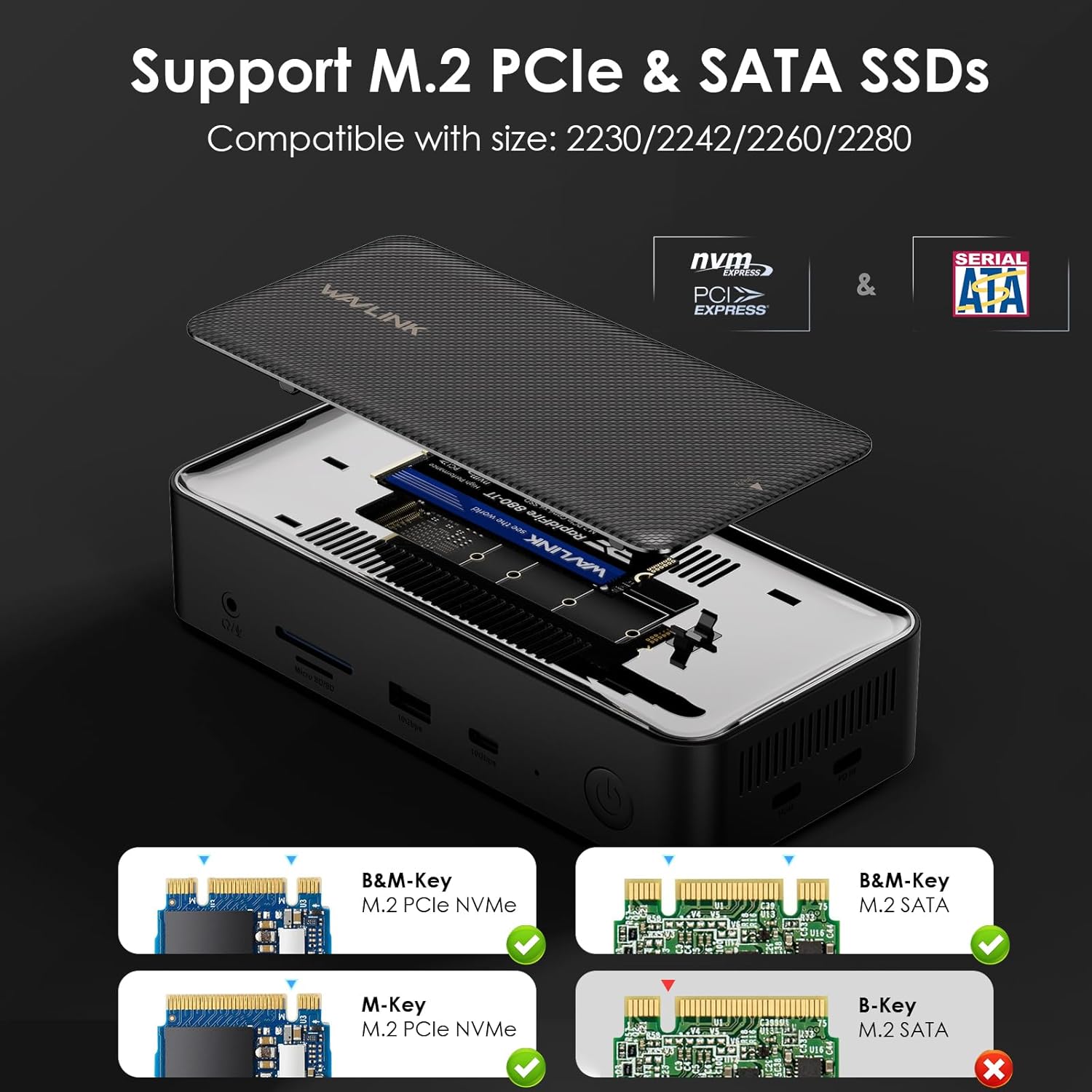
Imatge: Detallada view of the M.2 SSD enclosure, showing an M.2 NVMe SSD being inserted into the slot. Compatible SSD types (M-Key, B&M-Key) are illustrated.
5. Connectivitat i ports
The WAVLINK UMD23M-10GB offers a comprehensive array of ports:
- Sortides de visualització:
- 1 DisplayPort (4K a 60 Hz)
- 2 x HDMI ports (4K@60Hz)
- Ports de dades USB:
- 1 x USB 3.2 Gen2 USB-A port (10Gbps)
- 1 x USB 3.2 Gen2 USB-C port (10Gbps)
- 2 x USB 3.0 USB-A ports (5Gbps)
- Subministrament d'energia:
- 1 x USB-C PD port (100W for host charging)
- 1 x 20V DC In port (for docking station power)
- Xarxa:
- 1 x Gigabit RJ45 Ethernet port (1000Mbps)
- Àudio:
- 1 x 3.5mm Audio/Mic jack
- Lectors de targetes de memòria:
- 1 x SD card slot (104MB/s)
- 1 x TF card slot (104MB/s)
- Connexió de l'amfitrió:
- 1 x Host USB-C port (connects to your laptop)

Image: Detailed diagram showing the front and rear port layout of the WAVLINK 12-in-1 USB-C Docking Station, with labels for each port.
6. Compatibilitat
The docking station is broadly compatible with various operating systems and devices:
- Sistemes operatius: Windows (11/10/8.1/8/7), Mac OS (10.14-14, M1/M2/M3/M4), Chrome OS, Linux, iPad OS, Android, iOS, Harmony OS.
- Dispositius amfitrions: Compatible with Thunderbolt 3/4 laptops and devices with full-function USB-C ports that support video output. Supports USB-C desktop PCs, laptops, and OTG-enabled tablets/phones.
- SSD M.2: Supports M.2 PCIe NVMe and M.2 SATA (B&M-Key) SSDs of sizes 2230/2242/2260/2280.

Image: Infographic detailing the wide range of compatible operating systems (Windows, macOS, Chrome OS, Linux, iPad OS, Android, iOS, Harmony OS) and host devices (iMac, MacBook, ThinkPad, Tablet, Smartphone) for the WAVLINK docking station.
Note: The Type-C port of your host device must support video output (DP Alt Mode) for the adapter to function correctly with displays.
7. Manteniment
- Neteja: Use a soft, dry cloth to clean the exterior of the docking station. Avoid liquid cleaners or solvents.
- Emmagatzematge: Guardeu el dispositiu en un lloc fresc i sec, allunyat de la llum solar directa i de temperatures extremes.
- Manipulació: Handle the docking station with care to prevent physical damage. Avoid dropping or subjecting it to strong impacts.
- Gestió de cables: Assegureu-vos que els cables no estiguin excessivament doblegats ni enredats per evitar danys als ports o als cables.
8. Solució De Problemes
- Sense sortida de pantalla:
- Ensure the DisplayLink driver is correctly installed and updated.
- Verify your laptop's USB-C port supports DP Alt Mode.
- Check all cable connections (USB-C host, HDMI/DP to monitors).
- Prova de reiniciar el portàtil i tornar a connectar l'estació d'acoblament.
- For Windows, check display settings to ensure monitors are detected and configured (Extend/Mirror).
- For macOS, remember that MST is not supported; only one external display can be extended with different content.
- Pantalla/parpelleig intermitent:
- Assegureu-vos que tots els cables estiguin ben connectats.
- Try using different HDMI/DP cables.
- Reduce display resolution or refresh rate to see if stability improves.
- Actualitza els controladors gràfics del teu portàtil.
- Sense subministrament d'alimentació al portàtil:
- Ensure your own PD charger is connected to the USB-C PD port on the docking station.
- Verify your laptop's USB-C port supports power input.
- Comproveu el wattage of your PD charger; it should be sufficient for your laptop's requirements.
- M.2 SSD Not Detected or Disconnecting:
- Ensure the M.2 SSD is correctly installed and secured within the enclosure.
- Verify the SSD type (NVMe or SATA) is supported by the enclosure.
- Check the SSD for proper formatting in your operating system's disk management utility.
- Ensure the docking station has stable power.
- Els dispositius USB no funcionen:
- Ensure the docking station is powered and connected to the host.
- Prova de connectar el dispositiu USB a un port diferent de l'estació d'acoblament.
- Test the USB device directly on your laptop to rule out device issues.
Video: Official WAVLINK video demonstrating the triple monitor setup and functionality of the docking station, which can help in troubleshooting display issues.
9. Especificacions
- Número de model: UMD23M-10GB
- Dimensions del producte: 6.9 x 3.1 x 1.6 polzades
- Pes de l'article: 1.76 lliures (800 grams)
- Color: Negre
- Ports USB totals: 13 (including host and PD)
- Ports HDMI totals: 2
- Wattage (PD): 100.00W
- Interfície de maquinari: 3.5mm Audio, DisplayPort, HDMI, Secure Digital Card, USB 3.1 Type A, USB 3.2 Gen 1
10. Garantia i Suport
WAVLINK offers high-quality products backed by dedicated service and support. For warranty information, technical assistance, or customer service, please refer to the contact details below:
- Telèfon: +1 8889730883 (UTC-5) Mon - Fri 9AM - 6PM
- Correu electrònic: Contact@wavlink.com
- Weblloc: Visit the official WAVLINK weblloc web per al registre de productes, preguntes freqüents i recursos d'assistència addicionals.


