Baseus USB C Hub User Manual
Model: USB-C Hub with 30W PD Charger
1. Introducció
Thank you for choosing the Baseus USB C Hub. This manual provides detailed instructions for setting up, operating, maintaining, and troubleshooting your device to ensure optimal performance and longevity. Please read this manual thoroughly before using the product.
2. Producte acabatview
2.1 Contingut del paquet
- Baseus USB C Hub
- 30W Dual Port USB C PD Charger Block
- Manual d'usuari
2.2 Diagrama del producte
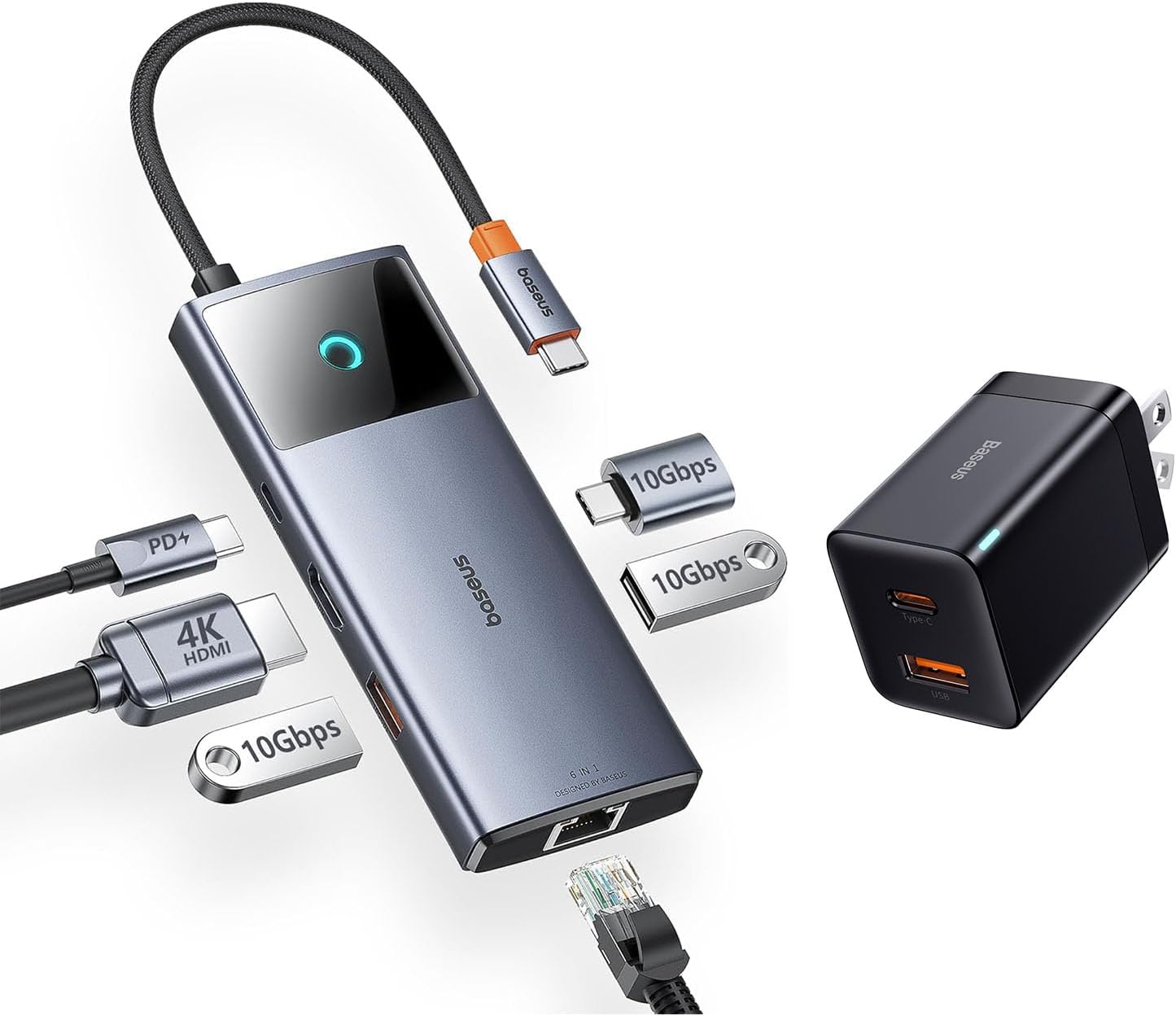
Image: The Baseus USB C Hub with its integrated cable, various ports, and the accompanying 30W dual-port charger.
The Baseus USB C Hub features multiple ports for expanded connectivity, including USB-A, USB-C data ports, an HDMI port, and an Ethernet port. The included 30W charger provides fast power delivery.
2.3 Característiques clau
- Sortida HDMI 4K a 60 Hz: Admet la duplicació de vídeo ultraclara o l'extensió a una pantalla externa.
- Transferència de dades de 10 Gbps: Equipped with USB-C and USB-A data ports for high-speed file transferències.
- Port Gigabit Ethernet: Provides a stable and fast wired internet connection.
- 30W Dual-Port PD Charging: Fast charges up to two devices simultaneously (18W USB-C, 12W USB-A).
- Disseny compacte i portàtil: Features a foldable plug for easy portability.
3. Configuració
3.1 Connexió del concentrador
- Connect the integrated USB-C cable of the Baseus USB C Hub to the USB-C port on your host device (e.g., laptop, iPad, iPhone 15 series).
- Ensure the connection is secure. The hub is plug-and-play and typically does not require driver installation.
3.2 Powering the Hub and Devices
- Plug the 30W Dual Port USB C PD Charger Block into a wall outlet.
- Connect your devices (e.g., smartphone, tablet) to the USB-C (18W) or USB-A (12W) output ports on the charger block using appropriate charging cables.
- For optimal performance of the hub and connected peripherals, ensure your host device is adequately powered.
4. Instruccions de funcionament
4.1 Transferència de dades

Image: Illustration of high-speed 10Gbps data transfer through the hub's USB-C and USB-A data ports.
Connect your USB-C or USB-A storage devices (e.g., external hard drives, flash drives) to the corresponding data ports on the hub. The hub supports data transfer speeds up to 10Gbps, allowing for rapid transfer of large files.
4.2 Video Output (HDMI)

Image: A laptop connected to an external monitor via the Baseus USB C Hub, displaying 4K@60Hz clarity.
Connect an HDMI cable from the hub's HDMI port to an external monitor or projector. The hub supports 4K resolution at 60Hz, providing a clear and smooth visual experience for presentations, video editing, or extended desktop use. Ensure your host device and display support 4K@60Hz for optimal performance.
4.3 Network Connection (Ethernet)

Image: A laptop connected to a network cable via the Baseus USB C Hub's Gigabit Ethernet port.
For a stable and high-speed internet connection, connect an Ethernet cable from your router or modem to the Gigabit Ethernet port on the hub. This provides a reliable wired connection, ideal for online gaming, video conferencing, or large downloads.
4.4 Dispositius de càrrega

Image: An iPhone 14 Pro Max charging rapidly with the 30W PPS charger, showing significant charge in 30 minutes.

Image: A smartphone and a tablet simultaneously charging from the USB-C (18W) and USB-A (12W) ports of the Baseus charger.
The included 30W dual-port charger allows you to fast charge two devices concurrently. Use the USB-C port for up to 18W Power Delivery (PD) and the USB-A port for up to 12W charging. This is suitable for smartphones, tablets, and other compatible USB-powered devices.
5. Manteniment
To ensure the longevity and proper functioning of your Baseus USB C Hub and charger, follow these maintenance guidelines:
- Neteja: Use a soft, dry cloth to wipe the surfaces of the hub and charger. Do not use liquid cleaners or abrasive materials.
- Emmagatzematge: Guardeu el dispositiu en un lloc fresc i sec, allunyat de la llum solar directa i de temperatures extremes.
- Manipulació: Eviteu deixar caure el dispositiu ni sotmetre'l a impactes forts. No doblegueu excessivament el cable USB-C integrat.
- Ventilació: Ensure the hub has adequate ventilation during use to prevent overheating.
6. Solució De Problemes
If you encounter issues with your Baseus USB C Hub, please refer to the following common solutions:
- Sense sortida de pantalla:
- Ensure the HDMI cable is securely connected to both the hub and the monitor.
- Verify that your host device's USB-C port supports video output (DisplayPort Alternate Mode).
- Prova un altre cable HDMI o monitor.
- Reinicieu el dispositiu amfitrió.
- Velocitat de transferència de dades lenta:
- Ensure your connected storage device supports 10Gbps (USB 3.1 Gen 2) speeds.
- Check if other high-bandwidth devices are connected to the hub simultaneously.
- Ensure your host device's USB-C port supports USB 3.1 Gen 2 speeds.
- Sense connexió de xarxa:
- Verify the Ethernet cable is properly connected to the hub and your router/modem.
- Revisa la configuració de xarxa al dispositiu amfitrió.
- Assegureu-vos que el vostre encaminador/mòdem funcioni correctament.
- Dispositius que no es carreguen:
- Ensure the 30W charger is securely plugged into a live wall outlet.
- Prova un cable de càrrega diferent.
- Verify that your device is compatible with the charging specifications (18W USB-C PD, 12W USB-A).
7. Especificacions
| Característica | Especificació |
|---|---|
| Model | Baseus USB C Hub (ASIN: B0CZP5S4JS) |
| Interfície del maquinari | USB 3.0 tipus C |
| Sortida HDMI | 4K@60Hz |
| Ports de dades USB | 1x USB-C (10Gbps), 2x USB-A (10Gbps) |
| Port Ethernet | Gigabit Ethernet (10/100/1000 Mbps) |
| Charger Output (USB-C) | Lliurament de potència (PD) de 18 W |
| Charger Output (USB-A) | 12W |
| Total USB Ports (Hub) | 4 (1x USB-C, 3x USB-A) |
| Dispositius compatibles | iPad Pro, iPad Air, iPad Mini, iPhone 15, iPhone 15 Pro, iPhone 15 Pro Max, Laptops with USB-C |
| Característica especial | Càrrega ràpida |
8. Garantia i Suport
Baseus products are designed and manufactured to the highest quality standards. This product is covered by a limited warranty from the date of purchase. Please refer to the warranty card included in your package for specific terms and conditions.
For technical support, troubleshooting assistance, or warranty claims, please contact Baseus customer service through the official Baseus website or your point of purchase. When contacting support, please have your product model and purchase information ready.


