1. Introducció
This manual provides detailed instructions for the setup, operation, maintenance, and troubleshooting of your Machenike K500B-B87 75% TKL Mechanical Wired Gaming Keyboard. Please read this manual thoroughly before using the product to ensure proper functionality and longevity.

Image 1.1: Machenike K500B-B87 Mechanical Gaming Keyboard, showcasing its compact 75% TKL layout with RGB backlighting and white/blue keycaps.
2. Contingut del paquet
Verifiqueu que tots els elements siguin presents al paquet:
- Machenike K500B-B87 Mechanical Gaming Keyboard
- Cable USB (per a connexió amb cable)
- Manual d'usuari (aquest document)
Note: Additional accessories such as a keycap puller, switch puller, or extra switches may be included depending on the specific product bundle.
3. Guia de configuració
3.1. Connexió del teclat
- Locate the USB-C port on the Machenike K500B-B87 keyboard, typically found on the top edge.
- Connect one end of the provided USB cable to the keyboard's USB-C port.
- Connect the other end of the USB cable to an available USB-A port on your computer (Laptop, Mac, or PC).
- El sistema operatiu reconeixerà automàticament el teclat. Normalment no es necessiten controladors addicionals per a la funcionalitat bàsica.
3.2. Engegada inicial
Upon successful connection, the keyboard's RGB backlighting will illuminate, indicating it is powered on and ready for use.
4. Instruccions de funcionament
4.1. Disposició i funcions de les tecles
The Machenike K500B-B87 features an 87-key TKL (Tenkeyless) layout, which is a compact design that retains essential function keys and a number row while saving desktop space.

Image 4.1: The keyboard demonstrating N-Key Rollover, allowing multiple simultaneous key presses without conflict.
The keyboard supports N-Key Rollover, ensuring that all key presses are registered accurately, even during rapid typing or complex gaming sequences.
4.2. Control de retroil·luminació RGB
The keyboard features dynamic RGB backlighting with 11 different lighting modes. Use the following key combinations to adjust the lighting effects:
| Combinació de tecles | Funció |
|---|---|
| FN + INS | Switch Lighting Modes (Cycle through 11 modes) |
| FN + ← / → | Adjust Lighting Speed |
| FN + ↑ / ↓ | Adjust Lighting Brightness |

Image 4.2: Illustration of the keyboard's multiple lighting modes and control key combinations.
4.3. Suport de programari
For advanced customization, including lighting adjustments, macro programming, and personalized keyboard control, dedicated software is available. This software is primarily compatible with Windows operating systems.
- Download the official software from the Machenike weblloc.
- Install the software on your Windows PC.
- Use the software to configure RGB effects, create custom macros, and remap keys.
Note: Settings configured via the software on a Windows PC will be saved to the keyboard's onboard memory and will persist when connected to other devices (e.g., Mac) that do not support the software.
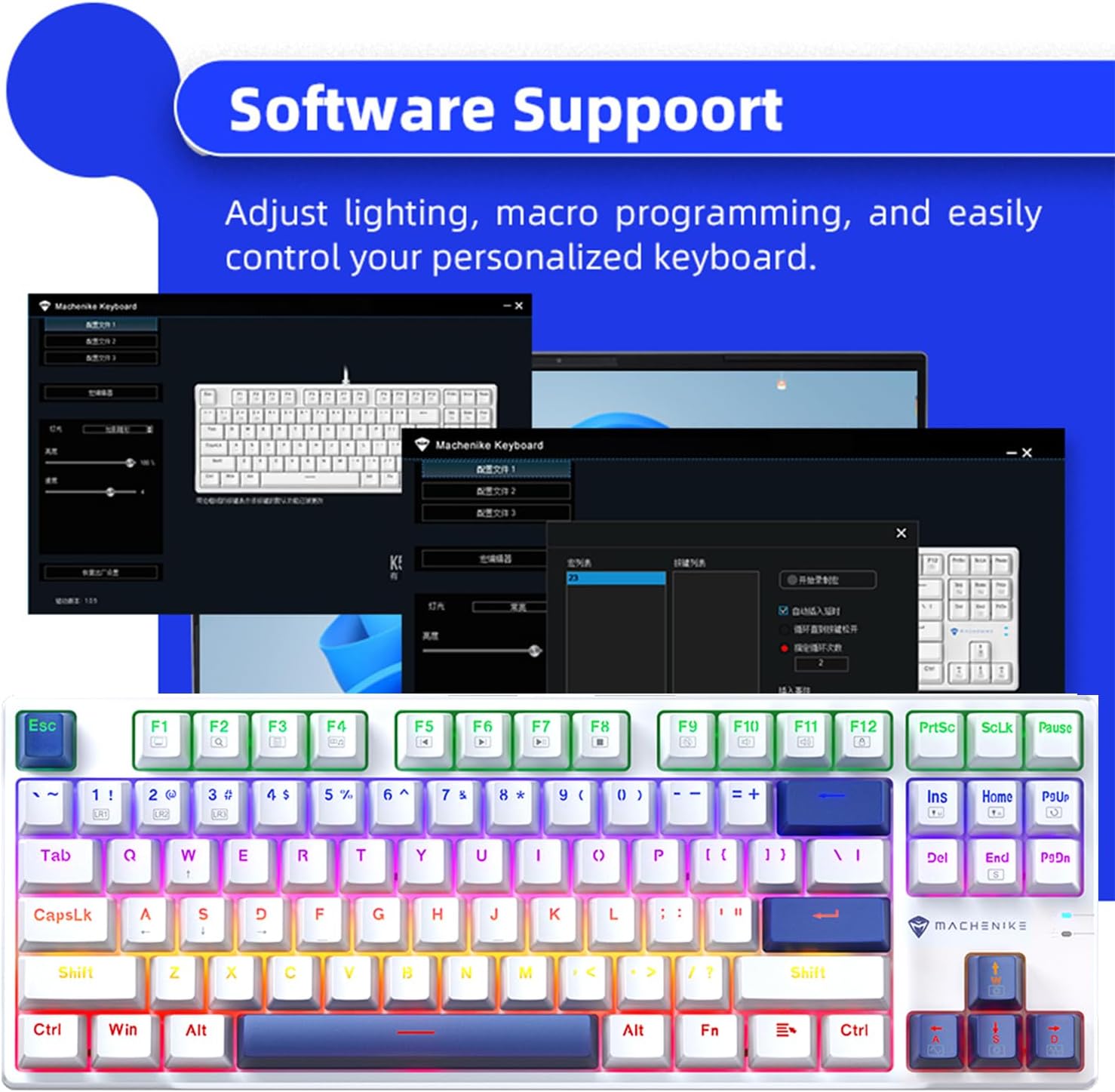
Image 4.3: Screenshot of the Machenike keyboard software interface, demonstrating customization options.
5. Manteniment
5.1. Neteja del teclat
- Desconnecteu el teclat de l'ordinador abans de netejar-lo.
- Feu servir una llauna d'aire comprimit per eliminar la pols i les restes que hi ha entre les tecles.
- Netegeu les tecles i la superfície del teclat amb un drap suau i lleugerament dryamp, drap sense borrissol. Eviteu la humitat excessiva.
- Do not use harsh chemicals, abrasive cleaners, or solvents, as these can damage the keycaps or finish.
5.2. Interruptors intercanviables en calent i tecles PBT
The Machenike K500B-B87 features hot-swappable mechanical switches (3-pin compatible) and durable double-shot PBT keycaps. This allows for easy customization and replacement of switches and keycaps.
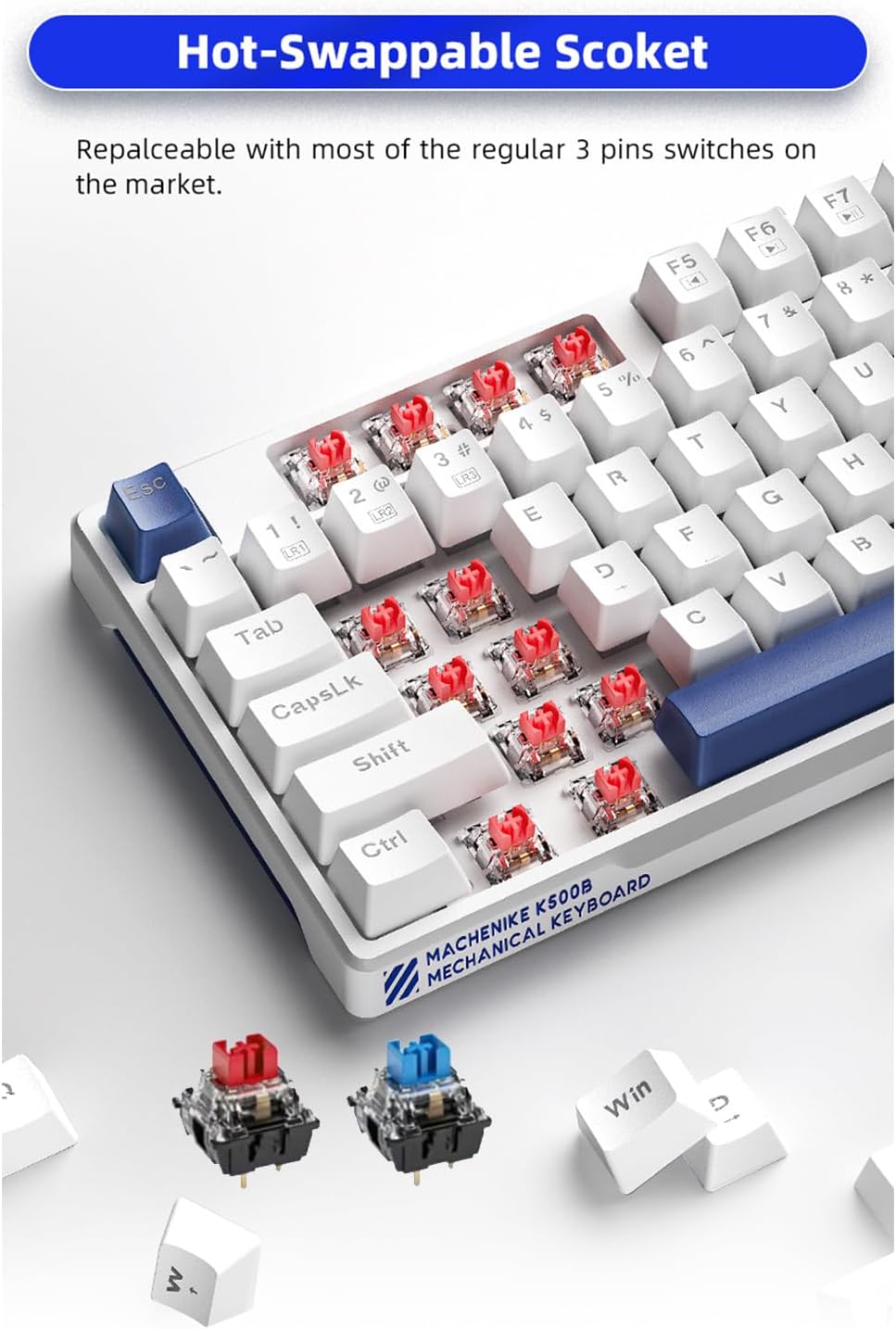
Imatge 5.1: Primer pla view of the hot-swappable sockets, illustrating how switches can be easily removed and replaced.
- Substitució de l'interruptor: Use a switch puller tool to carefully remove existing switches. Align the pins of the new 3-pin switch with the socket holes and press firmly until it clicks into place. Ensure pins are straight to avoid bending.
- Substitució de la tapa de les tecles: Use a keycap puller tool to gently remove keycaps. Align the new keycap with the switch stem and press down until it is securely seated.
Caution: Apply gentle force when removing or installing switches and keycaps to prevent damage to the keyboard or components.
6. Solució De Problemes
If you encounter issues with your Machenike K500B-B87 keyboard, refer to the following common problems and solutions:
- El teclat no respon:
- Assegureu-vos que el cable USB estigui connectat correctament tant al teclat com a l'ordinador.
- Prova de connectar el teclat a un port USB diferent de l'ordinador.
- Prova el teclat en un altre ordinador per determinar si el problema és amb el teclat o amb el port/controladors USB de l'ordinador.
- Reinicieu l'ordinador.
- Backlighting Not Working or Flickering:
- Check if the brightness is set to maximum using FN + ↑.
- Canvieu pels modes d'il·luminació utilitzant FN + INS to see if other modes function.
- Assegureu-vos que el teclat rep prou energia del port USB. Proveu un port diferent o un concentrador USB amb alimentació si en teniu.
- If using the software, ensure no conflicting settings are applied.
- Claus específiques que no es registren:
- This could indicate a faulty switch. If you have spare switches and a switch puller, try replacing the problematic switch.
- Assegureu-vos que la tapa de la tecla estigui correctament assentada a la tija de l'interruptor.
- El programari no reconeix el teclat:
- Ensure the software is the correct version for your keyboard model.
- Run the software as an administrator.
- Desactiveu temporalment qualsevol programari antivirus o tallafocs que pugui estar bloquejant la connexió.
- Torneu a instal·lar el programari.
If the problem persists after trying these steps, please contact Machenike customer support for further assistance.
7. Especificacions
| Característica | Detall |
|---|---|
| Model | K500B-B87 |
| Tecnologia de connectivitat | USB-C (amb cable) |
| Disseny de claus | 87 Keys (75% TKL) |
| Tipus de canvi | Mechanical (Blue Switch variant, hot-swappable 3-pin) |
| Taps de claus | PBT de doble tret |
| Il·luminació de fons | RGB (11 Modes) |
| Anti-fantasma | Canvi de clau N |
| Dispositius compatibles | Laptop, Mac, PC |
| Dimensions del producte | 14.16 x 5.11 x 1.41 polzades (359.7 x 129.7 x 36.0 mm) |
| Pes de l'article | 1.47 pounds (Approx. 667g) |
| Longitud del cable | Aprox. 1.6 metres |

Image 7.1: Visual representation of key specifications and software support for the Machenike K500B-B87 keyboard.
8. Garantia i Suport
8.1. Informació de la garantia
This product is covered by a manufacturer's warranty. Please refer to the warranty card included with your purchase or visit the official Machenike website for detailed warranty terms and conditions. The warranty typically covers defects in materials and workmanship under normal use.
8.2. Atenció al client
For technical assistance, troubleshooting beyond this manual, or warranty claims, please contact Machenike customer support through their official weblloc web o la informació de contacte que s'inclou amb l'embalatge del producte.
Visit the official Machenike Store on Amazon for more information: Machenike Store


