1. Introducció
This manual provides comprehensive instructions for the setup, operation, and maintenance of your AUSDOM 98Pro Silent Mechanical Keyboard. Designed for versatility and quiet performance, this keyboard features tri-mode connectivity, pre-lubed silent tactile switches, and a gasket structure for an enhanced typing experience. Please read this manual thoroughly before using the product to ensure optimal performance and longevity.

The AUSDOM 98Pro Silent Mechanical Keyboard, featuring a green and white color scheme.
2. Contingut del paquet
Si us plau, verifiqueu que tots els elements que s'enumeren a continuació estiguin inclosos al vostre paquet:
- Teclat mecànic sense fil x 1
- Receptor USB x 1
- Cable de càrrega tipus C x 1
- Manual d'instruccions x 1
- Mechanical Switch x 3
- Tirador d'interruptor x 1
3. Característiques del producte
The AUSDOM 98Pro keyboard is equipped with advanced features to enhance your productivity and gaming experience:
- Connectivitat trimodal: Supports Bluetooth 5.0, 2.4GHz wireless, and wired USB-C connections. Connect up to five devices simultaneously and switch easily.
- Pre-lubed Silent Tactile Switches: AUSDOM's self-developed switches provide a clear press feeling with a quiet typing environment, ideal for office use.
- Gasket Structure Design: Features a precision locking cover with gaskets and internal sound-absorbing/shock-absorbing layers to reduce typing noise and resonance.
- 95% Compact Layout (97 Keys): Saves desk space while retaining essential number and arrow keys.
- Intercanviable en calent: Allows for easy replacement of 3-pin/5-pin switches and keycaps without soldering.
- Ergonomic & PBT Keycaps: Two-color PBT keycaps are sweat-proof, non-slippery, and colorfast. Two-stage feet allow for adjustable typing height.
- Single White Backlight: Offers 4 levels of brightness and 16 lighting effects.
- Programari personalitzable: Supports customizable gaming shortcuts and lighting effects (Windows system only, wired and 2.4G modes).
- Anti-Ghosting Key: Ensures no key conflicts with any key combination.
- Mac and Win Dual Layout: Easily switch layouts with FN+ key combination.

Acabatview of the AUSDOM 98Pro Mechanical Keyboard's key features, including connectivity, gasket structure, white backlight, battery, PBT keycaps, hot-swappable design, mute keyboard function, and Mac/Win layout switch.
4. Configuració
4.1 Càrrega del teclat
Before first use, fully charge the keyboard using the provided Type-C charging cable. Connect one end to the keyboard's USB-C port and the other to a compatible USB power source (e.g., computer USB port, wall adapter).

The independent USB-C port for charging and wired connection.
4.2 Connexió del teclat
The AUSDOM 98Pro supports three connection modes: Bluetooth, 2.4GHz Wireless, and Wired USB-C.
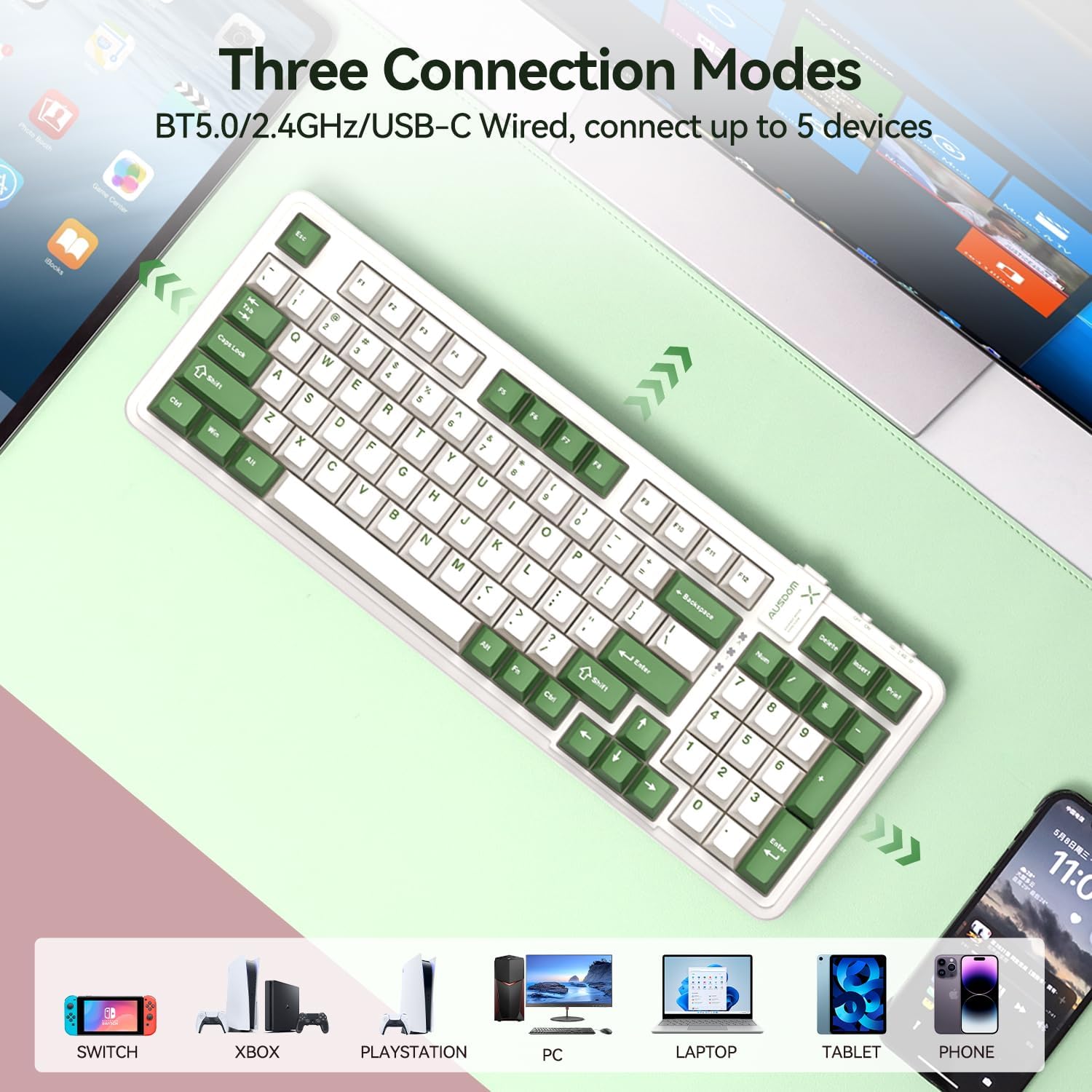
Visual representation of the three connection modes: Bluetooth 5.0, 2.4G wireless, and USB-C wired, showing compatibility with various devices like Switch, Xbox, PlayStation, PC, Laptop, Tablet, and Phone.
Connexió sense fil 4.2.1 de 2.4 GHz
- Locate the USB receiver in the keyboard's storage slot.
- Connecteu el receptor USB a un port USB disponible de l'ordinador o dispositiu.
- Switch the keyboard's mode selector to "2.4G" (usually located on the top edge of the keyboard).
- El teclat s'hauria de connectar automàticament. Si no, premeu FN + 4 per iniciar l'aparellament.
4.2.2 Connexió Bluetooth
The keyboard supports up to three Bluetooth devices (BT1, BT2, BT3).
- Switch the keyboard's mode selector to "BT".
- Mantén premut FN + 1 (per a BT1), FN + 2 (per a BT2), o FN + 3 (for BT3) for 3-5 seconds until the indicator light flashes rapidly, indicating pairing mode.
- On your device (computer, tablet, phone), enable Bluetooth and search for "AUSDOM 98Pro".
- Select the keyboard to pair. The indicator light will stop flashing once connected.
- Per canviar entre dispositius Bluetooth emparellats, només cal que premeu FN + 1, FN + 2, o FN + 3.
4.2.3 Connexió USB-C amb cable
- Connect the provided Type-C cable to the keyboard's USB-C port.
- Connecteu l'altre extrem del cable a un port USB de l'ordinador.
- Switch the keyboard's mode selector to "Wired" or ensure it's in a wired mode if no specific switch is present (often automatically detected when cable is plugged in).
5. Instruccions de funcionament
Control de retroiluminació 5.1
The keyboard features a single white backlight with multiple effects.
- Change Backlight Levels: Premeu FN + ← or FN + → to adjust backlight brightness (4 levels).
- Change Backlight Effects: Premeu FN + ↑ or FN + ↓ per alternar entre 16 efectes d'il·luminació diferents.

Illustrates how to change backlight levels using FN + left/right arrow keys and backlight effects using FN + up/down arrow keys.
5.2 Commutadors intercanviables en calent
The AUSDOM 98Pro allows you to easily change mechanical switches without soldering.
- Use the provided switch puller to gently remove the desired keycap.
- Feu servir l'extractor d'interruptors per subjectar amb cura l'interruptor i treure'l del seu sòcol.
- Align the pins of the new 3-pin or 5-pin switch with the holes in the PCB socket.
- Premeu suaument el nou interruptor al seu lloc fins que faci clic de manera segura.
- Substitueix la tapa de les tecles.
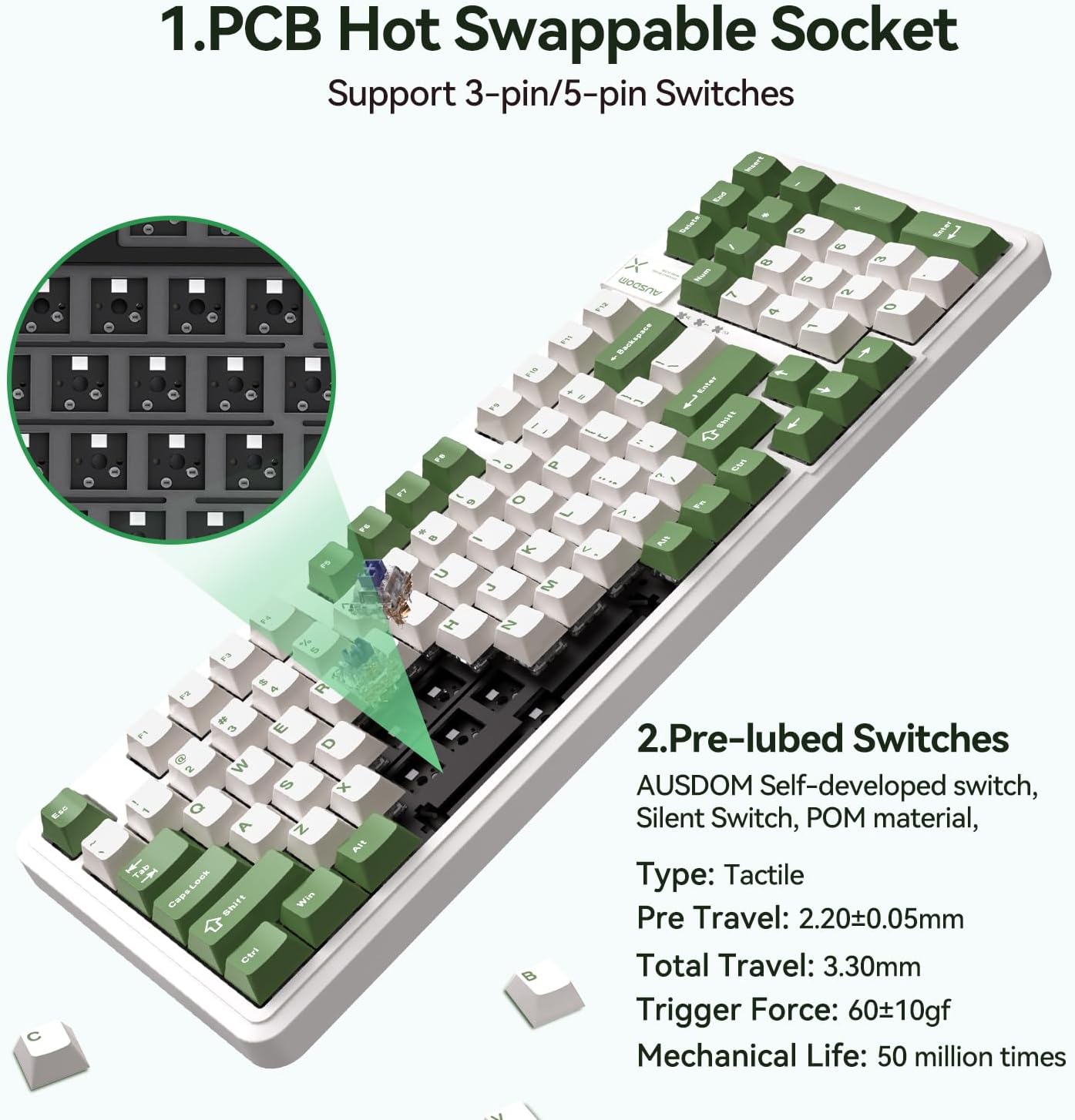
Detallada view of the PCB hot-swappable socket supporting 3-pin/5-pin switches and the pre-lubed tactile switches with their specifications.
5.3 Mac/Windows Layout Switching
To switch between Mac and Windows keyboard layouts, press FN + A per a la disposició de Windows o FN + S for Mac layout.
5.4 Custom Software (Windows Only)
For advanced customization of lighting effects and macro programming, download the official AUSDOM software. This software is compatible only with Windows operating systems and functions in wired and 2.4G modes.
- Customized light effects.
- All key support macro programmable.
- Customize the shortcut keys.
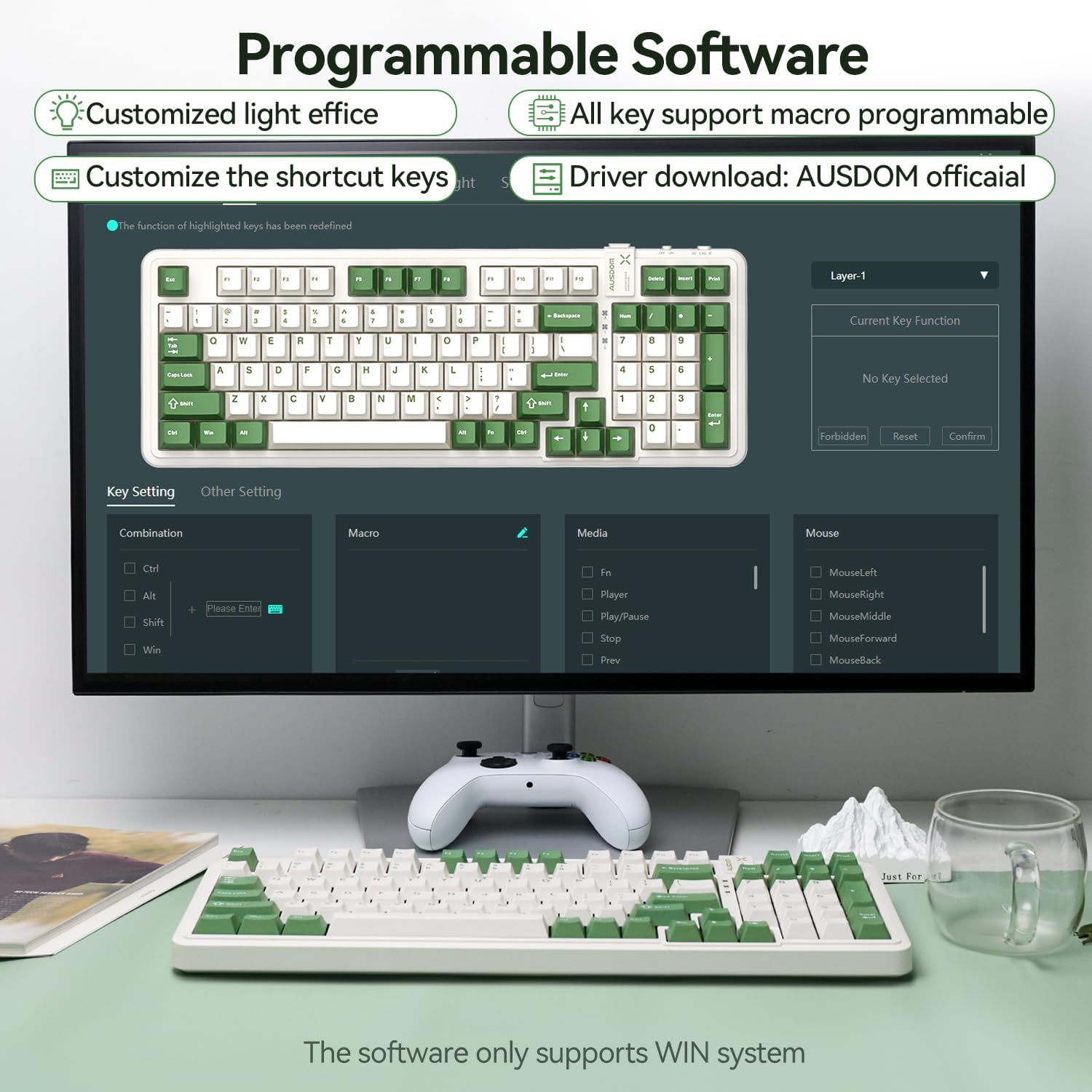
Screenshot of the programmable software interface, showing options for customized light effects, macro programming, and shortcut key customization. Note: Software supports Windows only.
6. Manteniment
- Neteja: Use a soft, dry cloth to wipe the keyboard surface. For deeper cleaning, use a can of compressed air to remove dust and debris from between the keys. Avoid using harsh chemicals or abrasive materials.
- Emmagatzematge: Guardeu el teclat en un lloc fresc i sec, allunyat de la llum solar directa i de temperatures extremes.
- Cura de la bateria: To prolong battery life, avoid fully discharging the keyboard frequently. Charge it regularly, especially if not used for extended periods.
- Extracció de la tapa de les tecles i l'interruptor: Quan retireu les tecles o els interruptors, feu-ho amb cura per evitar danyar els components.
7. Solució De Problemes
| Problema | Causa possible | Solució |
|---|---|---|
| El teclat no respon (sense fil) | Low battery; Incorrect connection mode; USB receiver not properly connected; Bluetooth not paired. | Charge the keyboard; Ensure the mode switch is set to 2.4G or BT; Re-insert the USB receiver; Re-pair Bluetooth (FN+1/2/3). |
| Les claus no es registren o s'escriuen dues vegades | Dust/debris under keycap/switch; Faulty switch. | Remove keycap and clean with compressed air; Replace the switch using the hot-swappable feature. |
| La retroiluminació no funciona o és tènue | Backlight turned off; Brightness set too low; Low battery. | Press FN + ←/→ to adjust brightness; Charge the keyboard. |
| El programari no detecta el teclat | Keyboard not in wired or 2.4G mode; Software compatibility issue. | Ensure keyboard is connected via wired USB-C or 2.4G wireless; Confirm your operating system is Windows. |
| Difficulty switching Mac/Win layout | Incorrect key combination. | Premeu FN + A per a la disposició de Windows o FN + S for Mac layout. |
8. Especificacions
| Característica | Detall |
|---|---|
| Dimensions del producte | 15.51 x 5.59 x 1.46 polzades |
| Pes de l'article | 2.9 lliures |
| Fabricant | AUSDOM |
| Número de model de l'article | AUSDOM 98Pro-Green&White-Silent |
| Bateries | Necessita 1 bateria de polímer de liti (inclosa) |
| Tecnologia de connectivitat | 2.4G, Bluetooth, USB-C |
| Descripció del teclat | Mecànica |
| Usos recomanats | Business, Gaming, Office Everyday Use, Personal, Student |
| Característiques especials | Backlit, Ergonomic, Hot-Swappable, Silent, Tri-mode Connect |
| Color | Green & White-Silent |
| Nombre de claus | 97 |
| Il·luminació del teclat | Color únic (blanc) |
| Estil | Modern |
9. Garantia i Suport
For warranty information and technical support, please refer to the official AUSDOM weblloc web o contacteu directament amb el seu servei d'atenció al client. Conserveu el rebut de compra com a comprovant de compra per a qualsevol reclamació de garantia.
Per obtenir més ajuda, visiteu: AUSDOM Official Store on Amazon


